Deleted Items Folder: Where Are The Deleted Messages

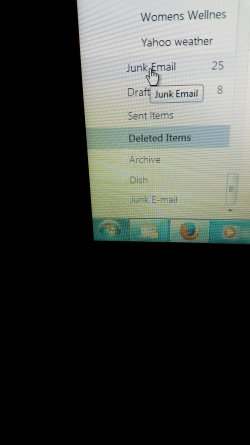
Now have 2 junk email folders in wlm had to sort not junk then copy paste rest into junk folder with x to delete remainder.
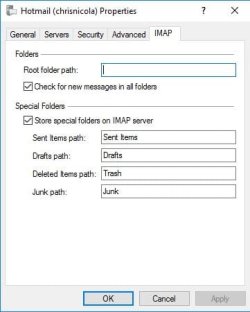
2 junk email folders at bottom in outlook web. No deleted items in folder. Have not gotten junk email thru wlm junk email folder for day or 2. Went back thru and made root folder path blank.
 

Attachments

  • 20160827_152720_resized.jpg
    20160827_152720_resized.jpg
    1.4 MB · Views: 0
  • 20160827_151004_resized.jpg
    20160827_151004_resized.jpg
    850.4 KB · Views: 0

My Computer My Computer

At a glance

Windows 7 64 bitintel i5
Computer type
Laptop
Computer Manufacturer/Model Number
Toshiba
OS
Windows 7 64 bit
CPU
intel i5
Antivirus
McAfee
Browser
Firefox 40
Progress? I now have 3 deleted emails in my trash folder-not in the deleted folder. I liked/was used to the deleted file folder. Now have both folders of which the deleted folder is empty. Don't need both.
 

My Computer My Computer

At a glance

Windows 7 64 bitintel i5
Computer type
Laptop
Computer Manufacturer/Model Number
Toshiba
OS
Windows 7 64 bit
CPU
intel i5
Antivirus
McAfee
Browser
Firefox 40
I suggest you delete the folders on the WEBSITE that are not active. Right click and delete. For example I can see a Junk e mail folder working with 25 messages and another empty one that is not.working. Similarly delete the Junk and deleted items folders on WLM that are not working. Do a test and delete a message in WLM and see where it goes to find out which folders are active and which folders are not. Check the names of the folders in your IMAP settings are the same as the names on the website. The exception for me is that on WLM I had to name the deleted items folder TRASH to get it to syncronise with Deleted items on the website.

Another option is to hide the inactive folders you dont want to see on WLM. I am not in front of my computer now but I think its by right click hide. I hope that you can get WLM to work properly.

Kind regards
Chris
 
Last edited:

My Computer My Computer

At a glance

Desktop Win 10 Pro 64 bit, Laptop Win 7 Home ...Desktop Intel i7 4790 CPU 3.6 GHz, Laptop AMD...Desktop 16 Gbt, Laptop 4 GbtDesktop nvidea GeForce NTX960, Laptop AMD Rae...
Computer type
PC/Desktop
Computer Manufacturer/Model Number
Desktop Custom built, Laptop Lenovo G575 Model 20081
OS
Desktop Win 10 Pro 64 bit, Laptop Win 7 Home 64 bit
CPU
Desktop Intel i7 4790 CPU 3.6 GHz, Laptop AMD C-50 1GHz
Motherboard
ASUS H81 Gamer
Memory
Desktop 16 Gbt, Laptop 4 Gbt
Graphics Card(s)
Desktop nvidea GeForce NTX960, Laptop AMD Raedon HD 6250M
Sound Card
Desktop onboard Realtec high definition audio nvidea HD aud
Monitor(s) Displays
BENQ G900 Digital 19 inch
Screen Resolution
1024 x 768
Hard Drives
Silicon Power SSD SATA 3.0 450b Gbt
Seagate 4 Tbt SSHD
PSU
Thermaltake 1000W
Case
Thermaltake
Cooling
Onboard case fans
Keyboard
Standard PS/2
Mouse
A4 Tech optical wireless PS/2
Internet Speed
10 Mbps
Antivirus
Microsoft Security Essentials
Other Info
DVD Samsung TSST corp CDDVDW - SATA
Up until 2 days ago my deleted emails went into deleted folder. So after reading posts yesterday I changed to trash.
 

My Computer My Computer

At a glance

Windows 7 64 bitintel i5
Computer type
Laptop
Computer Manufacturer/Model Number
Toshiba
OS
Windows 7 64 bit
CPU
intel i5
Antivirus
McAfee
Browser
Firefox 40
On outlook.com both trash and deleted folder are recent deletes-trash folder has ones I deleted earlier in wlm, deleted items folder has the ones I deleted today/just now on outlook.com. On wlm trash and junk e-mail have an X to right to delete multiple. Deleted and junk no X have to delete one by one. Also on wlm deleted file has the one I deleted on outlook.com. I think I am getting dizzy from all this.
 

My Computer My Computer

At a glance

Windows 7 64 bitintel i5
Computer type
Laptop
Computer Manufacturer/Model Number
Toshiba
OS
Windows 7 64 bit
CPU
intel i5
Antivirus
McAfee
Browser
Firefox 40
In wlm the ones that didn't have the X beside for deletion I did the hide from list. Wonder how it will affect the outlook.com-think those were the working ones in outlook. :( Funny how things worked good up until couple days ago and thanks.
 

My Computer My Computer

At a glance

Windows 7 64 bitintel i5
Computer type
Laptop
Computer Manufacturer/Model Number
Toshiba
OS
Windows 7 64 bit
CPU
intel i5
Antivirus
McAfee
Browser
Firefox 40
I have 2 sent folders -the one that is empty won't let me hide it. The other one only shows 2 from today-wonder where they are. I click on send/receive and it goes thru my folders checking for new messages. :(
 
Last edited:

My Computer My Computer

At a glance

Windows 7 64 bitintel i5
Computer type
Laptop
Computer Manufacturer/Model Number
Toshiba
OS
Windows 7 64 bit
CPU
intel i5
Antivirus
McAfee
Browser
Firefox 40
The problems you describe are similar to the ones I experienced. With some patience I managed to get WLM working properly. My folders are named as follows:

Outlook Website:
Inbox
Junk EMail
Drafts
Sent Items
Deleted Items
Trash

WLM IMAP Folders ( see screenshot)
Inbox
Sent Items
Drafts
Trash
Junk (not spelt Junk E-Mail as previously shown, but it doesn't seem to matter here)

I have made the Deleted Items folder in WLM hidden (right Click Hide). It is an IMAP system folder on the outlook website and cannot be deleted. When I delete something in WLM it goes to the Trash Folder and synchronises with the Outlook website. I think if you delete something on the Outlook website it will go to the Deleted Folder there and not to trash. It is probably the way the rules are set up.

1- So check the names are set up as shown on the outlook website and in WLM.
2- Also Right click all your WLM folders and make sure they are set to synchronise all messages (or whatever is your choice)
3- You also have some double or redundant folders on the Outlook website and on WLM you need to delete. By default you cannot delete the default system folders. You can only delete the ones you have created. So after some testing you will see which ones are empty and redundant and need to be deleted. Delete them both on the outlook website and on WLM.

These are the things that worked for me and I hope they will be of some help. Of course no two computers are the same and there are no guarantees. I hope you can get WLM working properly. Others may also have some suggestions. On 26 August Delta Sync stopped working with my Hotmail and I had to configure WLM to sync with IMAP. After troubleshooting for the last two days it is now working acceptably although slower than the older system with Delta Sync.

Kind regards
Chris

PS as has already been mentioned in a previous post its possible to change the message rules within WLM, so that might be another solution to get the deleted items folder working properly. However that is more technically demanding. Since the above method worked for me (creating a Trash Folder in WLM and hiding the default Deleted items folder from the outlook server) I am happy to leave things as they are.
 

Attachments

  • IMAP Folders C.JPG
    IMAP Folders C.JPG
    26.7 KB · Views: 10

My Computer My Computer

At a glance

Desktop Win 10 Pro 64 bit, Laptop Win 7 Home ...Desktop Intel i7 4790 CPU 3.6 GHz, Laptop AMD...Desktop 16 Gbt, Laptop 4 GbtDesktop nvidea GeForce NTX960, Laptop AMD Rae...
Computer type
PC/Desktop
Computer Manufacturer/Model Number
Desktop Custom built, Laptop Lenovo G575 Model 20081
OS
Desktop Win 10 Pro 64 bit, Laptop Win 7 Home 64 bit
CPU
Desktop Intel i7 4790 CPU 3.6 GHz, Laptop AMD C-50 1GHz
Motherboard
ASUS H81 Gamer
Memory
Desktop 16 Gbt, Laptop 4 Gbt
Graphics Card(s)
Desktop nvidea GeForce NTX960, Laptop AMD Raedon HD 6250M
Sound Card
Desktop onboard Realtec high definition audio nvidea HD aud
Monitor(s) Displays
BENQ G900 Digital 19 inch
Screen Resolution
1024 x 768
Hard Drives
Silicon Power SSD SATA 3.0 450b Gbt
Seagate 4 Tbt SSHD
PSU
Thermaltake 1000W
Case
Thermaltake
Cooling
Onboard case fans
Keyboard
Standard PS/2
Mouse
A4 Tech optical wireless PS/2
Internet Speed
10 Mbps
Antivirus
Microsoft Security Essentials
Other Info
DVD Samsung TSST corp CDDVDW - SATA
Searching "my wlm is checking my folders for new emails"-brought me to this website>
https://support.tigertech.net/windows-live-mail-imap reading thru says #3.

  • Enter Inbox for the "Root folder path".
  • Check the box marked "Check for new messages in all folders".


Why would you want to check for new messages (emails?) in all folders? Also why put Inbox in the "Root folder path"? Going to print your previous instructions out for ease of going thru. Thanks again.

 

My Computer My Computer

At a glance

Windows 7 64 bitintel i5
Computer type
Laptop
Computer Manufacturer/Model Number
Toshiba
OS
Windows 7 64 bit
CPU
intel i5
Antivirus
McAfee
Browser
Firefox 40
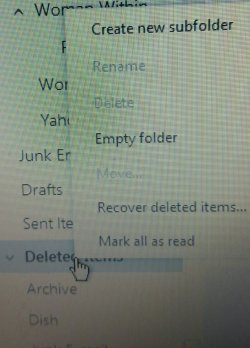
In outlook no option to hide deleted items folder>
 

Attachments

  • 2016-08-28 13.59.45_resized.jpg
    2016-08-28 13.59.45_resized.jpg
    409.3 KB · Views: 0

My Computer My Computer

At a glance

Windows 7 64 bitintel i5
Computer type
Laptop
Computer Manufacturer/Model Number
Toshiba
OS
Windows 7 64 bit
CPU
intel i5
Antivirus
McAfee
Browser
Firefox 40
I also tried the option to select the inbox as the root folder in IMAP folder settings using those instructions.

https://support.tigertech.net/windows-live-mail-imap

However, it did not work for me. Using the inbox as the root folder just created the sent, drafts, trash and junk folders as sub folders of the inbox and they were not being synchronised with the outlook server. So I left the root folder blank and deleted the redundant folders. I am not sure how old that information is and whether it still applies today.

According to the website when you check the box marked "Store special folders on IMAP server" it keeps a copy on the Outlook server as a back up and not just on your hard drive.

Thanks for sharing the screenshots. You say you cannot hide the Deleted items folder.

1- Is this a redundant folder that does not synchronise with the server?
2- Does this folder have any sub folders in it? I note that it has a chevron next to it.
3- If you have no useful messages here have you tried to delete the sub folders and other folders you don't need both from the outlook server and WLM?

Kind regards
Chris
________________________

Searching "my wlm is checking my folders for new emails"-brought me to this website>
https://support.tigertech.net/windows-live-mail-imap reading thru says #3.

  • Enter Inbox for the "Root folder path".
  • Check the box marked "Check for new messages in all folders".

Why would you want to check for new messages (emails?) in all folders? Also why put Inbox in the "Root folder path"? Going to print your previous instructions out for ease of going thru. Thanks again.
 

My Computer My Computer

At a glance

Desktop Win 10 Pro 64 bit, Laptop Win 7 Home ...Desktop Intel i7 4790 CPU 3.6 GHz, Laptop AMD...Desktop 16 Gbt, Laptop 4 GbtDesktop nvidea GeForce NTX960, Laptop AMD Rae...
Computer type
PC/Desktop
Computer Manufacturer/Model Number
Desktop Custom built, Laptop Lenovo G575 Model 20081
OS
Desktop Win 10 Pro 64 bit, Laptop Win 7 Home 64 bit
CPU
Desktop Intel i7 4790 CPU 3.6 GHz, Laptop AMD C-50 1GHz
Motherboard
ASUS H81 Gamer
Memory
Desktop 16 Gbt, Laptop 4 Gbt
Graphics Card(s)
Desktop nvidea GeForce NTX960, Laptop AMD Raedon HD 6250M
Sound Card
Desktop onboard Realtec high definition audio nvidea HD aud
Monitor(s) Displays
BENQ G900 Digital 19 inch
Screen Resolution
1024 x 768
Hard Drives
Silicon Power SSD SATA 3.0 450b Gbt
Seagate 4 Tbt SSHD
PSU
Thermaltake 1000W
Case
Thermaltake
Cooling
Onboard case fans
Keyboard
Standard PS/2
Mouse
A4 Tech optical wireless PS/2
Internet Speed
10 Mbps
Antivirus
Microsoft Security Essentials
Other Info
DVD Samsung TSST corp CDDVDW - SATA
lost junk email folder

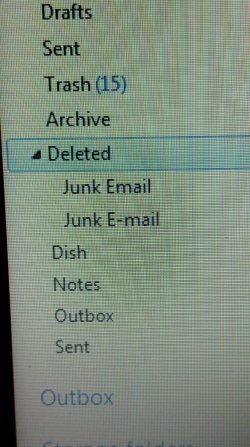
I have deleted and or re-named to delete what I thought was inactive folders on wlm and outlook. Doing that I have lost my junk email folder-the ones shown are not working-due to previous changes. Was able to delete the Junk e-mail folder. Can't reactivate the Junk email folder. Don't like having that Deleted folder with the Junk email folder in that file that I can't reactivate. So now wondering where the junk mail is going.
 

Attachments

  • 2016-08-29 12.29.42_resized.jpg
    2016-08-29 12.29.42_resized.jpg
    434 KB · Views: 0

My Computer My Computer

At a glance

Windows 7 64 bitintel i5
Computer type
Laptop
Computer Manufacturer/Model Number
Toshiba
OS
Windows 7 64 bit
CPU
intel i5
Antivirus
McAfee
Browser
Firefox 40
Deleted files are probably going to the Trash folder. The two Junk folders inside the Deleted folder probably do not work now. The Junk e mail folder on the outlook website should still be there as it can't be deleted as a system folder. Opt to redownload all folders from the server to get it back. If all else fails back up all your important messages to local folders, delete the account and start over again to create the Hotmail with IMAP.

Kind regards
Chris
 

My Computer My Computer

At a glance

Desktop Win 10 Pro 64 bit, Laptop Win 7 Home ...Desktop Intel i7 4790 CPU 3.6 GHz, Laptop AMD...Desktop 16 Gbt, Laptop 4 GbtDesktop nvidea GeForce NTX960, Laptop AMD Rae...
Computer type
PC/Desktop
Computer Manufacturer/Model Number
Desktop Custom built, Laptop Lenovo G575 Model 20081
OS
Desktop Win 10 Pro 64 bit, Laptop Win 7 Home 64 bit
CPU
Desktop Intel i7 4790 CPU 3.6 GHz, Laptop AMD C-50 1GHz
Motherboard
ASUS H81 Gamer
Memory
Desktop 16 Gbt, Laptop 4 Gbt
Graphics Card(s)
Desktop nvidea GeForce NTX960, Laptop AMD Raedon HD 6250M
Sound Card
Desktop onboard Realtec high definition audio nvidea HD aud
Monitor(s) Displays
BENQ G900 Digital 19 inch
Screen Resolution
1024 x 768
Hard Drives
Silicon Power SSD SATA 3.0 450b Gbt
Seagate 4 Tbt SSHD
PSU
Thermaltake 1000W
Case
Thermaltake
Cooling
Onboard case fans
Keyboard
Standard PS/2
Mouse
A4 Tech optical wireless PS/2
Internet Speed
10 Mbps
Antivirus
Microsoft Security Essentials
Other Info
DVD Samsung TSST corp CDDVDW - SATA
download

To re-download rt click my account, click properties, click download all folders? Did couple times and restarted wlm=no new junk email folder.
 

My Computer My Computer

At a glance

Windows 7 64 bitintel i5
Computer type
Laptop
Computer Manufacturer/Model Number
Toshiba
OS
Windows 7 64 bit
CPU
intel i5
Antivirus
McAfee
Browser
Firefox 40
Yes that is correct. You can also try On the accounts tab / IMAP folders/reset List. Also check on your outlook web interface as the Junk folder should still be there.

Kind Regards
Chris
 

Attachments

  • Reset List.JPG
    Reset List.JPG
    36.4 KB · Views: 1

My Computer My Computer

At a glance

Desktop Win 10 Pro 64 bit, Laptop Win 7 Home ...Desktop Intel i7 4790 CPU 3.6 GHz, Laptop AMD...Desktop 16 Gbt, Laptop 4 GbtDesktop nvidea GeForce NTX960, Laptop AMD Rae...
Computer type
PC/Desktop
Computer Manufacturer/Model Number
Desktop Custom built, Laptop Lenovo G575 Model 20081
OS
Desktop Win 10 Pro 64 bit, Laptop Win 7 Home 64 bit
CPU
Desktop Intel i7 4790 CPU 3.6 GHz, Laptop AMD C-50 1GHz
Motherboard
ASUS H81 Gamer
Memory
Desktop 16 Gbt, Laptop 4 Gbt
Graphics Card(s)
Desktop nvidea GeForce NTX960, Laptop AMD Raedon HD 6250M
Sound Card
Desktop onboard Realtec high definition audio nvidea HD aud
Monitor(s) Displays
BENQ G900 Digital 19 inch
Screen Resolution
1024 x 768
Hard Drives
Silicon Power SSD SATA 3.0 450b Gbt
Seagate 4 Tbt SSHD
PSU
Thermaltake 1000W
Case
Thermaltake
Cooling
Onboard case fans
Keyboard
Standard PS/2
Mouse
A4 Tech optical wireless PS/2
Internet Speed
10 Mbps
Antivirus
Microsoft Security Essentials
Other Info
DVD Samsung TSST corp CDDVDW - SATA
I did it they way you suggested above. No change. Still don't have a junk folder. Can't mark mail as junk. There are 2 sent folders the one above trash had a sent email in it I tried dragging to to sent folder below which took a while for it to appear there. How do you get rid of duplicate folders? I don't like the order/placement of some folders-like having junk and deleted at bottom of column-now looking 2 or 3 folders up. Shame can't drag a folder to position where you want.
 

Attachments

  • 2016-08-29 15.08.00_resized.jpg
    2016-08-29 15.08.00_resized.jpg
    804.8 KB · Views: 1

My Computer My Computer

At a glance

Windows 7 64 bitintel i5
Computer type
Laptop
Computer Manufacturer/Model Number
Toshiba
OS
Windows 7 64 bit
CPU
intel i5
Antivirus
McAfee
Browser
Firefox 40
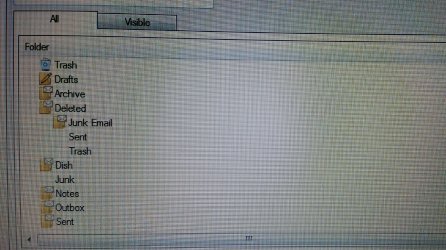
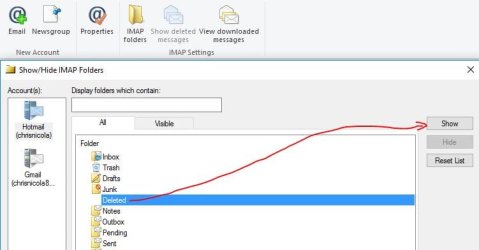
Thanks for sending the IMAP folder view. The ALL tab shows the list of visible and Invisible folders. The VISIBLE tab shows what you actually see under the WLM account. I can see under the ALL tab in the screenshot you sent above that one Sent folder, one Trash folder and one Junk folder has been made invisible (the ones with no folder icon to the left of the writing). You have probably made one of the active Junk folders invisible by mistake. To make a folder visible again, click on the invisible folder and select SHOW. Please see attached screenshot below.

Check on your Outlook Web account and you should find a Junk folder that is working properly. In WLM, when you see junk appearing in the correct folder then you know that is the correct one synchronising with the web account. You can hide or delete the ones that are not working.

Kind Regards
Chris
 

Attachments

  • Show Folders.JPG
    Show Folders.JPG
    34.2 KB · Views: 0

My Computer My Computer

At a glance

Desktop Win 10 Pro 64 bit, Laptop Win 7 Home ...Desktop Intel i7 4790 CPU 3.6 GHz, Laptop AMD...Desktop 16 Gbt, Laptop 4 GbtDesktop nvidea GeForce NTX960, Laptop AMD Rae...
Computer type
PC/Desktop
Computer Manufacturer/Model Number
Desktop Custom built, Laptop Lenovo G575 Model 20081
OS
Desktop Win 10 Pro 64 bit, Laptop Win 7 Home 64 bit
CPU
Desktop Intel i7 4790 CPU 3.6 GHz, Laptop AMD C-50 1GHz
Motherboard
ASUS H81 Gamer
Memory
Desktop 16 Gbt, Laptop 4 Gbt
Graphics Card(s)
Desktop nvidea GeForce NTX960, Laptop AMD Raedon HD 6250M
Sound Card
Desktop onboard Realtec high definition audio nvidea HD aud
Monitor(s) Displays
BENQ G900 Digital 19 inch
Screen Resolution
1024 x 768
Hard Drives
Silicon Power SSD SATA 3.0 450b Gbt
Seagate 4 Tbt SSHD
PSU
Thermaltake 1000W
Case
Thermaltake
Cooling
Onboard case fans
Keyboard
Standard PS/2
Mouse
A4 Tech optical wireless PS/2
Internet Speed
10 Mbps
Antivirus
Microsoft Security Essentials
Other Info
DVD Samsung TSST corp CDDVDW - SATA
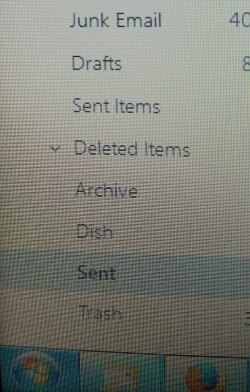
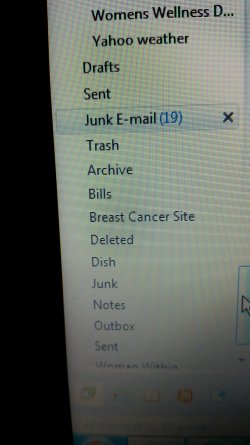
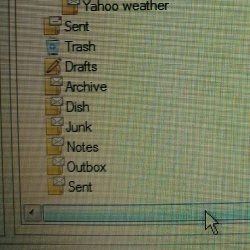
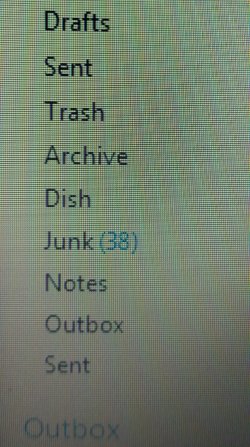
Thanks so much for your help and patience. Shame you are not my neighbor or live in same town. :) One pic is of the redone wlm view still 2 sent files-top one appears active on outlook whereas both active on wlm with the top one only have current "test" email as earlier I transferred couple of sent emails to the lower sent file. No option to hide the top sent folder in the IMAP folders. The 3rd sent file under the deleted file is hidden now. The Dish file seems out of place is a very old email. Unusual order of files. On pic of visible folders in the WLM IMAP folders and the other is how the folders appear in wlm. The last 2 is the outlook view. Junk folder showing 38 emails. No X beside junk email to delete all.
 

Attachments

  • 2016-08-29 16.14.14_resized (2).jpg
    2016-08-29 16.14.14_resized (2).jpg
    183.8 KB · Views: 1
  • 2016-08-29 16.28.01_resized.jpg
    2016-08-29 16.28.01_resized.jpg
    370 KB · Views: 0
  • 2016-08-29 16.43.21_resized.jpg
    2016-08-29 16.43.21_resized.jpg
    228.6 KB · Views: 1
  • 2016-08-29 16.50.30_resized.jpg
    2016-08-29 16.50.30_resized.jpg
    217 KB · Views: 1

My Computer My Computer

At a glance

Windows 7 64 bitintel i5
Computer type
Laptop
Computer Manufacturer/Model Number
Toshiba
OS
Windows 7 64 bit
CPU
intel i5
Antivirus
McAfee
Browser
Firefox 40
Thanks for sending the latest screenshots. From what I understand all your main system folders are now synchronising with the Outlook server. The only problems that remain in WLM is the cosmetic look in WLM and some functions like right click to empty the Trash and Junk folder do not work. You may be able to improve the cosmetic look with a bit of tweaking using the points mentioned previously about hiding and showing folders and re-downloading the folders if necessary. Microsoft will not be updating WLM so we may just have to live with some irregularities in the system. Another option is to back up your important e mails and delete the account in WLM and set it up again. But that might not be worth the hassle and there are no guarantees. My WLM is working properly and "right click delete all" works for the trash and Junk folders (only if there are files in them otherwise the option is greyed out) I wish there was an easier solution for you, but sometimes computers can be most uncooperative.

Kind regards
Chris
 

My Computer My Computer

At a glance

Desktop Win 10 Pro 64 bit, Laptop Win 7 Home ...Desktop Intel i7 4790 CPU 3.6 GHz, Laptop AMD...Desktop 16 Gbt, Laptop 4 GbtDesktop nvidea GeForce NTX960, Laptop AMD Rae...
Computer type
PC/Desktop
Computer Manufacturer/Model Number
Desktop Custom built, Laptop Lenovo G575 Model 20081
OS
Desktop Win 10 Pro 64 bit, Laptop Win 7 Home 64 bit
CPU
Desktop Intel i7 4790 CPU 3.6 GHz, Laptop AMD C-50 1GHz
Motherboard
ASUS H81 Gamer
Memory
Desktop 16 Gbt, Laptop 4 Gbt
Graphics Card(s)
Desktop nvidea GeForce NTX960, Laptop AMD Raedon HD 6250M
Sound Card
Desktop onboard Realtec high definition audio nvidea HD aud
Monitor(s) Displays
BENQ G900 Digital 19 inch
Screen Resolution
1024 x 768
Hard Drives
Silicon Power SSD SATA 3.0 450b Gbt
Seagate 4 Tbt SSHD
PSU
Thermaltake 1000W
Case
Thermaltake
Cooling
Onboard case fans
Keyboard
Standard PS/2
Mouse
A4 Tech optical wireless PS/2
Internet Speed
10 Mbps
Antivirus
Microsoft Security Essentials
Other Info
DVD Samsung TSST corp CDDVDW - SATA
Only 2-3 issues=2 sent folders >top one only holds couple days of sent emails-(does not have all going back to 2014)was dragging and copied into bottom sent folder that goes back to 2014. Bottom sent folder not current unless I drag and copy from the top sent folder. At this point haven't deleted either one. No option to hide the top one-there is for bottom sent folder-but didn't want to lose all the old ones. The trash folder I can delete all in folder per X to right of file name of which the junk folder doesn't have and I have to highlight multiple-to delete several/all then hit the delete at top. I have deleted wlm off of computer couple times and re-downloaded wlm. Doing that don't recall having issues-seemed to download most everything. But considering the way outlook looks different now I would be a little uneasy about deleting wlm now. How would you back wlm up? Sounds like it would be complex. I backed up my computer a month or so back but would have to do some research if I had to restore. Also the order of the files at bottom seems different>Draft, Sent, Trash, Archive, Dish, Junk, Notes, Outbox and Sent---The dish file is an email about Dish tv. What is >outbox?
 

My Computer My Computer

At a glance

Windows 7 64 bitintel i5
Computer type
Laptop
Computer Manufacturer/Model Number
Toshiba
OS
Windows 7 64 bit
CPU
intel i5
Antivirus
McAfee
Browser
Firefox 40
Back
Top