Deleted OEM Partition and now cannot boot

chuckie

New member
Local time
9:29 PM
Messages
8
I used EASEUS Partition Master to delete an OEM partition which was a system recovery partition from the original Windows XP install.

I then expanded C to fill the complete drive as it is only 80GB. Those two actions ran as 1 job.

Now the system will not boot.

I tried some tips from this forum, including using the Recovery menu from the Win 7 disk, but it has not helped at all.

The disk is now listed as Disk 0 Partition 1. It has no drive letter.

If I let the Win 7 install disk run up to the part where you select the install disk it says, "Windows cannot be installed to this hard disk space. The partition was reserved by the computer's Original Equipment Manufacturer (OEM)".

I do not understand why it says that is the OEM partition, as I told EASEUS to delete the OEM partition and then expand C to fill the disk. Surely it should be the C drive now.

Have I totally screwed it up?

Is there any way I can recover my C drive and my Windows 7 install?
 

My Computer

OS
windows 7

My Computer

Computer type
PC/Desktop
Computer Manufacturer/Model Number
Dell XPS 420
OS
Windows 10, Home Clean Install
CPU
Intel Core2 processsor Q8200(2.33Ghz 1333FSB) Quad Core Tech
Motherboard
Dell
Memory
6 gb
Graphics Card(s)
ATI Radeon 256MB HD3650
Sound Card
Intergrated 7.1 Channel Audio
Monitor(s) Displays
Dell SP2009W 20"
Hard Drives
640 GB Serial ATA Hard drive
Cooling
Fan
Keyboard
Dell USB Keyboard
Mouse
Dell Premium Optical USB
Internet Speed
DSL 2.85
Hello chuckie, welcome to Seven Forums!


Have a look at the tutorial at the link below, it's a disk that'll boot the PC and you'll be able to mark the Windows partition as "Active" that'll make it possible to do the "startup repairs" mentioned in the Note in Option One, Step One in the tutorial so you can get Windows booting again, to mark as "Active" have a look at Option Three, Step Two in the tutorial.
Be sure to post back to keep us informed or if you have any questions.


Partition Wizard : Use the Bootable CD
 

My Computer

Computer Manufacturer/Model Number
* BFK Customs *
OS
W 7 64-bit Ultimate
CPU
Intel Q9550 Yorkfield
Motherboard
ASUS P5Q Pro
Memory
8GB Dominator 8500C5D
Graphics Card(s)
ATI : XFX 5870
Sound Card
Realtek HD Audio 7-1
Monitor(s) Displays
1x 47" LCD HDMI & 3x 26" LCD HDMI
Screen Resolution
1920x1080P & 1920x1200
Hard Drives
1x 80GB Intel X25-M G2 SSD : 1x 500GB & 1x 640GB WD Caviar Black(s)
PSU
Corsair 620HX
Case
Cooler Master RC-690
Cooling
Tuniq Tower 120, 2x 140mm and 3x 120mm case fans
Keyboard
Microsoft 500
Mouse
Razer Diamondback 3G
Internet Speed
14 Mb/s
Other Info
1x Koutech 3Gb/s SATA HDD Hot Swap Rack
Thanks for the quick replies!

I tried using Partition Wizard to change the partition to active, but it does not help. It also seems to want to remain hidden. It changes back if I change it.

In Diskpart the partition is now Type OEM.

I tried the Windows 7 System Repair several times, but that has no effect.

Any other ideas?
 

My Computer

OS
windows 7

My Computer

Computer type
PC/Desktop
Computer Manufacturer/Model Number
Dell XPS 420
OS
Windows 10, Home Clean Install
CPU
Intel Core2 processsor Q8200(2.33Ghz 1333FSB) Quad Core Tech
Motherboard
Dell
Memory
6 gb
Graphics Card(s)
ATI Radeon 256MB HD3650
Sound Card
Intergrated 7.1 Channel Audio
Monitor(s) Displays
Dell SP2009W 20"
Hard Drives
640 GB Serial ATA Hard drive
Cooling
Fan
Keyboard
Dell USB Keyboard
Mouse
Dell Premium Optical USB
Internet Speed
DSL 2.85
Doesn't work.

"The system partition was not found"

I get the feeling I need a way to change the partition from Type OEM otherwise nothing will work.
 

My Computer

OS
windows 7
Hello again.


I thought you said you made one partition/volume of the entire HDD, my advice was to mark the Windows 7 partition (not the OEM partition) as active and do the repairs to that; then you can finish removing the OEM partition after you have Windows booting again.
 

My Computer

Computer Manufacturer/Model Number
* BFK Customs *
OS
W 7 64-bit Ultimate
CPU
Intel Q9550 Yorkfield
Motherboard
ASUS P5Q Pro
Memory
8GB Dominator 8500C5D
Graphics Card(s)
ATI : XFX 5870
Sound Card
Realtek HD Audio 7-1
Monitor(s) Displays
1x 47" LCD HDMI & 3x 26" LCD HDMI
Screen Resolution
1920x1080P & 1920x1200
Hard Drives
1x 80GB Intel X25-M G2 SSD : 1x 500GB & 1x 640GB WD Caviar Black(s)
PSU
Corsair 620HX
Case
Cooler Master RC-690
Cooling
Tuniq Tower 120, 2x 140mm and 3x 120mm case fans
Keyboard
Microsoft 500
Mouse
Razer Diamondback 3G
Internet Speed
14 Mb/s
Other Info
1x Koutech 3Gb/s SATA HDD Hot Swap Rack
Welcome to SevenForums,Did you say you can boot into safe mode? Use the f-8 key at startup. If you can then go to disk managment and try to set your partition to active by selecting then right click, make active. Then you mentioned you had install disc you boot from it and repair computer with start up repair. Good luck to you.
 

My Computer

Computer Manufacturer/Model Number
Gateway GT5692
OS
Windows 7 Ulti. x64
CPU
AMD Phenom 8450 triple-core 2.10 ghz
Memory
4GB
Graphics Card(s)
ATI Radion HD 3200
Monitor(s) Displays
Gateway FPD1775W
Screen Resolution
1280x720
Hard Drives
465.6613 Gibibytes
No, as per my original post, there is ONLY one partition now. There is no windows 7 partition. The only partition on the drive is Type OEM and it is the full 80GB (containing my win7 install).

And I have tried the setting the partition to active and using Win 7 disk Repair feature several times.

Any other ideas?
 

My Computer

OS
windows 7
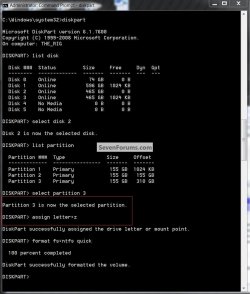
OK try this boot the Install disk and after the first "black/press any key ..." screen press shift + F10 keys to get to a DOS command window to see if assigning the partition a drive letter helps, have a look at the snip below to see how, I suggest the letter C:

click to enlarge
22222.jpg
 

My Computer

Computer Manufacturer/Model Number
* BFK Customs *
OS
W 7 64-bit Ultimate
CPU
Intel Q9550 Yorkfield
Motherboard
ASUS P5Q Pro
Memory
8GB Dominator 8500C5D
Graphics Card(s)
ATI : XFX 5870
Sound Card
Realtek HD Audio 7-1
Monitor(s) Displays
1x 47" LCD HDMI & 3x 26" LCD HDMI
Screen Resolution
1920x1080P & 1920x1200
Hard Drives
1x 80GB Intel X25-M G2 SSD : 1x 500GB & 1x 640GB WD Caviar Black(s)
PSU
Corsair 620HX
Case
Cooler Master RC-690
Cooling
Tuniq Tower 120, 2x 140mm and 3x 120mm case fans
Keyboard
Microsoft 500
Mouse
Razer Diamondback 3G
Internet Speed
14 Mb/s
Other Info
1x Koutech 3Gb/s SATA HDD Hot Swap Rack
take the drive out and put it into another machine that is already booted and see what you can get off it
you may need some help from friends but once your in the situation your in you need another drive to boot up with an OS with that drive connected then you can access it get what you need off of it (dox, tunes, pix) and then put it back in the original PC and reformat and reinstall ...I know this not what you want to hear but it will save you much grief all this repair stuff will drive you batty .... the other day I had this hp and I shut it off while booting and then windows said it was damaged after running all these repair utilities it said it could not fix the drive ... then I shut down and restart and the drive is fine ... still working
anyway my point is repair utilities almost never work and directly accessing the drive is going to be near impossible since the partition is all jacked however putting it in another machine (if you have one or have a friends) takes 10 minutes and then mark it as active as described by the gurus.....
 

My Computer

Computer Manufacturer/Model Number
Custom built super system & Fujitsu Lifebook (Lap)
OS
Win7 Ultimate (32) & Win7 Pro (64)
CPU
i7-860 (2.8 Ghz Overclocked) & intel centrino duo
Motherboard
Asus P7P55D & standard fujitsu
Memory
4 GB (Patriot) & 2 GB
Graphics Card(s)
nivida GeForce GTS 250 & standard
Sound Card
Creative Sound Blaster X-Fi Xtreme Audio & default fujitsu
Monitor(s) Displays
View Sonic , Samsung
Hard Drives
1 TB Caviar Black
1 TB Caviar Green
1/2 TB WD (my book thing)
60 gig Hitachi Travel star in the fuji lifebook
(I administer multiple systems but these are mine and usually they are not the ones with problems ---because theyre mine)
PSU
THERMALTAKE Toughpower 750 & Standard
Case
Cooler Master Sniper
Cooling
Standard
one more thing when you partitioned if there is only one and you losst the 100mb system part with the boot mgr you will never be able to boot from it unless you use bcdedit (boot utility ) and create a new system partition with a new boot record .... how to do that without a working OS is a mystery however the task can easily be accomplished if you put the drive in another machine as the secondary drive... good luck
 

My Computer

Computer Manufacturer/Model Number
Custom built super system & Fujitsu Lifebook (Lap)
OS
Win7 Ultimate (32) & Win7 Pro (64)
CPU
i7-860 (2.8 Ghz Overclocked) & intel centrino duo
Motherboard
Asus P7P55D & standard fujitsu
Memory
4 GB (Patriot) & 2 GB
Graphics Card(s)
nivida GeForce GTS 250 & standard
Sound Card
Creative Sound Blaster X-Fi Xtreme Audio & default fujitsu
Monitor(s) Displays
View Sonic , Samsung
Hard Drives
1 TB Caviar Black
1 TB Caviar Green
1/2 TB WD (my book thing)
60 gig Hitachi Travel star in the fuji lifebook
(I administer multiple systems but these are mine and usually they are not the ones with problems ---because theyre mine)
PSU
THERMALTAKE Toughpower 750 & Standard
Case
Cooler Master Sniper
Cooling
Standard
Well it is a laptop, so removing is not an option.

And from Technet, "You cannot assign a drive letter to an OEM partition".
 

My Computer

OS
windows 7
I removed my input because I had mistaken this thread with another thread - sorry.
 
Last edited:

My Computer

Computer Manufacturer/Model Number
HP, Dell, Gateway, Toshiba - 4 laptops and 2 desktops
OS
Vista, Windows7, Mint Mate, Zorin, Windows 8
CPU
from 1.6GHz Duo to i7
Monitor(s) Displays
2x HP w2207
Hard Drives
5x HDD, 7x SSD, 12x Externals
Keyboard
with trackball - no mices
Mouse
Trackball mice
Internet Speed
DSL 6000
Well it is a laptop, so removing is not an option.

And from Technet, "You cannot assign a drive letter to an OEM partition".


Did you try anyway?
 

My Computer

Computer Manufacturer/Model Number
* BFK Customs *
OS
W 7 64-bit Ultimate
CPU
Intel Q9550 Yorkfield
Motherboard
ASUS P5Q Pro
Memory
8GB Dominator 8500C5D
Graphics Card(s)
ATI : XFX 5870
Sound Card
Realtek HD Audio 7-1
Monitor(s) Displays
1x 47" LCD HDMI & 3x 26" LCD HDMI
Screen Resolution
1920x1080P & 1920x1200
Hard Drives
1x 80GB Intel X25-M G2 SSD : 1x 500GB & 1x 640GB WD Caviar Black(s)
PSU
Corsair 620HX
Case
Cooler Master RC-690
Cooling
Tuniq Tower 120, 2x 140mm and 3x 120mm case fans
Keyboard
Microsoft 500
Mouse
Razer Diamondback 3G
Internet Speed
14 Mb/s
Other Info
1x Koutech 3Gb/s SATA HDD Hot Swap Rack
what do you mean removing a laptop drive is the easiest ... if theres a jumper that might be a pain but laptop drives are generally of two types just like desk tops (IDE or SATA) but I see your point laptops generally have one drive bay so you might be hard pressed to find a running lap that you could plug your drive into however many newer machines have external SATA ports so if its sata your in luck .... try to create 100mb parttiton and fix your mbr ...
 

My Computer

Computer Manufacturer/Model Number
Custom built super system & Fujitsu Lifebook (Lap)
OS
Win7 Ultimate (32) & Win7 Pro (64)
CPU
i7-860 (2.8 Ghz Overclocked) & intel centrino duo
Motherboard
Asus P7P55D & standard fujitsu
Memory
4 GB (Patriot) & 2 GB
Graphics Card(s)
nivida GeForce GTS 250 & standard
Sound Card
Creative Sound Blaster X-Fi Xtreme Audio & default fujitsu
Monitor(s) Displays
View Sonic , Samsung
Hard Drives
1 TB Caviar Black
1 TB Caviar Green
1/2 TB WD (my book thing)
60 gig Hitachi Travel star in the fuji lifebook
(I administer multiple systems but these are mine and usually they are not the ones with problems ---because theyre mine)
PSU
THERMALTAKE Toughpower 750 & Standard
Case
Cooler Master Sniper
Cooling
Standard

My Computer

Computer Manufacturer/Model Number
* BFK Customs *
OS
W 7 64-bit Ultimate
CPU
Intel Q9550 Yorkfield
Motherboard
ASUS P5Q Pro
Memory
8GB Dominator 8500C5D
Graphics Card(s)
ATI : XFX 5870
Sound Card
Realtek HD Audio 7-1
Monitor(s) Displays
1x 47" LCD HDMI & 3x 26" LCD HDMI
Screen Resolution
1920x1080P & 1920x1200
Hard Drives
1x 80GB Intel X25-M G2 SSD : 1x 500GB & 1x 640GB WD Caviar Black(s)
PSU
Corsair 620HX
Case
Cooler Master RC-690
Cooling
Tuniq Tower 120, 2x 140mm and 3x 120mm case fans
Keyboard
Microsoft 500
Mouse
Razer Diamondback 3G
Internet Speed
14 Mb/s
Other Info
1x Koutech 3Gb/s SATA HDD Hot Swap Rack
The thing is at the end of the day I have my data backed up. So there is not point in removing the disk to retrieve data.

What do you mean by this, "try to create 100mb parttiton and fix your mbr ..."?
 

My Computer

OS
windows 7
The thing is at the end of the day I have my data backed up. So there is not point in removing the disk to retrieve data.

What do you mean by this, "try to create 100mb parttiton and fix your mbr ..."?


That's what started all this, right? ;)
 

My Computer

Computer Manufacturer/Model Number
* BFK Customs *
OS
W 7 64-bit Ultimate
CPU
Intel Q9550 Yorkfield
Motherboard
ASUS P5Q Pro
Memory
8GB Dominator 8500C5D
Graphics Card(s)
ATI : XFX 5870
Sound Card
Realtek HD Audio 7-1
Monitor(s) Displays
1x 47" LCD HDMI & 3x 26" LCD HDMI
Screen Resolution
1920x1080P & 1920x1200
Hard Drives
1x 80GB Intel X25-M G2 SSD : 1x 500GB & 1x 640GB WD Caviar Black(s)
PSU
Corsair 620HX
Case
Cooler Master RC-690
Cooling
Tuniq Tower 120, 2x 140mm and 3x 120mm case fans
Keyboard
Microsoft 500
Mouse
Razer Diamondback 3G
Internet Speed
14 Mb/s
Other Info
1x Koutech 3Gb/s SATA HDD Hot Swap Rack
Back
Top