Deleted Temporary Files in Disc Cleanup - Was This Wrong?

woodbine

New member
Member
VIP
Local time
10:53 PM
Messages
178
Location
Bristol, UK
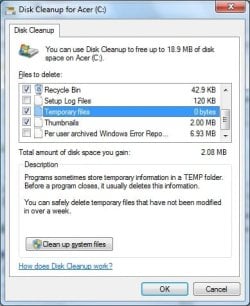
Earlier I used the Windows disc cleanup to clean my C Drive. I have just viewed a video on Youtube about optimising PCs, and he said not to check the box to remove temporary files as it causes problems. As I have removed them, what are the likely consequences?

Also, I had a look at restore points in case I wanted to go back so that the temp files could be reinstated. Strangely, there aren't any dates for restore points. Does this mean that by cleaning up the temp files, I have also removed restore points? Should I set up a restore point now?
 

Attachments
  • Disc Cleanup.jpg
    Disc Cleanup.jpg
    32.9 KB · Views: 46

My Computer My Computer

Computer type
PC/Desktop
Computer Manufacturer/Model Number
Acer Aspire Desktop M3910
OS
Windows 7 Home Premium 64 bit SP1
CPU
Intel i3 540
Memory
3GB DDR3SD
Monitor(s) Displays
LG Flatron L1960TR
Screen Resolution
1280x1024
Keyboard
Acer
Mouse
Genius
Antivirus
Avast (Free)
Browser
I E 11
Disk Cleanup is safe to use. I use Disk Cleanup several times a week.
Disk Cleanup does not remove Restore Points.
Disk Cleanup has never caused any problems for me.
Disk Cleanup is a Windows 7 built in tool. Windows does not like or want to hurt Windows.

I would suggest you set your Restore Point volume to 5% and create a Restore Point.

**How much free space do you have on your "C" partition?**
 

My Computer My Computer

Computer type
PC/Desktop
Computer Manufacturer/Model Number
Home made Desktop
OS
Windows 10 Pro. 64/ version 1709 Windows 7 Pro/64
CPU
Intel i7-6800K @ 4.3
Motherboard
ASUS X-99 Deluxe II
Memory
Corsair Platinum 16 gig @2400
Graphics Card(s)
EVGA GTX 1070 OC
Monitor(s) Displays
Asus 27" LED LCD/VE278Q
Screen Resolution
1920-1080 or 1280-720 HDMI
Hard Drives
INTEL SSD 730-240 Gb Sata 3.0/
PSU
EVGA Platium 1200W
Case
Phanteks Luxe Tempered Glass 8 fans/ one radiator
Cooling
XSPC/ Water Cooled CPU
Keyboard
Das 4 Professional
Mouse
Logitech M705/MX Anywhere 2-S
Internet Speed
100 mbits
Antivirus
Microsoft Security Essentials/ Malwarebytes Premium 3.0/ SAS
Browser
I.E. 11 default/Firefox/ ISP Time Warner Cable/Spectrum
Other Info
LG BluRay Burner/
Sound system-KLipsch-THX/
Icy Dock ssd Hot Swap bays.
It is rare that removing temp files creates a problem. Some apps (like CCleaner) will (by default) only delete "old" temp files. But again, you should not see any problems after removing temp files. Any app that keeps important files in a temp folder is a poorly written app.

It won't hurt to manually create a system restore point.

I'll let others speak to the impact (if any) of disk cleanup on system restore points.
edit: I see that Layback Bear has already addressed that issue.
 

My Computer My Computer

Computer type
Laptop
Computer Manufacturer/Model Number
Employer provided Dell Latitude
OS
W7 Pro SP1 64bit
CPU
i7
Memory
8GB
Graphics Card(s)
Intel HD Graphics
Hard Drives
crappy SSD
Antivirus
Employer mandated Symantec Endpoint Protection
Browser
Pale Moon 64bit, IE11 64bit & Chrome 64bit
Thanks for your quick replies. So, by checking the box and cleaning out my 'Temporary Files', I haven't removed anything important, Windows or otherwise? On the cleanup facility, are there recommended boxes to check and uncheck, or is it safe to check all?

Can you tell me how to set a restore point volume, please. Also, why are there no restore points? There were some a few days ago when I had to use one for something else.

As for C Drive, I have used 87GB from a total of 140GB.
 

My Computer My Computer

Computer type
PC/Desktop
Computer Manufacturer/Model Number
Acer Aspire Desktop M3910
OS
Windows 7 Home Premium 64 bit SP1
CPU
Intel i3 540
Memory
3GB DDR3SD
Monitor(s) Displays
LG Flatron L1960TR
Screen Resolution
1280x1024
Keyboard
Acer
Mouse
Genius
Antivirus
Avast (Free)
Browser
I E 11
Last edited:

My Computer My Computer

Computer type
Laptop
Computer Manufacturer/Model Number
ASUS
OS
Microsoft Windows 7 Home Premium 64-bit 7601 Multiprocessor Free Service Pack 1
CPU
AMD C-60 APU with Radeon(tm) HD Graphics
Motherboard
ASUSTeK COMPUTER INC. X501U
Memory
4.00 GB
Graphics Card(s)
AMD Radeon HD 6290 Graphics
Sound Card
(1) AMD High Definition Audio Device (2) Realtek High Defi
Screen Resolution
1366 x 768 x 32 bits (4294967296 colors) @ 60 Hz
Hard Drives
Hitachi HTS545050A7E380 SATA Disk Device
Antivirus
Comodo CIS & FW, SecureAplus App Whitelisting, Threatfire
Browser
Cyberfox 64bit, Opera 64bit, Airfox
Other Info
Spy-The-Spy, HitmanPro.Alert, Norton Connect Safe, MJRegWatcher, BitDefender TrafficLight, Voodoo Shield, Zemana AntiMalware
To the best of my knowledge, Windows 7 built in Disk Cleanup does not delete temp files that Windows 7 needs. Windows 7 tries it's best to protect itself.

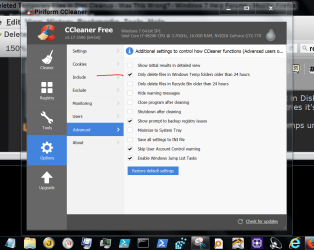
CCleaner when set to default will not delete temps until they are 24 hours old.


CCleaner default.PNG
 

My Computer My Computer

Computer type
PC/Desktop
Computer Manufacturer/Model Number
Home made Desktop
OS
Windows 10 Pro. 64/ version 1709 Windows 7 Pro/64
CPU
Intel i7-6800K @ 4.3
Motherboard
ASUS X-99 Deluxe II
Memory
Corsair Platinum 16 gig @2400
Graphics Card(s)
EVGA GTX 1070 OC
Monitor(s) Displays
Asus 27" LED LCD/VE278Q
Screen Resolution
1920-1080 or 1280-720 HDMI
Hard Drives
INTEL SSD 730-240 Gb Sata 3.0/
PSU
EVGA Platium 1200W
Case
Phanteks Luxe Tempered Glass 8 fans/ one radiator
Cooling
XSPC/ Water Cooled CPU
Keyboard
Das 4 Professional
Mouse
Logitech M705/MX Anywhere 2-S
Internet Speed
100 mbits
Antivirus
Microsoft Security Essentials/ Malwarebytes Premium 3.0/ SAS
Browser
I.E. 11 default/Firefox/ ISP Time Warner Cable/Spectrum
Other Info
LG BluRay Burner/
Sound system-KLipsch-THX/
Icy Dock ssd Hot Swap bays.
Hi Woodbine,
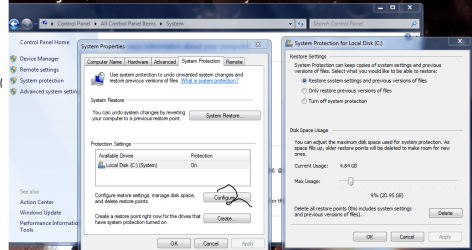
Disk clean can clear restore points, its part of the secondary option, Clean up System files.
You can select the size of the restore folder from here, see screenshot
Volumn shadow copy needs to be active as well,
check via Control panel >> Admin Tools >> services

Depending on which browser you use, there are in-built options to clear data at certain points.


Roy
 

Attachments

  • restor.PNG
    restor.PNG
    62.5 KB · Views: 2

My Computer My Computer

Computer type
PC/Desktop
Computer Manufacturer/Model Number
medionl/Aspire 6930G/acer x55a
OS
W7 home premium 32bit/W7HP 64bit/w10 tp insider ring
CPU
E5300 dual core
Motherboard
medion MS7366
Memory
3gb
Graphics Card(s)
Nvidia Geforce 7100 Nforce 630i
Monitor(s) Displays
avixc
Internet Speed
n (isp resticted to 72)
Antivirus
mse/pands
Browser
palemoon
Other Info
Belkin Fd7050 n USB using Railink RT2870 drivers, more upto date
Yes their are methods to clean Restore Points if one cares to.
I have never had Disk Cleanup do such a thing.
 

My Computer My Computer

Computer type
PC/Desktop
Computer Manufacturer/Model Number
Home made Desktop
OS
Windows 10 Pro. 64/ version 1709 Windows 7 Pro/64
CPU
Intel i7-6800K @ 4.3
Motherboard
ASUS X-99 Deluxe II
Memory
Corsair Platinum 16 gig @2400
Graphics Card(s)
EVGA GTX 1070 OC
Monitor(s) Displays
Asus 27" LED LCD/VE278Q
Screen Resolution
1920-1080 or 1280-720 HDMI
Hard Drives
INTEL SSD 730-240 Gb Sata 3.0/
PSU
EVGA Platium 1200W
Case
Phanteks Luxe Tempered Glass 8 fans/ one radiator
Cooling
XSPC/ Water Cooled CPU
Keyboard
Das 4 Professional
Mouse
Logitech M705/MX Anywhere 2-S
Internet Speed
100 mbits
Antivirus
Microsoft Security Essentials/ Malwarebytes Premium 3.0/ SAS
Browser
I.E. 11 default/Firefox/ ISP Time Warner Cable/Spectrum
Other Info
LG BluRay Burner/
Sound system-KLipsch-THX/
Icy Dock ssd Hot Swap bays.
Hi
LBB allways used it, no problems at all.

Do the same on my W10 TP's, getting rid of the "old" files, after enabling it:D

Roy
 

My Computer My Computer

Computer type
PC/Desktop
Computer Manufacturer/Model Number
medionl/Aspire 6930G/acer x55a
OS
W7 home premium 32bit/W7HP 64bit/w10 tp insider ring
CPU
E5300 dual core
Motherboard
medion MS7366
Memory
3gb
Graphics Card(s)
Nvidia Geforce 7100 Nforce 630i
Monitor(s) Displays
avixc
Internet Speed
n (isp resticted to 72)
Antivirus
mse/pands
Browser
palemoon
Other Info
Belkin Fd7050 n USB using Railink RT2870 drivers, more upto date
...by checking the box and cleaning out my 'Temporary Files', I haven't removed anything important, Windows or otherwise? On the cleanup facility, are there recommended boxes to check and uncheck, or is it safe to check all?
I say that it is safe to put a check by every box in the Disk Cleanup tool; even if you run the tool as admin (which offers more to check). If there was an important temp file for some 3rd party app, then that app should let you know that a file can not be found. You can always install that app again

why are there no restore points? There were some a few days ago when I had to use one for something else.
I have no idea what happened to your restore points.


Hi Woodbine,
Disk clean can clear restore points, its part of the secondary option, Clean up System files....
I am unable to get the Disk Cleanup tool to remove system restore points - even ones that are from last year.
 

My Computer My Computer

Computer type
Laptop
Computer Manufacturer/Model Number
Employer provided Dell Latitude
OS
W7 Pro SP1 64bit
CPU
i7
Memory
8GB
Graphics Card(s)
Intel HD Graphics
Hard Drives
crappy SSD
Antivirus
Employer mandated Symantec Endpoint Protection
Browser
Pale Moon 64bit, IE11 64bit & Chrome 64bit
I have just viewed a video on Youtube about optimising PCs, and he said not to check the box to remove temporary files as it causes problems. As I have removed them, what are the likely consequences?

The only thing you will see on YouTube that is true is the amazing things cats can do. Take everything else with a grain of salt.
 

My Computer My Computer

Computer type
PC/Desktop
Computer Manufacturer/Model Number
Compac
OS
Microsoft Windows 7 Ultimate 32-bit 7601
CPU
Intel(R) Pentium(R) Dual CPU E2160 @ 1.80GHz
Motherboard
MSI Boston
Memory
4.00 GB
Graphics Card(s)
(1) VNC Mirror Driver (2) Intel(R) G33/G31 Express Chipset
Sound Card
Disabled
Monitor(s) Displays
Headless
Screen Resolution
1280 x 960 x 32 bits (4294967296 colors) @ 60 Hz
Hard Drives
ST3320820AS ATA Device
Keyboard
Headless
Mouse
Headless
Antivirus
Malwarebytes pro
Other Info
Also
Windows 8.1 Laptop and Desktop both Acer
I have just viewed a video on Youtube about optimising PCs, and he said not to check the box to remove temporary files as it causes problems. As I have removed them, what are the likely consequences?

The only thing you will see on YouTube that is true is the amazing things cats can do. Take everything else with a grain of salt.

Yes, right on two points; Youtube + large cellar of salt, and feline tomfoolery.

Also, just checked my system restore. Firstly, it is already set to 5% so no adjustments needed. Secondly, a new list of restore points seems to be building up, so all is well.
 

My Computer My Computer

Computer type
PC/Desktop
Computer Manufacturer/Model Number
Acer Aspire Desktop M3910
OS
Windows 7 Home Premium 64 bit SP1
CPU
Intel i3 540
Memory
3GB DDR3SD
Monitor(s) Displays
LG Flatron L1960TR
Screen Resolution
1280x1024
Keyboard
Acer
Mouse
Genius
Antivirus
Avast (Free)
Browser
I E 11
Deleting temporary files can cause problems but this is most likely to happen when deleting them manually with Windows Explorer or similar utility. An example would be deleting temporary files created by a currently running program.

Disk Cleanup is quite conservative in what it deletes, as it must be. It does not delete all temporary files. The typical Windows user knows little of computers and does not want to learn so aggressive deletion of files would be dangerous. Of course you must use common sense. Checking the "Recycle Bin" option may delete files you may want to recover.

YouTube is hardly an authority in anything. Anyone can post videos about anything, whether they have knowledge of the subject matter or not. I have seen videos that are not only wrong, but dangerously wrong.

Edit: Using Disk Cleanup is about as safe as can reasonably be expected. But safety is always relative. Nothing in this world is absolutely 100% safe.
 

My Computer My Computer

Computer type
PC/Desktop
Computer Manufacturer/Model Number
HP
OS
Windows 7 Pro 64 bit
CPU
Xeon W3520
Memory
8 GB
Graphics Card(s)
Nvidia Geforce 210
Thanks LMiller7. I'm in the 'knows little of computers' category, so occasionally prey to doom-mongers. You've helped set my mind at rest.
 

My Computer My Computer

Computer type
PC/Desktop
Computer Manufacturer/Model Number
Acer Aspire Desktop M3910
OS
Windows 7 Home Premium 64 bit SP1
CPU
Intel i3 540
Memory
3GB DDR3SD
Monitor(s) Displays
LG Flatron L1960TR
Screen Resolution
1280x1024
Keyboard
Acer
Mouse
Genius
Antivirus
Avast (Free)
Browser
I E 11
According to HTG, Disk Cleanup only removes temp files that are a week or more old by default.
 

My Computer My Computer

Computer type
PC/Desktop
OS
Windows 7 Professional x64, Arch Linux
Back
Top