Deleting fonts and duplicates

Torquemada

New member
Local time
6:24 AM
Messages
16
When I try to delete a font (with no programs open), I am told it is "in use." I cleared all the TEMP files. Same result. When I drag the replacement font in, it asks me if I want to overwrite. If I say YES, it works, but then it leaves the old font and renames the new one with a 1 (and the next time with a 2, and so forth ... ). I don't want these fonts cluttering up my computer every time I edit a font. How do I get rid of them without affecting the system? And how do I keep the correct, original names without the numerals added to the end?
 

My Computer My Computer

At a glance

Windows 7 32-bit
OS
Windows 7 32-bit

My Computer My Computer

At a glance

Windows 8.1 ; Windows 7 x86 (Dec2008-Jan2013)
Computer type
PC/Desktop
OS
Windows 8.1 ; Windows 7 x86 (Dec2008-Jan2013)
Other Info
"The scale icon at the top right of a post or tutorial is how you can give rep to the member."
So what you're suggesting is that Windows can't handle this simple task?
 

My Computer My Computer

At a glance

Windows 7 32-bit
OS
Windows 7 32-bit
It can, but something is not quite right here. Normally Windows should delete a font without any problem, if that is not system protected font (like Segoe).

To figure out which process does not allow you to delete a font use
http://www.sevenforums.com/software/156706-unlocker-1-91-released.html

Normally, to run unlocker on folder you need to right click on it and select Unlocker from the menu, but this does not work on Fonts folder in Explorer. So, use alternative file manager like Total Commander or Altap Salamander etc.

Unlocker will check all processes and will give you the process which is holding file from deleting.
 

Attachments

  • unlocker.png
    unlocker.png
    21 KB · Views: 25

My Computer My Computer

At a glance

Windows 8.1 ; Windows 7 x86 (Dec2008-Jan2013)
Computer type
PC/Desktop
OS
Windows 8.1 ; Windows 7 x86 (Dec2008-Jan2013)
Other Info
"The scale icon at the top right of a post or tutorial is how you can give rep to the member."
Thanks for alerting me to the Unlocker program. Unfortunately, it works find in Total Commander (7.56) with everythingI tried, EXCEPT fonts. As with right clicking on fonts in Windows Explorer, the right click does not show the "Unlocker" option on the fonts folder. Any other ideas?
 

My Computer My Computer

At a glance

Windows 7 32-bit
OS
Windows 7 32-bit
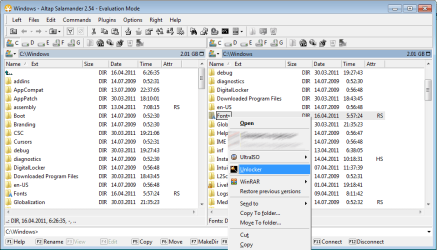
Interesting. I have tried in a Trial Version of Altap Salamander.
It works there. Here is a screenshot.
 

Attachments

  • altap_.png
    altap_.png
    32.2 KB · Views: 71

My Computer My Computer

At a glance

Windows 8.1 ; Windows 7 x86 (Dec2008-Jan2013)
Computer type
PC/Desktop
OS
Windows 8.1 ; Windows 7 x86 (Dec2008-Jan2013)
Other Info
"The scale icon at the top right of a post or tutorial is how you can give rep to the member."
I'm stumped. I downloaded Altap Salamander and nothing shows up at a right click on fonts, but everything shows up when I go to ordinary data files...
 

My Computer My Computer

At a glance

Windows 7 32-bit
OS
Windows 7 32-bit
Nothing shows up on individual fonts, but I was talking about the folder Fonts. Also, try reinstalling Unlocker (since it was installed before Salamander).
 

My Computer My Computer

At a glance

Windows 8.1 ; Windows 7 x86 (Dec2008-Jan2013)
Computer type
PC/Desktop
OS
Windows 8.1 ; Windows 7 x86 (Dec2008-Jan2013)
Other Info
"The scale icon at the top right of a post or tutorial is how you can give rep to the member."
I got it. Instead of clicking on an individual font, I eight-clicked on the FONTS folder with Total Commander and got the information I needed. Thanks.
 

My Computer My Computer

At a glance

Windows 7 32-bit
OS
Windows 7 32-bit
Back
Top