
Dell DataSafe Local Backup, Runtime Error (DSUpdate.exe)

osu1357

New member
Local time
2:48 AM
Messages
28
I have a Dell Inspiron 5721 running Windows 7 Home Premium 64-bit. It came installed with Dell DataSafe Local Backup. Periodically, I get this "Runtime Error" message (see below) when it tries to run DSUpdate.exe. I called the Dell DataSafe tech support and their "solution" was to uninstall the program and re-install it. Well this worked (at least at first). Now I continue to get that annoying message (which I just click 'OK' and close it).

1) Why am I getting this message on practically a brand new laptop?

2) How do I resolve this? Can this application be deleted, or should I leave it as is?

3) What does this application even do (is it needed)? Is it bloatware? My laptop did not come with any factory installation CDs so I really can't do a clean install if something were to happen (not sure if that is even relevant to my question) ..

I know I'm not the only one that's experienced this, so my question is what is the correct solution to this issue?
 

Attachments
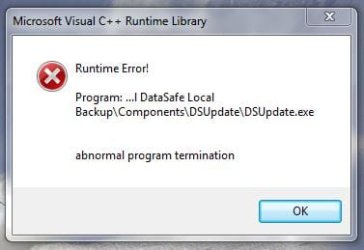
  • Error essage.JPG
    Error essage.JPG
    19.9 KB · Views: 5

My Computer

Computer type
PC/Desktop
Computer Manufacturer/Model Number
Dell Inspiron 5721
OS
Windows 7 Home Premium 64-Bit
CPU
Intel Core i7
Memory
8 GB
Hard Drives
1 TB
Internet Speed
20 Mbps
Antivirus
McAfee Internet Security
What is Dell DataSafe Local Backup? | Dell US

Above explains what it supposedly does---restore PC to factory state "without erasing your personal files and data".

Do you care about being able to do that?

There are other ways to do similar things:

1: use an imaging application to make an image file, which can then restore you to the state as of the date of the image file.

2: do a clean install of Windows, without bloatware. You'd download an ISO, burn it to disk, reinstall, and activate with the Product Key that should be found somewhere on the Dell. You'd have a standard Windows install, without whatever extra stuff Dell put on the machine.

Not sure exactly how Datasafe works. It may involve a recovery disk that you burn and then boot from, or it may involve a probably hidden partition on the laptop.

Regardless, those errors wouldn't inspire me and I'd hate to have to rely on it. So I wouldn't.
 

My Computer

Computer type
PC/Desktop
Computer Manufacturer/Model Number
Ignatz Special; 4 speed manual gearbox; factory air conditioning; one of one
OS
Windows 7 Home Premium SP1, 64-bit
CPU
Intel Skylake i5-6600K, not overclocked
Motherboard
AsRock Z170M Extreme 4, micro ATX
Memory
8 GB HyperX DDR4-2666 (2 x 4 GB)
Graphics Card(s)
none; graphics are integrated on CPU
Sound Card
onboard: Realtek ALC1150; external: USB Behringer UF0-202
Monitor(s) Displays
Dell S2340M 23 inch IPS
Screen Resolution
1600 x 900
Hard Drives
System: Crucial MX100 series SSD, 128 GB;
Data: Samsung Spinpoint 103SJ, 1 TB;
Backup: WD Caviar Green WD30EZRX-00D8PB0, 3 TB
PSU
Rosewill SilentNight 500 watt fanless, semi-modular
Case
Antec Solo II
Cooling
Noctua NH-U12S; Noctua F12 intake, Noctua S12A exhaust
Keyboard
Microsoft 200 6JH-00001 USB
Mouse
Dell or Microsoft optical wired; USB
Antivirus
Microsoft Security Essentials and Malwarebytes Premium
Browser
Pale Moon
Other Info
All fans PWM; speeds at idle: CPU circa 500 rpm; intake circa 600 rpm; exhaust circa 600 rpm; CPU temps 27 idle and 47 C load in a warm room (27 C/81 F) when running Intel Extreme Tuning Utility stress test.
That really doesn't answer my question but thank you for responding... I'm wanting to keep Dell DataSafe on my laptop but am looking for tech support from the Windows 7 community as to reasons WHY I am experiencing this error message, and then steps to troubleshoot and fix it...

Simply deleting it or switching to a 3rd party program really isn't solving the problem, especially considering I first experienced this issue on a "clean" laptop (only Dell factory programs were installed) .. In my opinion it shouldn't do that (even more, it shouldn't do it after uninstalling and then reinstalling Dell Datasafe) .. I like to know why certain programs behave the way they do on my PC's.

Are there any users out there that have actually experienced this issue (see initial post with error message) and found a way to fix this? :sleepy:
 

My Computer

Computer type
PC/Desktop
Computer Manufacturer/Model Number
Dell Inspiron 5721
OS
Windows 7 Home Premium 64-Bit
CPU
Intel Core i7
Memory
8 GB
Hard Drives
1 TB
Internet Speed
20 Mbps
Antivirus
McAfee Internet Security
Back
Top