normandorp
New member
- Local time
- 12:59 PM
- Messages
- 2
hi, im trying to restore my dell laptop to factory image using its dell datasafe local backup, but everytime it restarts it comes up with a error message saying
"windows failed to start. a recent hardware.........insert your windows installation disc...........file: \windows\system32\boot\winload.exe.....status0xc0000001...info:the selected entry could not be loaded because the application is missing or corrupt"
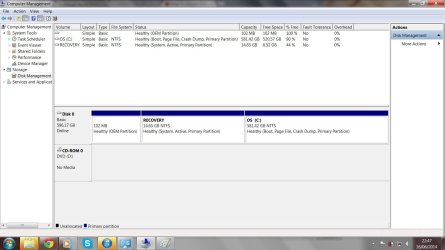
now i have realised that my recovery partition seems to be missing and there is only C:OS in computer. i have restored to factory image a few times in the past but i think the last time may not have restored properly and maybe the recovery partition wasnt made? i have reinstalled the dell datasafe but it does nothing
any help would be greatly appreciated
"windows failed to start. a recent hardware.........insert your windows installation disc...........file: \windows\system32\boot\winload.exe.....status0xc0000001...info:the selected entry could not be loaded because the application is missing or corrupt"
now i have realised that my recovery partition seems to be missing and there is only C:OS in computer. i have restored to factory image a few times in the past but i think the last time may not have restored properly and maybe the recovery partition wasnt made? i have reinstalled the dell datasafe but it does nothing
any help would be greatly appreciated
My Computer
- Computer type
- Laptop
- Computer Manufacturer/Model Number
- dell
- OS
- windows 7 64bit
- CPU
- core i7 2ghz
- Memory
- 8gb
- Graphics Card(s)
- nvidia gt540m
- Hard Drives
- 640gb
- Antivirus
- mse
- Browser
- chrome