PosslPussl
New member
- Local time
- 11:01 PM
- Messages
- 20
Hello All,
I am definitely no expert when it comes to backup, haven't ever bothered much with it (foolish I know) but since I am about to mess about the the OS on my laptop, which may not achieve what I'm hoping for, I'd like to be able to restore the machine to exactly what I have now, which works well enough (but not perfectly).
So I decided to make a system image and a system repair disk. I've never done this before, but from a bit of research it seemed simple enough.
There's not much on this laptop, only 40GB total on the hard drive.
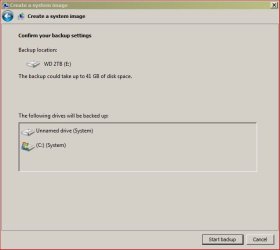
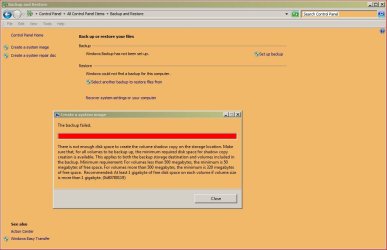
I plugged in a 2TB portable drive with 1.3 TB free, went to Control Panel/ Backup and Restore/ Create System Image, Windows found the portable drive, I clicked next, got the "confirm your backup settings" window, (see screenshot), clicked start backup, and after a few seconds I got the "backup failed" message.(See screenshot)
Well I haven't the faintest idea what that message means, it may as well be Chinese for all the sense I can make of it.
What's it all about please? What am I doing wrong? Can anybody enlighten me?
Thanks, PosslPussl
I am definitely no expert when it comes to backup, haven't ever bothered much with it (foolish I know) but since I am about to mess about the the OS on my laptop, which may not achieve what I'm hoping for, I'd like to be able to restore the machine to exactly what I have now, which works well enough (but not perfectly).
So I decided to make a system image and a system repair disk. I've never done this before, but from a bit of research it seemed simple enough.
There's not much on this laptop, only 40GB total on the hard drive.
I plugged in a 2TB portable drive with 1.3 TB free, went to Control Panel/ Backup and Restore/ Create System Image, Windows found the portable drive, I clicked next, got the "confirm your backup settings" window, (see screenshot), clicked start backup, and after a few seconds I got the "backup failed" message.(See screenshot)
Well I haven't the faintest idea what that message means, it may as well be Chinese for all the sense I can make of it.
What's it all about please? What am I doing wrong? Can anybody enlighten me?
Thanks, PosslPussl
Attachments
My Computer
At a glance
Windows 7 Professional 64bit with SP1Intel(R) Core(TM)2 Duo CPU4G
- Computer type
- PC/Desktop
- Computer Manufacturer/Model Number
- HP
- OS
- Windows 7 Professional 64bit with SP1
- CPU
- Intel(R) Core(TM)2 Duo CPU
- Memory
- 4G
- Sound Card
- realtek HD Audio
- Antivirus
- Microsoft Security Essentials
- Browser
- firefox, chrome