Solved Dell Inspiron N5110 has missing recovery partition.

angiesluck

New member
Member
VIP
Local time
8:23 PM
Messages
172
Location
Manchester UK
When going to update using Dells data safe it says missing recovery partition. Is there anyway I can create it without losing any data/files already on laptop. Thanks guys
 

My Computer My Computer

At a glance

windows 7 home premium 32bit
Computer Manufacturer/Model Number
Samsung R519
OS
windows 7 home premium 32bit
Solution Proposed !

Well the problem is actually on Dell's part not yours and is rather easy to solve. Actually the recovery partiton is hidden so the old version of Data Safe is unable to detect it. Let's solve this problem niw:

1. Open MyComputer, Click on C: drive.
2. Open Program Files (x86)/Dell DataSafe Local Backup/Components/DSUpdate
3. Click DSUpdate (an .exe file shown as type "Application") (You must be connected to internet)

4. It will update from version 9.4.40 to 9.4.4x (where x > 0)

5. It did something with the partition.
6. It will tell you to "reboot". Restart the laptop.
7. Then launch Dell DataSafe Local Backup.
8. This new version will detect the partition and enable you to make recovery discs.
9. You will need two DVD's and it will take approx one hour to create the recovery discs.


Hope this helps ! :D
 
Last edited:

My Computer My Computer

At a glance

Windows 7 Home Premium 64BitIntel(R) Core(TM) i7-2670QM CPU @ 2.20GHz8 GBNVIDIA GT540M
Computer Manufacturer/Model Number
Dell XPS 15 L502X
OS
Windows 7 Home Premium 64Bit
CPU
Intel(R) Core(TM) i7-2670QM CPU @ 2.20GHz
Motherboard
Dell
Memory
8 GB
Graphics Card(s)
NVIDIA GT540M
Hard Drives
750GB @ 7200 RPM
To see if Azo is correct (that the Recovery partition is simply hidden) you could open Disk Management and see if the Recovery partition is still showing. If it's not, it's most likely no longer on your hard drive.

How To Access Disk Management in Windows 7

If the Recovery partition is no longer on the hard drive it's probably not going to be possible to recreate it according to this Dell forum member. (Fireberd is also a Seven Forums member and very knowledgeable about all things Dell.)

Inspiron N5110 - restore to factory defaults !! BIG PROBLEM - Microsoft OS Forum - Software & Operating Systems - Dell Community
 

My Computer My Computer

At a glance

Win 7 Pro 64-bitIntel i5 2.4 Ghz8GB DDR3Intel HD 3000
Computer type
Laptop
Computer Manufacturer/Model Number
Sony Vaio VPCEB47GM Laptop
OS
Win 7 Pro 64-bit
CPU
Intel i5 2.4 Ghz
Memory
8GB DDR3
Graphics Card(s)
Intel HD 3000
Sound Card
IDT High Definition
Monitor(s) Displays
15.6 WGXA Anti-Glare LED
Screen Resolution
1280x800
Hard Drives
640Gb 7200rpm
Antivirus
MSE
Browser
Opera (primary) with IE9 backup
  • Like
Reactions: Azo
Most correct marsmimar. I forgot that possibility. Thanks for the reply !
 

My Computer My Computer

At a glance

Windows 7 Home Premium 64BitIntel(R) Core(TM) i7-2670QM CPU @ 2.20GHz8 GBNVIDIA GT540M
Computer Manufacturer/Model Number
Dell XPS 15 L502X
OS
Windows 7 Home Premium 64Bit
CPU
Intel(R) Core(TM) i7-2670QM CPU @ 2.20GHz
Motherboard
Dell
Memory
8 GB
Graphics Card(s)
NVIDIA GT540M
Hard Drives
750GB @ 7200 RPM
I can only find Program File (x86) not (x686)

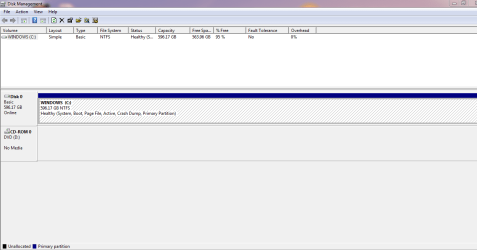
Also In computer management I see Disk 0.....and in a box it says.....WINDOWS (c) 596.17 GB NTSF Healthy (System, Boot, Page File, Active, Crash Dump, Primary Partition)
 
Last edited:

My Computer My Computer

At a glance

windows 7 home premium 32bit
Computer Manufacturer/Model Number
Samsung R519
OS
windows 7 home premium 32bit
Sorry that's x86 actually. My typo.
 

My Computer My Computer

At a glance

Windows 7 Home Premium 64BitIntel(R) Core(TM) i7-2670QM CPU @ 2.20GHz8 GBNVIDIA GT540M
Computer Manufacturer/Model Number
Dell XPS 15 L502X
OS
Windows 7 Home Premium 64Bit
CPU
Intel(R) Core(TM) i7-2670QM CPU @ 2.20GHz
Motherboard
Dell
Memory
8 GB
Graphics Card(s)
NVIDIA GT540M
Hard Drives
750GB @ 7200 RPM
I clicked on everything as you have said but nothing happens!
 

My Computer My Computer

At a glance

windows 7 home premium 32bit
Computer Manufacturer/Model Number
Samsung R519
OS
windows 7 home premium 32bit

My Computer My Computer

At a glance

Windows 7 Home Premium 64BitIntel(R) Core(TM) i7-2670QM CPU @ 2.20GHz8 GBNVIDIA GT540M
Computer Manufacturer/Model Number
Dell XPS 15 L502X
OS
Windows 7 Home Premium 64Bit
CPU
Intel(R) Core(TM) i7-2670QM CPU @ 2.20GHz
Motherboard
Dell
Memory
8 GB
Graphics Card(s)
NVIDIA GT540M
Hard Drives
750GB @ 7200 RPM
Hi, AZO that link just took me too the main windows 7 forum menu.....it does not actually dictate what I am supposed to be viewing to help me
 

My Computer My Computer

At a glance

windows 7 home premium 32bit
Computer Manufacturer/Model Number
Samsung R519
OS
windows 7 home premium 32bit
Link edited. Try out now ! :D
 

My Computer My Computer

At a glance

Windows 7 Home Premium 64BitIntel(R) Core(TM) i7-2670QM CPU @ 2.20GHz8 GBNVIDIA GT540M
Computer Manufacturer/Model Number
Dell XPS 15 L502X
OS
Windows 7 Home Premium 64Bit
CPU
Intel(R) Core(TM) i7-2670QM CPU @ 2.20GHz
Motherboard
Dell
Memory
8 GB
Graphics Card(s)
NVIDIA GT540M
Hard Drives
750GB @ 7200 RPM
Thanks...but the links do not help me into sorting out the recovery partition that I have missing
 

My Computer My Computer

At a glance

windows 7 home premium 32bit
Computer Manufacturer/Model Number
Samsung R519
OS
windows 7 home premium 32bit
Can you allow remote desktop connection? Then I can check it out myself ! I will check the problem and try to solve it by controlling your PC. You can terminate connection anytime you like.
 

My Computer My Computer

At a glance

Windows 7 Home Premium 64BitIntel(R) Core(TM) i7-2670QM CPU @ 2.20GHz8 GBNVIDIA GT540M
Computer Manufacturer/Model Number
Dell XPS 15 L502X
OS
Windows 7 Home Premium 64Bit
CPU
Intel(R) Core(TM) i7-2670QM CPU @ 2.20GHz
Motherboard
Dell
Memory
8 GB
Graphics Card(s)
NVIDIA GT540M
Hard Drives
750GB @ 7200 RPM
When going to update using Dells data safe it says missing recovery partition. Is there anyway I can create it without losing any data/files already on laptop. Thanks guys

If you're trying not to lose your data, files, etc then any attempt to restore your computer using recovery disks won't work. Recovery disks (or a recovery partition) are designed to return your computer to factory specifications, just like the day it was when you got it home from the store. All personal info, programs, data, tweaks, settings, themes, etc will be erased.

What exactly are you trying to update? The Dell Data Safe or something else? If something else there may be a workaround that would allow the update(s) while preserving your data.
 

My Computer My Computer

At a glance

Win 7 Pro 64-bitIntel i5 2.4 Ghz8GB DDR3Intel HD 3000
Computer type
Laptop
Computer Manufacturer/Model Number
Sony Vaio VPCEB47GM Laptop
OS
Win 7 Pro 64-bit
CPU
Intel i5 2.4 Ghz
Memory
8GB DDR3
Graphics Card(s)
Intel HD 3000
Sound Card
IDT High Definition
Monitor(s) Displays
15.6 WGXA Anti-Glare LED
Screen Resolution
1280x800
Hard Drives
640Gb 7200rpm
Antivirus
MSE
Browser
Opera (primary) with IE9 backup
angiesluck I'm no expert by any means but after reading this trend twice I and maybe others don't understand what you are trying to update and why. Please explain.
 

My Computer My Computer

At a glance

Windows 10 Pro. 64/ version 1709 Windows 7 Pr...Intel i7-6800K @ 4.3Corsair Platinum 16 gig @2400EVGA GTX 1070 OC
Computer type
PC/Desktop
Computer Manufacturer/Model Number
Home made Desktop
OS
Windows 10 Pro. 64/ version 1709 Windows 7 Pro/64
CPU
Intel i7-6800K @ 4.3
Motherboard
ASUS X-99 Deluxe II
Memory
Corsair Platinum 16 gig @2400
Graphics Card(s)
EVGA GTX 1070 OC
Monitor(s) Displays
Asus 27" LED LCD/VE278Q
Screen Resolution
1920-1080 or 1280-720 HDMI
Hard Drives
INTEL SSD 730-240 Gb Sata 3.0/
PSU
EVGA Platium 1200W
Case
Phanteks Luxe Tempered Glass 8 fans/ one radiator
Cooling
XSPC/ Water Cooled CPU
Keyboard
Das 4 Professional
Mouse
Logitech M705/MX Anywhere 2-S
Internet Speed
100 mbits
Antivirus
Microsoft Security Essentials/ Malwarebytes Premium 3.0/ SAS
Browser
I.E. 11 default/Firefox/ ISP Time Warner Cable/Spectrum
Other Info
LG BluRay Burner/
Sound system-KLipsch-THX/
Icy Dock ssd Hot Swap bays.
OK....A Dell update pops up...and when I go to update it says it cannot find the recovery partition as it is missing.....so the update cannot go ahead.....I have checked to try and find if I have the recovery partition on the hard drive but too no success.....I have tried what I have been told with the going to re update the (dell safe update system) on drive C but it will not launch the dell safe update...so unable to do the update to see if this is the problem causing the dell safe too not detect the recovery partition (if it is hidden) that is....or it just may be that the recovery partition is not on my hard drive....When I first got the laptop...it had it all installed so didnt need to do anything....its since this update keeps popping up that I have discovered that it is possible that the recovery partition has not been done.....I hope this helps in you understanding my problem....let me know :-)
 

My Computer My Computer

At a glance

windows 7 home premium 32bit
Computer Manufacturer/Model Number
Samsung R519
OS
windows 7 home premium 32bit
That does help. Greg and Karl are probably the best along these lines. I will see if I can find you some help.
 

My Computer My Computer

At a glance

Windows 10 Pro. 64/ version 1709 Windows 7 Pr...Intel i7-6800K @ 4.3Corsair Platinum 16 gig @2400EVGA GTX 1070 OC
Computer type
PC/Desktop
Computer Manufacturer/Model Number
Home made Desktop
OS
Windows 10 Pro. 64/ version 1709 Windows 7 Pro/64
CPU
Intel i7-6800K @ 4.3
Motherboard
ASUS X-99 Deluxe II
Memory
Corsair Platinum 16 gig @2400
Graphics Card(s)
EVGA GTX 1070 OC
Monitor(s) Displays
Asus 27" LED LCD/VE278Q
Screen Resolution
1920-1080 or 1280-720 HDMI
Hard Drives
INTEL SSD 730-240 Gb Sata 3.0/
PSU
EVGA Platium 1200W
Case
Phanteks Luxe Tempered Glass 8 fans/ one radiator
Cooling
XSPC/ Water Cooled CPU
Keyboard
Das 4 Professional
Mouse
Logitech M705/MX Anywhere 2-S
Internet Speed
100 mbits
Antivirus
Microsoft Security Essentials/ Malwarebytes Premium 3.0/ SAS
Browser
I.E. 11 default/Firefox/ ISP Time Warner Cable/Spectrum
Other Info
LG BluRay Burner/
Sound system-KLipsch-THX/
Icy Dock ssd Hot Swap bays.
Great ...Thanks
 

My Computer My Computer

At a glance

windows 7 home premium 32bit
Computer Manufacturer/Model Number
Samsung R519
OS
windows 7 home premium 32bit
Hi,

Lets see if that recovery partition does exist. Please follow these steps:

1. Click the Start Orb
2. In the search box, type disk managment
3. Click on the item that says 'Create and format hard disk partitions'
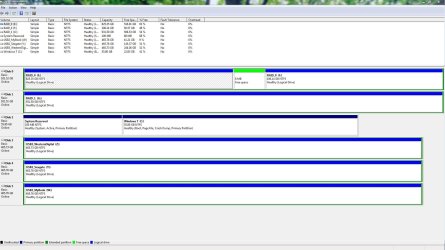
4. Take a screen capture image of the screen that opens, after maximising it, and then post the image here.

It should look similar to the image below.

Regards,
Golden
 

Attachments

  • Capture.JPG
    Capture.JPG
    183 KB · Views: 39

My Computer My Computer

At a glance

Windows 10 Pro x64 ; Xubuntu x64Intel i7 860 @ 2.80 GHz O/C'ed to 4.0GHz16GB Corsair Vengance DDR3 @ 661 MHz Dual Cha...EVGA NVidia GTX 560 1024MB
Computer type
PC/Desktop
Computer Manufacturer/Model Number
Golden Mk. I.4
OS
Windows 10 Pro x64 ; Xubuntu x64
CPU
Intel i7 860 @ 2.80 GHz O/C'ed to 4.0GHz
Motherboard
Gigabyte P55A-UD3R Rev.1. Award BIOS F13
Memory
16GB Corsair Vengance DDR3 @ 661 MHz Dual Channel (9-9-9-24)
Graphics Card(s)
EVGA NVidia GTX 560 1024MB
Sound Card
Realtek Integrated
Monitor(s) Displays
Dual Samsung SyncMaster 2494HS
Screen Resolution
1920*1080 and 1920*1080
Hard Drives
1*Samsung 840 EVO 120GB SSD;
1*OCZ Vertex 2 60GB SSD;
2*Samsung F3 SpinPoint 1TB in RAID0;
1*Samsung F1 SpinPoint 1TB;
2*Western Digital 1TB External USB 3.0
1*Western Digital 500GB External USB 3.0
1*Seagate 500GB External USB 2.0
PSU
Thermaltake ToughPower QFan 750W
Case
Thermaltake Element S VK60001W2Z
Cooling
Corsair H60 Water Cooling, 2*230mm and 2*80mm case fans
Keyboard
Logitech G110
Mouse
Logitech MX518
snip.PNG

Hope this helps and thanks for helping me
 

My Computer My Computer

At a glance

windows 7 home premium 32bit
Computer Manufacturer/Model Number
Samsung R519
OS
windows 7 home premium 32bit
Like I suggested back in Post # 3, the recovery partition isn't showing on your hard drive.
 

My Computer My Computer

At a glance

Win 7 Pro 64-bitIntel i5 2.4 Ghz8GB DDR3Intel HD 3000
Computer type
Laptop
Computer Manufacturer/Model Number
Sony Vaio VPCEB47GM Laptop
OS
Win 7 Pro 64-bit
CPU
Intel i5 2.4 Ghz
Memory
8GB DDR3
Graphics Card(s)
Intel HD 3000
Sound Card
IDT High Definition
Monitor(s) Displays
15.6 WGXA Anti-Glare LED
Screen Resolution
1280x800
Hard Drives
640Gb 7200rpm
Antivirus
MSE
Browser
Opera (primary) with IE9 backup
Back
Top