Solved Dell Inspiron N5110 has missing recovery partition.

Hi,

Yep - there is no recovery partition, that is why you get the error when you run that upgrade option. There isn't any point in running that update any longer.

What you should do, is see if there is a 'Burn Recovery Disks' option under the Start menu, and do that if you already haven't.

Regards,
Golden
 

My Computer My Computer

At a glance

Windows 10 Pro x64 ; Xubuntu x64Intel i7 860 @ 2.80 GHz O/C'ed to 4.0GHz16GB Corsair Vengance DDR3 @ 661 MHz Dual Cha...EVGA NVidia GTX 560 1024MB
Computer type
PC/Desktop
Computer Manufacturer/Model Number
Golden Mk. I.4
OS
Windows 10 Pro x64 ; Xubuntu x64
CPU
Intel i7 860 @ 2.80 GHz O/C'ed to 4.0GHz
Motherboard
Gigabyte P55A-UD3R Rev.1. Award BIOS F13
Memory
16GB Corsair Vengance DDR3 @ 661 MHz Dual Channel (9-9-9-24)
Graphics Card(s)
EVGA NVidia GTX 560 1024MB
Sound Card
Realtek Integrated
Monitor(s) Displays
Dual Samsung SyncMaster 2494HS
Screen Resolution
1920*1080 and 1920*1080
Hard Drives
1*Samsung 840 EVO 120GB SSD;
1*OCZ Vertex 2 60GB SSD;
2*Samsung F3 SpinPoint 1TB in RAID0;
1*Samsung F1 SpinPoint 1TB;
2*Western Digital 1TB External USB 3.0
1*Western Digital 500GB External USB 3.0
1*Seagate 500GB External USB 2.0
PSU
Thermaltake ToughPower QFan 750W
Case
Thermaltake Element S VK60001W2Z
Cooling
Corsair H60 Water Cooling, 2*230mm and 2*80mm case fans
Keyboard
Logitech G110
Mouse
Logitech MX518
can I not do a recovery partition instead onto the hard drive? If so how would I go about it...Thanks
 

My Computer My Computer

At a glance

windows 7 home premium 32bit
Computer Manufacturer/Model Number
Samsung R519
OS
windows 7 home premium 32bit
Hi,

If you restored from the recovery disks and set your computer back to the factory setting, it might do that, but there isn't any benefit if you already have the recovery discs burnt to DVD, so I wouldn't bother with that.

Regards,
Golden
 

My Computer My Computer

At a glance

Windows 10 Pro x64 ; Xubuntu x64Intel i7 860 @ 2.80 GHz O/C'ed to 4.0GHz16GB Corsair Vengance DDR3 @ 661 MHz Dual Cha...EVGA NVidia GTX 560 1024MB
Computer type
PC/Desktop
Computer Manufacturer/Model Number
Golden Mk. I.4
OS
Windows 10 Pro x64 ; Xubuntu x64
CPU
Intel i7 860 @ 2.80 GHz O/C'ed to 4.0GHz
Motherboard
Gigabyte P55A-UD3R Rev.1. Award BIOS F13
Memory
16GB Corsair Vengance DDR3 @ 661 MHz Dual Channel (9-9-9-24)
Graphics Card(s)
EVGA NVidia GTX 560 1024MB
Sound Card
Realtek Integrated
Monitor(s) Displays
Dual Samsung SyncMaster 2494HS
Screen Resolution
1920*1080 and 1920*1080
Hard Drives
1*Samsung 840 EVO 120GB SSD;
1*OCZ Vertex 2 60GB SSD;
2*Samsung F3 SpinPoint 1TB in RAID0;
1*Samsung F1 SpinPoint 1TB;
2*Western Digital 1TB External USB 3.0
1*Western Digital 500GB External USB 3.0
1*Seagate 500GB External USB 2.0
PSU
Thermaltake ToughPower QFan 750W
Case
Thermaltake Element S VK60001W2Z
Cooling
Corsair H60 Water Cooling, 2*230mm and 2*80mm case fans
Keyboard
Logitech G110
Mouse
Logitech MX518
As you've lost the recovery partition there's not much you can do about it. Did you get the machine brand new? Something happened to the way it was initially set up. But not only did you lose all the other partitions that were placed on that physical disk, the C: partition was enlarged to take up all disk space (swallowing any space that had originally been taken up by the factory partitions).

You didn't get any Dell recovery disks, did you? I kind of doubt it, especially if the recovery partitions truly did exist when it was out of the box.

Do you actually use any of the Dell branded software that came with the machine? Typically the branded software that comes with the machine is not necessary as w7 can manage the machine quite well on its own, without the additional bloat.

Do you use that "Dell Safe"? Looks as though it's some sort of backup utility, backing up your data to the cloud. Not sure why it's looking for the recovery partition.

Do you have your data backed up to some local media like an external hard drive or something?

If you answer the above questions forum members here can help you get your system back in shape as well as help in setting you up to handle "disaster recovery" (if the need ever arises).

EDIT: Can't believe it took me that long to compose this post. Agree with Golden's post before mine. Restoring via Recovery Disks is probably not what you want (at least right now). It would typically get you back to factory condition but you would lose all the updates and apps you've installed and all of your data as well.
 

My Computer My Computer

At a glance

Windows 7 Ultimate x64
OS
Windows 7 Ultimate x64
If your computer is malware free and working the way it's supposed to, create a system image and let that be your new recovery tool.
 

My Computer My Computer

At a glance

Win 7 Pro 64-bitIntel i5 2.4 Ghz8GB DDR3Intel HD 3000
Computer type
Laptop
Computer Manufacturer/Model Number
Sony Vaio VPCEB47GM Laptop
OS
Win 7 Pro 64-bit
CPU
Intel i5 2.4 Ghz
Memory
8GB DDR3
Graphics Card(s)
Intel HD 3000
Sound Card
IDT High Definition
Monitor(s) Displays
15.6 WGXA Anti-Glare LED
Screen Resolution
1280x800
Hard Drives
640Gb 7200rpm
Antivirus
MSE
Browser
Opera (primary) with IE9 backup
^ Thats a great suggestion from marsmimar!
 

My Computer My Computer

At a glance

Windows 10 Pro x64 ; Xubuntu x64Intel i7 860 @ 2.80 GHz O/C'ed to 4.0GHz16GB Corsair Vengance DDR3 @ 661 MHz Dual Cha...EVGA NVidia GTX 560 1024MB
Computer type
PC/Desktop
Computer Manufacturer/Model Number
Golden Mk. I.4
OS
Windows 10 Pro x64 ; Xubuntu x64
CPU
Intel i7 860 @ 2.80 GHz O/C'ed to 4.0GHz
Motherboard
Gigabyte P55A-UD3R Rev.1. Award BIOS F13
Memory
16GB Corsair Vengance DDR3 @ 661 MHz Dual Channel (9-9-9-24)
Graphics Card(s)
EVGA NVidia GTX 560 1024MB
Sound Card
Realtek Integrated
Monitor(s) Displays
Dual Samsung SyncMaster 2494HS
Screen Resolution
1920*1080 and 1920*1080
Hard Drives
1*Samsung 840 EVO 120GB SSD;
1*OCZ Vertex 2 60GB SSD;
2*Samsung F3 SpinPoint 1TB in RAID0;
1*Samsung F1 SpinPoint 1TB;
2*Western Digital 1TB External USB 3.0
1*Western Digital 500GB External USB 3.0
1*Seagate 500GB External USB 2.0
PSU
Thermaltake ToughPower QFan 750W
Case
Thermaltake Element S VK60001W2Z
Cooling
Corsair H60 Water Cooling, 2*230mm and 2*80mm case fans
Keyboard
Logitech G110
Mouse
Logitech MX518
I dont have any recovery disc's. I did buy the laptop new and when it arrived everything was fully installed (as far as I was aware) It came with OS disc and Utilitys disc thats all.. I have had it for 3 months now and even thou I have not used up much space it does seem to be running slow. I did discfrag, run disc clean and run malware checks/virus checks...all the safe stuff....but it still runs slow....Its only when the update came up that I found out it did not have the recovery partition. It seems as thou I will have too put my stuff on an external hard drive and take it back to where I purchased it from (PC World in UK) and let them sort it out as it seems it may have more stuff missing, with it running like it is so soon after purchasing it. I was hoping to sort it out myself but it looks like it may be out of my hands to do anything.
 

My Computer My Computer

At a glance

windows 7 home premium 32bit
Computer Manufacturer/Model Number
Samsung R519
OS
windows 7 home premium 32bit
Hi,

This OS+utility disk are the equivalent of the recovery disks I suspect.

You say your PC is running slow - can you be more specific?

Please try the following:

1. Click Start :orb:
2. In the search box, type cmd
3. Right-click on cmd.exe, and choose 'Run as Administrator'
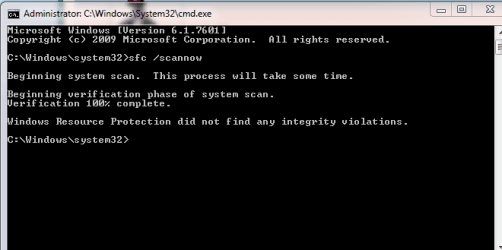
4. In the command window that opens, type sfc /scannow and hit enter.

Post back the output once its completed in your next reply.

Regards,
Golden
 

My Computer My Computer

At a glance

Windows 10 Pro x64 ; Xubuntu x64Intel i7 860 @ 2.80 GHz O/C'ed to 4.0GHz16GB Corsair Vengance DDR3 @ 661 MHz Dual Cha...EVGA NVidia GTX 560 1024MB
Computer type
PC/Desktop
Computer Manufacturer/Model Number
Golden Mk. I.4
OS
Windows 10 Pro x64 ; Xubuntu x64
CPU
Intel i7 860 @ 2.80 GHz O/C'ed to 4.0GHz
Motherboard
Gigabyte P55A-UD3R Rev.1. Award BIOS F13
Memory
16GB Corsair Vengance DDR3 @ 661 MHz Dual Channel (9-9-9-24)
Graphics Card(s)
EVGA NVidia GTX 560 1024MB
Sound Card
Realtek Integrated
Monitor(s) Displays
Dual Samsung SyncMaster 2494HS
Screen Resolution
1920*1080 and 1920*1080
Hard Drives
1*Samsung 840 EVO 120GB SSD;
1*OCZ Vertex 2 60GB SSD;
2*Samsung F3 SpinPoint 1TB in RAID0;
1*Samsung F1 SpinPoint 1TB;
2*Western Digital 1TB External USB 3.0
1*Western Digital 500GB External USB 3.0
1*Seagate 500GB External USB 2.0
PSU
Thermaltake ToughPower QFan 750W
Case
Thermaltake Element S VK60001W2Z
Cooling
Corsair H60 Water Cooling, 2*230mm and 2*80mm case fans
Keyboard
Logitech G110
Mouse
Logitech MX518
snip 1.PNG

Seems fine I think.. unless you see anything different, but it really is getting slow and I have hardly put anything on this laptop so I dont understand what is causing it...maybe because it cannot update perhaps!
 

My Computer My Computer

At a glance

windows 7 home premium 32bit
Computer Manufacturer/Model Number
Samsung R519
OS
windows 7 home premium 32bit
Hi,

It sounds to me like you are suffering a classic bloat-induced computer. Bloatware/crapware = all the rubbish that comes as part of an OEM installation (one where Windows is pre-installed for you) that you rarely use, but it slows down the PC phenomenally.

The good news, is there is a relatively simple fix for this, that involves installing Windows 7from scratch. It sounds daunting but we can walk you through this step by step if you feel up to it.

Let us know if you want to try this.

Regards,
Golden
 

My Computer My Computer

At a glance

Windows 10 Pro x64 ; Xubuntu x64Intel i7 860 @ 2.80 GHz O/C'ed to 4.0GHz16GB Corsair Vengance DDR3 @ 661 MHz Dual Cha...EVGA NVidia GTX 560 1024MB
Computer type
PC/Desktop
Computer Manufacturer/Model Number
Golden Mk. I.4
OS
Windows 10 Pro x64 ; Xubuntu x64
CPU
Intel i7 860 @ 2.80 GHz O/C'ed to 4.0GHz
Motherboard
Gigabyte P55A-UD3R Rev.1. Award BIOS F13
Memory
16GB Corsair Vengance DDR3 @ 661 MHz Dual Channel (9-9-9-24)
Graphics Card(s)
EVGA NVidia GTX 560 1024MB
Sound Card
Realtek Integrated
Monitor(s) Displays
Dual Samsung SyncMaster 2494HS
Screen Resolution
1920*1080 and 1920*1080
Hard Drives
1*Samsung 840 EVO 120GB SSD;
1*OCZ Vertex 2 60GB SSD;
2*Samsung F3 SpinPoint 1TB in RAID0;
1*Samsung F1 SpinPoint 1TB;
2*Western Digital 1TB External USB 3.0
1*Western Digital 500GB External USB 3.0
1*Seagate 500GB External USB 2.0
PSU
Thermaltake ToughPower QFan 750W
Case
Thermaltake Element S VK60001W2Z
Cooling
Corsair H60 Water Cooling, 2*230mm and 2*80mm case fans
Keyboard
Logitech G110
Mouse
Logitech MX518
would I lose my microsoft office that I reput on here with licence key when I got it cos I dont have another key as used them all up (cos you only get 3) and as I am sure you are aware they dont like to re issue too often incase its been given about to everyone...
 

My Computer My Computer

At a glance

windows 7 home premium 32bit
Computer Manufacturer/Model Number
Samsung R519
OS
windows 7 home premium 32bit
would I lose my microsoft office that I put on here when I got it as you only get to use the licence key 3times and you have to wait a year or so before they let it be re issued and I have used up the last one
 

My Computer My Computer

At a glance

windows 7 home premium 32bit
Computer Manufacturer/Model Number
Samsung R519
OS
windows 7 home premium 32bit
Hi,

Are you referring to the Home and Student Office 2010? I have re-installed that even after activation has recognised that all 3 installations have been used - all it takes is a call to MS to tell them you had to reformat and re-install everything on your computer. Since you are installing to the same computer, this is not a problem, but I'll ask NoelDP for some clarification on this too.

Re-installing Windows 7 will require everything to be wiped from the hard disk, so its important to make backups of your data (music, photos etc.) before you start.

Regards,
Golden
 

My Computer My Computer

At a glance

Windows 10 Pro x64 ; Xubuntu x64Intel i7 860 @ 2.80 GHz O/C'ed to 4.0GHz16GB Corsair Vengance DDR3 @ 661 MHz Dual Cha...EVGA NVidia GTX 560 1024MB
Computer type
PC/Desktop
Computer Manufacturer/Model Number
Golden Mk. I.4
OS
Windows 10 Pro x64 ; Xubuntu x64
CPU
Intel i7 860 @ 2.80 GHz O/C'ed to 4.0GHz
Motherboard
Gigabyte P55A-UD3R Rev.1. Award BIOS F13
Memory
16GB Corsair Vengance DDR3 @ 661 MHz Dual Channel (9-9-9-24)
Graphics Card(s)
EVGA NVidia GTX 560 1024MB
Sound Card
Realtek Integrated
Monitor(s) Displays
Dual Samsung SyncMaster 2494HS
Screen Resolution
1920*1080 and 1920*1080
Hard Drives
1*Samsung 840 EVO 120GB SSD;
1*OCZ Vertex 2 60GB SSD;
2*Samsung F3 SpinPoint 1TB in RAID0;
1*Samsung F1 SpinPoint 1TB;
2*Western Digital 1TB External USB 3.0
1*Western Digital 500GB External USB 3.0
1*Seagate 500GB External USB 2.0
PSU
Thermaltake ToughPower QFan 750W
Case
Thermaltake Element S VK60001W2Z
Cooling
Corsair H60 Water Cooling, 2*230mm and 2*80mm case fans
Keyboard
Logitech G110
Mouse
Logitech MX518
yes It is that one.....I do have an external hard drive to put the little amount I have on here which I will do now ...let me know what I have to do once I have done that then..cheers


I am doing a backup and restore onto my external now...is that what I should be doing...as I dont want to reput stuff afterwards back on to my laptop that I shouldnt be needing
 
Last edited:

My Computer My Computer

At a glance

windows 7 home premium 32bit
Computer Manufacturer/Model Number
Samsung R519
OS
windows 7 home premium 32bit
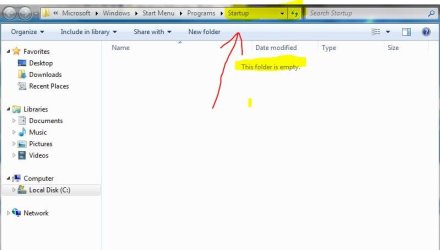
I have right clicked on startup to see if anything running that dont need and I opened all users then explore users and it was empty in both!! so obviously there is nothing running that shouldnt be I presume
 

My Computer My Computer

At a glance

windows 7 home premium 32bit
Computer Manufacturer/Model Number
Samsung R519
OS
windows 7 home premium 32bit
It's possible that your Startup Folder shows nothing. Just as mine does.

startup folder.JPG

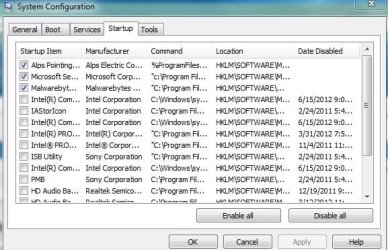
But you could have many services running at startup that can slow down your computer. Open system configuration (msconfig) and check the Startup tab. On my computer I have everything UNchecked (disabled) except for my touchpad and security applications.

msconfig startup.JPG

Using System Configuration

I'm still confused about some of your previous comments. You said you bought the computer new about 3 months ago from PC World. Did you actually ever see the now missing recovery partition? Is it possible the recovery partition was never on the computer? Could the computer have been refurbished by PC World and sold as new when in fact it was a return?

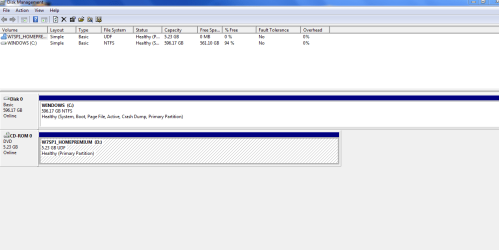
Because somehow, some way, somebody reformatted your hard drive. That's the only logical way the operating system would be on a single large partition. Any other partitions (like the recovery partition, system reserved partition etc that are normally provided by Dell) are mysteriously missing. Who else has access to your computer?
 

My Computer My Computer

At a glance

Win 7 Pro 64-bitIntel i5 2.4 Ghz8GB DDR3Intel HD 3000
Computer type
Laptop
Computer Manufacturer/Model Number
Sony Vaio VPCEB47GM Laptop
OS
Win 7 Pro 64-bit
CPU
Intel i5 2.4 Ghz
Memory
8GB DDR3
Graphics Card(s)
Intel HD 3000
Sound Card
IDT High Definition
Monitor(s) Displays
15.6 WGXA Anti-Glare LED
Screen Resolution
1280x800
Hard Drives
640Gb 7200rpm
Antivirus
MSE
Browser
Opera (primary) with IE9 backup
hi, well yes it was bought from PC World and is a refurb and comes with a full warranty but I would have to have it sent away for them to sort it out which is why I was hopeing to sort it out myself if possible b4 going down that road (so to speak) but surely it should all be up and running as if I had purchased it as new even thou it has been refurbed....There was no recovery partition on it... surely they should have done that b4 it was sent out shouldnt they?

I have looked in system configuration and it shows all ticked so I have gone for Selective startup and unticked the load startup items as this is what we have on another computer than runs great....Also I have upgraded the Windows 7 and had that reinstall itself as that does not lose any data. It did say in a box that it was had to repair .net I think it said version 4 and it has done that...So who knows if that too was causing a problem too.....Either way thou I still dont have the recovery partition!!

This is now what I see

snip2.png
 

My Computer My Computer

At a glance

windows 7 home premium 32bit
Computer Manufacturer/Model Number
Samsung R519
OS
windows 7 home premium 32bit
Here's my best guess, Angie. Somebody returned your Inspiron N5110 to PC World because something happened to the lappy. Maybe it shipped from the factory with a defective hard drive. Maybe the original buyer just nuked the hard drive and erased everything. Maybe the original buyer got it totally messed up with malware. Whatever the reason, PC World took it back and did not restore the machine to factory specs. Maybe they didn't have the recovery disks. Maybe the hidden recovery partition had also been seriously messed up. Maybe PC World also had to replace the motherboard and/or CPU because they were damaged. Whatever happened, it looks like PC World simply reinstalled Windows 7 and let it create a single default partition the size of the hard drive.

To the best of my knowledge, no computer manufacturer, including Dell, offers a way to install just a recovery partition. A manufacturer's recovery partition is unique to each computer. It is tied to the specific motherboard, RAM, CPU, etc that are all individually serial numbered. So if PC World replaced the motherboard (just as an example) maybe they couldn't use any recovery disks because they wouldn't work with the new hardware. I'm just guessing here, but that might explain why your machine doesn't have a recovery partition.

If and when your machine is working properly and to your satisfaction, don't get hung up on the lack of a recovery partition. As I suggested in another post, you can create a System Image of your lean, mean, speedy machine and that can be your recovery tool. In fact, IMHO it would be better than a factory recovery partition. All installed programs, Windows Updates, personal settings etc would be included as of when the system image was made. You'd save a lot of time if you ever had to use the image. You wouldn't get that with your typical recovery partition.

And one final consideration and no offense intended. It seems you're wanting a recovery partition on your hard drive because it would be nice to have. But if that hard drive ever fails (a mechanical failure where it won't even spin) you'd pretty much lose access to everything on the hard drive including that recovery partition. In other words, it would be pretty much useless. Wouldn't it be nice, not to mention safer, to have a system image on a separate external hard drive that could be accessed? Just a thought. :)
 

My Computer My Computer

At a glance

Win 7 Pro 64-bitIntel i5 2.4 Ghz8GB DDR3Intel HD 3000
Computer type
Laptop
Computer Manufacturer/Model Number
Sony Vaio VPCEB47GM Laptop
OS
Win 7 Pro 64-bit
CPU
Intel i5 2.4 Ghz
Memory
8GB DDR3
Graphics Card(s)
Intel HD 3000
Sound Card
IDT High Definition
Monitor(s) Displays
15.6 WGXA Anti-Glare LED
Screen Resolution
1280x800
Hard Drives
640Gb 7200rpm
Antivirus
MSE
Browser
Opera (primary) with IE9 backup
I totally agree...When I just did the backup and recovery onto my external hard drive it said something like (creating backup and backing up system image!!) So have I got one already!! this is very puzzling to say the least. I dont mind not having the recovery partition its just that when the data safe update pops up it wont do it without it...Now maybe I dont need the data safe to update!! I just dont know.....

In the mean time after I did the windows 7 update installer with my disc (inorder to protect losing everything just as a precaution just to try it) I have found it too be running much better plus I took all those not needed startup ones off too (well, unticked them) Like I said in my post it did come up something on updating windows 7 about having to repair .net something or other!! and so far so good...So maybe that was a fault already on the laptop on receiving it too!!

So any ideas then about the Image?
 

My Computer My Computer

At a glance

windows 7 home premium 32bit
Computer Manufacturer/Model Number
Samsung R519
OS
windows 7 home premium 32bit
When you set up Windows Backup, you can let Windows choose what to back up, which will include a system image, or you can select the items that you want to back up and whether you want to include a system image.

If you selected "let Windows choose" a system image was made.

What is a system image?

If the drive you are saving your backup on is formatted using the NTFS file system and has enough disk space, a system image of your programs, Windows, and all drivers and registry settings are also included in the backup. This image can be used to restore the contents of your computer if your hard drive or computer stops working.

How does Windows choose which files to back up?
 

My Computer My Computer

At a glance

Win 7 Pro 64-bitIntel i5 2.4 Ghz8GB DDR3Intel HD 3000
Computer type
Laptop
Computer Manufacturer/Model Number
Sony Vaio VPCEB47GM Laptop
OS
Win 7 Pro 64-bit
CPU
Intel i5 2.4 Ghz
Memory
8GB DDR3
Graphics Card(s)
Intel HD 3000
Sound Card
IDT High Definition
Monitor(s) Displays
15.6 WGXA Anti-Glare LED
Screen Resolution
1280x800
Hard Drives
640Gb 7200rpm
Antivirus
MSE
Browser
Opera (primary) with IE9 backup
Back
Top