
Solved Dell Inspiron one 2320 - Will not recover/repair

iamseven

New member
Local time
9:28 AM
Messages
27
My sons PC Dell Inspiron One 2320 Windows 7 will not recover/repair itself.

Switch on Windows files will load across the screen, then asks to attempt to repair the system files etc. This may take some 3 or 4 minutes, then says it can't repair.

When looking at diagnostic report it lists,
Boot Mgr failed to find OS Loader.
Error code 0x490
also error code 0xc00000e9 unexpected I/O error has occurred.

I've tried a Windows 7 recovery disk, that it by-pass's doing nothing.

Tried a Windows 7 (Home Edition) Installation disk, but using the repair part not installation. But says this disk version is not compatible.

Tried to download a Windows 7 Repair, but say the Key Code is a Manufacturer installation.

By hook or crook I was able to get to My Computer and the drives are as below.
C: Recovery 4.22GB free of 14.8GB
D: OS 704 GB free of 916GB
X: Boot 28.8MB free of 31.2MB

Also managed to get to cmd prompt and run sfc /scannow on all 3 drives, but cannot complete as a system repair is pending and needs a restart then run sfc again later, nothing shows. I can also list all the Directories of the drives C: D: and X:

Any clues of how rectify the problem or is this a harddrive failure.

thanks

The signature info is my old laptop before upgrading to Windows 10.
 

My Computer My Computer

At a glance

Windows 7 64bit Home PremiumAMD E2-18004.00 GBbuilt in CPU
Computer type
Laptop
Computer Manufacturer/Model Number
HP 2000-2a20CA
OS
Windows 7 64bit Home Premium
CPU
AMD E2-1800
Memory
4.00 GB
Graphics Card(s)
built in CPU
Hard Drives
ST950032 5AS SATA
Antivirus
Microsoft Security Essentials
Browser
Google Chrome

My Computer My Computer

At a glance

Windows 7 x64, Vista x64, 8.1 smartphoneIntel E8400 65W 64-bitDDR2 2 x 2GB, 1GB x 2XFX Radeon HD5750
Computer type
PC/Desktop
OS
Windows 7 x64, Vista x64, 8.1 smartphone
CPU
Intel E8400 65W 64-bit
Motherboard
Gigabyte EP45-UD3LR
Memory
DDR2 2 x 2GB, 1GB x 2
Graphics Card(s)
XFX Radeon HD5750
Sound Card
AMD High Definition Audio; Realtek High Definition Audio
Monitor(s) Displays
iiyama prolite X2377HDS
Screen Resolution
1920 x 1080
Hard Drives
500GB 7200 rpm Seagate ST3500413AS 16MB, 500GB 5400 rpm Toshiba MQ02ABF050H 32MB, 200GB 7200 rpm Seagate ST3200820AS 8MB, 2TB 7200 rpm Western Digital WD20EZRX 64MB
PSU
Enermax Liberty Modular
Case
Antec P193 Midi Tower
Keyboard
Mionix ZIBAL 60
Mouse
Razer USB 2.0 Diamondback Mouse or Huion Graphics Tablet
Browser
Internet Explorer, Lunascape, Firefox, Opera, Avast Safezone

My Computer My Computer

At a glance

Windows 7 64bit Home PremiumAMD E2-18004.00 GBbuilt in CPU
Computer type
Laptop
Computer Manufacturer/Model Number
HP 2000-2a20CA
OS
Windows 7 64bit Home Premium
CPU
AMD E2-1800
Memory
4.00 GB
Graphics Card(s)
built in CPU
Hard Drives
ST950032 5AS SATA
Antivirus
Microsoft Security Essentials
Browser
Google Chrome
I've fixed his link, you should be able to get it now.
 

My Computer My Computer

At a glance

Windows 11
Computer type
PC/Desktop
OS
Windows 11
Thanks

Microsoft says: "Thread Not Found
We are sorry, the thread is not available at this time."

Sorry the link was broken. I hope z3r010 has fixed it for you.

If you encounter any problems, then post again into this thread.
 

My Computer My Computer

At a glance

Windows 7 x64, Vista x64, 8.1 smartphoneIntel E8400 65W 64-bitDDR2 2 x 2GB, 1GB x 2XFX Radeon HD5750
Computer type
PC/Desktop
OS
Windows 7 x64, Vista x64, 8.1 smartphone
CPU
Intel E8400 65W 64-bit
Motherboard
Gigabyte EP45-UD3LR
Memory
DDR2 2 x 2GB, 1GB x 2
Graphics Card(s)
XFX Radeon HD5750
Sound Card
AMD High Definition Audio; Realtek High Definition Audio
Monitor(s) Displays
iiyama prolite X2377HDS
Screen Resolution
1920 x 1080
Hard Drives
500GB 7200 rpm Seagate ST3500413AS 16MB, 500GB 5400 rpm Toshiba MQ02ABF050H 32MB, 200GB 7200 rpm Seagate ST3200820AS 8MB, 2TB 7200 rpm Western Digital WD20EZRX 64MB
PSU
Enermax Liberty Modular
Case
Antec P193 Midi Tower
Keyboard
Mionix ZIBAL 60
Mouse
Razer USB 2.0 Diamondback Mouse or Huion Graphics Tablet
Browser
Internet Explorer, Lunascape, Firefox, Opera, Avast Safezone
Fist thing you should do is to check the disk
Boot from win 7 installation disk (same bit version), go to repair and launch a CMD window.
Using dir C:, dir D: etc find the drive letters of your disk (OS, Recovery and Boot)
Then run:
chkdsk z: /f (replace z by the drive letters you found using dir)
 

My Computers My Computers

  • At a glance

    Windows 7 HP 64i5 6600K - 800MHz to 4200MHz4+4G GSkill DDR4 3000IG - Intel 530
    Computer type
    PC/Desktop
    Computer Manufacturer/Model Number
    custom build
    OS
    Windows 7 HP 64
    CPU
    i5 6600K - 800MHz to 4200MHz
    Motherboard
    GA-Z170-HD3P
    Memory
    4+4G GSkill DDR4 3000
    Graphics Card(s)
    IG - Intel 530
    Monitor(s) Displays
    Samsung 226BW
    Screen Resolution
    1680x1050
    Hard Drives
    (1) -1 SM951 – 128GB M.2 AHCI PCIe SSD drive for Windows 7 and Lubuntu
    (2) -1 WD SATA 3 - 1T for Data
    (3) -1 WD SATA 3 - 1T for backup
    PSU
    Thermaltake 450W TR2 gold
    Keyboard
    Old and good Chicony mechanical keyboard
    Mouse
    Logitech mX performance - 9 buttons (had to disable some)
    Internet Speed
    500Mb/s
    Browser
    Firefox 64
    Other Info
    TinyWall firewall
  • At a glance

    Windows 7 Proi7-4500U 800MHz to 3.0GHz(4+4)G DDR3 1600IG intel 4400 + NVIDIA GeForce GT 745M
    Computer type
    Laptop
    System Manufacturer/Model Number
    Asus Q550LF
    OS
    Windows 7 Pro
    CPU
    i7-4500U 800MHz to 3.0GHz
    Motherboard
    Asus Q550LF
    Memory
    (4+4)G DDR3 1600
    Graphics Card(s)
    IG intel 4400 + NVIDIA GeForce GT 745M
    Sound Card
    Realtek
    Monitor(s) Displays
    LG Display LP156WF4-SPH1
    Screen Resolution
    1920 x 1080
    Hard Drives
    BX500 120G SSD for Windows and programs +
    1T HDD for data
    Internet Speed
    500 Mb/s
    Browser
    Firefox
    Other Info
    TinyWall firewall
Thanks all,

This not my PC as its my sons, I do not know whether its a 32 or 64bit as there are no labels etc to say which.

I cannot access Safe Mode via F8 and have to go via F1 and run the dvd.

I'm using a Win7 installation disc and go via the Repair route and so on.

But by doing this I can see Win7 (highlighted) D: OS, but moving forward (next) I am told the disk I am using for System Recovery Option is not compatible with the version of windows on the computer. And I or he do not have a disk.

I can find all the partitions on the HDD via Properties of My Computer, as listed earlier C: Recovery D: OS X: Boot

D:\ to carry out chkdsk /r which D:\ had to be dismounted to proceed. Spent some 5 hrs 100%

Then proceeded to D:\bootrec.exe /FIXMBR (successful)
Then proceeded to D:\bootrec.exe /FIXBOOT (successful)
DISKPART
List disk
select 0
select partition 1 (although no partitions could be seen)
active
exit Diskpart
reboot.

Still same did not work

Tried again with C:\ same results

X:\ is write protected

Tried reboot for windows to do its own repair with no cure.

Any help please
 

My Computer My Computer

At a glance

Windows 7 64bit Home PremiumAMD E2-18004.00 GBbuilt in CPU
Computer type
Laptop
Computer Manufacturer/Model Number
HP 2000-2a20CA
OS
Windows 7 64bit Home Premium
CPU
AMD E2-1800
Memory
4.00 GB
Graphics Card(s)
built in CPU
Hard Drives
ST950032 5AS SATA
Antivirus
Microsoft Security Essentials
Browser
Google Chrome
Hello

How are drives C: and D: normally found on the machine? - Is C: and D: on separate disks or are they found on separate partitions of the same disk?

Since the computer has its own recovery partition, you should be able to press F8 at the right point in boot-up (start-up), then select Repair Computer from list.
 

My Computer My Computer

At a glance

Windows 7 x64, Vista x64, 8.1 smartphoneIntel E8400 65W 64-bitDDR2 2 x 2GB, 1GB x 2XFX Radeon HD5750
Computer type
PC/Desktop
OS
Windows 7 x64, Vista x64, 8.1 smartphone
CPU
Intel E8400 65W 64-bit
Motherboard
Gigabyte EP45-UD3LR
Memory
DDR2 2 x 2GB, 1GB x 2
Graphics Card(s)
XFX Radeon HD5750
Sound Card
AMD High Definition Audio; Realtek High Definition Audio
Monitor(s) Displays
iiyama prolite X2377HDS
Screen Resolution
1920 x 1080
Hard Drives
500GB 7200 rpm Seagate ST3500413AS 16MB, 500GB 5400 rpm Toshiba MQ02ABF050H 32MB, 200GB 7200 rpm Seagate ST3200820AS 8MB, 2TB 7200 rpm Western Digital WD20EZRX 64MB
PSU
Enermax Liberty Modular
Case
Antec P193 Midi Tower
Keyboard
Mionix ZIBAL 60
Mouse
Razer USB 2.0 Diamondback Mouse or Huion Graphics Tablet
Browser
Internet Explorer, Lunascape, Firefox, Opera, Avast Safezone
What happens if you continuously hold down the F8 key during startup? You said it didn't work and I'm wondering exactly what happens.
 

My Computer My Computer

At a glance

Windows 7 Pro SP1 64 bit8 GB
Computer type
Laptop
Computer Manufacturer/Model Number
Dell M6500 Precision Work Station
OS
Windows 7 Pro SP1 64 bit
Memory
8 GB
Screen Resolution
1920x
Internet Speed
30 Mbps
Antivirus
Norton Security
Browser
IE 11
OK,

Before doing any of below, I did try to get a Win 7 Repair download from Microsoft using the Key code.
Told the version on the PC is OEM installed.

What drives are normally seen when opening such as 'File explorer', I've never seen and dont think my son knows either.

All the drives listed are seen opening by 'My Computer' when using the 'Repair' on the disc I have.
As far as I'm aware only one hdd is installed, so I guess the drives are partitions on the hdd. Also listed on the same screen with 'My Computer' is 'Control Panel' and 'Recycle Bin', both these show as blank.

F8 is pressed every half second/second as soon as the PC power is switched on starting the PC.
The screen shows a choice of F2 or F12, if left alone the screen moves onto a new showing.

Press F1 or Powerbutton to shutdown. If F1 is selected without any media etc plugged in, it shows a form of Dos. C:\> and nothing can be changed etc.

With the Windows 7 disk I have in the Rom drive, from F1 I can select either Installation or Repair.

With Repair selected, it will search for any Windows Installation. It will find Windows 7 on the D:\ drive. If I select that highlighted Windows and click next. It tells me the disk I using is not compatible for the repair for the version installed.

If go back and select drivers then next and cancel, I get the list with Command Prompt, System Restore and others.

Selecting Command, I can do the listing of the Dir's of C:\> D:\> X:\Sources>
Using bootrec /FixMBR or bootrec /Fixboot or bootrec / OSscan and bootrec /RebuildBcd all result as:-

Successfully scanned windows installations
Total identified windows installations: 0
The operation completed successfully

Exit
Restart

Back to square one with or without the disk in the rom.

Hope this helps in trying to identity my problem and any further things that can be done....
 

My Computer My Computer

At a glance

Windows 7 64bit Home PremiumAMD E2-18004.00 GBbuilt in CPU
Computer type
Laptop
Computer Manufacturer/Model Number
HP 2000-2a20CA
OS
Windows 7 64bit Home Premium
CPU
AMD E2-1800
Memory
4.00 GB
Graphics Card(s)
built in CPU
Hard Drives
ST950032 5AS SATA
Antivirus
Microsoft Security Essentials
Browser
Google Chrome
Okay, sounds like you have already tried a lot of things to get your son's computer working again.

Total identified Windows installations:0

This could mean that the BCD store exists, so first you have to remove the current BCD store manually, and then try and rebuild it again.

1. Restart computer, and go to cmd prompt window, via F8 or via your repair disk.
2. At the cmd prompt, type bcdedit /export d:\bcdbackup <Enter>
The command should return with
The operation completed successfully.
If you get any error messages, stop then make note of the message.

3. Next, type attrib d:\boot\bcd -h -r -s <Enter>
4. Type ren d:\boot\bcd bcd.old

5. Try rebuilding BCD again, as you did before
bootrec /rebuildbcd <Enter>
which should produce the following message in the cmd window:
Scanning all disks for Windows installations
Please wait, since this may take a while...
Successfully scanned Windows installations.
Total identified Windows installations: 1
[1] D:\Windows
Add installation to boot list? Yes<Y>/No<N>/All<A>:

meaning that the BCD store rebuild is progressing as expected.
6. Enter Y for Yes <Enter>
7. Type Exit <Enter> to exit the bcd environment.
8. Reboot the computer. And all being well, windows should start as normal.

Just take your time. The important thing is that you get no error messages at any stage.
 

My Computer My Computer

At a glance

Windows 7 x64, Vista x64, 8.1 smartphoneIntel E8400 65W 64-bitDDR2 2 x 2GB, 1GB x 2XFX Radeon HD5750
Computer type
PC/Desktop
OS
Windows 7 x64, Vista x64, 8.1 smartphone
CPU
Intel E8400 65W 64-bit
Motherboard
Gigabyte EP45-UD3LR
Memory
DDR2 2 x 2GB, 1GB x 2
Graphics Card(s)
XFX Radeon HD5750
Sound Card
AMD High Definition Audio; Realtek High Definition Audio
Monitor(s) Displays
iiyama prolite X2377HDS
Screen Resolution
1920 x 1080
Hard Drives
500GB 7200 rpm Seagate ST3500413AS 16MB, 500GB 5400 rpm Toshiba MQ02ABF050H 32MB, 200GB 7200 rpm Seagate ST3200820AS 8MB, 2TB 7200 rpm Western Digital WD20EZRX 64MB
PSU
Enermax Liberty Modular
Case
Antec P193 Midi Tower
Keyboard
Mionix ZIBAL 60
Mouse
Razer USB 2.0 Diamondback Mouse or Huion Graphics Tablet
Browser
Internet Explorer, Lunascape, Firefox, Opera, Avast Safezone
thanks iko22

but sorry looks if I have messed up

firstly I managed to a win7 64bit repair disk and can get into the proper repair system by clicking on the highlighted win7 it finds and get the repair listing selections.

OK I went into cmd prompt and because its showing x:\windows\system32>
following your instructions I exported to x:\bcdbackup proceeded as per the list.

everything was ok till 'ren x:\boot\bcd bcd.old' cannot find it

I did try to import back 'bcdedit /import x:\bcdbackup' cannot find it

As I have messed up is this the end or can I search for it or recovery the original bcd etc to start again.

Just ran through the 'bootrec's' again

/fixmbr the operation completed successfully

/fixboot the volume does not contain a reconized file system
please make sure that all required file drivers are loaded and that the vol is not corrupted

/scanos total identified windows installations: 0
the operation completed successfully

/rebuildbcd total identified windows installations: 0
the operation completed successfully

thanks
 
Last edited:

My Computer My Computer

At a glance

Windows 7 64bit Home PremiumAMD E2-18004.00 GBbuilt in CPU
Computer type
Laptop
Computer Manufacturer/Model Number
HP 2000-2a20CA
OS
Windows 7 64bit Home Premium
CPU
AMD E2-1800
Memory
4.00 GB
Graphics Card(s)
built in CPU
Hard Drives
ST950032 5AS SATA
Antivirus
Microsoft Security Essentials
Browser
Google Chrome
Don't tap the F8 key. Hold it down continuously.
 

My Computer My Computer

At a glance

Windows 7 Pro SP1 64 bit8 GB
Computer type
Laptop
Computer Manufacturer/Model Number
Dell M6500 Precision Work Station
OS
Windows 7 Pro SP1 64 bit
Memory
8 GB
Screen Resolution
1920x
Internet Speed
30 Mbps
Antivirus
Norton Security
Browser
IE 11
X is the ram drive for winpe. It is not on your hard disk.

You had better use this boot media. It has windows explorer so you can see what you are doing:

17514x64-v9.iso


thanks iko22

but sorry looks if I have messed up

firstly I managed to a win7 64bit repair disk and can get into the proper repair system by clicking on the highlighted win7 it finds and get the repair listing selections.

OK I went into cmd prompt and because its showing x:\windows\system32>
following your instructions I exported to x:\bcdbackup proceeded as per the list.

everything was ok till 'ren x:\boot\bcd bcd.old' cannot find it

I did try to import back 'bcdedit /import x:\bcdbackup' cannot find it

As I have messed up is this the end or can I search for it or recovery the original bcd etc to start again.

Just ran through the 'bootrec's' again

/fixmbr the operation completed successfully

/fixboot the volume does not contain a reconized file system
please make sure that all required file drivers are loaded and that the vol is not corrupted

/scanos total identified windows installations: 0
the operation completed successfully

/rebuildbcd total identified windows installations: 0
the operation completed successfully

thanks
 

My Computers My Computers

  • At a glance

    7 X64i5 84002x8gb 3200mhz
    Computer type
    PC/Desktop
    OS
    7 X64
    CPU
    i5 8400
    Motherboard
    gigabyte b365m ds3h
    Memory
    2x8gb 3200mhz
    Hard Drives
    various
    PSU
    pure power 11 400w cm
    Case
    Coolermaster
    Cooling
    cryorig m9i
  • At a glance

    7x64g54008gb ddr4 2400
    Computer type
    PC/Desktop
    OS
    7x64
    CPU
    g5400
    Motherboard
    ga b365m ds3h
    Memory
    8gb ddr4 2400
    PSU
    xfx pro 450w
Hello iamseven, how are you getting on?

thanks iko22
...

OK I went into cmd prompt and because its showing x:\windows\system32>
following your instructions I exported to x:\bcdbackup proceeded as per the list.

everything was ok till 'ren x:\boot\bcd bcd.old' cannot find it

I did try to import back 'bcdedit /import x:\bcdbackup' cannot find it
...
thanks

as SIW2 is suggesting, X is the wrong drive letter to use.

I think your Operating System is located on the D: drive. X: is a virtual drive used by the recovery environment.

So therefore do those instructions again, this time use D: instead of using X: drive.

SO at the X:\> prompt, type bcdedit /export d:\bcdbackup <Enter>
 

My Computer My Computer

At a glance

Windows 7 x64, Vista x64, 8.1 smartphoneIntel E8400 65W 64-bitDDR2 2 x 2GB, 1GB x 2XFX Radeon HD5750
Computer type
PC/Desktop
OS
Windows 7 x64, Vista x64, 8.1 smartphone
CPU
Intel E8400 65W 64-bit
Motherboard
Gigabyte EP45-UD3LR
Memory
DDR2 2 x 2GB, 1GB x 2
Graphics Card(s)
XFX Radeon HD5750
Sound Card
AMD High Definition Audio; Realtek High Definition Audio
Monitor(s) Displays
iiyama prolite X2377HDS
Screen Resolution
1920 x 1080
Hard Drives
500GB 7200 rpm Seagate ST3500413AS 16MB, 500GB 5400 rpm Toshiba MQ02ABF050H 32MB, 200GB 7200 rpm Seagate ST3200820AS 8MB, 2TB 7200 rpm Western Digital WD20EZRX 64MB
PSU
Enermax Liberty Modular
Case
Antec P193 Midi Tower
Keyboard
Mionix ZIBAL 60
Mouse
Razer USB 2.0 Diamondback Mouse or Huion Graphics Tablet
Browser
Internet Explorer, Lunascape, Firefox, Opera, Avast Safezone
Thanks Guys

Still nothing. All the PC's I'd had there's only been 2 drives C:\ and D:\

Sons PC shows 4 drives/partitions

Local disk C:\ - 24.5 mb free of 39mb
Recovery D:\ - 4.32 gb free of 14.8gb
OS E:\ - 705 gb free of 916gb
Boot X:\ - 502 mb free of 504mb

Rightly or Wrongly each drive has a boot folder. I can find a Boot efi ect. in E:\ in Windows directory dated 2009. Also boot.mgr can be found.

I did the list to rebuild the bcd again. Doing so for D:\ or E:\ exporting is ok. But with either 'attrib' or 'ren' it cant the file or path.

But doing the list with C:\ it all goes exactly as the rebuild list instructs.

But on Reboot, nothing still same going to F2 - F12 and onto F1 or Shutdown.

Can the BDC be rebuilt etc. manually to boot the PC.

I am very grateful for your help
thanks
 

My Computer My Computer

At a glance

Windows 7 64bit Home PremiumAMD E2-18004.00 GBbuilt in CPU
Computer type
Laptop
Computer Manufacturer/Model Number
HP 2000-2a20CA
OS
Windows 7 64bit Home Premium
CPU
AMD E2-1800
Memory
4.00 GB
Graphics Card(s)
built in CPU
Hard Drives
ST950032 5AS SATA
Antivirus
Microsoft Security Essentials
Browser
Google Chrome
On OEM computers with Win 7 you probably have 3 partitions:
- System partition ~100M - It has some tools like repair and the one to launch Factory recover.
- OS partition - Very big NTFS
- Recovery partition ~ 20G - It has a partition image to be used under Factory recover.

Drive letters are assigned by the OS it boots. As you're booting from a Win 7 installation disk, it loads a Win 7 PE on a Ram disk (X:) and the other partitions may have different letters from what you're used to see. Drive letters are assigned by the OS it boots.
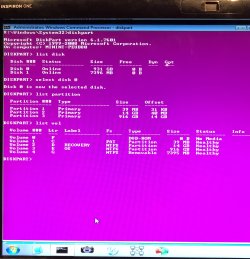
Boot the Win 7 installation disk and then open a CMD window and type:
diskpart
list disk (it will list the disks as 0, 1, 2 etc. Identify the HDD disk number)
select disk ? (replace ? by the HDD number from list disk)
list partition (it will list all partitions on the HDD)
list volume (it will list all volumes on all disks. Remember: Drive letters are assigned by the OS it boots (in this case, Win PE)
exit (to exit diskpart)
 
Last edited:

My Computers My Computers

  • At a glance

    Windows 7 HP 64i5 6600K - 800MHz to 4200MHz4+4G GSkill DDR4 3000IG - Intel 530
    Computer type
    PC/Desktop
    Computer Manufacturer/Model Number
    custom build
    OS
    Windows 7 HP 64
    CPU
    i5 6600K - 800MHz to 4200MHz
    Motherboard
    GA-Z170-HD3P
    Memory
    4+4G GSkill DDR4 3000
    Graphics Card(s)
    IG - Intel 530
    Monitor(s) Displays
    Samsung 226BW
    Screen Resolution
    1680x1050
    Hard Drives
    (1) -1 SM951 – 128GB M.2 AHCI PCIe SSD drive for Windows 7 and Lubuntu
    (2) -1 WD SATA 3 - 1T for Data
    (3) -1 WD SATA 3 - 1T for backup
    PSU
    Thermaltake 450W TR2 gold
    Keyboard
    Old and good Chicony mechanical keyboard
    Mouse
    Logitech mX performance - 9 buttons (had to disable some)
    Internet Speed
    500Mb/s
    Browser
    Firefox 64
    Other Info
    TinyWall firewall
  • At a glance

    Windows 7 Proi7-4500U 800MHz to 3.0GHz(4+4)G DDR3 1600IG intel 4400 + NVIDIA GeForce GT 745M
    Computer type
    Laptop
    System Manufacturer/Model Number
    Asus Q550LF
    OS
    Windows 7 Pro
    CPU
    i7-4500U 800MHz to 3.0GHz
    Motherboard
    Asus Q550LF
    Memory
    (4+4)G DDR3 1600
    Graphics Card(s)
    IG intel 4400 + NVIDIA GeForce GT 745M
    Sound Card
    Realtek
    Monitor(s) Displays
    LG Display LP156WF4-SPH1
    Screen Resolution
    1920 x 1080
    Hard Drives
    BX500 120G SSD for Windows and programs +
    1T HDD for data
    Internet Speed
    500 Mb/s
    Browser
    Firefox
    Other Info
    TinyWall firewall
I tend to agree with Megahertz07:
...
Boot the Win 7 installation disk and then open a CMD window and type:
diskpart
list disk (it will list the disks as 0, 1, 2 etc. Identify the HDD disk number)
select disk ? (replace ? by the HDD number from list disk)
list partition (it will list all partitions on the HDD)
list volume (it will list all volumes on all disks. Remember: Drive letters are assigned by the OS it boots (in this case, Win PE)
exit (to exit diskpart)

Perhaps also take a photo with a camera or a smartphone, and upload the picture to this thread.
 

My Computer My Computer

At a glance

Windows 7 x64, Vista x64, 8.1 smartphoneIntel E8400 65W 64-bitDDR2 2 x 2GB, 1GB x 2XFX Radeon HD5750
Computer type
PC/Desktop
OS
Windows 7 x64, Vista x64, 8.1 smartphone
CPU
Intel E8400 65W 64-bit
Motherboard
Gigabyte EP45-UD3LR
Memory
DDR2 2 x 2GB, 1GB x 2
Graphics Card(s)
XFX Radeon HD5750
Sound Card
AMD High Definition Audio; Realtek High Definition Audio
Monitor(s) Displays
iiyama prolite X2377HDS
Screen Resolution
1920 x 1080
Hard Drives
500GB 7200 rpm Seagate ST3500413AS 16MB, 500GB 5400 rpm Toshiba MQ02ABF050H 32MB, 200GB 7200 rpm Seagate ST3200820AS 8MB, 2TB 7200 rpm Western Digital WD20EZRX 64MB
PSU
Enermax Liberty Modular
Case
Antec P193 Midi Tower
Keyboard
Mionix ZIBAL 60
Mouse
Razer USB 2.0 Diamondback Mouse or Huion Graphics Tablet
Browser
Internet Explorer, Lunascape, Firefox, Opera, Avast Safezone
Have you tried SIW2 17514x64-v9.iso?
Download it and burn a CD. It will be boot able.
You boot on a lite Win 7 GUI with a lot of tools. Very good.
 

My Computers My Computers

  • At a glance

    Windows 7 HP 64i5 6600K - 800MHz to 4200MHz4+4G GSkill DDR4 3000IG - Intel 530
    Computer type
    PC/Desktop
    Computer Manufacturer/Model Number
    custom build
    OS
    Windows 7 HP 64
    CPU
    i5 6600K - 800MHz to 4200MHz
    Motherboard
    GA-Z170-HD3P
    Memory
    4+4G GSkill DDR4 3000
    Graphics Card(s)
    IG - Intel 530
    Monitor(s) Displays
    Samsung 226BW
    Screen Resolution
    1680x1050
    Hard Drives
    (1) -1 SM951 – 128GB M.2 AHCI PCIe SSD drive for Windows 7 and Lubuntu
    (2) -1 WD SATA 3 - 1T for Data
    (3) -1 WD SATA 3 - 1T for backup
    PSU
    Thermaltake 450W TR2 gold
    Keyboard
    Old and good Chicony mechanical keyboard
    Mouse
    Logitech mX performance - 9 buttons (had to disable some)
    Internet Speed
    500Mb/s
    Browser
    Firefox 64
    Other Info
    TinyWall firewall
  • At a glance

    Windows 7 Proi7-4500U 800MHz to 3.0GHz(4+4)G DDR3 1600IG intel 4400 + NVIDIA GeForce GT 745M
    Computer type
    Laptop
    System Manufacturer/Model Number
    Asus Q550LF
    OS
    Windows 7 Pro
    CPU
    i7-4500U 800MHz to 3.0GHz
    Motherboard
    Asus Q550LF
    Memory
    (4+4)G DDR3 1600
    Graphics Card(s)
    IG intel 4400 + NVIDIA GeForce GT 745M
    Sound Card
    Realtek
    Monitor(s) Displays
    LG Display LP156WF4-SPH1
    Screen Resolution
    1920 x 1080
    Hard Drives
    BX500 120G SSD for Windows and programs +
    1T HDD for data
    Internet Speed
    500 Mb/s
    Browser
    Firefox
    Other Info
    TinyWall firewall
Hi Guys
Here is the Diskpart listings from the Win7 Inspiron

Thanks megahertz07 yes alot of useful stuff.

See EasyBcd listed but unsure how to use.

thanks
 

Attachments

  • IMG_2532.jpg
    IMG_2532.jpg
    796.8 KB · Views: 1

My Computer My Computer

At a glance

Windows 7 64bit Home PremiumAMD E2-18004.00 GBbuilt in CPU
Computer type
Laptop
Computer Manufacturer/Model Number
HP 2000-2a20CA
OS
Windows 7 64bit Home Premium
CPU
AMD E2-1800
Memory
4.00 GB
Graphics Card(s)
built in CPU
Hard Drives
ST950032 5AS SATA
Antivirus
Microsoft Security Essentials
Browser
Google Chrome
Back
Top