
Upgrade to Win 10 on Dell Inspiron One 2320

gtrainer

New member
Local time
4:59 PM
Messages
9
Hi,

I would really, really love some input on how to best proceed here. I have a Dell Inspiron One 2320 with Windows 7 Home 64-bit. With the end of life for windows 7 around the corner, I wanted to upgrade to Windows 10. With the tool CPU-Z I was able to see that the CPU instructions had what I needed to upgrade to Windows 10 (SSE2, EM64T, VT-x). However when I called Dell to confirm if I can upgrade, I was told not to move ahead. So I'm not sure how to proceed. I could use some input here how best to proceed. Another options was to consider upgrading to Windows 8 if Win 10 was iffy as the upgrade checker seemed for most part advise me that the system is upgradeable.

Here are the general specs for the Dell Inspiron One 2320 I wish to upgrade:

Operating System
Windows 7 Home Premium 64-bit SP1
CPU
Intel Core i5 2400S @ 2.50GHz 58 °C
Sandy Bridge 32nm Technology
RAM
6.00GB Dual-Channel DDR3 @ 665MHz (9-9-9-24)
Motherboard
Dell Inc. 050NT9 (CPU 1)
Graphics
23" AIO (1600x900@60Hz)
Intel HD Graphics (Dell)
1024MB NVIDIA GeForce GT 525M (Dell) 49 °C
Storage
931GB Seagate ST1000NM0033-9ZM173 ATA Device (SATA) 37 °C
931GB Western Digital WD My Passport 259F USB Device (USB (SATA)) 31 °C
29GB SanDisk Ultra USB Device (USB)
Optical Drives
MATSHITA DVD+-RW UJ8C1 ATA Device
Audio
Realtek High Definition Audio

Thank you.
 

My Computer My Computer

At a glance

Windows 7 Professional, 32-bit
Computer type
PC/Desktop
OS
Windows 7 Professional, 32-bit

My Computers My Computers

  • At a glance

    7 X64i5 84002x8gb 3200mhz
    Computer type
    PC/Desktop
    OS
    7 X64
    CPU
    i5 8400
    Motherboard
    gigabyte b365m ds3h
    Memory
    2x8gb 3200mhz
    Hard Drives
    various
    PSU
    pure power 11 400w cm
    Case
    Coolermaster
    Cooling
    cryorig m9i
  • At a glance

    7x64g54008gb ddr4 2400
    Computer type
    PC/Desktop
    OS
    7x64
    CPU
    g5400
    Motherboard
    ga b365m ds3h
    Memory
    8gb ddr4 2400
    PSU
    xfx pro 450w
Could you just give me a heads up on creating a new partition? Sorry, usually just use existing partitions. Sure I can figure out but if you don't mind, please set me on the path...


Re windows 8 compatible checker, said 4 not compatible, which shouldn't be a problem.. Here was the actual results


For you to review
defaultPlugins.png
Install an app to play DVDs
You may need to install an app to play DVDs in Windows 8.1.
More info
defaultPlugins.png
Secure Boot isn't compatible with your PC
Your PC's firmware doesn't support Secure Boot so you won't be able to use it in Windows 8.1.
More info
defaultPlugins.png
The touchscreen on this PC wasn't designed for Windows 8.1
You can use this touchscreen with Windows 8.1 but it won't be as responsive and gestures won't be as precise as a touchscreen designed for Windows 8.1.
More info
defaultApp.png
Lexmark Series Printer
warning.png
Reinstall this app in Windows 8.1

Compatible
classicon_%7B4D36E972-E325-11CE-BFC1-08002BE10318%7D.png
Dell Wireless 1702 802.11b/g/n
Atheros Communications Inc.
classicon_%7B4D36E96F-E325-11CE-BFC1-08002BE10318%7D.png
HID-compliant mouse
Microsoft
classicon_%7B6BDD1FC6-810F-11D0-BEC7-08002BE2092F%7D.png
Integrated Webcam
Microsoft
classicon_%7B4D36E968-E325-11CE-BFC1-08002BE10318%7D.png
Intel(R) HD Graphics
Intel Corporation
classicon_%7B4D36E968-E325-11CE-BFC1-08002BE10318%7D.png
NVIDIA GeForce GT 525M
NVIDIA
classicon_%7B4D36E96C-E325-11CE-BFC1-08002BE10318%7D.png
Realtek High Definition Audio
Realtek
classicon_%7B4D36E972-E325-11CE-BFC1-08002BE10318%7D.png
Realtek PCIe GBE Family Controller
Realtek
classicon_%7B36FC9E60-C465-11CF-8056-444553540000%7D.png
USB Mass Storage Device
Compatible USB storage device
 

My Computer My Computer

At a glance

Windows 7 Professional, 32-bit
Computer type
PC/Desktop
OS
Windows 7 Professional, 32-bit
My Computers My Computers

  • At a glance

    7 X64i5 84002x8gb 3200mhz
    Computer type
    PC/Desktop
    OS
    7 X64
    CPU
    i5 8400
    Motherboard
    gigabyte b365m ds3h
    Memory
    2x8gb 3200mhz
    Hard Drives
    various
    PSU
    pure power 11 400w cm
    Case
    Coolermaster
    Cooling
    cryorig m9i
  • At a glance

    7x64g54008gb ddr4 2400
    Computer type
    PC/Desktop
    OS
    7x64
    CPU
    g5400
    Motherboard
    ga b365m ds3h
    Memory
    8gb ddr4 2400
    PSU
    xfx pro 450w
Thank you very much! If you don't mind, I'd like your opinion on this piont. The other idea is to install Windows 10, and if possible, if there are issues, reinstall or roll back to Windows 7. If you know anything about that point, I'd sure appreciate your input. Otherwise thank you for your timely responses.
 

My Computer My Computer

At a glance

Windows 7 Professional, 32-bit
Computer type
PC/Desktop
OS
Windows 7 Professional, 32-bit

My Computers My Computers

  • At a glance

    7 X64i5 84002x8gb 3200mhz
    Computer type
    PC/Desktop
    OS
    7 X64
    CPU
    i5 8400
    Motherboard
    gigabyte b365m ds3h
    Memory
    2x8gb 3200mhz
    Hard Drives
    various
    PSU
    pure power 11 400w cm
    Case
    Coolermaster
    Cooling
    cryorig m9i
  • At a glance

    7x64g54008gb ddr4 2400
    Computer type
    PC/Desktop
    OS
    7x64
    CPU
    g5400
    Motherboard
    ga b365m ds3h
    Memory
    8gb ddr4 2400
    PSU
    xfx pro 450w
In my opinion, Win 7 is still the best OS as it is stable. Win 10 upgrades itself every 6 months and with the upgrades comes a lot of bugs and problems. When M$ fixes the bugs it comes a new upgrade with a of of bugs and problems.
End of M$ support only means that you won't receive new "updates". It will work the way it does today. No reason to downgrade to win 10.

So, if you want to try Win 10, buy a small SSD 128G (will cost around US$25), replace the Win 7 HDD and do a fresh Win 10 install. If you have Win 7 home or HP, install win 10 Home; if you have Win 7 Pro or ultimate, install Win 10 Pro. When asked, insert the Win 7 key on the COA sticker (look under the laptop or inside the battery compartment).

If you want to do a huge upgrade to your laptop:
Buy a 120G SSD (~US$ 25) and a HDD caddy (~US$ 5) to install / replace the ODD. Do a clean install on the SSD and move (Using Kari tutorial) C:/Users from the SSD to D:/Users on the HDD. You will have the speed of a SSD and the space of a HDD at low cost.

Last week a friend brought me a laptop that was taking almost 4 minutes to boot.
I've installed the SSD in the HDD place and installed the HDD on a caddy in the ODD place.

With the SSD it's now taking 30 sec to boot.

120G should be more than enough to install windows and programs if you move the users folder from the SSD (C:\Users) to the HDD (D:\Users).
Use Kari tutorial. I can guide you as I've done it many times
relocate-users.zip


Crucial BX500 120GB
 

My Computers My Computers

  • At a glance

    Windows 7 HP 64i5 6600K - 800MHz to 4200MHz4+4G GSkill DDR4 3000IG - Intel 530
    Computer type
    PC/Desktop
    Computer Manufacturer/Model Number
    custom build
    OS
    Windows 7 HP 64
    CPU
    i5 6600K - 800MHz to 4200MHz
    Motherboard
    GA-Z170-HD3P
    Memory
    4+4G GSkill DDR4 3000
    Graphics Card(s)
    IG - Intel 530
    Monitor(s) Displays
    Samsung 226BW
    Screen Resolution
    1680x1050
    Hard Drives
    (1) -1 SM951 – 128GB M.2 AHCI PCIe SSD drive for Windows 7 and Lubuntu
    (2) -1 WD SATA 3 - 1T for Data
    (3) -1 WD SATA 3 - 1T for backup
    PSU
    Thermaltake 450W TR2 gold
    Keyboard
    Old and good Chicony mechanical keyboard
    Mouse
    Logitech mX performance - 9 buttons (had to disable some)
    Internet Speed
    500Mb/s
    Browser
    Firefox 64
    Other Info
    TinyWall firewall
  • At a glance

    Windows 7 Proi7-4500U 800MHz to 3.0GHz(4+4)G DDR3 1600IG intel 4400 + NVIDIA GeForce GT 745M
    Computer type
    Laptop
    System Manufacturer/Model Number
    Asus Q550LF
    OS
    Windows 7 Pro
    CPU
    i7-4500U 800MHz to 3.0GHz
    Motherboard
    Asus Q550LF
    Memory
    (4+4)G DDR3 1600
    Graphics Card(s)
    IG intel 4400 + NVIDIA GeForce GT 745M
    Sound Card
    Realtek
    Monitor(s) Displays
    LG Display LP156WF4-SPH1
    Screen Resolution
    1920 x 1080
    Hard Drives
    BX500 120G SSD for Windows and programs +
    1T HDD for data
    Internet Speed
    500 Mb/s
    Browser
    Firefox
    Other Info
    TinyWall firewall
sorry for delay in replying. Thanks for your feedback. This is not a laptop. It's an all in one machine from dell so not familiar with opening it up or changing hard drives which I've only done on a desktop. So a bit beyond my learning curve though I'm always up for a challenge. At this time, I just want to give them 2-3 more years on their current machine with secuirty updates still coming to their pc. So either they continue to just run Windows 7, as you gave good feedback for, which is where I'm leaning.


Instead of Windows 10 I wanted to upgrade them now to 8.1 so they can have security updates until Win 8 end of life in 2023 but it seems Dell says that model PC can not be upgradd to 8.1. I am just not 100% SURE if that is true or accurate. Would just have liked to hear back from somebody who actually upgraded this model Dell.


Thanks for your feedback.
 

My Computer My Computer

At a glance

Windows 7 Professional, 32-bit
Computer type
PC/Desktop
OS
Windows 7 Professional, 32-bit
This is not a laptop. It's an all in one machine from dell so not familiar with opening it up or changing hard drives which I've only done on a desktop. So a bit beyond my learning curve though I'm always up for a challenge.
Dell's User Manual is here. From a quick glance, it looks to be easier to work on than most laptops. Pop the back cover off and you have ready access to the hard drive and both memory slots. If you've had experience working on desktops, you should be fine.


Instead of Windows 10 I wanted to upgrade them now to 8.1 so they can have security updates until Win 8 end of life in 2023 but it seems Dell says that model PC can not be upgradd to 8.1. I am just not 100% SURE if that is true or accurate.
Dell has Win 8 drivers available for the 2320, so I'd say the claim that it can't be upgraded is hogwash.

Note that you'll have to supply your own Win 8/8.1 product key if you go that route. I don't think your Win 7 product key will work to activate a Win 8/8.1 install. Win 8/8.1 product keys are hard to come by these days, so it'd be more than I'd want to tackle just to eke out a couple more years of support.

Since it can take Win 8, it should be able to take 10 as well, if you wanted. At present, you can still download Win 10 for free, and unlike 8, 10 should activate with your Win 7 product key. I agree with Megahertz07 that Win 10 has it's own idiosyncrasies that are show-stoppers for some, but if you wanted to give it a try it should cost you no more than some time and a spare hard drive to test with.

There are plenty of forum threads around about how to make 10 look and behave (mostly) like 7, so if it's 7's End-Of-Support you're worried about (which is not the same as EOL), I think a customized 10 makes more sense than 8.1.

As for the four incompatibilities in your post #3, they're all inconsequential:
  • Win 8/8.1/10 don't have the old Windows Media Player, so you'll have to download/install a third-party player. No big deal.

  • The 2320 evidently doesn't support Secure Boot -- and by extension, I assume not UEFI-boot, either. But 8/8.1/10 will still install just fine in MBR mode, so Secure Boot is irrelevant. Not a problem as long as your hard drive is less than 2TB.

  • The touchscreen will probably still work, but not as smoothly as the newer generation of touchscreens. However, it should work as well as it already has with Win 7, so it's not like the user experience will be degraded from what you're used to. IAC, if you don't even use the touchscreen, everything should work just fine with a mouse.

  • The compatibility checker is merely saying Windows doesn't have the Lexmark driver built-in. At worst, you'd have to get a new printer, but chances are Lexmark already has a 8/10 driver and you just need to find it and install it.
 

My Computer My Computer

At a glance

Windows 7/8.1/10 multibootIntel Core i7-770048GB (2x16GB Crucial DDR4-3200 + 2x8GB Hynix ...Intel HD630 + AMD Radeon R7 450 PCIe
Computer type
PC/Desktop
Computer Manufacturer/Model Number
Dell Optiplex 7050
OS
Windows 7/8.1/10 multiboot
CPU
Intel Core i7-7700
Motherboard
Dell, Intel Q270 chipset
Memory
48GB (2x16GB Crucial DDR4-3200 + 2x8GB Hynix DDR4-2400)
Graphics Card(s)
Intel HD630 + AMD Radeon R7 450 PCIe
Monitor(s) Displays
Asus VC279 (27")
Screen Resolution
1920x1080
Hard Drives
Toshiba M.2 NVMe (256GB),
Samsung 960 Evo (500GB),
WD Red Plus 80EFBX (8TB)
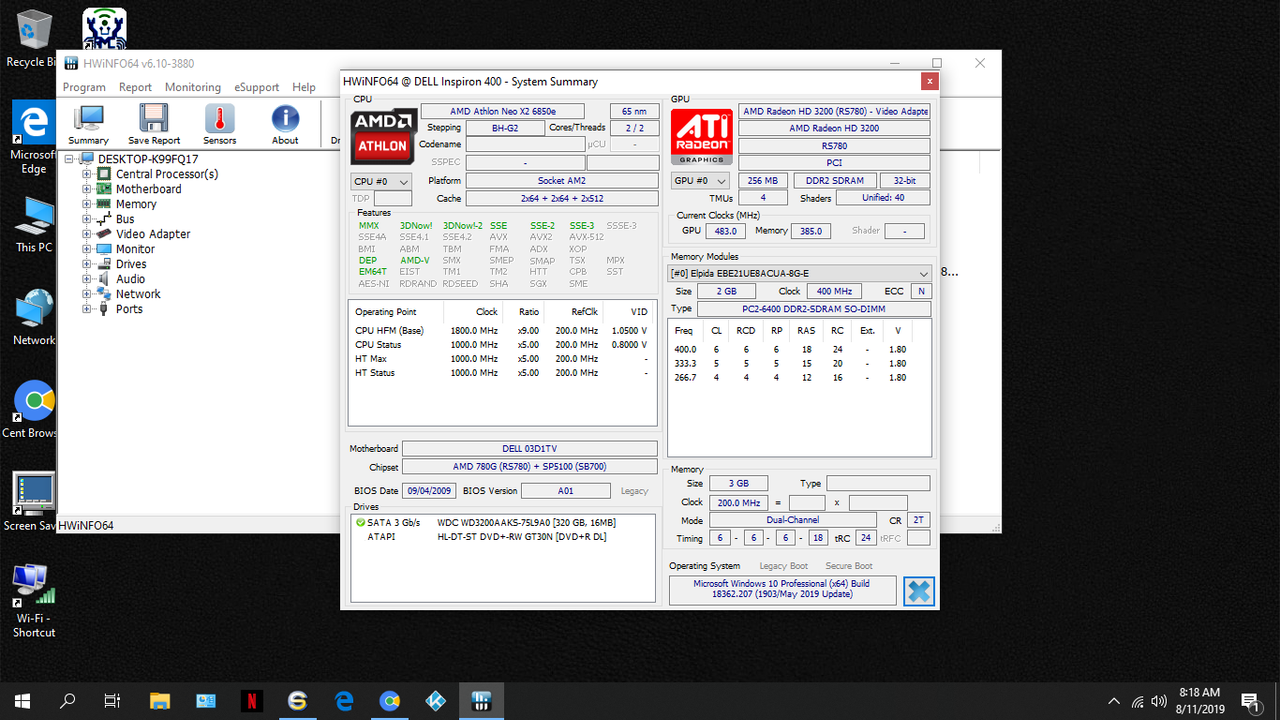
Go for it. My Dell Ispiron Zino HD 400 is older, lower spec than yours and I was able to install Windows 10 Pro X64.

ZINO-HD-400.png


Please note that I did a clean install, not an upgrade. I made an image of the Windows 7 Home X64 OS that it came with then wiped the HD and installed Windows 10.

You can disable the auto updates (I did) and the telemetry in Windows 10. It picked up all the drivers for the system so no question marks in device manager. The only snag I ran into was the built-in Dell WLAN 1397 Mini card couldn't get a good connection from my router (it worked fine in Windows 7). I ended up getting a USB WiFi dongle that came with its own Windows 10 drivers and I was all set.

If it doesn't work right you can simply restore the Windows 7 image you made.
 

My Computer My Computer

At a glance

Windows 7 Pro x64
Computer type
PC/Desktop
OS
Windows 7 Pro x64
Instead of Windows 10 I wanted to upgrade them now to 8.1 so they can have security updates until Win 8 end of life in 2023 but it seems Dell says that model PC can not be upgradd to 8.1. I am just not 100% SURE if that is true or accurate. Would just have liked to hear back from somebody who actually upgraded this model Dell.
Thanks for your feedback.

You're not able to free downgrade from win 7 to Win 8.1.
And in my opinion, Win 10 is better than win 8.1, and you can downgrade it for free.

Make sure you have all you need to reinstall win 7. Seen many people that tried Win 10, didn't like it and came back to win 7.
 

My Computers My Computers

  • At a glance

    Windows 7 HP 64i5 6600K - 800MHz to 4200MHz4+4G GSkill DDR4 3000IG - Intel 530
    Computer type
    PC/Desktop
    Computer Manufacturer/Model Number
    custom build
    OS
    Windows 7 HP 64
    CPU
    i5 6600K - 800MHz to 4200MHz
    Motherboard
    GA-Z170-HD3P
    Memory
    4+4G GSkill DDR4 3000
    Graphics Card(s)
    IG - Intel 530
    Monitor(s) Displays
    Samsung 226BW
    Screen Resolution
    1680x1050
    Hard Drives
    (1) -1 SM951 – 128GB M.2 AHCI PCIe SSD drive for Windows 7 and Lubuntu
    (2) -1 WD SATA 3 - 1T for Data
    (3) -1 WD SATA 3 - 1T for backup
    PSU
    Thermaltake 450W TR2 gold
    Keyboard
    Old and good Chicony mechanical keyboard
    Mouse
    Logitech mX performance - 9 buttons (had to disable some)
    Internet Speed
    500Mb/s
    Browser
    Firefox 64
    Other Info
    TinyWall firewall
  • At a glance

    Windows 7 Proi7-4500U 800MHz to 3.0GHz(4+4)G DDR3 1600IG intel 4400 + NVIDIA GeForce GT 745M
    Computer type
    Laptop
    System Manufacturer/Model Number
    Asus Q550LF
    OS
    Windows 7 Pro
    CPU
    i7-4500U 800MHz to 3.0GHz
    Motherboard
    Asus Q550LF
    Memory
    (4+4)G DDR3 1600
    Graphics Card(s)
    IG intel 4400 + NVIDIA GeForce GT 745M
    Sound Card
    Realtek
    Monitor(s) Displays
    LG Display LP156WF4-SPH1
    Screen Resolution
    1920 x 1080
    Hard Drives
    BX500 120G SSD for Windows and programs +
    1T HDD for data
    Internet Speed
    500 Mb/s
    Browser
    Firefox
    Other Info
    TinyWall firewall
Thank you for you input. Yes, I'm going for it for sure! I had an even older Dell Laptop from 2009 and decided to put a clean install of Windows 10 (took 32-bit). Installing went smoothly. Was some hickups with Windows update but used the Windows Update troubleshooter and it worked fine. So I will definately go with installing Windows 10 64 bit on the Dell 2320 All in One.


My only question is pecking order of when to do updates, installing software, etc. Do you suggest getting all the older drivers working before updating Windows? For example, they have a Lexmark printer that only has Windows 8 drivers. Should I get all those drivers going before Updating? I know that after installing MS Office, it does require updates, service packets, etc. Would appreciate your input.
 

My Computer My Computer

At a glance

Windows 7 Professional, 32-bit
Computer type
PC/Desktop
OS
Windows 7 Professional, 32-bit
Don't think you have to concern on finding drivers prior the win 10 installation.
The installation disk has most of the needed drivers. An "upgrade" installation, (run win 10 setup on running windows) will install win 10 and replace the needed drivers with new versions.
There is nothing like a clean install (start from scratch), but then you may need to find a specific driver.
After installation, open device manager and look for yellow alerts of missing drivers (if any).
 

My Computers My Computers

  • At a glance

    Windows 7 HP 64i5 6600K - 800MHz to 4200MHz4+4G GSkill DDR4 3000IG - Intel 530
    Computer type
    PC/Desktop
    Computer Manufacturer/Model Number
    custom build
    OS
    Windows 7 HP 64
    CPU
    i5 6600K - 800MHz to 4200MHz
    Motherboard
    GA-Z170-HD3P
    Memory
    4+4G GSkill DDR4 3000
    Graphics Card(s)
    IG - Intel 530
    Monitor(s) Displays
    Samsung 226BW
    Screen Resolution
    1680x1050
    Hard Drives
    (1) -1 SM951 – 128GB M.2 AHCI PCIe SSD drive for Windows 7 and Lubuntu
    (2) -1 WD SATA 3 - 1T for Data
    (3) -1 WD SATA 3 - 1T for backup
    PSU
    Thermaltake 450W TR2 gold
    Keyboard
    Old and good Chicony mechanical keyboard
    Mouse
    Logitech mX performance - 9 buttons (had to disable some)
    Internet Speed
    500Mb/s
    Browser
    Firefox 64
    Other Info
    TinyWall firewall
  • At a glance

    Windows 7 Proi7-4500U 800MHz to 3.0GHz(4+4)G DDR3 1600IG intel 4400 + NVIDIA GeForce GT 745M
    Computer type
    Laptop
    System Manufacturer/Model Number
    Asus Q550LF
    OS
    Windows 7 Pro
    CPU
    i7-4500U 800MHz to 3.0GHz
    Motherboard
    Asus Q550LF
    Memory
    (4+4)G DDR3 1600
    Graphics Card(s)
    IG intel 4400 + NVIDIA GeForce GT 745M
    Sound Card
    Realtek
    Monitor(s) Displays
    LG Display LP156WF4-SPH1
    Screen Resolution
    1920 x 1080
    Hard Drives
    BX500 120G SSD for Windows and programs +
    1T HDD for data
    Internet Speed
    500 Mb/s
    Browser
    Firefox
    Other Info
    TinyWall firewall
After you're done installing if you're connected to the internet it should download any missing drivers not on the installation media. Once you've got everything working perfectly make an image!
 

My Computer My Computer

At a glance

Windows 7 Pro x64
Computer type
PC/Desktop
OS
Windows 7 Pro x64
Back
Top