Solved Dell Inspiron one 2320 - Will not recover/repair

Click nt6repair ( it is on the desktop).

1. Activation Section:

Select E in the "Select partition to mark Active" dropdown.
Click "Set active"

2. Auto Boot Repair section:

Select E in "Select Active partition" dropdown
Select E in "Select Windows partition" dropdown
Click "Apply"
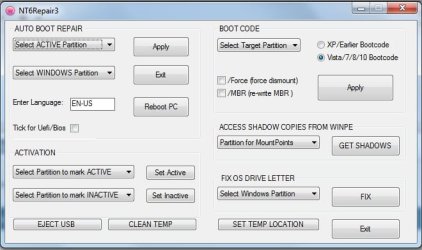
nt6rep.jpg
 

My Computers My Computers

  • At a glance

    7 X64i5 84002x8gb 3200mhz
    Computer type
    PC/Desktop
    OS
    7 X64
    CPU
    i5 8400
    Motherboard
    gigabyte b365m ds3h
    Memory
    2x8gb 3200mhz
    Hard Drives
    various
    PSU
    pure power 11 400w cm
    Case
    Coolermaster
    Cooling
    cryorig m9i
  • At a glance

    7x64g54008gb ddr4 2400
    Computer type
    PC/Desktop
    OS
    7x64
    CPU
    g5400
    Motherboard
    ga b365m ds3h
    Memory
    8gb ddr4 2400
    PSU
    xfx pro 450w
Hi Guys
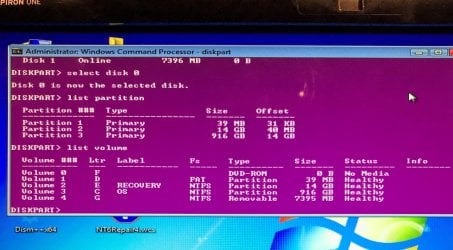
Here is the Diskpart listings from the Win7 Inspiron
...

Yes the DISKPART listing in the picture shows no active partition.

The picture also shows that the operating system is on drive E: (partition 3 of disk 0). You need to mark this partition as "active". Either use DISKPART or follow SIW2's instructions:

Click nt6repair ( it is on the desktop).

1. Activation Section:

Select E in the "Select partition to mark Active" dropdown.
Click "Set active"

2. Auto Boot Repair section:

Select E in "Select Active partition" dropdown
Select E in "Select Windows partition" dropdown
Click "Apply"

View attachment 406010
 

My Computer My Computer

At a glance

Windows 7 x64, Vista x64, 8.1 smartphoneIntel E8400 65W 64-bitDDR2 2 x 2GB, 1GB x 2XFX Radeon HD5750
Computer type
PC/Desktop
OS
Windows 7 x64, Vista x64, 8.1 smartphone
CPU
Intel E8400 65W 64-bit
Motherboard
Gigabyte EP45-UD3LR
Memory
DDR2 2 x 2GB, 1GB x 2
Graphics Card(s)
XFX Radeon HD5750
Sound Card
AMD High Definition Audio; Realtek High Definition Audio
Monitor(s) Displays
iiyama prolite X2377HDS
Screen Resolution
1920 x 1080
Hard Drives
500GB 7200 rpm Seagate ST3500413AS 16MB, 500GB 5400 rpm Toshiba MQ02ABF050H 32MB, 200GB 7200 rpm Seagate ST3200820AS 8MB, 2TB 7200 rpm Western Digital WD20EZRX 64MB
PSU
Enermax Liberty Modular
Case
Antec P193 Midi Tower
Keyboard
Mionix ZIBAL 60
Mouse
Razer USB 2.0 Diamondback Mouse or Huion Graphics Tablet
Browser
Internet Explorer, Lunascape, Firefox, Opera, Avast Safezone
I don't have any OEM computer to check, but I would say that The C: (System partition) is the one to mark as Active and E: is the one with Win 7.
 

My Computers My Computers

  • At a glance

    Windows 7 HP 64i5 6600K - 800MHz to 4200MHz4+4G GSkill DDR4 3000IG - Intel 530
    Computer type
    PC/Desktop
    Computer Manufacturer/Model Number
    custom build
    OS
    Windows 7 HP 64
    CPU
    i5 6600K - 800MHz to 4200MHz
    Motherboard
    GA-Z170-HD3P
    Memory
    4+4G GSkill DDR4 3000
    Graphics Card(s)
    IG - Intel 530
    Monitor(s) Displays
    Samsung 226BW
    Screen Resolution
    1680x1050
    Hard Drives
    (1) -1 SM951 – 128GB M.2 AHCI PCIe SSD drive for Windows 7 and Lubuntu
    (2) -1 WD SATA 3 - 1T for Data
    (3) -1 WD SATA 3 - 1T for backup
    PSU
    Thermaltake 450W TR2 gold
    Keyboard
    Old and good Chicony mechanical keyboard
    Mouse
    Logitech mX performance - 9 buttons (had to disable some)
    Internet Speed
    500Mb/s
    Browser
    Firefox 64
    Other Info
    TinyWall firewall
  • At a glance

    Windows 7 Proi7-4500U 800MHz to 3.0GHz(4+4)G DDR3 1600IG intel 4400 + NVIDIA GeForce GT 745M
    Computer type
    Laptop
    System Manufacturer/Model Number
    Asus Q550LF
    OS
    Windows 7 Pro
    CPU
    i7-4500U 800MHz to 3.0GHz
    Motherboard
    Asus Q550LF
    Memory
    (4+4)G DDR3 1600
    Graphics Card(s)
    IG intel 4400 + NVIDIA GeForce GT 745M
    Sound Card
    Realtek
    Monitor(s) Displays
    LG Display LP156WF4-SPH1
    Screen Resolution
    1920 x 1080
    Hard Drives
    BX500 120G SSD for Windows and programs +
    1T HDD for data
    Internet Speed
    500 Mb/s
    Browser
    Firefox
    Other Info
    TinyWall firewall
OK guys,

Still no joy.

Did as per instructions with nt6repair, selecting E:\.

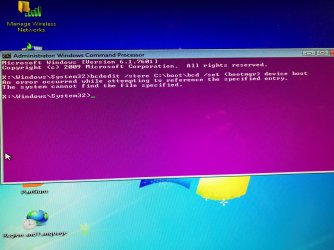
Did a restart and still same start up but with a black screen from F1 with error from Windows boot manager

Went back through diskpart checking where is the os drive now. Its now C:\

Went back into nt6repair and continued as before but with C:\ as it has the os now.

Rebooted and still same black screen message from Windows manager.
 

Attachments

  • error.jpg
    error.jpg
    221.8 KB · Views: 0
  • After error.jpg
    After error.jpg
    209.1 KB · Views: 0

My Computer My Computer

At a glance

Windows 7 64bit Home PremiumAMD E2-18004.00 GBbuilt in CPU
Computer type
Laptop
Computer Manufacturer/Model Number
HP 2000-2a20CA
OS
Windows 7 64bit Home Premium
CPU
AMD E2-1800
Memory
4.00 GB
Graphics Card(s)
built in CPU
Hard Drives
ST950032 5AS SATA
Antivirus
Microsoft Security Essentials
Browser
Google Chrome
That usually indicates the location in the bcd store is wrong.


First, open partition assistant and check the windows partition ( now C ) is showing as Active


Then you could try the following commands:

bcdedit /store C:\Boot\BCD /set {bootmgr} device boot
(press enter)

bcdedit /store C:\Boot\BCD /set {default} device boot
(press enter)

bcdedit /store C:\Boot\BCD /set {default} osdevice boot
(press enter)


Alternatively, you could run startup repair from my boot media.
 

My Computers My Computers

  • At a glance

    7 X64i5 84002x8gb 3200mhz
    Computer type
    PC/Desktop
    OS
    7 X64
    CPU
    i5 8400
    Motherboard
    gigabyte b365m ds3h
    Memory
    2x8gb 3200mhz
    Hard Drives
    various
    PSU
    pure power 11 400w cm
    Case
    Coolermaster
    Cooling
    cryorig m9i
  • At a glance

    7x64g54008gb ddr4 2400
    Computer type
    PC/Desktop
    OS
    7x64
    CPU
    g5400
    Motherboard
    ga b365m ds3h
    Memory
    8gb ddr4 2400
    PSU
    xfx pro 450w
Can't understand why on a Legacy - MBR disk you have partition 1 (39M) as FAT. Does it has anything on D: ?
 

My Computers My Computers

  • At a glance

    Windows 7 HP 64i5 6600K - 800MHz to 4200MHz4+4G GSkill DDR4 3000IG - Intel 530
    Computer type
    PC/Desktop
    Computer Manufacturer/Model Number
    custom build
    OS
    Windows 7 HP 64
    CPU
    i5 6600K - 800MHz to 4200MHz
    Motherboard
    GA-Z170-HD3P
    Memory
    4+4G GSkill DDR4 3000
    Graphics Card(s)
    IG - Intel 530
    Monitor(s) Displays
    Samsung 226BW
    Screen Resolution
    1680x1050
    Hard Drives
    (1) -1 SM951 – 128GB M.2 AHCI PCIe SSD drive for Windows 7 and Lubuntu
    (2) -1 WD SATA 3 - 1T for Data
    (3) -1 WD SATA 3 - 1T for backup
    PSU
    Thermaltake 450W TR2 gold
    Keyboard
    Old and good Chicony mechanical keyboard
    Mouse
    Logitech mX performance - 9 buttons (had to disable some)
    Internet Speed
    500Mb/s
    Browser
    Firefox 64
    Other Info
    TinyWall firewall
  • At a glance

    Windows 7 Proi7-4500U 800MHz to 3.0GHz(4+4)G DDR3 1600IG intel 4400 + NVIDIA GeForce GT 745M
    Computer type
    Laptop
    System Manufacturer/Model Number
    Asus Q550LF
    OS
    Windows 7 Pro
    CPU
    i7-4500U 800MHz to 3.0GHz
    Motherboard
    Asus Q550LF
    Memory
    (4+4)G DDR3 1600
    Graphics Card(s)
    IG intel 4400 + NVIDIA GeForce GT 745M
    Sound Card
    Realtek
    Monitor(s) Displays
    LG Display LP156WF4-SPH1
    Screen Resolution
    1920 x 1080
    Hard Drives
    BX500 120G SSD for Windows and programs +
    1T HDD for data
    Internet Speed
    500 Mb/s
    Browser
    Firefox
    Other Info
    TinyWall firewall
That usually indicates the location in the bcd store is wrong.


First, open partition assistant and check the windows partition ( now C ) is showing as Active

.

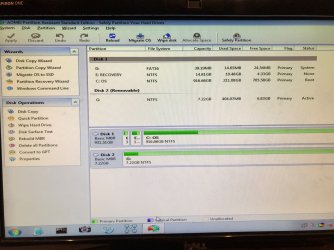
Ok ran Partition Asst to check if C: was active and its showing as 'boot'.

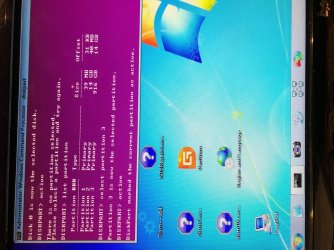
Ran Diskpart again and selected disk '0' then Partition '3' as having 'os' and selected to be active.

Diskpart confirmed as active.

Went back into Partition assist and C: still shown as Boot.

Not tried any further with the other instructions.
 

Attachments

  • CheckPart Active.jpg
    CheckPart Active.jpg
    356.3 KB · Views: 0
  • PartAsst.jpg
    PartAsst.jpg
    231.9 KB · Views: 0

My Computer My Computer

At a glance

Windows 7 64bit Home PremiumAMD E2-18004.00 GBbuilt in CPU
Computer type
Laptop
Computer Manufacturer/Model Number
HP 2000-2a20CA
OS
Windows 7 64bit Home Premium
CPU
AMD E2-1800
Memory
4.00 GB
Graphics Card(s)
built in CPU
Hard Drives
ST950032 5AS SATA
Antivirus
Microsoft Security Essentials
Browser
Google Chrome
You need to rt click C and select Advanced>Set Active partition

Then click Apply Tick at top left ( If it grayed out it is already Active ).

Then restart the machine.
 

My Computers My Computers

  • At a glance

    7 X64i5 84002x8gb 3200mhz
    Computer type
    PC/Desktop
    OS
    7 X64
    CPU
    i5 8400
    Motherboard
    gigabyte b365m ds3h
    Memory
    2x8gb 3200mhz
    Hard Drives
    various
    PSU
    pure power 11 400w cm
    Case
    Coolermaster
    Cooling
    cryorig m9i
  • At a glance

    7x64g54008gb ddr4 2400
    Computer type
    PC/Desktop
    OS
    7x64
    CPU
    g5400
    Motherboard
    ga b365m ds3h
    Memory
    8gb ddr4 2400
    PSU
    xfx pro 450w
Back again,

Yeah C: is active. Now doing the bcdedit list from earlier, something else is coming up now. Have not tried the other instructions.
 

Attachments

  • Bcdedit1.jpg
    Bcdedit1.jpg
    251.7 KB · Views: 0

My Computer My Computer

At a glance

Windows 7 64bit Home PremiumAMD E2-18004.00 GBbuilt in CPU
Computer type
Laptop
Computer Manufacturer/Model Number
HP 2000-2a20CA
OS
Windows 7 64bit Home Premium
CPU
AMD E2-1800
Memory
4.00 GB
Graphics Card(s)
built in CPU
Hard Drives
ST950032 5AS SATA
Antivirus
Microsoft Security Essentials
Browser
Google Chrome
What does bootice show?

It is under the start menu.

Are you sure you created the boot files on your windows partition when you used nt6repair?
 

My Computers My Computers

  • At a glance

    7 X64i5 84002x8gb 3200mhz
    Computer type
    PC/Desktop
    OS
    7 X64
    CPU
    i5 8400
    Motherboard
    gigabyte b365m ds3h
    Memory
    2x8gb 3200mhz
    Hard Drives
    various
    PSU
    pure power 11 400w cm
    Case
    Coolermaster
    Cooling
    cryorig m9i
  • At a glance

    7x64g54008gb ddr4 2400
    Computer type
    PC/Desktop
    OS
    7x64
    CPU
    g5400
    Motherboard
    ga b365m ds3h
    Memory
    8gb ddr4 2400
    PSU
    xfx pro 450w
Sorry

Found it
 

My Computer My Computer

At a glance

Windows 7 64bit Home PremiumAMD E2-18004.00 GBbuilt in CPU
Computer type
Laptop
Computer Manufacturer/Model Number
HP 2000-2a20CA
OS
Windows 7 64bit Home Premium
CPU
AMD E2-1800
Memory
4.00 GB
Graphics Card(s)
built in CPU
Hard Drives
ST950032 5AS SATA
Antivirus
Microsoft Security Essentials
Browser
Google Chrome
Partition management shows C: as active. If thats what you're looking for
 

My Computer My Computer

At a glance

Windows 7 64bit Home PremiumAMD E2-18004.00 GBbuilt in CPU
Computer type
Laptop
Computer Manufacturer/Model Number
HP 2000-2a20CA
OS
Windows 7 64bit Home Premium
CPU
AMD E2-1800
Memory
4.00 GB
Graphics Card(s)
built in CPU
Hard Drives
ST950032 5AS SATA
Antivirus
Microsoft Security Essentials
Browser
Google Chrome
if it sheds more light on the issue, at a cmd prompt:
type bcdedit /enum bootmgr <Enter>
take a picture of the output
type bcdedit /enum osloader <Enter>
take a picture of the output
(you may have to scroll the window up or down to fit text into picture.)
(upload the pictures into this thread.)
 

My Computer My Computer

At a glance

Windows 7 x64, Vista x64, 8.1 smartphoneIntel E8400 65W 64-bitDDR2 2 x 2GB, 1GB x 2XFX Radeon HD5750
Computer type
PC/Desktop
OS
Windows 7 x64, Vista x64, 8.1 smartphone
CPU
Intel E8400 65W 64-bit
Motherboard
Gigabyte EP45-UD3LR
Memory
DDR2 2 x 2GB, 1GB x 2
Graphics Card(s)
XFX Radeon HD5750
Sound Card
AMD High Definition Audio; Realtek High Definition Audio
Monitor(s) Displays
iiyama prolite X2377HDS
Screen Resolution
1920 x 1080
Hard Drives
500GB 7200 rpm Seagate ST3500413AS 16MB, 500GB 5400 rpm Toshiba MQ02ABF050H 32MB, 200GB 7200 rpm Seagate ST3200820AS 8MB, 2TB 7200 rpm Western Digital WD20EZRX 64MB
PSU
Enermax Liberty Modular
Case
Antec P193 Midi Tower
Keyboard
Mionix ZIBAL 60
Mouse
Razer USB 2.0 Diamondback Mouse or Huion Graphics Tablet
Browser
Internet Explorer, Lunascape, Firefox, Opera, Avast Safezone
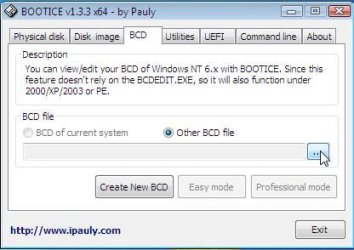
bootice > bcd tab > bcd of C: >professional mode

Screenshots of the entries for bootmgr and for the windows 7 entries.

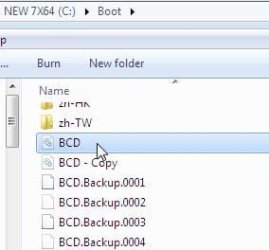
You should have folder C:\Boot the bcd file is in there.
 

My Computers My Computers

  • At a glance

    7 X64i5 84002x8gb 3200mhz
    Computer type
    PC/Desktop
    OS
    7 X64
    CPU
    i5 8400
    Motherboard
    gigabyte b365m ds3h
    Memory
    2x8gb 3200mhz
    Hard Drives
    various
    PSU
    pure power 11 400w cm
    Case
    Coolermaster
    Cooling
    cryorig m9i
  • At a glance

    7x64g54008gb ddr4 2400
    Computer type
    PC/Desktop
    OS
    7x64
    CPU
    g5400
    Motherboard
    ga b365m ds3h
    Memory
    8gb ddr4 2400
    PSU
    xfx pro 450w
bootice-bcd1.jpg

You should have folder C:\Boot the bcd file is in there.


bootice-bcd2.jpg
 

My Computers My Computers

  • At a glance

    7 X64i5 84002x8gb 3200mhz
    Computer type
    PC/Desktop
    OS
    7 X64
    CPU
    i5 8400
    Motherboard
    gigabyte b365m ds3h
    Memory
    2x8gb 3200mhz
    Hard Drives
    various
    PSU
    pure power 11 400w cm
    Case
    Coolermaster
    Cooling
    cryorig m9i
  • At a glance

    7x64g54008gb ddr4 2400
    Computer type
    PC/Desktop
    OS
    7x64
    CPU
    g5400
    Motherboard
    ga b365m ds3h
    Memory
    8gb ddr4 2400
    PSU
    xfx pro 450w
OK,

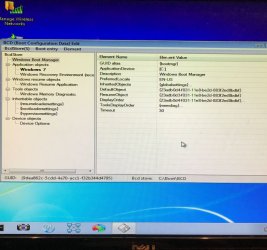
Even if I am a total novice of this. I think if I am right there should be only one 'windows boot loader'. Two is causing a conflict, maybe this resulted from the early part of trying to sort this out.

The photo is as iko22 suggested, sorry SIW2 didn't grasp the 'professional mode'.

But hope the photo helps you both in resolving the problem.
 

Attachments

  • Bcdedit2.jpg
    Bcdedit2.jpg
    279.2 KB · Views: 0

My Computer My Computer

At a glance

Windows 7 64bit Home PremiumAMD E2-18004.00 GBbuilt in CPU
Computer type
Laptop
Computer Manufacturer/Model Number
HP 2000-2a20CA
OS
Windows 7 64bit Home Premium
CPU
AMD E2-1800
Memory
4.00 GB
Graphics Card(s)
built in CPU
Hard Drives
ST950032 5AS SATA
Antivirus
Microsoft Security Essentials
Browser
Google Chrome
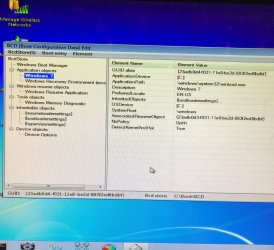
SIW22

found the path you asked for, if this is correct.
 

Attachments

  • Bcd Boot.jpg
    Bcd Boot.jpg
    248.3 KB · Views: 0

My Computer My Computer

At a glance

Windows 7 64bit Home PremiumAMD E2-18004.00 GBbuilt in CPU
Computer type
Laptop
Computer Manufacturer/Model Number
HP 2000-2a20CA
OS
Windows 7 64bit Home Premium
CPU
AMD E2-1800
Memory
4.00 GB
Graphics Card(s)
built in CPU
Hard Drives
ST950032 5AS SATA
Antivirus
Microsoft Security Essentials
Browser
Google Chrome
I think the locale is maybe wrong? It says En-US, but you are located in GB, am I correct? If you want to change it, then type at cmd prompt:
bcdedit /set local en-GB <Enter>
Otherwise the pictures seems to be okay. You should have only one boot manager, but you can have many os loaders in the bcd store.
Can you please confirm the file winload.exe exists where the error message is pointing to?
At the cmd prompt again, type:
dir C:\windows\system32\winload.exe
The result should be, that it finds one file.
 

My Computer My Computer

At a glance

Windows 7 x64, Vista x64, 8.1 smartphoneIntel E8400 65W 64-bitDDR2 2 x 2GB, 1GB x 2XFX Radeon HD5750
Computer type
PC/Desktop
OS
Windows 7 x64, Vista x64, 8.1 smartphone
CPU
Intel E8400 65W 64-bit
Motherboard
Gigabyte EP45-UD3LR
Memory
DDR2 2 x 2GB, 1GB x 2
Graphics Card(s)
XFX Radeon HD5750
Sound Card
AMD High Definition Audio; Realtek High Definition Audio
Monitor(s) Displays
iiyama prolite X2377HDS
Screen Resolution
1920 x 1080
Hard Drives
500GB 7200 rpm Seagate ST3500413AS 16MB, 500GB 5400 rpm Toshiba MQ02ABF050H 32MB, 200GB 7200 rpm Seagate ST3200820AS 8MB, 2TB 7200 rpm Western Digital WD20EZRX 64MB
PSU
Enermax Liberty Modular
Case
Antec P193 Midi Tower
Keyboard
Mionix ZIBAL 60
Mouse
Razer USB 2.0 Diamondback Mouse or Huion Graphics Tablet
Browser
Internet Explorer, Lunascape, Firefox, Opera, Avast Safezone
That is the bootmgr entry, looks ok.

Click on the windows 7 entry and do a screenshot. Tho it looks ok from your post#36

Are you rebooting winpe every time? You can take screenshots using the little camera icon on the taskbar.You can post using qtweb browser ( it is the blue Qt thing on the taskbar- to the right of the camera icon). type sevenforums in top right of qtweb (where it says google in this pic ), then press enter.

qtweb-search.jpg
 
Last edited:

My Computers My Computers

  • At a glance

    7 X64i5 84002x8gb 3200mhz
    Computer type
    PC/Desktop
    OS
    7 X64
    CPU
    i5 8400
    Motherboard
    gigabyte b365m ds3h
    Memory
    2x8gb 3200mhz
    Hard Drives
    various
    PSU
    pure power 11 400w cm
    Case
    Coolermaster
    Cooling
    cryorig m9i
  • At a glance

    7x64g54008gb ddr4 2400
    Computer type
    PC/Desktop
    OS
    7x64
    CPU
    g5400
    Motherboard
    ga b365m ds3h
    Memory
    8gb ddr4 2400
    PSU
    xfx pro 450w
IKO22,

Yes its there as an app. But it I run it "C:\Windows \System32\winload.exe is not a valid Win32 application.


SIW2

New photo with Wndows 7 highlighted
 

Attachments

  • Winload.jpg
    Winload.jpg
    339.8 KB · Views: 0
  • Bcd Boot2.jpg
    Bcd Boot2.jpg
    280.6 KB · Views: 0

My Computer My Computer

At a glance

Windows 7 64bit Home PremiumAMD E2-18004.00 GBbuilt in CPU
Computer type
Laptop
Computer Manufacturer/Model Number
HP 2000-2a20CA
OS
Windows 7 64bit Home Premium
CPU
AMD E2-1800
Memory
4.00 GB
Graphics Card(s)
built in CPU
Hard Drives
ST950032 5AS SATA
Antivirus
Microsoft Security Essentials
Browser
Google Chrome
Back
Top