Solved Dell Inspiron with windows 7 very very very dim

nighthawk01

New member
Local time
2:11 PM
Messages
13
I upgraded my old Inspiron 9400 from xp to windows 7 and when I installed the drivers for my graphics card (x1400) my screen has gone very very dim and can only be seen with a flashlight. Can anyone help?:confused:
 

My Computer My Computer

At a glance

Windows 7 ultimate 64 bit
Computer type
Laptop
Computer Manufacturer/Model Number
Dell
OS
Windows 7 ultimate 64 bit
There should be a couple of keys on the motherboard for brightening or dimming the screen, usually a combination of the Fn key plus another such as F5, F8, etc. Notebooks/Laptops vary on that point. Also, not knowing the Service Tag number I couldn't check at Support | Dell US as to the drivers available that are compatible with Win7.
 

My Computer My Computer

At a glance

Windows 7 Ultimate 64-bit, Windows 8.1 64-bit...
Computer type
PC/Desktop
Computer Manufacturer/Model Number
Customs, Dell, Gateway, HP, Toshiba, Acer, ASUS
OS
Windows 7 Ultimate 64-bit, Windows 8.1 64-bit, Mac OS X 10.10, Linux Mint 17, Windows 10 Pro TP
Keyboard
Microsoft
Mouse
Microsoft
Checked

I checked their site but nothing is there... One thing I know is that there was once windows 7 on here... Working. But now when I install it it doesn't work. Only xp works
 

My Computer My Computer

At a glance

Windows 7 ultimate 64 bit
Computer type
Laptop
Computer Manufacturer/Model Number
Dell
OS
Windows 7 ultimate 64 bit
There's a possibility the drivers for Vista would work. Also be sure to get either 32-bit or 64-bit version according to which Windows is installed although the incorrect version shouldn't even install.
 

My Computer My Computer

At a glance

Windows 7 Ultimate 64-bit, Windows 8.1 64-bit...
Computer type
PC/Desktop
Computer Manufacturer/Model Number
Customs, Dell, Gateway, HP, Toshiba, Acer, ASUS
OS
Windows 7 Ultimate 64-bit, Windows 8.1 64-bit, Mac OS X 10.10, Linux Mint 17, Windows 10 Pro TP
Keyboard
Microsoft
Mouse
Microsoft
Tried that

I tried that but it told me that it is not compatible or whatnot. I think that xp is creeping up on me. I still have the original OEM disc from it
 

My Computer My Computer

At a glance

Windows 7 ultimate 64 bit
Computer type
Laptop
Computer Manufacturer/Model Number
Dell
OS
Windows 7 ultimate 64 bit
Try to Install the Chipset Driver and also the QuickSet Application ..

That should help with your Function Keys ...


Product Support | Dell US
 

My Computer My Computer

At a glance

windows 7 home 64bitINTEL-CORE I716GB
Computer Manufacturer/Model Number
W530-3630QM1
OS
windows 7 home 64bit
CPU
INTEL-CORE I7
Memory
16GB
Hard Drives
750GB
Browser
Chrome
Oh well.

When I connect an external monitor and use quickset it says brightness is 100% but the screen on the laptop is very dim
 

My Computer My Computer

At a glance

Windows 7 ultimate 64 bit
Computer type
Laptop
Computer Manufacturer/Model Number
Dell
OS
Windows 7 ultimate 64 bit
Maybe my screen is finished? On the dell boot screen it's dark as well:cry:
 

My Computer My Computer

At a glance

Windows 7 ultimate 64 bit
Computer type
Laptop
Computer Manufacturer/Model Number
Dell
OS
Windows 7 ultimate 64 bit
Do you have a Monitor you could try ? ....
 

My Computer My Computer

At a glance

windows 7 home 64bitINTEL-CORE I716GB
Computer Manufacturer/Model Number
W530-3630QM1
OS
windows 7 home 64bit
CPU
INTEL-CORE I7
Memory
16GB
Hard Drives
750GB
Browser
Chrome
Oh and if it helps the right fan when it's on makes a very very loud rattling/grinding noise
 

My Computer My Computer

At a glance

Windows 7 ultimate 64 bit
Computer type
Laptop
Computer Manufacturer/Model Number
Dell
OS
Windows 7 ultimate 64 bit
Also I do have a monitor
 

My Computer My Computer

At a glance

Windows 7 ultimate 64 bit
Computer type
Laptop
Computer Manufacturer/Model Number
Dell
OS
Windows 7 ultimate 64 bit
Here is a picture of how to looks (sorry for potato camera)
 

Attachments

  • image.jpg
    image.jpg
    81.4 KB · Views: 0

My Computer My Computer

At a glance

Windows 7 ultimate 64 bit
Computer type
Laptop
Computer Manufacturer/Model Number
Dell
OS
Windows 7 ultimate 64 bit
Just looks black to me .. Try it with the Monitor if that works would rule out the Graphics .. You will need to see to that fan also ..
 

My Computer My Computer

At a glance

windows 7 home 64bitINTEL-CORE I716GB
Computer Manufacturer/Model Number
W530-3630QM1
OS
windows 7 home 64bit
CPU
INTEL-CORE I7
Memory
16GB
Hard Drives
750GB
Browser
Chrome
With the monitor it works flawlessly. The display its a hit and miss. Yesterday it was working today it gives up... The fan isn't a problem to what I know since this laptop used to work well even with the nearly broken fan
 

My Computer My Computer

At a glance

Windows 7 ultimate 64 bit
Computer type
Laptop
Computer Manufacturer/Model Number
Dell
OS
Windows 7 ultimate 64 bit
Looks like you have some sort of a problem with the LCD or the back light ... You have removed the Ac Adapter and the Battery and press and hold the power button for at least 30 seconds ? ...
 

My Computer My Computer

At a glance

windows 7 home 64bitINTEL-CORE I716GB
Computer Manufacturer/Model Number
W530-3630QM1
OS
windows 7 home 64bit
CPU
INTEL-CORE I7
Memory
16GB
Hard Drives
750GB
Browser
Chrome
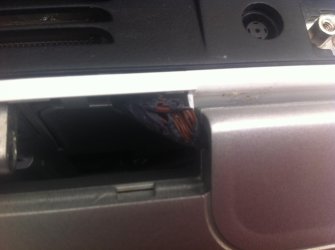
Maybe it's a ripped screen cord?
 

Attachments

  • image.jpg
    image.jpg
    315.2 KB · Views: 0

My Computer My Computer

At a glance

Windows 7 ultimate 64 bit
Computer type
Laptop
Computer Manufacturer/Model Number
Dell
OS
Windows 7 ultimate 64 bit
Could be many things ... Best to get some one who knows what they are doing to have a look at it ...
 

My Computer My Computer

At a glance

windows 7 home 64bitINTEL-CORE I716GB
Computer Manufacturer/Model Number
W530-3630QM1
OS
windows 7 home 64bit
CPU
INTEL-CORE I7
Memory
16GB
Hard Drives
750GB
Browser
Chrome
I have the inside a massive clean out and now it looks like its working. looks like it was the fan or something. by the way thanks everyone who helped :)
 

My Computer My Computer

At a glance

Windows 7 ultimate 64 bit
Computer type
Laptop
Computer Manufacturer/Model Number
Dell
OS
Windows 7 ultimate 64 bit
Great news :)
 

My Computer My Computer

At a glance

windows 7 home 64bitINTEL-CORE I716GB
Computer Manufacturer/Model Number
W530-3630QM1
OS
windows 7 home 64bit
CPU
INTEL-CORE I7
Memory
16GB
Hard Drives
750GB
Browser
Chrome
Oh yea and also if this happens to anyone clean it out then take the display cover thing (the one that says dell) an make sure the display wire isn't squashed
 

My Computer My Computer

At a glance

Windows 7 ultimate 64 bit
Computer type
Laptop
Computer Manufacturer/Model Number
Dell
OS
Windows 7 ultimate 64 bit
Back
Top