Dell M6600 no USB boot option

Tofik

New member
Local time
6:35 PM
Messages
12
Hullo,

After reinstalling Windows 7 64bit Pro on M6600 computer I notice I have NO USB boot option in one-time boot list (F12).
USB device is on the second place in BIOS boot sequence (F2).

USB ports works find. I can use all devices connected to them. Although external keyboard remains inactive till the Windows logon screen.

Because of the above I am not able to perform windows backup Image restore directly from an external HD used previously to backup the system. Attempting this I have a prompt to install the driver that I cannot localise.

I will deeply appreciate any helpful suggestion to solve the problem.
Thank you very much in advance,
 

My Computer My Computer

Computer type
PC/Desktop
Computer Manufacturer/Model Number
Dell T1700, Dell M6600, Dell XPS M1530
OS
7 home prem 64, 7 pro 64
Tofik how did you reinstall as in what sort of media did you use and where from?
 

My Computer My Computer

Computer type
PC/Desktop
Computer Manufacturer/Model Number
Own build (new) Desk1 / Asus ROG Win 7 / Desk2 1st build
OS
Desk1 7 Home Prem / Desk2 10 Pro / Main lap Asus ROG 10 Pro 2 laptop Toshiba 7 Pro Asus P2520 7 & 10
CPU
Desk1 i5 3750K / Laptop i7 GTX 860M / Desk2 i5 2500
Motherboard
Desk1 Asus P877-V / Desk2 Gigabyte H67 UD3H / Laptop ?
Memory
Desk1 8GB (1866) / Desk2 16GB (1333) / Laptop 8Gb DDR3
Graphics Card(s)
Desk 1& 2NVidia GTX 650 & Laptops on board Intel
Sound Card
Desk 1 & 2 -XONAR DG Realtek High Def audio Laptop
Monitor(s) Displays
Desk 1 Benq HD 2450 / Desk2 Philips 24" / Laptop 17.5"
Screen Resolution
1920x1080 D1 & D2 & Laptop 1
Hard Drives
Desk1 Samsung 120GB 830 SSD
Asus ROG 256GB 850 Pro SSD
Desk2 Samsung 840 256 SSD
Toshiba 120GB EVO
PSU
Desk 1 Corsair HX 1050/ Laptop ? / Desk 2 Corsair HX 650
Case
Desk 1 Cooler HAF XM ? Toshiba laptop / Desk2 Coolermaster
Cooling
Fans on all Desk1 -2 Desk2 - all Coolermasters 5 Laptop ?
Keyboard
Desk 1 MS Sidewinder X6 Desk 2 MS Sidewinder X 4
Mouse
Desk 1&2 - Gigabyte MS 900 gamer - laptop - Logitec wireless
Internet Speed
ADSL2+
Other Info
One other Desktop (tester) and spare Toshba laptop both with SSD's
Running Kaspersky 2016 ISS on all machines config'd identically
Logitec audio stereo systems on each machine (x3)
Canon MG5250MFC
Router/modem TP-Link running WPA2SK
Tofik how did you reinstall as in what sort of media did you use and where from?

It was an original Dell DVD Installation Disk and drivers from Dell website installed more than less in suggested order. Recently I update the bios to the latest version.
Legacy USB was/is enabled by default and still no USB option showing up in an one-time boot option.
 

My Computer My Computer

Computer type
PC/Desktop
Computer Manufacturer/Model Number
Dell T1700, Dell M6600, Dell XPS M1530
OS
7 home prem 64, 7 pro 64
I think the problem is solved. In a Dell M6600 model only two USB 2 ports could be used for USB booting.
While an USB key is inserted there the USB boot option IS enabled in one-boot list (F12).

However the keyboard connected there remains disabled, though highlighted until the Windows logon screen comes out.
Any idea on that?

Thank you for your response.
 
Last edited:

My Computer My Computer

Computer type
PC/Desktop
Computer Manufacturer/Model Number
Dell T1700, Dell M6600, Dell XPS M1530
OS
7 home prem 64, 7 pro 64
Tofic one option you have mate is a clean install using this

REINSTALL

For installingI prefer a disk to be honest but if you want to try again this is the one tofollow
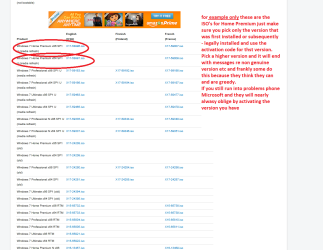
Clean Reinstall - Factory OEM Windows 7 makesure it is the right version ie Home Premium or Ultimate whatever you have an activationcode (on the machine sticker) for and then the language. (see pic)
Now this will eliminate all of the Dell bloatware and in general gives you a bit faster machine but please stick with the version you had originally some go for the Pro or Ultimate when they see them and of course the code will not activate them.
Any Dell drivers can be added afterwards if need be.
You can use a disk or USB stick with this.


Attachments

  • ISO.PNG
    ISO.PNG
    41.1 KB · Views: 0

My Computer My Computer

Computer type
PC/Desktop
Computer Manufacturer/Model Number
Own build (new) Desk1 / Asus ROG Win 7 / Desk2 1st build
OS
Desk1 7 Home Prem / Desk2 10 Pro / Main lap Asus ROG 10 Pro 2 laptop Toshiba 7 Pro Asus P2520 7 & 10
CPU
Desk1 i5 3750K / Laptop i7 GTX 860M / Desk2 i5 2500
Motherboard
Desk1 Asus P877-V / Desk2 Gigabyte H67 UD3H / Laptop ?
Memory
Desk1 8GB (1866) / Desk2 16GB (1333) / Laptop 8Gb DDR3
Graphics Card(s)
Desk 1& 2NVidia GTX 650 & Laptops on board Intel
Sound Card
Desk 1 & 2 -XONAR DG Realtek High Def audio Laptop
Monitor(s) Displays
Desk 1 Benq HD 2450 / Desk2 Philips 24" / Laptop 17.5"
Screen Resolution
1920x1080 D1 & D2 & Laptop 1
Hard Drives
Desk1 Samsung 120GB 830 SSD
Asus ROG 256GB 850 Pro SSD
Desk2 Samsung 840 256 SSD
Toshiba 120GB EVO
PSU
Desk 1 Corsair HX 1050/ Laptop ? / Desk 2 Corsair HX 650
Case
Desk 1 Cooler HAF XM ? Toshiba laptop / Desk2 Coolermaster
Cooling
Fans on all Desk1 -2 Desk2 - all Coolermasters 5 Laptop ?
Keyboard
Desk 1 MS Sidewinder X6 Desk 2 MS Sidewinder X 4
Mouse
Desk 1&2 - Gigabyte MS 900 gamer - laptop - Logitec wireless
Internet Speed
ADSL2+
Other Info
One other Desktop (tester) and spare Toshba laptop both with SSD's
Running Kaspersky 2016 ISS on all machines config'd identically
Logitec audio stereo systems on each machine (x3)
Canon MG5250MFC
Router/modem TP-Link running WPA2SK
Back
Top