Dell MSN Homepage Hi-hack

mikegc

New member
Power User
Local time
2:54 AM
Messages
79
I'm setting up a new Dell Inspiron, Windows 7 (64 bit). To change the home page, I went to Tools> Internet Options> Home Page and inserted my new home page address, MSN.com. I clicked Apply, closed everything and reopened the browser. Dell's version of MSN came up instead. How do I get rid of this and activate my regular browser?

Thanks,

Mike
 

My Computer My Computer

Computer Manufacturer/Model Number
Dell XPS
OS
Windows 7 Ultimate x64
CPU
Intel® Core™ i7-840QM (1.86GHz, 8 threads, turbo boost up to
Memory
8 GB Shared Dual Channel DDR3 Memory
Graphics Card(s)
NVIDIA® GeForce® GT 435M 2GB graphics
Hard Drives
640GB 7200 RPM SATA Hard Drive
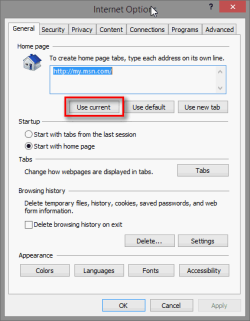
Using Internet Explorer: Browse to the webpage you want to use as your homepage and while the page is open and its tab active, open Tools > Internet Options > General and click Use current, click OK to save settings.

2013-07-11_133143.PNG

Kari
 

My Computer My Computer

Computer type
Laptop
Computer Manufacturer/Model Number
HP ENVY 17-1150eg
OS
Windows 10 Pro x64 EN-GB
CPU
1.6 GHz Intel Core i7-720QM Processor
Memory
6 GB
Graphics Card(s)
ATI Mobility Radeon HD 5850 Graphics
Sound Card
Beats sound system with integrated subwoofer
Monitor(s) Displays
17" laptop display, 22" LED and 32" Full HD TV through HDMI
Screen Resolution
1600*900 (1), 1920*1080 (2&3)
Hard Drives
Internal: 2 x 500 GB SATA Hard Disk Drive 7200 rpm
External: 2TB for backups, 3TB USB3 network drive for media
Cooling
As Envy runs a bit warm, I have it on a Cooler Master pad
Keyboard
Logitech diNovo Media Desktop Laser (bluetooth)
Mouse
Logitech Performance Mouse MX
Internet Speed
50/10 Mbps VDSL
Antivirus
Windows Defender 4.3.9431.0
Browser
Maxthon 3.5.2., IE11
How do I change my homepage

I'm setting up a brand new Dell Inspiron, Windows 7 (64 bit). On Dell's version of MSN, I clicked on Tools> Internet Options> General tab and, under the home, I removed Dell's address and entered MSN.com. I clicked on Apply and closed everything. When I reopened the browser, Dell version of MSN was back. I looked at Internet Options, again, and the address I'd entered was still listed as the ome page. How do I make the Dell version go away.

Thanks,

Mike
 

My Computer My Computer

Computer Manufacturer/Model Number
Dell XPS
OS
Windows 7 Ultimate x64
CPU
Intel® Core™ i7-840QM (1.86GHz, 8 threads, turbo boost up to
Memory
8 GB Shared Dual Channel DDR3 Memory
Graphics Card(s)
NVIDIA® GeForce® GT 435M 2GB graphics
Hard Drives
640GB 7200 RPM SATA Hard Drive
I'm sorry, I should have mentioned I'd done that. . . . several times. I reverts back to Dell's MSN version.

Mike
 

My Computer My Computer

Computer Manufacturer/Model Number
Dell XPS
OS
Windows 7 Ultimate x64
CPU
Intel® Core™ i7-840QM (1.86GHz, 8 threads, turbo boost up to
Memory
8 GB Shared Dual Channel DDR3 Memory
Graphics Card(s)
NVIDIA® GeForce® GT 435M 2GB graphics
Hard Drives
640GB 7200 RPM SATA Hard Drive
Strange. I have several HP laptops that when first booted or after factory reset default to HP's MSN page, doing as I told has always solved it. Does the Homepage settings list only one Homepage or several Homepage addresses (tabs)?

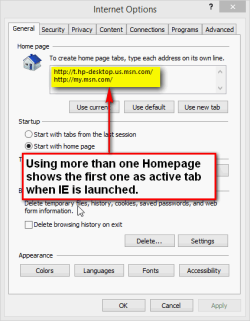
The only way I can reproduce your issue is to set two or more Homepages, in which case IE opens them all showing the first one (top most) in first tab and active when IE is launched.

2013-07-11_140421.PNG

Deleting all but the preferred Homepage solves this issue, in my case anyway.

Kari
 

My Computer My Computer

Computer type
Laptop
Computer Manufacturer/Model Number
HP ENVY 17-1150eg
OS
Windows 10 Pro x64 EN-GB
CPU
1.6 GHz Intel Core i7-720QM Processor
Memory
6 GB
Graphics Card(s)
ATI Mobility Radeon HD 5850 Graphics
Sound Card
Beats sound system with integrated subwoofer
Monitor(s) Displays
17" laptop display, 22" LED and 32" Full HD TV through HDMI
Screen Resolution
1600*900 (1), 1920*1080 (2&3)
Hard Drives
Internal: 2 x 500 GB SATA Hard Disk Drive 7200 rpm
External: 2TB for backups, 3TB USB3 network drive for media
Cooling
As Envy runs a bit warm, I have it on a Cooler Master pad
Keyboard
Logitech diNovo Media Desktop Laser (bluetooth)
Mouse
Logitech Performance Mouse MX
Internet Speed
50/10 Mbps VDSL
Antivirus
Windows Defender 4.3.9431.0
Browser
Maxthon 3.5.2., IE11
I tried that, too. After clicking Apply, I closed everything and reopened the browser. Seeing the new tab, I clicked on it and it was the Dell MSN, too. I think there's a conspiracy going on!

Mike
 

My Computer My Computer

Computer Manufacturer/Model Number
Dell XPS
OS
Windows 7 Ultimate x64
CPU
Intel® Core™ i7-840QM (1.86GHz, 8 threads, turbo boost up to
Memory
8 GB Shared Dual Channel DDR3 Memory
Graphics Card(s)
NVIDIA® GeForce® GT 435M 2GB graphics
Hard Drives
640GB 7200 RPM SATA Hard Drive
Go to Internet option/ Advanced and use Reset/ Check the box to Delete personal settings,
Does it show as dell's home page then ?
Open ie use Alt+TA then Show all add-ons/ Are there any Dell add-ons listed ?
 

My Computer My Computer

Computer type
PC/Desktop
Computer Manufacturer/Model Number
Custom assembled by me :}
OS
Win-7-Pro64bit 7-H-Prem-64bit
CPU
i7-5930K 2nd i9-9940x both water blocked VRM's too
Motherboard
ASUS SABERTOOTH X99 2nd ASUS x299 Apex
Memory
Trident-z 3200C14 2nd Trident-z 3600C16
Graphics Card(s)
EVGA 1080ti ftw3 2nd Titan Xp both water blocked
Sound Card
Built-in Realtek
Monitor(s) Displays
1-AOC G2460PG 24"G-Sync 144Hz/ 2nd 1-ASUS VG248QE 24" 144Hz
Screen Resolution
1920 x 1080 144Hz
Hard Drives
2-Samsung M.2 Evo & Evo Plus
2-Samsung 850 EVO 500GB SSD's/ 3-2.5 W.D. Black 1tb-&3-1tb/3-3.5 WD Black 1tb hdd's
PSU
EVGA SuperNOVA 1000-P2 2nd 1200-P2
Case
2-Corsair Obsidian Series 450D Black ATX Mid Tower
Cooling
Custom water loops
Keyboard
Logitech G710+/ 2nd Logitech G910
Mouse
2-RedDragon M901 Perdition 16400 dpi Gaming mouse = wired
Internet Speed
Comcast Ping 19ms 89.31mbps download speed 6.12mbps upload
Antivirus
Malwarebytes Pro/ Superantispyware Pro
Browser
FireFox & Pale moon
Other Info
2nd ASUS X299 Apex/Intel i9-9940x with Custom water loop/7H-Prem-x64/Corsair 450D case/Ram Trident-z 3600C16 4x8gb / Samsung970Evo plus 500gb SSD/Dual ssd EZ swap evo/PSU EVGA SuperNova 1200w-P2 80+Platinum/GPU Titan Xp /8-ML-140 on push-pull on 2-280GTX rads

My Computer My Computer

Computer Manufacturer/Model Number
Dell XPS
OS
Windows 7 Ultimate x64
CPU
Intel® Core™ i7-840QM (1.86GHz, 8 threads, turbo boost up to
Memory
8 GB Shared Dual Channel DDR3 Memory
Graphics Card(s)
NVIDIA® GeForce® GT 435M 2GB graphics
Hard Drives
640GB 7200 RPM SATA Hard Drive
Solved Dell MSN Homepage Hi-hack

I just switched to the browser, My MSN, and all is well there. I'm giving up and letting Michael Dell win the Battle of the MSN.com browser.

Thanks everyone!

Mike
 

My Computer My Computer

Computer Manufacturer/Model Number
Dell XPS
OS
Windows 7 Ultimate x64
CPU
Intel® Core™ i7-840QM (1.86GHz, 8 threads, turbo boost up to
Memory
8 GB Shared Dual Channel DDR3 Memory
Graphics Card(s)
NVIDIA® GeForce® GT 435M 2GB graphics
Hard Drives
640GB 7200 RPM SATA Hard Drive
Welcome, I never had the problem with HP though :huh:
 

My Computer My Computer

Computer type
Laptop
Solved Dell MSN Homepage Hi-hack

I'm glad you haven't had the problem!!! It must be a Dell-thing as I've seen plenty of complaints about the problem. Oh well, on to other mistakes . . . . . .

Mike
 

My Computer My Computer

Computer Manufacturer/Model Number
Dell XPS
OS
Windows 7 Ultimate x64
CPU
Intel® Core™ i7-840QM (1.86GHz, 8 threads, turbo boost up to
Memory
8 GB Shared Dual Channel DDR3 Memory
Graphics Card(s)
NVIDIA® GeForce® GT 435M 2GB graphics
Hard Drives
640GB 7200 RPM SATA Hard Drive
Does seem a common problem Mike ... Though not with all Dells as i got one last year and no problem
 

My Computer My Computer

Computer Manufacturer/Model Number
W530-3630QM1
OS
windows 7 home 64bit
CPU
INTEL-CORE I7
Memory
16GB
Hard Drives
750GB
Browser
Chrome
Disable or Remove all of the Add-on's in your Browser except Flash which you can install if necessary. Check in Control Panel>Programs to see if Add-Ons are also present there, to Uninstall them.

Use the stable search box for Google and remove all others there, too. Tick the box to not allow it to change.

Next I'd run SUPERAntiSpyware scan to root these out in the registry, too. Turn off SAS at Startup in its Preferences.

Be aware that the Dell factory preinstalled Win7 is a grossly inferior install smothered by bloatware and useless duplicate utiltiies that have much better versions built into Win7. For this reason most tech enthusiasts choose to Clean Reinstall - Factory OEM Windows 7 to get the best Win7 performance from the actual Win7 and not a crippled version of it.

At the minimum I'd Clean Up Factory Bloatware until you can do the reinstall to get perfect performance.
 
I'm setting up a brand new Dell Inspiron, Windows 7 (64 bit). On Dell's version of MSN, I clicked on Tools> Internet Options> General tab and, under the home, I removed Dell's address and entered MSN.com. I clicked on Apply and closed everything. When I reopened the browser, Dell version of MSN was back. I looked at Internet Options, again, and the address I'd entered was still listed as the ome page. How do I make the Dell version go away.

Thanks,

Mike

Hi Mike,

We truly regret the inconvenience that has been caused to you. Please follow these steps for changing homepage for the Internet Explorer:

Make sure you've closed all open tabs, then open Internet Explorer for the desktop.

Tap or click Tools, and then tap or click Internet options.

Under the General tab, enter the web address of your new home page, and then tap or click Apply.

You'll need to restart both Internet Explorer and Internet Explorer for the desktop to see your new home page. You can change your home page at any time, or set up multiple home pages that will open in separate tabs.

Note

Your home page only appears when Internet Explorer is restarted. So if you open a new tab in Internet Explorer, you'll see a blank page until you enter a URL or search term in the Address bar.

And if you are still unable to change the homepage then kindly run the MS Fix-it from the link below:

http://go.microsoft.com/?linkid=9743806

Keep us posted with the results.
 

My Computer My Computer

Computer type
PC/Desktop
OS
Winndows 7 32 bit
Back
Top