Dell Optiplex 755 Signed SATA HD Driver

HenriK37

New member
Member
Local time
9:52 PM
Messages
83
In trying to do a clean reinstall of Win 7 Pro on an old Dell Optiplex 755, now equipped with a brand new 1 TB Western Digital SATA HD following the original SATA HD's failure, using the same media that was used for the original installation, the installation stalls and calls for a signed HD driver. Dell's R123415 driver downloaded from Dell Support, believed to be appropriate, doesn't work as it is apparently unsigned. The PC has Dell's A22 BIOS (the last one published) installed.

How do I get around this problem? Keep things simple as I am now in my mid 80s and neither as up to date or as fast as I used to be. Thanks, in advance, for advice, guidance, ideas, and/or instructions on how to proceed.
 

My Computer My Computer

Computer type
PC/Desktop
Computer Manufacturer/Model Number
Dell Optiplex 755/Optiplex 780/Latitude E6400/Precision T3500
OS
Win7 Pro x86/Win7 Pro x64/Win 10 Pro x64
CPU
Intel Core 2 Duo E7200 2.53 gHz/Core 2 Duo E8400 3.0 gHz/
Internet Speed
FiOS 100 mB
Antivirus
Bitdefender Total Security
Browser
SeaMonkey/Edge

My Computers My Computers

System One System Two

  • Computer type
    PC/Desktop
    OS
    7 X64
    CPU
    i5 8400
    Motherboard
    gigabyte b365m ds3h
    Memory
    2x8gb 3200mhz
    Hard Drives
    various
    PSU
    pure power 11 400w cm
    Case
    Coolermaster
    Cooling
    cryorig m9i
  • Computer type
    PC/Desktop
    OS
    7x64
    CPU
    g5400
    Motherboard
    ga b365m ds3h
    Memory
    8gb ddr4 2400
    PSU
    xfx pro 450w
Dell Optiplex 755 Signed SATA HD Driver - BIOS, Formatting Hard Drives

Thanks for your suggestion. I have read through the referenced paper three times and the solution sounds both complex and daunting for someone of my limited abilities. The author seems to suggest installing an earlier BIOS version. The earliest version I have found is A19 on Dell's site - which replaced the A22 version previously installed. Does anyone know of or have a store of older Optiplex 755 BIOS files?

I also have the original Drivers and Utilities CD that originally came packed with the PC and it appears to contain a copy of v.9.92 of the SATA IDE driver file. Would extracting this file be useful and how do I get it to load?

The author of the referenced paper also appears to indicate that the SATA drive he was trying format had been previously formatted somehow. Would such an approach be useful in my case where I am trying to reinstall Win 7 Pro on a brand new 1TB SATA drive?

Step-by-step guidance is particularly helpful. Thank you, in advance, for any and all assistance.
 

My Computer My Computer

Computer type
PC/Desktop
Computer Manufacturer/Model Number
Dell Optiplex 755/Optiplex 780/Latitude E6400/Precision T3500
OS
Win7 Pro x86/Win7 Pro x64/Win 10 Pro x64
CPU
Intel Core 2 Duo E7200 2.53 gHz/Core 2 Duo E8400 3.0 gHz/
Internet Speed
FiOS 100 mB
Antivirus
Bitdefender Total Security
Browser
SeaMonkey/Edge
Maybe you should try dell recovery media. I havent seen one for a model that old though I believe it exists for optiplex 790 in professional edition.

You would need a win7 license, presumably you have one.

What edition do you need - e.g Home Premium, Professional ?

Do you need 32 or 64 bit ?

- - - Updated - - -

According to the previously linked dell forum posts, you might need irst drivers. What bit version 32 or 64?

I have looked at the dell recovery/install media I have to hand, and they have irst drivers included

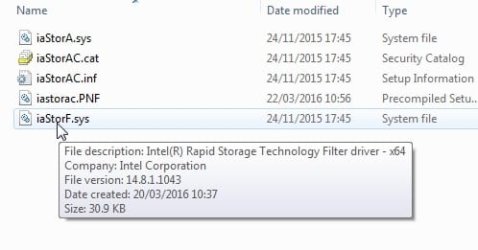
Intel recommends the installation of Intel Rapid Storage Technology (RST) driver v9.6 and above.

I have some in front of me. Version 14.8, they are 64 bit.

iastor14.8x64..jpg

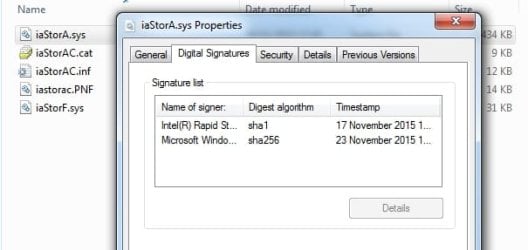
iastorac-digsig.jpg

What bit version do you need?

- - - Updated - - -

I could probabaly do a batch file that will integrate the irst drivers into your installation media.

I have already done something similar.
 
Last edited:

My Computers My Computers

System One System Two

  • Computer type
    PC/Desktop
    OS
    7 X64
    CPU
    i5 8400
    Motherboard
    gigabyte b365m ds3h
    Memory
    2x8gb 3200mhz
    Hard Drives
    various
    PSU
    pure power 11 400w cm
    Case
    Coolermaster
    Cooling
    cryorig m9i
  • Computer type
    PC/Desktop
    OS
    7x64
    CPU
    g5400
    Motherboard
    ga b365m ds3h
    Memory
    8gb ddr4 2400
    PSU
    xfx pro 450w
The support site for the Dell OptiPlex 755 has drivers only for Windows XP and Windows Vista 32/64-bit.

However, I personally know it will run Windows 7 32/64-bit because I purchased a few of them in refurbished condition with Windows 7 Home Premium SP1 64-bit several years ago.

I also re-did all of them with a clean re-install before donating them, so I know it can be done.

What is the 7-character "service tag" number on yours?
 

My Computer My Computer

Computer type
PC/Desktop
Computer Manufacturer/Model Number
Dell OptiPlex 9020
OS
Windows 7 Professional SP1 64-bit
CPU
Intel Core i7-4790 3.60 GHz
Memory
32 GB DDR3-1600 MHz
Graphics Card(s)
Integrated Intel HD Graphics 4600
Monitor(s) Displays
Viewsonic 32" LCD
Hard Drives
Kingston SATA 3 240 GB SSD
Internet Speed
Spectrum Internet 1000 Mbps
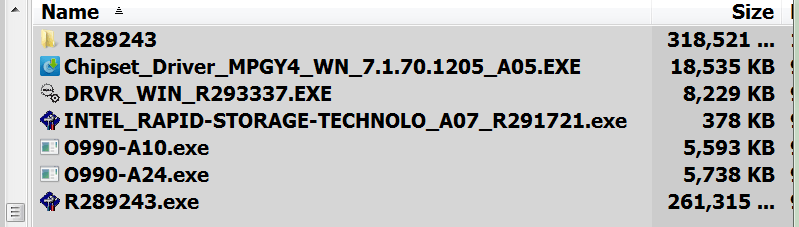
i have these for my new install of win7pro on Dell optiplex 990MT.. works great.ScreenHunter_01 Nov. 21 10.48.gif let me know if you want them..
 

My Computers My Computers

System One System Two

  • Computer type
    PC/Desktop
    Computer Manufacturer/Model Number
    Dell 990MT
    OS
    win7pro 64
    CPU
    I7
    Memory
    16
    Graphics Card(s)
    dedicated
    Hard Drives
    2 ssd
    PSU
    stock
    Case
    stock
    Cooling
    stock
    Internet Speed
    cable
    Antivirus
    mse
    Browser
    pale moon 29.1 portable
  • Computer type
    PC/Desktop
Back
Top