Solved Dell XPS 435mt Shows odd Memory and proc configuration

mohavepc

Mohave PC Computers
Guru
VIP
Local time
3:50 PM
Messages
559
Location
Lake Havasu City, Arizona
:confused: XPS 435MT:confused:
i7 processor extreme? (thats what Dell is calling it) 8core
6 1GB DDR3 Memory sticks
Gigabit Ethernet
Windows Vista Home Prem. 64bit upgraded to Windows 7 Home Prem. 64Bit

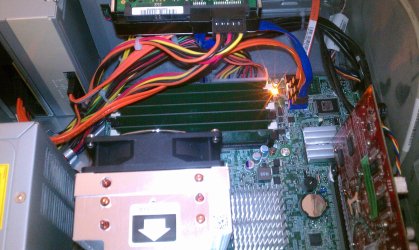
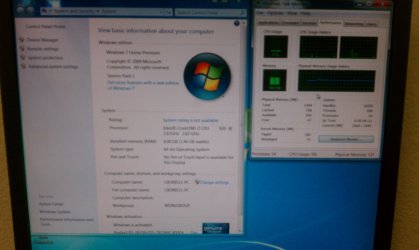
Ok in the original Vista and now in the Windows 7 the customer upgraded to it shows in the properties box and in task manager that 1.4 gb of memory is available. When I tested Ram I pulled all but 1 stick. in the Black slot closest to the proc I inserted 1 gb stick and booted. I get 2 beeps pause 2 beeps as if there is no ram inserted. I installed a 4Gb stick in that slot and get the beeps. in the next slot which is white it boots but says 4GB installed 1.4gb usable. :sarc:
the i7 8core shows as a dual core.:eek:

I swapped out an i5 dual core and it shows a single core:eek:

I ran an MRI Hardware test on it (Eurosoft pc-check 7.03) and it shows no errors and ran as a 8 core. I pulled the heatsink to replace the thermal paste and checked the numbers. it is indeed an i7 extreme 8 core proc.

With all of that I am going to assume that the motherboard is hosed.:sick: I just am hoping for either a confirmation or a direction for testing.
 

Attachments

  • IMAG0197.jpg
    IMAG0197.jpg
    868.6 KB · Views: 6
  • IMAG0198.jpg
    IMAG0198.jpg
    410.9 KB · Views: 5
  • IMAG0199.jpg
    IMAG0199.jpg
    449.5 KB · Views: 8
  • IMAG0200.jpg
    IMAG0200.jpg
    448.7 KB · Views: 7

My Computer My Computer

At a glance

Windows 7 Professional x64AMD Athlon II x4 3.00 GHz16GB Kingston DDR3Nvidia 8600 (dual DVI out for 2 monitors)
Computer type
PC/Desktop
Computer Manufacturer/Model Number
Custom Build MPCBS AMII
OS
Windows 7 Professional x64
CPU
AMD Athlon II x4 3.00 GHz
Motherboard
MSI GF615M-p33
Memory
16GB Kingston DDR3
Graphics Card(s)
Nvidia 8600 (dual DVI out for 2 monitors)
Sound Card
Onboard
Monitor(s) Displays
Acer H233H 23", ASUS 23"
Screen Resolution
1366 x 768
Hard Drives
(2) WD Blue 1 TB 3 partitions, (1) Seagate 7200 500GB with 2 partitions for useless and frequently deleted data Looking forward do an ssd for os soon.
PSU
Corsair 1100Watt
Case
Apevia HAF
Cooling
HAF AMD High Profile Heat sink and fan
Keyboard
wireless Logitech
Mouse
wireless Logitech
Internet Speed
16 mbps
Antivirus
eSet, AVG, Clam and Clamwin (depends on machine)
Browser
Firefox
Other Info
(9) Win 7 machines all x64 (POS Updated to Windows 7 pro YEA), (4) Linux machines x64 and x86 including a v3000 compaq lappy brought back to life with Mint 9 used to scan drives, (1) Linux Machine dual boot XP Pro (for testing and destroying), (1) Win 7 pro x64/Win 8.1 Lenovo Laptop Dual Boot.
The Dell community (users helping users forum) would be the best place since there are people there familiar with Dell hardware.

The desktop hardware section would be the place to start.
Desktop - Dell Community

I used to work the Dell forums (10 years) and Dell's have had a history of memory compatibility with non-Dell branded memory. For that reason we always recommended Crucial Memory as it was guaranteed to work in Dell's. Other brands will work but its hit or miss.
 

My Computer My Computer

At a glance

Windows 10 64 bitIntel i7 6700K16GB Corsair DominatorIntel CPU Graphics
Computer type
PC/Desktop
Computer Manufacturer/Model Number
My Own Build
OS
Windows 10 64 bit
CPU
Intel i7 6700K
Motherboard
ASUS ROG Maximus VIII Hero
Memory
16GB Corsair Dominator
Graphics Card(s)
Intel CPU Graphics
Sound Card
RealTek
Monitor(s) Displays
27" Dell S2719dgf
Screen Resolution
2560X1440
Hard Drives
1 TB Samsung 850 EVO SSD for Win 10 Pro
500GB Samsung 850 EVO SSD for Win 10 Insider
2 TB drive for backup
PSU
EVGA Supernova 750G2
Case
BeQuiet Silent Base 600
Cooling
Deepcool Captain 120EX
Keyboard
Microsoft Wireless 2000
Mouse
Microsoft wireless
Internet Speed
100 MB/sec (Cable)
Antivirus
Microsoft Defender and Malwarebytes
Browser
Edge/Firefox
Other Info
Cakewalk (Sonar) by BandLab and Studio One 4.1 Pro recording studio software. MOTU 896Mk3 Hybrid recording interface, Frontier Tranzport wireless control unit, Behringer X-Touch Control Surface.
Five USB connected optical drives for CD Audio production using Nero BurningROM
The Dell community (users helping users forum) would be the best place since there are people there familiar with Dell hardware.

The desktop hardware section would be the place to start.
Desktop - Dell Community

I used to work the Dell forums (10 years) and Dell's have had a history of memory compatibility with non-Dell branded memory. For that reason we always recommended Crucial Memory as it was guaranteed to work in Dell's. Other brands will work but its hit or miss.

This memory is the original Samsung M378b2873dz1-cf8 0850 listed on the configuration insert that the customer brought to me. Everything other than Windows 7 is original and this issue arose it's ugly head well before 7 was install. This customer thought he could fix it himself by installing 7.
 

My Computer My Computer

At a glance

Windows 7 Professional x64AMD Athlon II x4 3.00 GHz16GB Kingston DDR3Nvidia 8600 (dual DVI out for 2 monitors)
Computer type
PC/Desktop
Computer Manufacturer/Model Number
Custom Build MPCBS AMII
OS
Windows 7 Professional x64
CPU
AMD Athlon II x4 3.00 GHz
Motherboard
MSI GF615M-p33
Memory
16GB Kingston DDR3
Graphics Card(s)
Nvidia 8600 (dual DVI out for 2 monitors)
Sound Card
Onboard
Monitor(s) Displays
Acer H233H 23", ASUS 23"
Screen Resolution
1366 x 768
Hard Drives
(2) WD Blue 1 TB 3 partitions, (1) Seagate 7200 500GB with 2 partitions for useless and frequently deleted data Looking forward do an ssd for os soon.
PSU
Corsair 1100Watt
Case
Apevia HAF
Cooling
HAF AMD High Profile Heat sink and fan
Keyboard
wireless Logitech
Mouse
wireless Logitech
Internet Speed
16 mbps
Antivirus
eSet, AVG, Clam and Clamwin (depends on machine)
Browser
Firefox
Other Info
(9) Win 7 machines all x64 (POS Updated to Windows 7 pro YEA), (4) Linux machines x64 and x86 including a v3000 compaq lappy brought back to life with Mint 9 used to scan drives, (1) Linux Machine dual boot XP Pro (for testing and destroying), (1) Win 7 pro x64/Win 8.1 Lenovo Laptop Dual Boot.
Then the Dell forum is your best bet (probably to confirm your suspicions that its the motherboard).
 

My Computer My Computer

At a glance

Windows 10 64 bitIntel i7 6700K16GB Corsair DominatorIntel CPU Graphics
Computer type
PC/Desktop
Computer Manufacturer/Model Number
My Own Build
OS
Windows 10 64 bit
CPU
Intel i7 6700K
Motherboard
ASUS ROG Maximus VIII Hero
Memory
16GB Corsair Dominator
Graphics Card(s)
Intel CPU Graphics
Sound Card
RealTek
Monitor(s) Displays
27" Dell S2719dgf
Screen Resolution
2560X1440
Hard Drives
1 TB Samsung 850 EVO SSD for Win 10 Pro
500GB Samsung 850 EVO SSD for Win 10 Insider
2 TB drive for backup
PSU
EVGA Supernova 750G2
Case
BeQuiet Silent Base 600
Cooling
Deepcool Captain 120EX
Keyboard
Microsoft Wireless 2000
Mouse
Microsoft wireless
Internet Speed
100 MB/sec (Cable)
Antivirus
Microsoft Defender and Malwarebytes
Browser
Edge/Firefox
Other Info
Cakewalk (Sonar) by BandLab and Studio One 4.1 Pro recording studio software. MOTU 896Mk3 Hybrid recording interface, Frontier Tranzport wireless control unit, Behringer X-Touch Control Surface.
Five USB connected optical drives for CD Audio production using Nero BurningROM
Try performing a ClearCMOS procedure.
This is a very important step whenever changing a processor. The BIOS needs to update it's enumerations or it will pass garbage off to the OS.
 

My Computer My Computer

At a glance

Windows 7 64 Bit Home Premium SP1i7-3820GSkill F3-14900CL9Q - 16GBEVGA GeForce GTX660 - Driver 352.86
Computer type
PC/Desktop
Computer Manufacturer/Model Number
Home Built - Jan 2013
OS
Windows 7 64 Bit Home Premium SP1
CPU
i7-3820
Motherboard
Asus P9X79-PRO - Bios 4608
Memory
GSkill F3-14900CL9Q - 16GB
Graphics Card(s)
EVGA GeForce GTX660 - Driver 352.86
Sound Card
On board Realtek ALC898
Monitor(s) Displays
Acer S271HL
Screen Resolution
1920 x 1080
Hard Drives
#1- Samsung 840 Pro Series
#2- Western Digital WD1002FAEX Sata3 Black
#3- Western Digital WD1002FAEX Sata3 Black
PSU
Corsair CMPSU-850TX-V2 - 850 watt (by Seasonic)
Case
Corsair Obsidian 550D
Cooling
Standard 3 120mm case fans, Cooler Master Hyper 212 EVO
Keyboard
MS KC-0405
Mouse
Intellimouse 5-button
Internet Speed
56 Mbits/Sec (on a good day)
Antivirus
Avast & Malwarebytes
Browser
Firefox
Other Info
Asus DVD - DRW-24B1ST 24X
Try performing a ClearCMOS procedure.
This is a very important step whenever changing a processor. The BIOS needs to update it's enumerations or it will pass garbage off to the OS.

I did indeed clear the cmos and reset the bios to defaults at each test. By the way the 2nd run of the hardware test showed mem slot 5 of the six as being empty. I switched out memory and again it said slot 5 was empty. I would have to say the mobo has failed.
 

My Computer My Computer

At a glance

Windows 7 Professional x64AMD Athlon II x4 3.00 GHz16GB Kingston DDR3Nvidia 8600 (dual DVI out for 2 monitors)
Computer type
PC/Desktop
Computer Manufacturer/Model Number
Custom Build MPCBS AMII
OS
Windows 7 Professional x64
CPU
AMD Athlon II x4 3.00 GHz
Motherboard
MSI GF615M-p33
Memory
16GB Kingston DDR3
Graphics Card(s)
Nvidia 8600 (dual DVI out for 2 monitors)
Sound Card
Onboard
Monitor(s) Displays
Acer H233H 23", ASUS 23"
Screen Resolution
1366 x 768
Hard Drives
(2) WD Blue 1 TB 3 partitions, (1) Seagate 7200 500GB with 2 partitions for useless and frequently deleted data Looking forward do an ssd for os soon.
PSU
Corsair 1100Watt
Case
Apevia HAF
Cooling
HAF AMD High Profile Heat sink and fan
Keyboard
wireless Logitech
Mouse
wireless Logitech
Internet Speed
16 mbps
Antivirus
eSet, AVG, Clam and Clamwin (depends on machine)
Browser
Firefox
Other Info
(9) Win 7 machines all x64 (POS Updated to Windows 7 pro YEA), (4) Linux machines x64 and x86 including a v3000 compaq lappy brought back to life with Mint 9 used to scan drives, (1) Linux Machine dual boot XP Pro (for testing and destroying), (1) Win 7 pro x64/Win 8.1 Lenovo Laptop Dual Boot.
Well check the Dell forum as Fireberd said. Someone there might know something we don't about Dells.
 

My Computer My Computer

At a glance

Windows 7 64 Bit Home Premium SP1i7-3820GSkill F3-14900CL9Q - 16GBEVGA GeForce GTX660 - Driver 352.86
Computer type
PC/Desktop
Computer Manufacturer/Model Number
Home Built - Jan 2013
OS
Windows 7 64 Bit Home Premium SP1
CPU
i7-3820
Motherboard
Asus P9X79-PRO - Bios 4608
Memory
GSkill F3-14900CL9Q - 16GB
Graphics Card(s)
EVGA GeForce GTX660 - Driver 352.86
Sound Card
On board Realtek ALC898
Monitor(s) Displays
Acer S271HL
Screen Resolution
1920 x 1080
Hard Drives
#1- Samsung 840 Pro Series
#2- Western Digital WD1002FAEX Sata3 Black
#3- Western Digital WD1002FAEX Sata3 Black
PSU
Corsair CMPSU-850TX-V2 - 850 watt (by Seasonic)
Case
Corsair Obsidian 550D
Cooling
Standard 3 120mm case fans, Cooler Master Hyper 212 EVO
Keyboard
MS KC-0405
Mouse
Intellimouse 5-button
Internet Speed
56 Mbits/Sec (on a good day)
Antivirus
Avast & Malwarebytes
Browser
Firefox
Other Info
Asus DVD - DRW-24B1ST 24X
Well check the Dell forum as Fireberd said. Someone there might know something we don't about Dells.

Have done so. No answer as of yet but they did tell me that the procedure for adding in ram is to start with putting ram into slot1 instead of slot0. I tried that and cleard the ram so unfortunately no luck. I have a mobo on order and it should be here Mon. or Tues.

Thanks for trying.:huh:
 

My Computer My Computer

At a glance

Windows 7 Professional x64AMD Athlon II x4 3.00 GHz16GB Kingston DDR3Nvidia 8600 (dual DVI out for 2 monitors)
Computer type
PC/Desktop
Computer Manufacturer/Model Number
Custom Build MPCBS AMII
OS
Windows 7 Professional x64
CPU
AMD Athlon II x4 3.00 GHz
Motherboard
MSI GF615M-p33
Memory
16GB Kingston DDR3
Graphics Card(s)
Nvidia 8600 (dual DVI out for 2 monitors)
Sound Card
Onboard
Monitor(s) Displays
Acer H233H 23", ASUS 23"
Screen Resolution
1366 x 768
Hard Drives
(2) WD Blue 1 TB 3 partitions, (1) Seagate 7200 500GB with 2 partitions for useless and frequently deleted data Looking forward do an ssd for os soon.
PSU
Corsair 1100Watt
Case
Apevia HAF
Cooling
HAF AMD High Profile Heat sink and fan
Keyboard
wireless Logitech
Mouse
wireless Logitech
Internet Speed
16 mbps
Antivirus
eSet, AVG, Clam and Clamwin (depends on machine)
Browser
Firefox
Other Info
(9) Win 7 machines all x64 (POS Updated to Windows 7 pro YEA), (4) Linux machines x64 and x86 including a v3000 compaq lappy brought back to life with Mint 9 used to scan drives, (1) Linux Machine dual boot XP Pro (for testing and destroying), (1) Win 7 pro x64/Win 8.1 Lenovo Laptop Dual Boot.
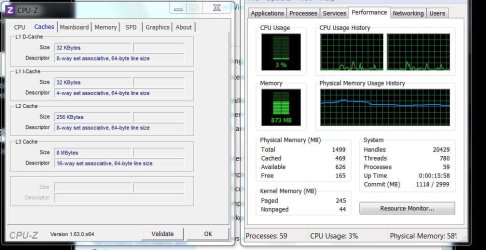
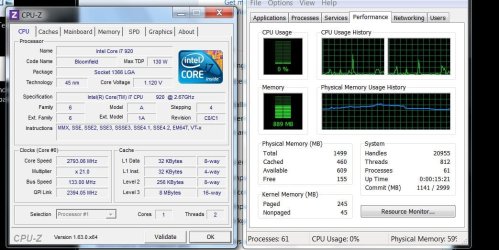
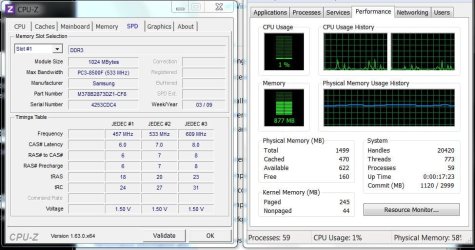
No Love for the Dead Dell. New (yes new stock from Dell) Motherboard has almost same issue, only now insead of 4 gigs of ram showing in the bios all six show. but 1.4 usable out of 4 in windows. Ran CPU-Z. See attachements. I have no farking idea whats whrong with this bastiches. :confused:
 

Attachments

  • Capture1.JPG
    Capture1.JPG
    102.7 KB · Views: 6
  • Capture2.JPG
    Capture2.JPG
    88 KB · Views: 4
  • Capture3.JPG
    Capture3.JPG
    89.2 KB · Views: 5
  • Capture4.JPG
    Capture4.JPG
    85.3 KB · Views: 4
  • Capture5.JPG
    Capture5.JPG
    91.9 KB · Views: 5

My Computer My Computer

At a glance

Windows 7 Professional x64AMD Athlon II x4 3.00 GHz16GB Kingston DDR3Nvidia 8600 (dual DVI out for 2 monitors)
Computer type
PC/Desktop
Computer Manufacturer/Model Number
Custom Build MPCBS AMII
OS
Windows 7 Professional x64
CPU
AMD Athlon II x4 3.00 GHz
Motherboard
MSI GF615M-p33
Memory
16GB Kingston DDR3
Graphics Card(s)
Nvidia 8600 (dual DVI out for 2 monitors)
Sound Card
Onboard
Monitor(s) Displays
Acer H233H 23", ASUS 23"
Screen Resolution
1366 x 768
Hard Drives
(2) WD Blue 1 TB 3 partitions, (1) Seagate 7200 500GB with 2 partitions for useless and frequently deleted data Looking forward do an ssd for os soon.
PSU
Corsair 1100Watt
Case
Apevia HAF
Cooling
HAF AMD High Profile Heat sink and fan
Keyboard
wireless Logitech
Mouse
wireless Logitech
Internet Speed
16 mbps
Antivirus
eSet, AVG, Clam and Clamwin (depends on machine)
Browser
Firefox
Other Info
(9) Win 7 machines all x64 (POS Updated to Windows 7 pro YEA), (4) Linux machines x64 and x86 including a v3000 compaq lappy brought back to life with Mint 9 used to scan drives, (1) Linux Machine dual boot XP Pro (for testing and destroying), (1) Win 7 pro x64/Win 8.1 Lenovo Laptop Dual Boot.
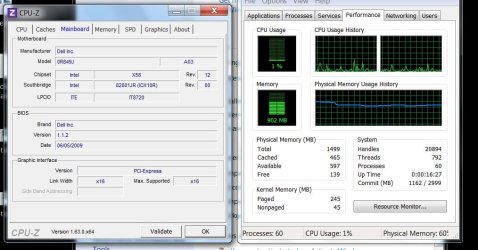
Something I did notice here that I feel is a bit odd is that CPU-z reports the CPU as an i7 but 1 core and 2 threads. My AMD Quad shows 4 cores 4 threads. An i5 shows 2 cores 2 threads in the new Mobo but still only 1.4 usable ram.
 

My Computer My Computer

At a glance

Windows 7 Professional x64AMD Athlon II x4 3.00 GHz16GB Kingston DDR3Nvidia 8600 (dual DVI out for 2 monitors)
Computer type
PC/Desktop
Computer Manufacturer/Model Number
Custom Build MPCBS AMII
OS
Windows 7 Professional x64
CPU
AMD Athlon II x4 3.00 GHz
Motherboard
MSI GF615M-p33
Memory
16GB Kingston DDR3
Graphics Card(s)
Nvidia 8600 (dual DVI out for 2 monitors)
Sound Card
Onboard
Monitor(s) Displays
Acer H233H 23", ASUS 23"
Screen Resolution
1366 x 768
Hard Drives
(2) WD Blue 1 TB 3 partitions, (1) Seagate 7200 500GB with 2 partitions for useless and frequently deleted data Looking forward do an ssd for os soon.
PSU
Corsair 1100Watt
Case
Apevia HAF
Cooling
HAF AMD High Profile Heat sink and fan
Keyboard
wireless Logitech
Mouse
wireless Logitech
Internet Speed
16 mbps
Antivirus
eSet, AVG, Clam and Clamwin (depends on machine)
Browser
Firefox
Other Info
(9) Win 7 machines all x64 (POS Updated to Windows 7 pro YEA), (4) Linux machines x64 and x86 including a v3000 compaq lappy brought back to life with Mint 9 used to scan drives, (1) Linux Machine dual boot XP Pro (for testing and destroying), (1) Win 7 pro x64/Win 8.1 Lenovo Laptop Dual Boot.
I see you mentioned switching processors. That can cause problems.
Try doing a ClearCMOS procedure. (CLRTC is the same thing) It should be in you Dell manual. But for many motherboards it involves moving a jumper:


  • Note all your current BIOS settings
  • Shut down the computer > remove the power cord.
  • Remove the 3v battery.
  • Move the CLRTC jumper from pins 1-2 to 2-3.
  • Touch a metal part of the case and Press and Hold the reset button for approx. 30 seconds to discharge all power from the board.
  • Put the CLRTC jumper back on pins 1-2.
  • Replace the 3v battery > replace the power cord > boot.
  • Immediately go back into BIOS and reset all your preferred settings. If the CLRTC worked you will need to reset the date and time.
 

My Computer My Computer

At a glance

Windows 7 64 Bit Home Premium SP1i7-3820GSkill F3-14900CL9Q - 16GBEVGA GeForce GTX660 - Driver 352.86
Computer type
PC/Desktop
Computer Manufacturer/Model Number
Home Built - Jan 2013
OS
Windows 7 64 Bit Home Premium SP1
CPU
i7-3820
Motherboard
Asus P9X79-PRO - Bios 4608
Memory
GSkill F3-14900CL9Q - 16GB
Graphics Card(s)
EVGA GeForce GTX660 - Driver 352.86
Sound Card
On board Realtek ALC898
Monitor(s) Displays
Acer S271HL
Screen Resolution
1920 x 1080
Hard Drives
#1- Samsung 840 Pro Series
#2- Western Digital WD1002FAEX Sata3 Black
#3- Western Digital WD1002FAEX Sata3 Black
PSU
Corsair CMPSU-850TX-V2 - 850 watt (by Seasonic)
Case
Corsair Obsidian 550D
Cooling
Standard 3 120mm case fans, Cooler Master Hyper 212 EVO
Keyboard
MS KC-0405
Mouse
Intellimouse 5-button
Internet Speed
56 Mbits/Sec (on a good day)
Antivirus
Avast & Malwarebytes
Browser
Firefox
Other Info
Asus DVD - DRW-24B1ST 24X
I see you mentioned switching processors. That can cause problems.
Try doing a ClearCMOS procedure. (CLRTC is the same thing) It should be in you Dell manual. But for many motherboards it involves moving a jumper:


  • Note all your current BIOS settings
  • Shut down the computer > remove the power cord.
  • Remove the 3v battery.
  • Move the CLRTC jumper from pins 1-2 to 2-3.
  • Touch a metal part of the case and Press and Hold the reset button for approx. 30 seconds to discharge all power from the board.
  • Put the CLRTC jumper back on pins 1-2.
  • Replace the 3v battery > replace the power cord > boot.
  • Immediately go back into BIOS and reset all your preferred settings. If the CLRTC worked you will need to reset the date and time.
I have done this with everything I have changed. Really an odd issue. The MRI bootable CD independantly *sp* checks the hardware and I have had it show me bad memory, bad Proscessor, bad hard drives on all sorts of machines including i7's and AMD 8cores.

It shows this system hardware as Completely Healthy. Could Windows really be the Issue?

I am going to boot up Mint and see what the system says then. I have been waiting for the latest edition to download so I know it's compatable with an i7.
 

My Computer My Computer

At a glance

Windows 7 Professional x64AMD Athlon II x4 3.00 GHz16GB Kingston DDR3Nvidia 8600 (dual DVI out for 2 monitors)
Computer type
PC/Desktop
Computer Manufacturer/Model Number
Custom Build MPCBS AMII
OS
Windows 7 Professional x64
CPU
AMD Athlon II x4 3.00 GHz
Motherboard
MSI GF615M-p33
Memory
16GB Kingston DDR3
Graphics Card(s)
Nvidia 8600 (dual DVI out for 2 monitors)
Sound Card
Onboard
Monitor(s) Displays
Acer H233H 23", ASUS 23"
Screen Resolution
1366 x 768
Hard Drives
(2) WD Blue 1 TB 3 partitions, (1) Seagate 7200 500GB with 2 partitions for useless and frequently deleted data Looking forward do an ssd for os soon.
PSU
Corsair 1100Watt
Case
Apevia HAF
Cooling
HAF AMD High Profile Heat sink and fan
Keyboard
wireless Logitech
Mouse
wireless Logitech
Internet Speed
16 mbps
Antivirus
eSet, AVG, Clam and Clamwin (depends on machine)
Browser
Firefox
Other Info
(9) Win 7 machines all x64 (POS Updated to Windows 7 pro YEA), (4) Linux machines x64 and x86 including a v3000 compaq lappy brought back to life with Mint 9 used to scan drives, (1) Linux Machine dual boot XP Pro (for testing and destroying), (1) Win 7 pro x64/Win 8.1 Lenovo Laptop Dual Boot.
Here is what I might try myself if I were convinced it might be a windows issue:

I would remove my current OS hard drive and install a blank hard drive. Then I would perform a ClearCMOS on the system, Reset the BIOS DEfaults, make only the absolute minimum BIOS settings changes needed (AHCI Mode, Boot from DVD), and then install W7 fresh. If it is still reporting hardware wrong then you can be assured it is not the OS. Reinstall the old hard drive and you are back to square one.

If you don't have a spare hard drive then an alternative would be to make a disk image of your current C: drive and System Partition (if you have one), and the format (just the) C: drive and do the fresh install.
 

My Computer My Computer

At a glance

Windows 7 64 Bit Home Premium SP1i7-3820GSkill F3-14900CL9Q - 16GBEVGA GeForce GTX660 - Driver 352.86
Computer type
PC/Desktop
Computer Manufacturer/Model Number
Home Built - Jan 2013
OS
Windows 7 64 Bit Home Premium SP1
CPU
i7-3820
Motherboard
Asus P9X79-PRO - Bios 4608
Memory
GSkill F3-14900CL9Q - 16GB
Graphics Card(s)
EVGA GeForce GTX660 - Driver 352.86
Sound Card
On board Realtek ALC898
Monitor(s) Displays
Acer S271HL
Screen Resolution
1920 x 1080
Hard Drives
#1- Samsung 840 Pro Series
#2- Western Digital WD1002FAEX Sata3 Black
#3- Western Digital WD1002FAEX Sata3 Black
PSU
Corsair CMPSU-850TX-V2 - 850 watt (by Seasonic)
Case
Corsair Obsidian 550D
Cooling
Standard 3 120mm case fans, Cooler Master Hyper 212 EVO
Keyboard
MS KC-0405
Mouse
Intellimouse 5-button
Internet Speed
56 Mbits/Sec (on a good day)
Antivirus
Avast & Malwarebytes
Browser
Firefox
Other Info
Asus DVD - DRW-24B1ST 24X
Here is what I might try myself if I were convinced it might be a windows issue:

I would remove my current OS hard drive and install a blank hard drive. Then I would perform a ClearCMOS on the system, Reset the BIOS DEfaults, make only the absolute minimum BIOS settings changes needed (AHCI Mode, Boot from DVD), and then install W7 fresh. If it is still reporting hardware wrong then you can be assured it is not the OS. Reinstall the old hard drive and you are back to square one.

If you don't have a spare hard drive then an alternative would be to make a disk image of your current C: drive and System Partition (if you have one), and the format (just the) C: drive and do the fresh install.

I actually did that right before I read this lol. and guess what?
Fresh install on an 80gb tosser drive shows............wait for it...........8 CORES!:party::party::dinesh::thumbsup:.... mem is off but it shows 1 2gb is missing and that could be my mem stick. :doh:
 

My Computer My Computer

At a glance

Windows 7 Professional x64AMD Athlon II x4 3.00 GHz16GB Kingston DDR3Nvidia 8600 (dual DVI out for 2 monitors)
Computer type
PC/Desktop
Computer Manufacturer/Model Number
Custom Build MPCBS AMII
OS
Windows 7 Professional x64
CPU
AMD Athlon II x4 3.00 GHz
Motherboard
MSI GF615M-p33
Memory
16GB Kingston DDR3
Graphics Card(s)
Nvidia 8600 (dual DVI out for 2 monitors)
Sound Card
Onboard
Monitor(s) Displays
Acer H233H 23", ASUS 23"
Screen Resolution
1366 x 768
Hard Drives
(2) WD Blue 1 TB 3 partitions, (1) Seagate 7200 500GB with 2 partitions for useless and frequently deleted data Looking forward do an ssd for os soon.
PSU
Corsair 1100Watt
Case
Apevia HAF
Cooling
HAF AMD High Profile Heat sink and fan
Keyboard
wireless Logitech
Mouse
wireless Logitech
Internet Speed
16 mbps
Antivirus
eSet, AVG, Clam and Clamwin (depends on machine)
Browser
Firefox
Other Info
(9) Win 7 machines all x64 (POS Updated to Windows 7 pro YEA), (4) Linux machines x64 and x86 including a v3000 compaq lappy brought back to life with Mint 9 used to scan drives, (1) Linux Machine dual boot XP Pro (for testing and destroying), (1) Win 7 pro x64/Win 8.1 Lenovo Laptop Dual Boot.
Excellent! :party:

To test the memory do this:
Download Memtest86+ - Advanced Memory Diagnostic Tool , the bootable CD (ISO) or the USB stick. And boot that to run.

The best way to test for a bad stick is to install one stick in slot A1 and then run Memtest overnight (or at least 3 passes - about 4 hours). Do each stick one at a time till you find the bad stick(s). Discard these.

If all sticks test OK then you could have a bad slot. (Hope for the bad stick!) To test for the bad slot you install one (now known good) stick at a time in each slot (Slot A1 & B1, then A1, B1, C1, etc.) until you hit the bad slot - the known good stick starts throwing up errors.

This is not fun, but it is a thorough test.
 

My Computer My Computer

At a glance

Windows 7 64 Bit Home Premium SP1i7-3820GSkill F3-14900CL9Q - 16GBEVGA GeForce GTX660 - Driver 352.86
Computer type
PC/Desktop
Computer Manufacturer/Model Number
Home Built - Jan 2013
OS
Windows 7 64 Bit Home Premium SP1
CPU
i7-3820
Motherboard
Asus P9X79-PRO - Bios 4608
Memory
GSkill F3-14900CL9Q - 16GB
Graphics Card(s)
EVGA GeForce GTX660 - Driver 352.86
Sound Card
On board Realtek ALC898
Monitor(s) Displays
Acer S271HL
Screen Resolution
1920 x 1080
Hard Drives
#1- Samsung 840 Pro Series
#2- Western Digital WD1002FAEX Sata3 Black
#3- Western Digital WD1002FAEX Sata3 Black
PSU
Corsair CMPSU-850TX-V2 - 850 watt (by Seasonic)
Case
Corsair Obsidian 550D
Cooling
Standard 3 120mm case fans, Cooler Master Hyper 212 EVO
Keyboard
MS KC-0405
Mouse
Intellimouse 5-button
Internet Speed
56 Mbits/Sec (on a good day)
Antivirus
Avast & Malwarebytes
Browser
Firefox
Other Info
Asus DVD - DRW-24B1ST 24X
Excellent! :party:

To test the memory do this:
Download Memtest86+ - Advanced Memory Diagnostic Tool , the bootable CD (ISO) or the USB stick. And boot that to run.

The best way to test for a bad stick is to install one stick in slot A1 and then run Memtest overnight (or at least 3 passes - about 4 hours). Do each stick one at a time till you find the bad stick(s). Discard these.

If all sticks test OK then you could have a bad slot. (Hope for the bad stick!) To test for the bad slot you install one (now known good) stick at a time in each slot (Slot A1 & B1, then A1, B1, C1, etc.) until you hit the bad slot - the known good stick starts throwing up errors.

This is not fun, but it is a thorough test.

While I admit this is thorough and expansive I ran MRI once again and it shows the 2GB stick in slot b2 as failing. I inserted the original 6GB factory memory (6 1GB sticks) and it shows 6gb 4.97 usable. I will root out the bad stick next and if needed I will use the memtest cd. I think I still have one in my case from last week.

Have you ever had any luck running memteset from a usb? I havent as of yet but I dont know what I might be doing wrong.

But I digress.:shock: :focus:

Point now is that with the new Mobo(yes the old one eventually failed a stress test AND Windows nailed down as an accomplice I am breathing a sigh of relief. Thanks to all that offered help and Thank you TVeblen.
:thumbsup:
 

My Computer My Computer

At a glance

Windows 7 Professional x64AMD Athlon II x4 3.00 GHz16GB Kingston DDR3Nvidia 8600 (dual DVI out for 2 monitors)
Computer type
PC/Desktop
Computer Manufacturer/Model Number
Custom Build MPCBS AMII
OS
Windows 7 Professional x64
CPU
AMD Athlon II x4 3.00 GHz
Motherboard
MSI GF615M-p33
Memory
16GB Kingston DDR3
Graphics Card(s)
Nvidia 8600 (dual DVI out for 2 monitors)
Sound Card
Onboard
Monitor(s) Displays
Acer H233H 23", ASUS 23"
Screen Resolution
1366 x 768
Hard Drives
(2) WD Blue 1 TB 3 partitions, (1) Seagate 7200 500GB with 2 partitions for useless and frequently deleted data Looking forward do an ssd for os soon.
PSU
Corsair 1100Watt
Case
Apevia HAF
Cooling
HAF AMD High Profile Heat sink and fan
Keyboard
wireless Logitech
Mouse
wireless Logitech
Internet Speed
16 mbps
Antivirus
eSet, AVG, Clam and Clamwin (depends on machine)
Browser
Firefox
Other Info
(9) Win 7 machines all x64 (POS Updated to Windows 7 pro YEA), (4) Linux machines x64 and x86 including a v3000 compaq lappy brought back to life with Mint 9 used to scan drives, (1) Linux Machine dual boot XP Pro (for testing and destroying), (1) Win 7 pro x64/Win 8.1 Lenovo Laptop Dual Boot.
You're most welcome.
I've always used my CD to run Memtest. Never gave the USB a try. No need until the optical drive goes the way of the floppy disk, a process that has already begun, what with laptops and tablets being sold without one.
 

My Computer My Computer

At a glance

Windows 7 64 Bit Home Premium SP1i7-3820GSkill F3-14900CL9Q - 16GBEVGA GeForce GTX660 - Driver 352.86
Computer type
PC/Desktop
Computer Manufacturer/Model Number
Home Built - Jan 2013
OS
Windows 7 64 Bit Home Premium SP1
CPU
i7-3820
Motherboard
Asus P9X79-PRO - Bios 4608
Memory
GSkill F3-14900CL9Q - 16GB
Graphics Card(s)
EVGA GeForce GTX660 - Driver 352.86
Sound Card
On board Realtek ALC898
Monitor(s) Displays
Acer S271HL
Screen Resolution
1920 x 1080
Hard Drives
#1- Samsung 840 Pro Series
#2- Western Digital WD1002FAEX Sata3 Black
#3- Western Digital WD1002FAEX Sata3 Black
PSU
Corsair CMPSU-850TX-V2 - 850 watt (by Seasonic)
Case
Corsair Obsidian 550D
Cooling
Standard 3 120mm case fans, Cooler Master Hyper 212 EVO
Keyboard
MS KC-0405
Mouse
Intellimouse 5-button
Internet Speed
56 Mbits/Sec (on a good day)
Antivirus
Avast & Malwarebytes
Browser
Firefox
Other Info
Asus DVD - DRW-24B1ST 24X
I'm a bit confused here. The Studio XPS 435MT is an X58 system, LGA 1366.

You didn't put an I5 CPU into it because there are no I5 Socket 1366 CPUs. The Socket 1156 and 1155 I5s wouldn't fit. The only desktop CPUs for 1366 that I know of are I7-9xx, which are 4 cores with hyperthreading (windows shows 8 cores) or 6 core (12 shown).

So: what did you really do?
 

My Computer My Computer

At a glance

Windows 7 Pro X64 SP1Intel Core I7-3930k16 GB Gskill DDR3-2133eVGA GTX680
Computer Manufacturer/Model Number
homegrown
OS
Windows 7 Pro X64 SP1
CPU
Intel Core I7-3930k
Motherboard
Asus P9X79 Pro
Memory
16 GB Gskill DDR3-2133
Graphics Card(s)
eVGA GTX680
Sound Card
Creative X-Fi Titanium
Monitor(s) Displays
As PA246Q
Screen Resolution
1920 X 1200
Hard Drives
Corsair Force GT, 120 GB
WDC 1.5TB Caviar Black
PSU
PCP&C Silencer 750 Crossfire
Case
Silverstone FT02
Cooling
Noctua NH-D14
Keyboard
cheap Logitech USB
Mouse
Microsoft Intellimouse Explorer (old optical) USB
Internet Speed
6Mb cable
Other Info
Pioneer BDR-205
Samsung SH-203B
Monsoon 5.1 speakers
I'm a bit confused here. The Studio XPS 435MT is an X58 system, LGA 1366.

You didn't put an I5 CPU into it because there are no I5 Socket 1366 CPUs. The Socket 1156 and 1155 I5s wouldn't fit. The only desktop CPUs for 1366 that I know of are I7-9xx, which are 4 cores with hyperthreading (windows shows 8 cores) or 6 core (12 shown).

So: what did you really do?


You are correct and this is a mistake of labeling on my part. I have dozens of test cpu's and I had i5 on the capsule this proc was in. after you mentioned this I looked closer it is indeed Not an i5 but a Xeon 5600 Dual core. My bad and I appologize.
the results are the same.
have a good day
 

My Computer My Computer

At a glance

Windows 7 Professional x64AMD Athlon II x4 3.00 GHz16GB Kingston DDR3Nvidia 8600 (dual DVI out for 2 monitors)
Computer type
PC/Desktop
Computer Manufacturer/Model Number
Custom Build MPCBS AMII
OS
Windows 7 Professional x64
CPU
AMD Athlon II x4 3.00 GHz
Motherboard
MSI GF615M-p33
Memory
16GB Kingston DDR3
Graphics Card(s)
Nvidia 8600 (dual DVI out for 2 monitors)
Sound Card
Onboard
Monitor(s) Displays
Acer H233H 23", ASUS 23"
Screen Resolution
1366 x 768
Hard Drives
(2) WD Blue 1 TB 3 partitions, (1) Seagate 7200 500GB with 2 partitions for useless and frequently deleted data Looking forward do an ssd for os soon.
PSU
Corsair 1100Watt
Case
Apevia HAF
Cooling
HAF AMD High Profile Heat sink and fan
Keyboard
wireless Logitech
Mouse
wireless Logitech
Internet Speed
16 mbps
Antivirus
eSet, AVG, Clam and Clamwin (depends on machine)
Browser
Firefox
Other Info
(9) Win 7 machines all x64 (POS Updated to Windows 7 pro YEA), (4) Linux machines x64 and x86 including a v3000 compaq lappy brought back to life with Mint 9 used to scan drives, (1) Linux Machine dual boot XP Pro (for testing and destroying), (1) Win 7 pro x64/Win 8.1 Lenovo Laptop Dual Boot.
I'm a bit confused here. The Studio XPS 435MT is an X58 system, LGA 1366.

You didn't put an I5 CPU into it because there are no I5 Socket 1366 CPUs. The Socket 1156 and 1155 I5s wouldn't fit. The only desktop CPUs for 1366 that I know of are I7-9xx, which are 4 cores with hyperthreading (windows shows 8 cores) or 6 core (12 shown).

So: what did you really do?


You are correct and this is a mistake of labeling on my part. I have dozens of test cpu's and I had i5 on the capsule this proc was in. after you mentioned this I looked closer it is indeed Not an i5 but a Xeon 5600 Dual core. My bad and I appologize.
the results are the same.
have a good day

No need for an apology. Thanks for the clarification.

I mentioned "desktop" CPUs because I know nothing about Xeons. I've only glanced at the specs for the 8 core versions, and they're all too expensive for me.
 

My Computer My Computer

At a glance

Windows 7 Pro X64 SP1Intel Core I7-3930k16 GB Gskill DDR3-2133eVGA GTX680
Computer Manufacturer/Model Number
homegrown
OS
Windows 7 Pro X64 SP1
CPU
Intel Core I7-3930k
Motherboard
Asus P9X79 Pro
Memory
16 GB Gskill DDR3-2133
Graphics Card(s)
eVGA GTX680
Sound Card
Creative X-Fi Titanium
Monitor(s) Displays
As PA246Q
Screen Resolution
1920 X 1200
Hard Drives
Corsair Force GT, 120 GB
WDC 1.5TB Caviar Black
PSU
PCP&C Silencer 750 Crossfire
Case
Silverstone FT02
Cooling
Noctua NH-D14
Keyboard
cheap Logitech USB
Mouse
Microsoft Intellimouse Explorer (old optical) USB
Internet Speed
6Mb cable
Other Info
Pioneer BDR-205
Samsung SH-203B
Monsoon 5.1 speakers
Back
Top