Denied Access to D:\ drive

Hakon

New member
Local time
10:11 PM
Messages
72
Seems i ****** up my permission settings pretty badly thistime.

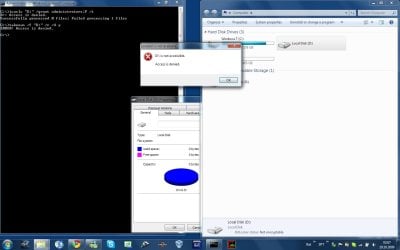
cmd is run as admin, and uac is off.
Code:
C:\>whoami
troll\hákon

C:\>net user Hákon
User name                    Hákon
Full Name                    Hákon
Comment
User's comment
Country code                 000 (System Default)
Account active               Yes
Account expires              Never

Password last set            18.8.2009 12:42:43
Password expires             Never
Password changeable          18.8.2009 12:42:43
Password required            No
User may change password     Yes

Workstations allowed         All
Logon script
User profile
Home directory
Last logon                   19.10.2009 01:39:46

Logon hours allowed          All

[B]Local Group Memberships      *Administrators[/B]
Global Group memberships     *None
The command completed successfully.


C:\>takeown /f "D:" /r /d y
ERROR: Access is denied.

C:\>icacls "D:" /grant administrators:F /t
D:: Access is denied.
Successfully processed 0 files; Failed processing 1 files

C:\>

Clipboard01.jpg

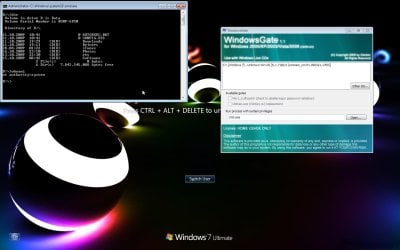
WindowsGate.jpg
 

My Computer My Computer

At a glance

Windows 7 build 7600 64 bitPhenom II X4 955 retail 3.2GHz4x GeiL 2GB Value PC3-10660 CL9 DC DDR3-1333,...PowerColor Radeon HD5850 PCS+ 1024MB, 256-bit...
Computer Manufacturer/Model Number
Custom
OS
Windows 7 build 7600 64 bit
CPU
Phenom II X4 955 retail 3.2GHz
Motherboard
ASRock M3A790GXH/USB3 ATX AMD AMD3
Memory
4x GeiL 2GB Value PC3-10660 CL9 DC DDR3-1333, CL 9-9-9-28
Graphics Card(s)
PowerColor Radeon HD5850 PCS+ 1024MB, 256-bit GDDR5
Sound Card
Built in
Hard Drives
G.Skill Phoenix Pro 120GB SATA2 SSD Sandforce SF-120
Samsung Spinpoint 500GB SATA2 7200RPM
PSU
Tacens Radix III Smart 520W

My Computer My Computer

At a glance

XP, Seven, 2008R2AMD, Intel, VIACorsair, Kingston, etc.ATI, NVIDIA
Computer Manufacturer/Model Number
Too many to list.
OS
XP, Seven, 2008R2
CPU
AMD, Intel, VIA
Motherboard
Various
Memory
Corsair, Kingston, etc.
Graphics Card(s)
ATI, NVIDIA
Monitor(s) Displays
Samsung
Hard Drives
Maxtor, Western Digital
Keyboard
qwerty
Internet Speed
22 Mb/s @ home, 1 Gb/s @ server
Other Info
All of my systems still run fastest on XP 32-bit for the most part. Win7 is fun to play with, but I still prefer XP for raw speed, security, and functionality.
1.First try through GUI takeownership of drive:Take Ownership of file - Vista Forums

2.If point I fail...Download PsTools PsTools extract from this psexec.exe file and place it in C:\Windows\System32.Psexec let you run processes from SYSTEM account.

for example:if you type in cmd.exe run with administrative previlliges this command:

psexec -s -i -d cmd.exe


it will run second console from SYSTEM account.

You can also run explorer from SYSTEM account

psexec -s -i -d explorer.exe

and again try GUI to take ownership of drive
you can also use your favorite file manager

psexec -s -i -d "path to favorite any good file menager"
 

My Computer My Computer

At a glance

Windows 7 Professional x64 PLAMD Athlon 4450eGoodRam DDR2 2x2048MB (FSB 800MHz)nVidia GeForce 9600GT (G94-300) 1024 MB
Computer Manufacturer/Model Number
Custom made
OS
Windows 7 Professional x64 PL
CPU
AMD Athlon 4450e
Motherboard
Giga-Byte GA-MA69G-S3H
Memory
GoodRam DDR2 2x2048MB (FSB 800MHz)
Graphics Card(s)
nVidia GeForce 9600GT (G94-300) 1024 MB
Monitor(s) Displays
SAMSUNG SyncMaster HS2P301688
Hard Drives
Seagate ST3750330AS 750GB
PSU
Corsair 550W
Cooling
AeroCool ExtremeEngine 3T
i had the same issue
i clicked with the right mouse button then navigate to the security tab, then the advanced button on the right bottom, then the owner Tab, edit and there click on your user account dont forget to check the box on the left bottom, the last step is to confirm with OK, and there you have your permissions set to your account.
 

My Computer My Computer

At a glance

W7
Computer Manufacturer/Model Number
dv5 1199ew
OS
W7
Other Info
+Rep if I have helped
Thanks for all the replies, i took the laptop to the freindly local computershop and they had a microsoft professional look at it, and he said there is no way to revert what i did (set denie permissions to all Users that are members of the "Users" group). i can now access all subfolders of the D:\ drive (eg. D:\Software) but not the D:\ itself. here is a copypaste from the icacls D: command:

Code:
C:\>icacls D:
D: BUILTIN\Users:(OI)(CI)(N)
   BUILTIN\Users:(F)
   TROLL\Hákon:(F)
   BUILTIN\Administrators:(F)
   NT AUTHORITY\SYSTEM:(OI)(CI)(F)
   BUILTIN\Administrators:(OI)(CI)(F)
   Everyone:(OI)(CI)(F)

Successfully processed 1 files; Failed processing 0 files

C:\>

if there is any l33t h4x0r out there that can possibly help me fix this(eg. rebuild the whole ACL, delete all acl entrys for that drive)...id be thankfull, otherwise im just copying 200GB of data to my external drive and re-partitioning the drive

@ moadip:
i dont have the "Security" tab anymore

@ Flavius:
thanks for the PsExec tool, its awesome, but i cant run explorer as system(i can, but i cant open a window as system, it just runs as the current user)

@ sup3rsprt:
i....dont remember, well, i set denie permissions to all normal users...and something else:o
 

My Computer My Computer

At a glance

Windows 7 build 7600 64 bitPhenom II X4 955 retail 3.2GHz4x GeiL 2GB Value PC3-10660 CL9 DC DDR3-1333,...PowerColor Radeon HD5850 PCS+ 1024MB, 256-bit...
Computer Manufacturer/Model Number
Custom
OS
Windows 7 build 7600 64 bit
CPU
Phenom II X4 955 retail 3.2GHz
Motherboard
ASRock M3A790GXH/USB3 ATX AMD AMD3
Memory
4x GeiL 2GB Value PC3-10660 CL9 DC DDR3-1333, CL 9-9-9-28
Graphics Card(s)
PowerColor Radeon HD5850 PCS+ 1024MB, 256-bit GDDR5
Sound Card
Built in
Hard Drives
G.Skill Phoenix Pro 120GB SATA2 SSD Sandforce SF-120
Samsung Spinpoint 500GB SATA2 7200RPM
PSU
Tacens Radix III Smart 520W
Probably best to save what you can from the drive then delete it. As well as never mess with permissions again... o.o Using DENY permissions need to be done with consideration and careful planning because DENY takes precedence over ALLOW.
 

My Computer My Computer

At a glance

Windows 10 Pro (x64)Intel Core i7-3930K (3.2GHz - 4.5GHz)4x Samsung 4GB PC3-12800 DDR3 (16GB 1600MHz)Nvidia Geforce GTX 690
Computer type
PC/Desktop
Computer Manufacturer/Model Number
Alienware Aurora ALX R4
OS
Windows 10 Pro (x64)
CPU
Intel Core i7-3930K (3.2GHz - 4.5GHz)
Motherboard
Alienware Aurora-R4 x79
Memory
4x Samsung 4GB PC3-12800 DDR3 (16GB 1600MHz)
Graphics Card(s)
Nvidia Geforce GTX 690
Sound Card
SteelSeries Siberia Elite
Monitor(s) Displays
Dell UltraSharp U3011
Screen Resolution
2560x1600
Hard Drives
Samsung 850 Pro 256 GB, Seagate 1TB Desktop Hybrid HDD, 2x Western Digital 4TB Green HDD
PSU
875W Some Dell PSU <.<
Case
Alienware Aurora ALX
Cooling
Custom Liquid Cooling (EK CPU & GPU blocks) dual EK 480RAD
Keyboard
Logitech G710+ Mechanical
Mouse
Logitech G700s
Internet Speed
Verizon Fios (50 mbps average)
Other Info
Server: Intel NUC D54250WYK: i5-4250U, 16GB, 256 GB mSATA, Windows Server 2012 R2
@ Flavius:
thanks for the PsExec tool, its awesome, but i cant run explorer as system(i can, but i cant open a window as system, it just runs as the current user)
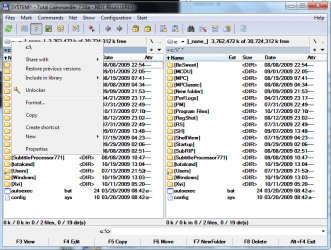
So run from SYSTEM account any external file menager with security tabs for example Total Commander.From this kind of started program you must have access to security tabs from System account not your own.I often do this kind of things.

EDIT

@ moadip:
i dont have the "Security" tab anymore

Navigate to key HKEY_CURRENT_USER\Software\Microsoft\windows\CurrentVersion\Policies\Explorer and make sure you don't have string Nosecuritytab <-if you have this string remove it +restart
 

My Computer My Computer

At a glance

Windows 7 Professional x64 PLAMD Athlon 4450eGoodRam DDR2 2x2048MB (FSB 800MHz)nVidia GeForce 9600GT (G94-300) 1024 MB
Computer Manufacturer/Model Number
Custom made
OS
Windows 7 Professional x64 PL
CPU
AMD Athlon 4450e
Motherboard
Giga-Byte GA-MA69G-S3H
Memory
GoodRam DDR2 2x2048MB (FSB 800MHz)
Graphics Card(s)
nVidia GeForce 9600GT (G94-300) 1024 MB
Monitor(s) Displays
SAMSUNG SyncMaster HS2P301688
Hard Drives
Seagate ST3750330AS 750GB
PSU
Corsair 550W
Cooling
AeroCool ExtremeEngine 3T
How do i do that to a drive in TC ? i figured it out for folders. Select a folder > File > Properties > security tab
 

My Computer My Computer

At a glance

Windows 7 build 7600 64 bitPhenom II X4 955 retail 3.2GHz4x GeiL 2GB Value PC3-10660 CL9 DC DDR3-1333,...PowerColor Radeon HD5850 PCS+ 1024MB, 256-bit...
Computer Manufacturer/Model Number
Custom
OS
Windows 7 build 7600 64 bit
CPU
Phenom II X4 955 retail 3.2GHz
Motherboard
ASRock M3A790GXH/USB3 ATX AMD AMD3
Memory
4x GeiL 2GB Value PC3-10660 CL9 DC DDR3-1333, CL 9-9-9-28
Graphics Card(s)
PowerColor Radeon HD5850 PCS+ 1024MB, 256-bit GDDR5
Sound Card
Built in
Hard Drives
G.Skill Phoenix Pro 120GB SATA2 SSD Sandforce SF-120
Samsung Spinpoint 500GB SATA2 7200RPM
PSU
Tacens Radix III Smart 520W
Nvm, i figured it out :)
 

My Computer My Computer

At a glance

Windows 7 build 7600 64 bitPhenom II X4 955 retail 3.2GHz4x GeiL 2GB Value PC3-10660 CL9 DC DDR3-1333,...PowerColor Radeon HD5850 PCS+ 1024MB, 256-bit...
Computer Manufacturer/Model Number
Custom
OS
Windows 7 build 7600 64 bit
CPU
Phenom II X4 955 retail 3.2GHz
Motherboard
ASRock M3A790GXH/USB3 ATX AMD AMD3
Memory
4x GeiL 2GB Value PC3-10660 CL9 DC DDR3-1333, CL 9-9-9-28
Graphics Card(s)
PowerColor Radeon HD5850 PCS+ 1024MB, 256-bit GDDR5
Sound Card
Built in
Hard Drives
G.Skill Phoenix Pro 120GB SATA2 SSD Sandforce SF-120
Samsung Spinpoint 500GB SATA2 7200RPM
PSU
Tacens Radix III Smart 520W
How do i do that to a drive in TC ? i figured it out for folders. Select a folder > File > Properties > security tab
For drives is bit different.Navigate to left upper corner with drive letter,rightclick>>Properties (image)
 

Attachments

  • TC.png
    TC.png
    32.8 KB · Views: 295

My Computer My Computer

At a glance

Windows 7 Professional x64 PLAMD Athlon 4450eGoodRam DDR2 2x2048MB (FSB 800MHz)nVidia GeForce 9600GT (G94-300) 1024 MB
Computer Manufacturer/Model Number
Custom made
OS
Windows 7 Professional x64 PL
CPU
AMD Athlon 4450e
Motherboard
Giga-Byte GA-MA69G-S3H
Memory
GoodRam DDR2 2x2048MB (FSB 800MHz)
Graphics Card(s)
nVidia GeForce 9600GT (G94-300) 1024 MB
Monitor(s) Displays
SAMSUNG SyncMaster HS2P301688
Hard Drives
Seagate ST3750330AS 750GB
PSU
Corsair 550W
Cooling
AeroCool ExtremeEngine 3T
Aaand it has been solved! thank you all for the replies, and tanks Flavius for the solution! :)
 

My Computer My Computer

At a glance

Windows 7 build 7600 64 bitPhenom II X4 955 retail 3.2GHz4x GeiL 2GB Value PC3-10660 CL9 DC DDR3-1333,...PowerColor Radeon HD5850 PCS+ 1024MB, 256-bit...
Computer Manufacturer/Model Number
Custom
OS
Windows 7 build 7600 64 bit
CPU
Phenom II X4 955 retail 3.2GHz
Motherboard
ASRock M3A790GXH/USB3 ATX AMD AMD3
Memory
4x GeiL 2GB Value PC3-10660 CL9 DC DDR3-1333, CL 9-9-9-28
Graphics Card(s)
PowerColor Radeon HD5850 PCS+ 1024MB, 256-bit GDDR5
Sound Card
Built in
Hard Drives
G.Skill Phoenix Pro 120GB SATA2 SSD Sandforce SF-120
Samsung Spinpoint 500GB SATA2 7200RPM
PSU
Tacens Radix III Smart 520W
Hi Guys,
I have exactly the same problem as Hakon, only, I still cannot access my drive trough TC. Can you help me find the solution that worked for you?

I ran TC via PsExec as you suggested, but My Total Commander still returns Access Denied when I try to get the properties of my F:/ Drive.

8yrwo5.png


What I did was delete all user rights and then click Apply. I was planning to recursively set all rights to "Everyone" after that. Stupid mistake ofcourse.

Any way to bring my files back?
 

My Computer My Computer

At a glance

Windows 7
OS
Windows 7

My Computer My Computer

At a glance

Windows 7 Professional x64 PLAMD Athlon 4450eGoodRam DDR2 2x2048MB (FSB 800MHz)nVidia GeForce 9600GT (G94-300) 1024 MB
Computer Manufacturer/Model Number
Custom made
OS
Windows 7 Professional x64 PL
CPU
AMD Athlon 4450e
Motherboard
Giga-Byte GA-MA69G-S3H
Memory
GoodRam DDR2 2x2048MB (FSB 800MHz)
Graphics Card(s)
nVidia GeForce 9600GT (G94-300) 1024 MB
Monitor(s) Displays
SAMSUNG SyncMaster HS2P301688
Hard Drives
Seagate ST3750330AS 750GB
PSU
Corsair 550W
Cooling
AeroCool ExtremeEngine 3T
Try using cacls to set permissions in a NT_AUTORITY\SYSTEM elevated command prompt, using PsExec
 

My Computer My Computer

At a glance

Windows 7 build 7600 64 bitPhenom II X4 955 retail 3.2GHz4x GeiL 2GB Value PC3-10660 CL9 DC DDR3-1333,...PowerColor Radeon HD5850 PCS+ 1024MB, 256-bit...
Computer Manufacturer/Model Number
Custom
OS
Windows 7 build 7600 64 bit
CPU
Phenom II X4 955 retail 3.2GHz
Motherboard
ASRock M3A790GXH/USB3 ATX AMD AMD3
Memory
4x GeiL 2GB Value PC3-10660 CL9 DC DDR3-1333, CL 9-9-9-28
Graphics Card(s)
PowerColor Radeon HD5850 PCS+ 1024MB, 256-bit GDDR5
Sound Card
Built in
Hard Drives
G.Skill Phoenix Pro 120GB SATA2 SSD Sandforce SF-120
Samsung Spinpoint 500GB SATA2 7200RPM
PSU
Tacens Radix III Smart 520W
Back
Top