Desktop Background - Allow or Prevent Changing

How to Allow or Prevent Changing Desktop Background in Windows


   Information
This tutorial will show you how to allow or prevent all or specific users to be able to add, configure, or change desktop background wallpaper through Personalization in Vista, Windows 7, and Windows 8.

The Windows 7 Starter and Home Basic editions do not have the Personalization feature included in them, so this tutorial will not apply to them.

You must be logged in as an administrator to be able to do the steps in this tutorial.

   Warning
This will not prevent users on the computer from right clicking on an image and clicking on Set as desktop background (on computer) or Set as Background (on website), to change the desktop background wallpaper as that image.

To disable Set as desktop background, you could specify a desktop background wallpaper that will be displayed on all users' desktops that cannot be changed afterwards.

You could also remove Set as desktop background from the context menu.
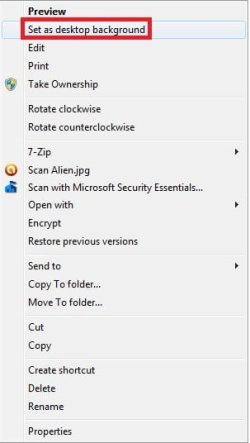
Set-as-desktop-background.jpgSet-as-Background.jpg

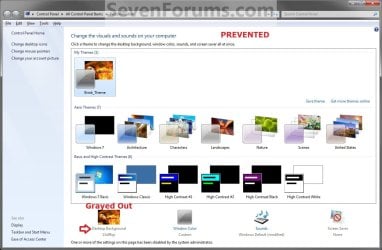
EXAMPLE: Desktop Background in Personalization
NOTE: This is Desktop Background set to be allowed (left screenshot below) and prevented (right screenshot below) in Personalization.
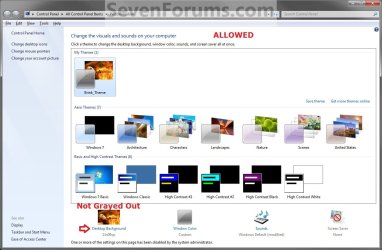
Allowed.jpg

Prevented.jpg


OPTION ONE

To Allow or Prevent Changing Desktop Background using REG File


1. To Allow Changing Desktop Background for Only Current User
NOTE: This is the default setting.
A) Click/tap on the Download button below to download the file below, and go to step 3 below.
Allow_Changing_Desktop_Background.reg

Download


2. To Prevent Changing Desktop Background for Only Current User
A) Click/tap on the Download button below to download the file below, and go to step 3 below.
Prevent_Changing_Desktop_Background.reg


Download


3. Save the .reg file to your desktop.

4. Double click/tap on the downloaded .reg file to merge it.

5. Click/tap on Run, Yes (UAC Windows 7/8) or Continue (UAC Vista), Yes, and OK when prompted.

6. Restart the computer to fully apply.

7. When finished, you can delete the downloaded .reg file if you like.


OPTION TWO

To Allow or Prevent Changing Desktop Background using Group Policy


1. Open the all users, specific users or groups, or all users except administrators Local Group Policy Editor for how you want this policy applied.

2. In the left pane, click/tap on to expand User Configuration, Administrative Templates, Control Panel, and Personalization. (See screenshot below)
Group_Policy.jpg
3. In the right pane of Personalization, double click/tap on Prevent changing desktop background to edit it. (See screenshot above)

4. To Allow Changing Desktop Background
A) Select (dot) either Not Configured or Disabled, and go to step 6 below. (See screenshot below step 6)
NOTE: Not Configured is the default setting.
5. To Prevent Changing Desktop Background
A) Select (dot) Enabled, and go to step 6 below. (See screenshot below step 6)
6. Click/tap on OK. (See screenshot below)
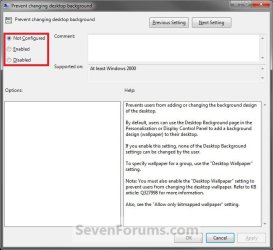
Edit.jpg
7. Close the Local Group Policy Editor window.

8. Restart the computer to fully apply.
That's it,
Shawn


Attachments

Last edited:

My Computer

OS
Windows 7 Ultimate 32bit
CPU
AMD Phenom II x4 965 3.4GHz
Motherboard
Gigabyte GA-890FXA-UD5 rev2.0
Memory
G.SKILL F3-16000CL8D-4GBPIS (2GBx2)
Graphics Card(s)
Inno3d GTX480 1.5GB GDDR5
Monitor(s) Displays
LG FLATRON W2486L
Screen Resolution
1920x1080@60Hz
Hard Drives
Western Digital Caviar Black WD1002FAEX 1TB 64MB 7200RPM Sata III x3
PSU
Enermax MODU82+ 625W
Case
Thermaltake Element G Middle Tower
Hello Need4steer,

Thank you. It's already in the warning box at the top of the tutorial. ;)
 

My Computer

Computer type
PC/Desktop
Computer Manufacturer/Model Number
Self built custom
OS
64-bit Windows 11 Pro for Workstations
CPU
Intel i7-8700K OC'd to 5 GHz
Motherboard
ASUS ROG Maximus XI Formula Z390
Memory
64 GB (4x16GB) G.SKILL TridentZ RGB DDR4 3600 MHz
Graphics Card(s)
ASUS ROG-STRIX-GTX1080TI-O11G-GAMING
Sound Card
Integrated
Monitor(s) Displays
2 x Samsung Odyssey G7 27"
Screen Resolution
2560x1440
Hard Drives
1TB Samsung 990 PRO M.2,
4TB Samsung 990 PRO PRO M.2,
TerraMaster F8 SSD Plus NAS
PSU
Seasonic Prime Titanium 850W
Case
Thermaltake Core P3
Cooling
Corsair Hydro H115i
Keyboard
Logitech wireless K800
Mouse
Logitech MX Master 4
Internet Speed
2 Gb/s Download and 100 Mb/s Upload
Antivirus
Malwarebyte Anti-Malware Premium
Browser
Google Chrome
Other Info
Logitech Z625 speaker system,
Logitech BRIO 4K Pro webcam,
HP Color LaserJet Pro MFP M477fdn,
APC SMART-UPS RT 1000 XL - SURT1000XLI,
Galaxy S23 Plus phone
REG File Download didnt work for me

Hi Guys, ok did the reg file download and restarted. However still have the same issue, cant change desktop background and the and cant use option 2 as im running Windows 7 Home Premium:( any ideas? Thanks in advance
 

My Computer

OS
Windows 7 Ultimate Home Premium 64bit
Hello Yogi, and welcome to Seven Forums.

Could you post some screenshots of what is wrong when you try to change your desktop background, and give more details on what is or is not happening? For example, any of the options grayed out, or you are only able to change to solid colors, etc......
 

My Computer

Computer type
PC/Desktop
Computer Manufacturer/Model Number
Self built custom
OS
64-bit Windows 11 Pro for Workstations
CPU
Intel i7-8700K OC'd to 5 GHz
Motherboard
ASUS ROG Maximus XI Formula Z390
Memory
64 GB (4x16GB) G.SKILL TridentZ RGB DDR4 3600 MHz
Graphics Card(s)
ASUS ROG-STRIX-GTX1080TI-O11G-GAMING
Sound Card
Integrated
Monitor(s) Displays
2 x Samsung Odyssey G7 27"
Screen Resolution
2560x1440
Hard Drives
1TB Samsung 990 PRO M.2,
4TB Samsung 990 PRO PRO M.2,
TerraMaster F8 SSD Plus NAS
PSU
Seasonic Prime Titanium 850W
Case
Thermaltake Core P3
Cooling
Corsair Hydro H115i
Keyboard
Logitech wireless K800
Mouse
Logitech MX Master 4
Internet Speed
2 Gb/s Download and 100 Mb/s Upload
Antivirus
Malwarebyte Anti-Malware Premium
Browser
Google Chrome
Other Info
Logitech Z625 speaker system,
Logitech BRIO 4K Pro webcam,
HP Color LaserJet Pro MFP M477fdn,
APC SMART-UPS RT 1000 XL - SURT1000XLI,
Galaxy S23 Plus phone
Hi Brink, many thanks for the prompt reply, didnt expect to get one so quick:)

Tried to reply with a screenshot of the desktop personalisation options but didnt work.

Anyway doesnt really matter as its the usual issue: can only choose solid colour options, and the writing under 'Desktop Background' is greyed out... Help....???? Feel like im goingcrazy here, found your tutorial and thought i was sorted however the reg file didnt seem to work for me:(

Sorry, i see my first post came thorugh but the screenshot didnt load properly, maybe you can delete that post? In realtion to my issue, i noticed on another thread that you had changed the reg download for another user and that then worked, maybe if i got the original reg download that may work for me? Perhaps not but just a thought. Thanks
 
Last edited by a moderator:

My Computer

OS
Windows 7 Ultimate Home Premium 64bit

My Computer

Computer type
PC/Desktop
Computer Manufacturer/Model Number
Self built custom
OS
64-bit Windows 11 Pro for Workstations
CPU
Intel i7-8700K OC'd to 5 GHz
Motherboard
ASUS ROG Maximus XI Formula Z390
Memory
64 GB (4x16GB) G.SKILL TridentZ RGB DDR4 3600 MHz
Graphics Card(s)
ASUS ROG-STRIX-GTX1080TI-O11G-GAMING
Sound Card
Integrated
Monitor(s) Displays
2 x Samsung Odyssey G7 27"
Screen Resolution
2560x1440
Hard Drives
1TB Samsung 990 PRO M.2,
4TB Samsung 990 PRO PRO M.2,
TerraMaster F8 SSD Plus NAS
PSU
Seasonic Prime Titanium 850W
Case
Thermaltake Core P3
Cooling
Corsair Hydro H115i
Keyboard
Logitech wireless K800
Mouse
Logitech MX Master 4
Internet Speed
2 Gb/s Download and 100 Mb/s Upload
Antivirus
Malwarebyte Anti-Malware Premium
Browser
Google Chrome
Other Info
Logitech Z625 speaker system,
Logitech BRIO 4K Pro webcam,
HP Color LaserJet Pro MFP M477fdn,
APC SMART-UPS RT 1000 XL - SURT1000XLI,
Galaxy S23 Plus phone
Hi Brink, many thanks for the follow up, unfortunately no joy though.

I had already tried:
Remove background images (where available) .http://www.sevenforums.com/tutorials...available.html

And i just tried with no success:
Not specify a desktop background.http://www.sevenforums.com/tutorials...nt-change.html

First i tried without step 5, i.e. have a locked wallpaper, this didnt work.
Then tried with step 5, i.e. the default setting allowing users to change their own desktop backgrounds. Still no luck :(

Starting to get worried now, nothing seems to be working, any other suggestions.
I know not having the exact pic I want is not a major deal in the grand scheme of things, however this is now really annoying me, have spent so ling trying to resolve what should be such a straight forward thing.

Any other ideas or suggestions would be greatly, greatly appreciated. Thanks
 

My Computer

OS
Windows 7 Ultimate Home Premium 64bit
Yogi,

Well, we tried the usual suspects. You could do a system restore using a restore point (if available) dated before this started happening to hopefully undo and fix it.
 

My Computer

Computer type
PC/Desktop
Computer Manufacturer/Model Number
Self built custom
OS
64-bit Windows 11 Pro for Workstations
CPU
Intel i7-8700K OC'd to 5 GHz
Motherboard
ASUS ROG Maximus XI Formula Z390
Memory
64 GB (4x16GB) G.SKILL TridentZ RGB DDR4 3600 MHz
Graphics Card(s)
ASUS ROG-STRIX-GTX1080TI-O11G-GAMING
Sound Card
Integrated
Monitor(s) Displays
2 x Samsung Odyssey G7 27"
Screen Resolution
2560x1440
Hard Drives
1TB Samsung 990 PRO M.2,
4TB Samsung 990 PRO PRO M.2,
TerraMaster F8 SSD Plus NAS
PSU
Seasonic Prime Titanium 850W
Case
Thermaltake Core P3
Cooling
Corsair Hydro H115i
Keyboard
Logitech wireless K800
Mouse
Logitech MX Master 4
Internet Speed
2 Gb/s Download and 100 Mb/s Upload
Antivirus
Malwarebyte Anti-Malware Premium
Browser
Google Chrome
Other Info
Logitech Z625 speaker system,
Logitech BRIO 4K Pro webcam,
HP Color LaserJet Pro MFP M477fdn,
APC SMART-UPS RT 1000 XL - SURT1000XLI,
Galaxy S23 Plus phone
I realize that this thread is old but thought I’d take a chance that someone might still pick it up. As you’ll note below, System Restore is out of the picture, however I do have registry backups that were saved at or before the system tweaks I performed on my system. I have a Sony VAIO Touchscreen PC & have used its VAIO Care module for system tune-ups until now.

Steps Taken Thus Far:

· CP à Ease of Access Center
o Ensured that Remove background images (where available) was unchecked.
· Regedit
o Navigated to HKEY_LOCAL_MACHINE\Software\Microsoft\Windows\CurrentVersion\Policies
o Right-clicked on Policies > New > KEY > named it as “ActiveDesktop”.
o Then right-clicked (RHP) > New > DWORD > name it as “NoChangingWallPaper”.
o Since DWORD value 1 would restrict change in desktop wallpaper, set value to 0 to allow change.
o Rebooted
· Corrupted TranscodedWallpaper.jpg?
o Opened Windows Explorer and typed the following in the address bar and hit Enter
§ %USERPROFILE%\Data\Roaming\Microsoft\Windows\Themes\
o Renamed TranscodedWallpaper.jpg to TranscodedWallpaper.old.
§ (Very important to note that after changing file name to .old, the .jpg file immediately recreated itself)
o Then double-clicked slideshow.ini file to open it with Notepad.
§ Emptied its contents, i.e., selected all the text and deleted it, then saved changes.
o Closed Windows Explorer.

I’ve tried going back & running System Restore but all have failed due to incurring the infamous BSOD during the process. SR error message codes were odd as well.

I’ve attached a screenshot of the current desktop & Personalization Module screen.

Ideas? Thanks.
 

Attachments

My Computer

Computer Manufacturer/Model Number
Sony VAIO® L Series All-in-One Touch Screen Model # VPCL22SFX
OS
Windows 7 Home Ultimate 64-bit
CPU
Processor Intel(R) Core(TM) i7-2720QM CPU @ 2.20GHz, 2201 Mh
Memory
8 GB DDR3 SDRAM
Graphics Card(s)
NVIDIA GeForce GT 540M
Sound Card
Realtek High Definition Audio
Monitor(s) Displays
Active Matrix TFT Color LCD, Display Size: 24"
Screen Resolution
Max Resolution: 1920 x 1080
Hard Drives
WDC WD30EZRS-55J99B0, 3TB
Case
All-In-One
Keyboard
Standard PS/2 Keyboard
Mouse
HID-compliant mouse
Internet Speed
18 MBps
Other Info
Product Series: L
Screen Mode: Full HD
Processor Model: i7-2720QM
Memory Card Reader: Yes
64-bit Processing: Yes
Hard Drive RPM: 5400
Analog Tuner: NTSC
Hyper-Threading: Yes
HyperTransport Speed: Not Applicable
TV Card: Yes
Network (RJ-45): Yes
Hybrid Hard Drive Capacity:Not Applicable
Maximum Power Supply Wattage: 240 W
Audio Line In: Yes
Audio Line Out: Yes
Media Ce
Hello Randun,

Here's a few more things to check to hopefully help. :)

Normally you would delete the NoChangingWallPaper DWROD, but 0 should work as well.

Check in the registry location below to make sure that there is not an ActiveDesktop desktop key there.
HKEY_CURRENT_USER\Software\Microsoft\Windows\CurrentVersion\Policies
Make sure that your Windows is activated. If it's not, and goes past it's trial period, you will get a black screen like this as well.
 

My Computer

Computer type
PC/Desktop
Computer Manufacturer/Model Number
Self built custom
OS
64-bit Windows 11 Pro for Workstations
CPU
Intel i7-8700K OC'd to 5 GHz
Motherboard
ASUS ROG Maximus XI Formula Z390
Memory
64 GB (4x16GB) G.SKILL TridentZ RGB DDR4 3600 MHz
Graphics Card(s)
ASUS ROG-STRIX-GTX1080TI-O11G-GAMING
Sound Card
Integrated
Monitor(s) Displays
2 x Samsung Odyssey G7 27"
Screen Resolution
2560x1440
Hard Drives
1TB Samsung 990 PRO M.2,
4TB Samsung 990 PRO PRO M.2,
TerraMaster F8 SSD Plus NAS
PSU
Seasonic Prime Titanium 850W
Case
Thermaltake Core P3
Cooling
Corsair Hydro H115i
Keyboard
Logitech wireless K800
Mouse
Logitech MX Master 4
Internet Speed
2 Gb/s Download and 100 Mb/s Upload
Antivirus
Malwarebyte Anti-Malware Premium
Browser
Google Chrome
Other Info
Logitech Z625 speaker system,
Logitech BRIO 4K Pro webcam,
HP Color LaserJet Pro MFP M477fdn,
APC SMART-UPS RT 1000 XL - SURT1000XLI,
Galaxy S23 Plus phone
Hello Randun,

Here's a few more things to check to hopefully help. :)

Normally you would delete the NoChangingWallPaper DWROD, but 0 should work as well.

Check in the registry location below to make sure that there is not an ActiveDesktop desktop key there.
HKEY_CURRENT_USER\Software\Microsoft\Windows\CurrentVersion\Policies
Make sure that your Windows is activated. If it's not, and goes past it's trial period, you will get a black screen like this as well.

I picked up the first tweak from another forum & 0 didn't have any effect.

No ActiveDesktop at the specified registry entry.

My version of Windows (7 Ultimate) is verified as "activated".

I did look under Themes under the same registry entry & CurrentValue was set to C:/... as My Themes. I backed up the registry then changed the entry to (current value empty). I haven't rebooted yet so I'll have to come back & report on it.
 

My Computer

Computer Manufacturer/Model Number
Sony VAIO® L Series All-in-One Touch Screen Model # VPCL22SFX
OS
Windows 7 Home Ultimate 64-bit
CPU
Processor Intel(R) Core(TM) i7-2720QM CPU @ 2.20GHz, 2201 Mh
Memory
8 GB DDR3 SDRAM
Graphics Card(s)
NVIDIA GeForce GT 540M
Sound Card
Realtek High Definition Audio
Monitor(s) Displays
Active Matrix TFT Color LCD, Display Size: 24"
Screen Resolution
Max Resolution: 1920 x 1080
Hard Drives
WDC WD30EZRS-55J99B0, 3TB
Case
All-In-One
Keyboard
Standard PS/2 Keyboard
Mouse
HID-compliant mouse
Internet Speed
18 MBps
Other Info
Product Series: L
Screen Mode: Full HD
Processor Model: i7-2720QM
Memory Card Reader: Yes
64-bit Processing: Yes
Hard Drive RPM: 5400
Analog Tuner: NTSC
Hyper-Threading: Yes
HyperTransport Speed: Not Applicable
TV Card: Yes
Network (RJ-45): Yes
Hybrid Hard Drive Capacity:Not Applicable
Maximum Power Supply Wattage: 240 W
Audio Line In: Yes
Audio Line Out: Yes
Media Ce
Hello Randun,

Here's a few more things to check to hopefully help. :)

Normally you would delete the NoChangingWallPaper DWROD, but 0 should work as well.

Check in the registry location below to make sure that there is not an ActiveDesktop desktop key there.
HKEY_CURRENT_USER\Software\Microsoft\Windows\CurrentVersion\Policies
Make sure that your Windows is activated. If it's not, and goes past it's trial period, you will get a black screen like this as well.

I picked up the first tweak from another forum & 0 didn't have any effect.

No ActiveDesktop at the specified registry entry.

My version of Windows (7 Ultimate) is verified as "activated".

I did look under Themes under the same registry entry & CurrentValue was set to C:/... as My Themes. I backed up the registry then changed the entry to (current value empty). I haven't rebooted yet so I'll have to come back & report on it.

Well, I tried all of your suggested fixes along with numerous others & I've had it. I'm not about to perform a System Repair so I'm downloading a trial version of WindowBlinds to see if it'll work.
 

My Computer

Computer Manufacturer/Model Number
Sony VAIO® L Series All-in-One Touch Screen Model # VPCL22SFX
OS
Windows 7 Home Ultimate 64-bit
CPU
Processor Intel(R) Core(TM) i7-2720QM CPU @ 2.20GHz, 2201 Mh
Memory
8 GB DDR3 SDRAM
Graphics Card(s)
NVIDIA GeForce GT 540M
Sound Card
Realtek High Definition Audio
Monitor(s) Displays
Active Matrix TFT Color LCD, Display Size: 24"
Screen Resolution
Max Resolution: 1920 x 1080
Hard Drives
WDC WD30EZRS-55J99B0, 3TB
Case
All-In-One
Keyboard
Standard PS/2 Keyboard
Mouse
HID-compliant mouse
Internet Speed
18 MBps
Other Info
Product Series: L
Screen Mode: Full HD
Processor Model: i7-2720QM
Memory Card Reader: Yes
64-bit Processing: Yes
Hard Drive RPM: 5400
Analog Tuner: NTSC
Hyper-Threading: Yes
HyperTransport Speed: Not Applicable
TV Card: Yes
Network (RJ-45): Yes
Hybrid Hard Drive Capacity:Not Applicable
Maximum Power Supply Wattage: 240 W
Audio Line In: Yes
Audio Line Out: Yes
Media Ce
THANKS!!

Seriously been trying to fix no changing the background for several hours. Tried the Ease of Access, Registry, and Gsedit.msc. None worked! Option One in this thread worked like magic!!!:):):):)

I made an account on this only because you helped out so much. I'll tell all my friends having trouble with windows to check this site out.
 

My Computer

Computer type
PC/Desktop
Computer Manufacturer/Model Number
Surface Pro 3
OS
Windows 10
Browser
Chrome
I'm glad it could help Deltron, and welcome to Seven Forums. :)
 

My Computer

Computer type
PC/Desktop
Computer Manufacturer/Model Number
Self built custom
OS
64-bit Windows 11 Pro for Workstations
CPU
Intel i7-8700K OC'd to 5 GHz
Motherboard
ASUS ROG Maximus XI Formula Z390
Memory
64 GB (4x16GB) G.SKILL TridentZ RGB DDR4 3600 MHz
Graphics Card(s)
ASUS ROG-STRIX-GTX1080TI-O11G-GAMING
Sound Card
Integrated
Monitor(s) Displays
2 x Samsung Odyssey G7 27"
Screen Resolution
2560x1440
Hard Drives
1TB Samsung 990 PRO M.2,
4TB Samsung 990 PRO PRO M.2,
TerraMaster F8 SSD Plus NAS
PSU
Seasonic Prime Titanium 850W
Case
Thermaltake Core P3
Cooling
Corsair Hydro H115i
Keyboard
Logitech wireless K800
Mouse
Logitech MX Master 4
Internet Speed
2 Gb/s Download and 100 Mb/s Upload
Antivirus
Malwarebyte Anti-Malware Premium
Browser
Google Chrome
Other Info
Logitech Z625 speaker system,
Logitech BRIO 4K Pro webcam,
HP Color LaserJet Pro MFP M477fdn,
APC SMART-UPS RT 1000 XL - SURT1000XLI,
Galaxy S23 Plus phone
Back
Top