Desktop computer will not connect through ethernet

bartnawer

New member
Local time
2:34 PM
Messages
20
This issue just started today after a couple years of working fine.

I have a modem and a router. I connect the ethernet from the modem to the router, which then provides wireless. I then also have an ethernet cable from the router to the computer. This always provided a wired connection and has always worked.

For some reason today, the wireless connection works for all laptop computers but the wired connect from the router to my desktop does not work. It just shows something is wrong with the internet connection and has a yellow caution sign.

I restarted the modem and router multiple times. I also tried to connect the ethernet directly from the modem to my computer. That does not work either. Again, the internet works fine wirelessly, just not to my wired connection.

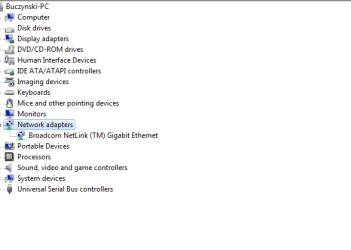
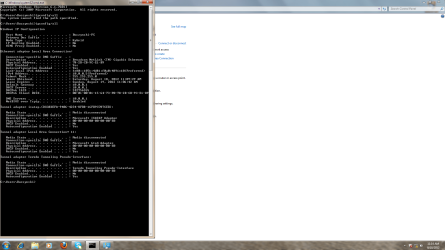
Here is a couple screenshots from the desktop computer. I disabled firewall.

UPDATE: Wired connection is working in safe mode. Strange. Will update when i run malwarebytes in case
 

Attachments
  • Untitled.png
    Untitled.png
    69.9 KB · Views: 31
  • Untitled3.png
    Untitled3.png
    7.9 KB · Views: 22
Last edited:

My Computer

OS
home premium
The wireless configuration does not show...
 

My Computer

Computer type
Laptop
Computer Manufacturer/Model Number
HP 17-ak0xx, dv7 3173nr
OS
Win7 Home Premium x64 W10Pro&Home
CPU
A12 9720p 4+8 TurionII M520
Motherboard
HP 3839
Memory
6GB 8GB
Graphics Card(s)
R7
Monitor(s) Displays
24" sa550
Screen Resolution
1600x900 1920x1080
Mouse
Logitechx2
Internet Speed
120Mb/s down 12up
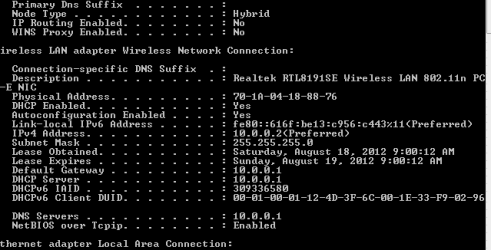
Is the default gateway the same (10.0.0.1) for wired and wireless?
 

My Computer

Computer type
Laptop
Computer Manufacturer/Model Number
HP 17-ak0xx, dv7 3173nr
OS
Win7 Home Premium x64 W10Pro&Home
CPU
A12 9720p 4+8 TurionII M520
Motherboard
HP 3839
Memory
6GB 8GB
Graphics Card(s)
R7
Monitor(s) Displays
24" sa550
Screen Resolution
1600x900 1920x1080
Mouse
Logitechx2
Internet Speed
120Mb/s down 12up
Is the default gateway the same (10.0.0.1) for wired and wireless?
Yes it is the same. Attached is wireless(from laptop) ip config
 

Attachments

  • Untitled.png
    Untitled.png
    4.8 KB · Views: 25

My Computer

OS
home premium
The subnet masks don't match...
 

My Computer

Computer type
Laptop
Computer Manufacturer/Model Number
HP 17-ak0xx, dv7 3173nr
OS
Win7 Home Premium x64 W10Pro&Home
CPU
A12 9720p 4+8 TurionII M520
Motherboard
HP 3839
Memory
6GB 8GB
Graphics Card(s)
R7
Monitor(s) Displays
24" sa550
Screen Resolution
1600x900 1920x1080
Mouse
Logitechx2
Internet Speed
120Mb/s down 12up
Go into the network settings where you see the Ethernet adapter, right clik and select properties, make sure both are set to automatically obtain, clik the advanced button and enter the default gateway address, clik ok, reboot the machine...
 

My Computer

Computer type
Laptop
Computer Manufacturer/Model Number
HP 17-ak0xx, dv7 3173nr
OS
Win7 Home Premium x64 W10Pro&Home
CPU
A12 9720p 4+8 TurionII M520
Motherboard
HP 3839
Memory
6GB 8GB
Graphics Card(s)
R7
Monitor(s) Displays
24" sa550
Screen Resolution
1600x900 1920x1080
Mouse
Logitechx2
Internet Speed
120Mb/s down 12up
From where I'm looking the subnet masks are the same on both machines 255.255.255.0
The IP's are also in the same range.

If the wired connection on the one machine won't work you might try resetting the TCP/IP stack or flushing the DNS and reset winsock. The file below will do that for you, save file unzip and run the file until your machine reboots.
 

Attachments

My Computer

Computer type
PC/Desktop
Computer Manufacturer/Model Number
Home built
OS
Windows 7 Ult, Windows 8.1 Pro,
CPU
Q9650-4.275GHz, E8600 4.5GHz, E6750-3.8GHz
Motherboard
Evga 780i FTW
Memory
G.Skill PC2 9600 1200Mhz 5 5 5 15 2T
Graphics Card(s)
GTX480
Sound Card
Asus Xonar D2
Monitor(s) Displays
HannsG
Screen Resolution
1680X1050
Hard Drives
GSkill Phoenix Pro 120GB SSD
PSU
ThermalTake Toughpower 1000Watt modular
Case
ThermalTake XaserV
Cooling
Xigmatek S1283
Keyboard
Logitech G15
Mouse
Logitech G9
Internet Speed
T1
Musta been my eyes playing tricks, would have sworn one was .0.0 :o
 

My Computer

Computer type
Laptop
Computer Manufacturer/Model Number
HP 17-ak0xx, dv7 3173nr
OS
Win7 Home Premium x64 W10Pro&Home
CPU
A12 9720p 4+8 TurionII M520
Motherboard
HP 3839
Memory
6GB 8GB
Graphics Card(s)
R7
Monitor(s) Displays
24" sa550
Screen Resolution
1600x900 1920x1080
Mouse
Logitechx2
Internet Speed
120Mb/s down 12up
Musta been my eyes playing tricks, would have sworn one was .0.0 :o

Well one of the ipconfig's had little tiny numbers and the other had normal size ones lol. :sarc:
 

My Computer

Computer type
PC/Desktop
Computer Manufacturer/Model Number
Home built
OS
Windows 7 Ult, Windows 8.1 Pro,
CPU
Q9650-4.275GHz, E8600 4.5GHz, E6750-3.8GHz
Motherboard
Evga 780i FTW
Memory
G.Skill PC2 9600 1200Mhz 5 5 5 15 2T
Graphics Card(s)
GTX480
Sound Card
Asus Xonar D2
Monitor(s) Displays
HannsG
Screen Resolution
1680X1050
Hard Drives
GSkill Phoenix Pro 120GB SSD
PSU
ThermalTake Toughpower 1000Watt modular
Case
ThermalTake XaserV
Cooling
Xigmatek S1283
Keyboard
Logitech G15
Mouse
Logitech G9
Internet Speed
T1
From where I'm looking the subnet masks are the same on both machines 255.255.255.0
The IP's are also in the same range.

If the wired connection on the one machine won't work you might try resetting the TCP/IP stack or flushing the DNS and reset winsock. The file below will do that for you, save file unzip and run the file until your machine reboots.
I ran the program on the desktop computer with the ethernet connected straight from the modem to the back of the computer and the issue still persists.
 

My Computer

OS
home premium
UPDATE: Wired connection is working in safe mode. Strange. Will update when i run malwarebytes in case
 

My Computer

OS
home premium
So it worked in safe mode, found 3 viruses, removed them, and in regular windows 7, still cannot connect to internet. Worked in safe mode...
 

My Computer

OS
home premium
So it worked in safe mode, found 3 viruses, removed them, and in regular windows 7, still cannot connect to internet. Worked in safe mode...

Well between the three viruses and only being able to connect in safe mode I'd say there is probably another program that is preventing the connection or the machine is infected with more viruses.

You can try removing the installed programs one at a time or use a system restore point or a system image to restore the system to a previous point in time.

Running the sfc/scannow command might fix any files that may have been corrupted.
 

My Computer

Computer type
PC/Desktop
Computer Manufacturer/Model Number
Home built
OS
Windows 7 Ult, Windows 8.1 Pro,
CPU
Q9650-4.275GHz, E8600 4.5GHz, E6750-3.8GHz
Motherboard
Evga 780i FTW
Memory
G.Skill PC2 9600 1200Mhz 5 5 5 15 2T
Graphics Card(s)
GTX480
Sound Card
Asus Xonar D2
Monitor(s) Displays
HannsG
Screen Resolution
1680X1050
Hard Drives
GSkill Phoenix Pro 120GB SSD
PSU
ThermalTake Toughpower 1000Watt modular
Case
ThermalTake XaserV
Cooling
Xigmatek S1283
Keyboard
Logitech G15
Mouse
Logitech G9
Internet Speed
T1
Back
Top