Desktop 'dropdown' window?

markg2

New member
Member
VIP
Local time
5:48 PM
Messages
477
I have several Word and Excel support messages that I've saved to docs and keep on my desktop while learning and using the information.

Instead of cluttering the desktop I could create a folder on the desktop for files.

However, it'd be more fun if I could create a drop-down window of sorts that upon clicking the down arrow would open with the file listing. Is such a thing available?

Thanks,

Mark
 

My Computer

Computer type
PC/Desktop
OS
Windows 7 & Windows 10
I downloaded Rocketdock and read about Objectdock. They're cute but neither have my simple need (that I've found)--a dropdown desktop 'click' that opens a list of files under a dir--

Mark
 

My Computer

Computer type
PC/Desktop
OS
Windows 7 & Windows 10
I have several Word and Excel support messages that I've saved to docs and keep on my desktop while learning and using the information.
Instead of cluttering the desktop I could create a folder on the desktop for files.
However, it'd be more fun if I could create a drop-down window of sorts that upon clicking the down arrow would open with the file listing. Is such a thing available?
Thanks,
Mark


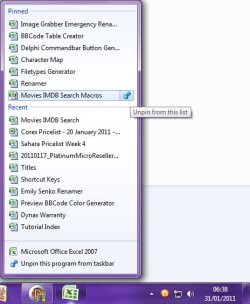
The only workable native solution I can offer is to pin Word or Excel to the taskbar, and then to make use of the Recent documents list:

Image1.jpg
  1. Start Excel
  2. Pin it to the taskbar by right-clicking it's taskbar icon and then selecting Pin this program to taskbar.
  3. From within Excel, open and then close each respective document that you want to "Pin"
  4. Close Excel
  5. Right-click the pinned taskbar icon
    • You'll notice that when you move the mouse over the very right of a recent file, a grey color "Pin" will appear. Left-click this pin to force the recent item to remain on the list so that opening other documents will not remove it.
    • The pin will turn blue, and if clicked again, the recent file will be unpinned, allowing it to be pushed off the recent list by opening other files.
    • A recent file can also be removed from the list by right-clicking and selecting Remove from this list
  6. Even if Excel is not open, you can right-click it's pinned icon, and then left-click a recent file to open that file
 
Last edited:

My Computer

Computer type
PC/Desktop
Computer Manufacturer/Model Number
Virtual Machine
OS
Windows 7 Professional 32-bit SP1
CPU
AMD A4/A6
Motherboard
Intel Corporation 440BX Desktop Reference Platform
Memory
3.00GB EDO
Graphics Card(s)
VMware SVGA 3D
Sound Card
High Definition Audio Device
Monitor(s) Displays
Generic Non-PnP Monitor on VMware SVGA 3D
Screen Resolution
1440x900
Hard Drives
1 x 60GB VMware Virtual SATA Hard Drive ATA Device
Antivirus
Kaspersky Total Security
Thanks for the thorough explain re pin to... I know that option and it just won't do.

Manay, I'll try the Objectdock tab. I installed Rocketdock to test. Can I run both utils at the same time without things up or do I need to play with them one at a time?

Mark
 

My Computer

Computer type
PC/Desktop
OS
Windows 7 & Windows 10
I'm starting to warm up to Rocket even before trying the other. I may have spoken too quickly earlier.

Since I can place the folder containing the Word tips in the Rocket bar that does simply things.

I would, however, like to have the folder name 'on or below' the folder so I do not have to hover to determine which folder is which. I have not seen that option?

Also, the My Documents doesn't work in my case. I do not store my doc there but as separate folders under the folder MyStuff. If I change the path to MyStuff Rocket refuses since it's looking for a list of files not folders?
 

My Computer

Computer type
PC/Desktop
OS
Windows 7 & Windows 10
Back
Top