Desktop Freezes frequently time to time, need help please!

denden

New member
Local time
12:21 AM
Messages
37
Just a few minutes ago I had music playing, youtube on watching pranks, and had a game loaded and running on my chrome browser, my whole computer froze up and started making noises(I guess the noise was from the video I was watching, it was like spitting out sounds from the video while being frozen, can't move the mouse or anything for 15-30seconds) then it comes back to normal and I can use the computer again.

Not sure what I need to do to check what's the problem, so far i think i really only had 1 BSOD, but not really sure as other people in my family use this computer as well. But the freezes happen quite often when ur watching movies, playing games that take a lot of processing power, etc. Anything I can do to solve this problem? Thank you!

Edit: Looks like I've had 3-4 freezes so far on my desktop all in one computer in the past 30mins, 1 before this post and 2 after this post. Really driving me crazy, never really had a problem with this computer before, I even reformatted my hdd, reinstalled my win7 like a month ago, still getting these annoying freezes, not sure if this is the correct place to post it in, if I posted in the wrong section, please point me in the right direction so I can get fast replies on this problem. Thank you!
 
Last edited:

My Computer My Computer

At a glance

Windows 7 Home Premium 64bitPentium(R) Dual-Core CPU E5400 @ 2.70ghz4gbNVIDIA GeForce G210M
Computer type
PC/Desktop
Computer Manufacturer/Model Number
Sony Corp.
OS
Windows 7 Home Premium 64bit
CPU
Pentium(R) Dual-Core CPU E5400 @ 2.70ghz
Motherboard
VPCL111FX
Memory
4gb
Graphics Card(s)
NVIDIA GeForce G210M
Hard Drives
300gb HDD
Internet Speed
18mbs down, 2mbs up.
Antivirus
AVG/Malwarebytes
Browser
Chrome/Firefox
These dump files are fairly old but I will try to use them as guidance.

You have had two 0x116 bugchecks which indicate an attempt to reset the display within the allocated time interval failed.
There are two main causes for such bugchecks.
A bad display driver or a faulty GPU.
Your display driver is out of date..

Code:
1: kd> [COLOR="Green"]lmvm nvlddmkm[/COLOR]
start             end                 module name
fffff880`0483e000 fffff880`05343700   nvlddmkm T (no symbols)           
    Loaded symbol image file: nvlddmkm.sys
    Image path: \SystemRoot\system32\DRIVERS\nvlddmkm.sys
    Image name: nvlddmkm.sys
    Timestamp:        [COLOR="Red"]Tue Jul 28 01:41:15 2009[/COLOR] (4A6E492B)
    CheckSum:         00B12301
    ImageSize:        00B05700
    Translations:     0000.04b0 0000.04e4 0409.04b0 0409.04e4

It looks like you're using a laptop.
Therefor you should update your display driver form your manufacturers website, in this case it looks like a Sony VAIO.

Secondly because you reinstalled I am leaning towards a failing GPU but we can't be certain yet.
Run Furmark after updating your display driver.


Stress test your graphics card with Furmark

I recommend running it for around 30 minutes

   Warning

Furmark will increase the temperature of your GPU rapidly so keep and eye on your temperatures
 

My Computer My Computer

Computer type
PC/Desktop
These dump files are fairly old but I will try to use them as guidance.

You have had two 0x116 bugchecks which indicate an attempt to reset the display within the allocated time interval failed.
There are two main causes for such bugchecks.
A bad display driver or a faulty GPU.
Your display driver is out of date..

Code:
1: kd> [COLOR="Green"]lmvm nvlddmkm[/COLOR]
start             end                 module name
fffff880`0483e000 fffff880`05343700   nvlddmkm T (no symbols)           
    Loaded symbol image file: nvlddmkm.sys
    Image path: \SystemRoot\system32\DRIVERS\nvlddmkm.sys
    Image name: nvlddmkm.sys
    Timestamp:        [COLOR="Red"]Tue Jul 28 01:41:15 2009[/COLOR] (4A6E492B)
    CheckSum:         00B12301
    ImageSize:        00B05700
    Translations:     0000.04b0 0000.04e4 0409.04b0 0409.04e4

It looks like you're using a laptop.
Therefor you should update your display driver form your manufacturers website, in this case it looks like a Sony VAIO.

Secondly because you reinstalled I am leaning towards a failing GPU but we can't be certain yet.
Run Furmark after updating your display driver.


Stress test your graphics card with Furmark

I recommend running it for around 30 minutes

   Warning

Furmark will increase the temperature of your GPU rapidly so keep and eye on your temperatures

It's an VAIO® L Series All-in-One Touch Screen, so I can see why you would think it's a laptop as the graphics card in this pc are usually used for laptops then desktops. Not sure why I have the oldest dump from 2009, as I should have some newer ones then that, but who knows, maybe a reformat for rid of those dumps, I'll try what you have suggested, even tho I installed all my drivers/updated them right when i installed fresh clean win7 using the recovery partition.
 

My Computer My Computer

At a glance

Windows 7 Home Premium 64bitPentium(R) Dual-Core CPU E5400 @ 2.70ghz4gbNVIDIA GeForce G210M
Computer type
PC/Desktop
Computer Manufacturer/Model Number
Sony Corp.
OS
Windows 7 Home Premium 64bit
CPU
Pentium(R) Dual-Core CPU E5400 @ 2.70ghz
Motherboard
VPCL111FX
Memory
4gb
Graphics Card(s)
NVIDIA GeForce G210M
Hard Drives
300gb HDD
Internet Speed
18mbs down, 2mbs up.
Antivirus
AVG/Malwarebytes
Browser
Chrome/Firefox
Also if it wouldn't be much trouble, you think you can tell me what should i click to download that display driver? As there couple links on that site, not sure if it's under "video" or "picture motion browser" or none of those lol. link: Sony eSupport - VPCL111FX - Support
 

My Computer My Computer

At a glance

Windows 7 Home Premium 64bitPentium(R) Dual-Core CPU E5400 @ 2.70ghz4gbNVIDIA GeForce G210M
Computer type
PC/Desktop
Computer Manufacturer/Model Number
Sony Corp.
OS
Windows 7 Home Premium 64bit
CPU
Pentium(R) Dual-Core CPU E5400 @ 2.70ghz
Motherboard
VPCL111FX
Memory
4gb
Graphics Card(s)
NVIDIA GeForce G210M
Hard Drives
300gb HDD
Internet Speed
18mbs down, 2mbs up.
Antivirus
AVG/Malwarebytes
Browser
Chrome/Firefox
It would be under video but that's the same driver version.

If you create a restore point first.
Before changing drivers!
These are useful instructions

http://www.sevenforums.com/tutorials/697-system-restore-point-create.html

Then you can try here:

Drivers | GeForce

That should be the correct driver based on your system specs.
Windows 7 64bit Nvidia geforce G210m.

   Warning

If it's not the same and you have changed your system specs then do not download the driver.
 

My Computer My Computer

Computer type
PC/Desktop
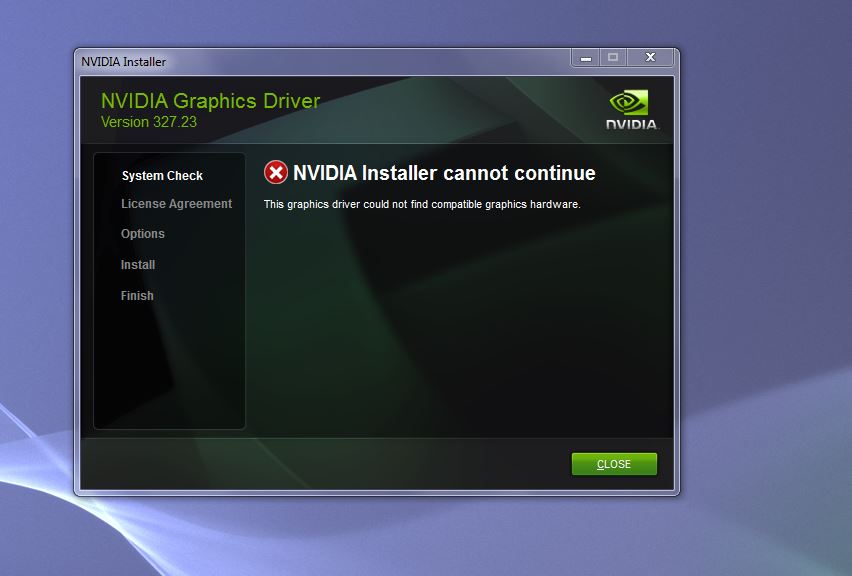
No luck =/ I think i tried downloading the latest driver off geforce site, and other sites before, couldn't get it installed due to compatibility issues, the computer is as is since I bought it, nothing has been changed. =/
GUluJ4D.jpg
 

My Computer My Computer

At a glance

Windows 7 Home Premium 64bitPentium(R) Dual-Core CPU E5400 @ 2.70ghz4gbNVIDIA GeForce G210M
Computer type
PC/Desktop
Computer Manufacturer/Model Number
Sony Corp.
OS
Windows 7 Home Premium 64bit
CPU
Pentium(R) Dual-Core CPU E5400 @ 2.70ghz
Motherboard
VPCL111FX
Memory
4gb
Graphics Card(s)
NVIDIA GeForce G210M
Hard Drives
300gb HDD
Internet Speed
18mbs down, 2mbs up.
Antivirus
AVG/Malwarebytes
Browser
Chrome/Firefox
It might not work due to the timestamp of the current driver but I'd give Furmark a shot.
 

My Computer My Computer

Computer type
PC/Desktop
Ran the furmark gpu test for 32mins or so, attached a excel spreadsheet of the results it gave.

Edit: Almost forgot, before I ran the test I downloaded the automatic driver update form geforce site, it updated to whatever up-to-date my gpu driver should be.(NVidia GeForce experience or some b.s., i think i had geforce experience before, and it caused trouble. but i'll see if it does anything now.)

Edit: Not sure if really updated my driver to the best possible one as the system information, driver version hasn't changed. I was thinking maybe trying installing this driver to see if anything changes/makes it better. NVIDIA DRIVERS GeForce 335.23 Driver WHQL

Also what I have atm after it auto updated with geforce experience or w.e.
91Res.png
 

My Computer My Computer

At a glance

Windows 7 Home Premium 64bitPentium(R) Dual-Core CPU E5400 @ 2.70ghz4gbNVIDIA GeForce G210M
Computer type
PC/Desktop
Computer Manufacturer/Model Number
Sony Corp.
OS
Windows 7 Home Premium 64bit
CPU
Pentium(R) Dual-Core CPU E5400 @ 2.70ghz
Motherboard
VPCL111FX
Memory
4gb
Graphics Card(s)
NVIDIA GeForce G210M
Hard Drives
300gb HDD
Internet Speed
18mbs down, 2mbs up.
Antivirus
AVG/Malwarebytes
Browser
Chrome/Firefox
From post #1

Just a few minutes ago I had music playing, youtube on watching pranks, and had a game loaded and running on my chrome browser, my whole computer froze up and started making noises
I'm thinking this is a bit much to ask that hardware to do all at one time.

VAIO® L Series All-in-One Touch Screen
 

My Computer My Computer

At a glance

Windows 10 Pro. 64/ version 1709 Windows 7 Pr...Intel i7-6800K @ 4.3Corsair Platinum 16 gig @2400EVGA GTX 1070 OC
Computer type
PC/Desktop
Computer Manufacturer/Model Number
Home made Desktop
OS
Windows 10 Pro. 64/ version 1709 Windows 7 Pro/64
CPU
Intel i7-6800K @ 4.3
Motherboard
ASUS X-99 Deluxe II
Memory
Corsair Platinum 16 gig @2400
Graphics Card(s)
EVGA GTX 1070 OC
Monitor(s) Displays
Asus 27" LED LCD/VE278Q
Screen Resolution
1920-1080 or 1280-720 HDMI
Hard Drives
INTEL SSD 730-240 Gb Sata 3.0/
PSU
EVGA Platium 1200W
Case
Phanteks Luxe Tempered Glass 8 fans/ one radiator
Cooling
XSPC/ Water Cooled CPU
Keyboard
Das 4 Professional
Mouse
Logitech M705/MX Anywhere 2-S
Internet Speed
100 mbits
Antivirus
Microsoft Security Essentials/ Malwarebytes Premium 3.0/ SAS
Browser
I.E. 11 default/Firefox/ ISP Time Warner Cable/Spectrum
Other Info
LG BluRay Burner/
Sound system-KLipsch-THX/
Icy Dock ssd Hot Swap bays.
From post #1

Just a few minutes ago I had music playing, youtube on watching pranks, and had a game loaded and running on my chrome browser, my whole computer froze up and started making noises

I'm thinking this is a bit much to ask that hardware to do all at one time with the cooling system it has.

VAIO® L Series All-in-One Touch Screen

Maybe so, but I've had this computer for good coupe years, and i never had a problem running music+playing a game+browsing on internet/watching a movie.(plus I'm not playing high end game or anything, just a flash game) So i was trying to find a solution on how to solve the freezing problems, etc. Was also wondering if my gpu was failing or any piece of hardware inside, or it's just the load I'm making it handle?

Edit: I also try and blow out he dust from within 1-3weeks, but it's kinda hard since it's kinda lame to take it apart just to blow it out, so i make due with however I can to blow out the dust, etc.
 

My Computer My Computer

At a glance

Windows 7 Home Premium 64bitPentium(R) Dual-Core CPU E5400 @ 2.70ghz4gbNVIDIA GeForce G210M
Computer type
PC/Desktop
Computer Manufacturer/Model Number
Sony Corp.
OS
Windows 7 Home Premium 64bit
CPU
Pentium(R) Dual-Core CPU E5400 @ 2.70ghz
Motherboard
VPCL111FX
Memory
4gb
Graphics Card(s)
NVIDIA GeForce G210M
Hard Drives
300gb HDD
Internet Speed
18mbs down, 2mbs up.
Antivirus
AVG/Malwarebytes
Browser
Chrome/Firefox
Don't forget hardware can fail at anytime so just because it's been fine for years that doesn't mean it will stay like that forever.
Hardware can and will fail at some point.
Hardware is not my expertise so Layback Bear will help you more with that.
 

My Computer My Computer

Computer type
PC/Desktop
Don't forget hardware can fail at anytime so just because it's been fine for years that doesn't mean it will stay like that forever.
Hardware can and will fail at some point.
Hardware is not my expertise so Layback Bear will help you more with that.

Yeah, I know, that makes sense. But if it's not the problem with the hardware at the moment, I'd love to fix this freezing issue so I can use the computer in peace, but sometimes it would just freeze up when I'm only watching utube videos and couple tabs open on chrome browsing the net. So i have no idea.
 

My Computer My Computer

At a glance

Windows 7 Home Premium 64bitPentium(R) Dual-Core CPU E5400 @ 2.70ghz4gbNVIDIA GeForce G210M
Computer type
PC/Desktop
Computer Manufacturer/Model Number
Sony Corp.
OS
Windows 7 Home Premium 64bit
CPU
Pentium(R) Dual-Core CPU E5400 @ 2.70ghz
Motherboard
VPCL111FX
Memory
4gb
Graphics Card(s)
NVIDIA GeForce G210M
Hard Drives
300gb HDD
Internet Speed
18mbs down, 2mbs up.
Antivirus
AVG/Malwarebytes
Browser
Chrome/Firefox
Anyone?
 

My Computer My Computer

At a glance

Windows 7 Home Premium 64bitPentium(R) Dual-Core CPU E5400 @ 2.70ghz4gbNVIDIA GeForce G210M
Computer type
PC/Desktop
Computer Manufacturer/Model Number
Sony Corp.
OS
Windows 7 Home Premium 64bit
CPU
Pentium(R) Dual-Core CPU E5400 @ 2.70ghz
Motherboard
VPCL111FX
Memory
4gb
Graphics Card(s)
NVIDIA GeForce G210M
Hard Drives
300gb HDD
Internet Speed
18mbs down, 2mbs up.
Antivirus
AVG/Malwarebytes
Browser
Chrome/Firefox
No1 has any suggestions on solving this issue? =/
 

My Computer My Computer

At a glance

Windows 7 Home Premium 64bitPentium(R) Dual-Core CPU E5400 @ 2.70ghz4gbNVIDIA GeForce G210M
Computer type
PC/Desktop
Computer Manufacturer/Model Number
Sony Corp.
OS
Windows 7 Home Premium 64bit
CPU
Pentium(R) Dual-Core CPU E5400 @ 2.70ghz
Motherboard
VPCL111FX
Memory
4gb
Graphics Card(s)
NVIDIA GeForce G210M
Hard Drives
300gb HDD
Internet Speed
18mbs down, 2mbs up.
Antivirus
AVG/Malwarebytes
Browser
Chrome/Firefox
I feel like it might be the graphics card failing, or something to do with graphics card? As the computer freezes more frequently at times while only watching utube, and nothing else, or other flash related things. What do you think?

Screen would at times freeze up for 10-40secs(everything is frozen, if a video with sound is on, it will be giving out weird sound b/c of played video) then come back like nothing happened, at times it says that the display driver failed and recovered.
 

My Computer My Computer

At a glance

Windows 7 Home Premium 64bitPentium(R) Dual-Core CPU E5400 @ 2.70ghz4gbNVIDIA GeForce G210M
Computer type
PC/Desktop
Computer Manufacturer/Model Number
Sony Corp.
OS
Windows 7 Home Premium 64bit
CPU
Pentium(R) Dual-Core CPU E5400 @ 2.70ghz
Motherboard
VPCL111FX
Memory
4gb
Graphics Card(s)
NVIDIA GeForce G210M
Hard Drives
300gb HDD
Internet Speed
18mbs down, 2mbs up.
Antivirus
AVG/Malwarebytes
Browser
Chrome/Firefox
Sorry Thedoctor44 for getting in the way. It was just a suggestion on my part.
Please continue.
 

My Computer My Computer

At a glance

Windows 10 Pro. 64/ version 1709 Windows 7 Pr...Intel i7-6800K @ 4.3Corsair Platinum 16 gig @2400EVGA GTX 1070 OC
Computer type
PC/Desktop
Computer Manufacturer/Model Number
Home made Desktop
OS
Windows 10 Pro. 64/ version 1709 Windows 7 Pro/64
CPU
Intel i7-6800K @ 4.3
Motherboard
ASUS X-99 Deluxe II
Memory
Corsair Platinum 16 gig @2400
Graphics Card(s)
EVGA GTX 1070 OC
Monitor(s) Displays
Asus 27" LED LCD/VE278Q
Screen Resolution
1920-1080 or 1280-720 HDMI
Hard Drives
INTEL SSD 730-240 Gb Sata 3.0/
PSU
EVGA Platium 1200W
Case
Phanteks Luxe Tempered Glass 8 fans/ one radiator
Cooling
XSPC/ Water Cooled CPU
Keyboard
Das 4 Professional
Mouse
Logitech M705/MX Anywhere 2-S
Internet Speed
100 mbits
Antivirus
Microsoft Security Essentials/ Malwarebytes Premium 3.0/ SAS
Browser
I.E. 11 default/Firefox/ ISP Time Warner Cable/Spectrum
Other Info
LG BluRay Burner/
Sound system-KLipsch-THX/
Icy Dock ssd Hot Swap bays.
Try removing all Nvidia software and let Windows install the display driver for you, see if that causes issues.
 

My Computer My Computer

Computer type
PC/Desktop
Try removing all Nvidia software and let Windows install the display driver for you, see if that causes issues.

Uninstalled All Nvidia display drivers, ran the windows update=no drivers were found to install. =/
 

My Computer My Computer

At a glance

Windows 7 Home Premium 64bitPentium(R) Dual-Core CPU E5400 @ 2.70ghz4gbNVIDIA GeForce G210M
Computer type
PC/Desktop
Computer Manufacturer/Model Number
Sony Corp.
OS
Windows 7 Home Premium 64bit
CPU
Pentium(R) Dual-Core CPU E5400 @ 2.70ghz
Motherboard
VPCL111FX
Memory
4gb
Graphics Card(s)
NVIDIA GeForce G210M
Hard Drives
300gb HDD
Internet Speed
18mbs down, 2mbs up.
Antivirus
AVG/Malwarebytes
Browser
Chrome/Firefox
Back
Top