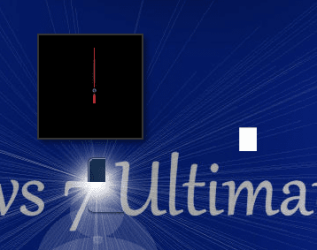
desktop gadget not working

jama223

New member
Local time
7:55 PM
Messages
3
Problem signature:
Problem Event Name: BEX
Application Name: sidebar.exe
Application Version: 6.1.7600.16385
Application Timestamp: 4a5bc613
Fault Module Name: StackHash_0a9e
Fault Module Version: 0.0.0.0
Fault Module Timestamp: 00000000
Exception Offset: 00552148
Exception Code: c0000005
Exception Data: 00000008
OS Version: 6.1.7600.2.0.0.256.1
Locale ID: 1033
Additional Information 1: 0a9e
Additional Information 2: 0a9e372d3b4ad19135b953a78882e789
Additional Information 3: 0a9e
Additional Information 4: 0a9e372d3b4ad19135b953a78882e789
someone please help me
 

My Computer

OS
windows 7 ultimate 32 bit
jama -

We will need more information from you
-

1.Click "Start", input "eventvwr"[ without quotation marks] in the Start Search bar & press Enter.
2.Expand the 'Windows Logs"node on the left pane, right click on "Application"
3.Check to see if there are any error messages.
 

My Computer

Computer Manufacturer/Model Number
LAPTOP. HP Pavilion dv7-4010TX .
OS
Win 7 Ultimate 64-bit. SP1.
CPU
Intel i7 -720QM.[1.6GHz Turbo Boost 2.8GHz. 6MB Cache.]
Memory
8 DDR 3 RAM. 1066MHZ
Graphics Card(s)
ATI 1024 MB. DDR3. Radeon HD5650
Monitor(s) Displays
17.3" High Definition Brightview LCD. LED Backlit.
Screen Resolution
1600 x 900.
Hard Drives
640GB
Case
Laptop / notebook.
Mouse
Logitech Anywhere mouse. MX.
Internet Speed
ADSL [ but too slow ]
jama -

We will need more information from you
-

1.Click "Start", input "eventvwr"[ without quotation marks] in the Start Search bar & press Enter.
2.Expand the 'Windows Logs"node on the left pane, right click on "Application"
3.Check to see if there are any error messages.
thanks for the reply but i solved the problem...there wass a corrupted gadget in the ones i downloaded....so i went to
C:\Users\"name of the user"\AppData\Local\Microsoft\
and deleted the folder named "windows sidebar"
now the gadgets are working properly.
thanks again for your reply!!! =D
 

My Computer

OS
windows 7 ultimate 32 bit
Problem signature:
Problem Event Name: BEX
Application Name: sidebar.exe
Application Version: 6.1.7600.16385
Application Timestamp: 4a5bc613
Fault Module Name: StackHash_0a9e
Fault Module Version: 0.0.0.0
Fault Module Timestamp: 00000000
Exception Offset: 00552148
Exception Code: c0000005
Exception Data: 00000008
OS Version: 6.1.7600.2.0.0.256.1
Locale ID: 1033
Additional Information 1: 0a9e
Additional Information 2: 0a9e372d3b4ad19135b953a78882e789
Additional Information 3: 0a9e
Additional Information 4: 0a9e372d3b4ad19135b953a78882e789
someone please help me


Please help me with my gadgets. It is not working properly. Here is the picture.

Capture.PNG

please help me. I'm tired of this windows 7.


212.PNG
 
Last edited by a moderator:

My Computer

Computer Manufacturer/Model Number
MS Windows 7 Ultimate 32-bit
OS
Windows 7 Ultimate 32bit
CPU
Intel Pentium T4200 @ 2.00GHz
Motherboard
FUJITSU SIEMENS D48 (U2E1)
Memory
2.0GB Single-Channel DDR2 @ 399MHz (6-6-6-18)
Sound Card
High Definition Audio Device
Monitor(s) Displays
Generic PnP Monitor @ 1280x800
dawnill29,

You would be best advised to start a new thread with your problem. ;)

This thread has been marked as solved.
 

My Computer

Computer Manufacturer/Model Number
LAPTOP. HP Pavilion dv7-4010TX .
OS
Win 7 Ultimate 64-bit. SP1.
CPU
Intel i7 -720QM.[1.6GHz Turbo Boost 2.8GHz. 6MB Cache.]
Memory
8 DDR 3 RAM. 1066MHZ
Graphics Card(s)
ATI 1024 MB. DDR3. Radeon HD5650
Monitor(s) Displays
17.3" High Definition Brightview LCD. LED Backlit.
Screen Resolution
1600 x 900.
Hard Drives
640GB
Case
Laptop / notebook.
Mouse
Logitech Anywhere mouse. MX.
Internet Speed
ADSL [ but too slow ]
dawnill29,

You would be best advised to start a new thread with your problem. ;)

This thread has been marked as solved.


yes, as you see it is solved. but it will only display a black clock and noting on the other gadgets. any idea of it?
 

My Computer

Computer Manufacturer/Model Number
MS Windows 7 Ultimate 32-bit
OS
Windows 7 Ultimate 32bit
CPU
Intel Pentium T4200 @ 2.00GHz
Motherboard
FUJITSU SIEMENS D48 (U2E1)
Memory
2.0GB Single-Channel DDR2 @ 399MHz (6-6-6-18)
Sound Card
High Definition Audio Device
Monitor(s) Displays
Generic PnP Monitor @ 1280x800
dawnill29,

You would be best advised to start a new thread with your problem. ;)

This thread has been marked as solved.


yes, as you see it is solved. but it will only display a black clock and noting on the other gadgets. any idea of it?

What JMH meant was you are requesting help in a thread that is already marked solved, for the original posters problem. So you are unlikely to get much help. Have a look here, most known fixes are in that thread:

http://www.sevenforums.com/gadgets/102165-gadget-black-error.html

A Guy
 

My Computer

Computer type
PC/Desktop
OS
Windows 10 Home x64
CPU
INTEL Core i5-750 Quad-Core 3.37GHz
Motherboard
ASUS P7P55D
Memory
HyperX Fury Black Series 8GB (2 x 4GB) 1866Mhz
Graphics Card(s)
EVGA GeForce GTX 750 Superclocked 1GB 128-Bit GDDR5
Monitor(s) Displays
LG 32MA68HY 32" IPS
Screen Resolution
1920 x 1080
Hard Drives
Samsung 840 Evo 120GB, SEAGATE 500GB Barracuda® 7200.12, SATA 3 Gb/s, 7200 RPM, 16MB cache
PSU
ANTEC TruePower New TP-550, 80 PLUS, 550W
Case
ANTEC Three Hundred Illusion
Cooling
COOLER MASTER Hyper 212 Plus, 4 x 120mm 1 x 140mm Noctua's
Internet Speed
85 + Mbps
Antivirus
Avast
Browser
Vivaldi
Back
Top