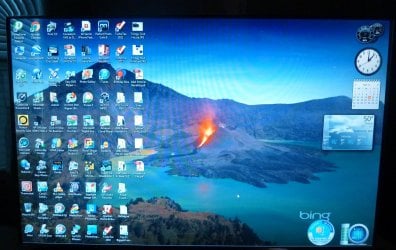
Desktop icons play hide and go seek...

HowardWoodard

New member
Member
VIP
Local time
11:52 PM
Messages
49
Location
Redmond, WA
I like to keep a lot of my programs on my desktop and I group similar function programs together.

Occasionally my screen will blink, the icons will change to placeholders and then sequentially replace all of the placeholders with the correct icon. Sometimes -- not very often but even once is too much -- they will be in a completely different, and haphazard, order.

(1) Does anyone know what causes this to happen?

(2) Does anyone know of a way to save, and re-establish, the original order?

Thanks in advance for your help.
 

My Computer My Computer

At a glance

Windows 7 Professional 64 bitIntel Core Quad Q9550 @ 2.83GHz8 GB Corsair PC-6400Asus Radeon HD 4870
Computer type
PC/Desktop
Computer Manufacturer/Model Number
Custom built
OS
Windows 7 Professional 64 bit
CPU
Intel Core Quad Q9550 @ 2.83GHz
Motherboard
Asus P5Q-Pro
Memory
8 GB Corsair PC-6400
Graphics Card(s)
Asus Radeon HD 4870
Sound Card
Integrated
Monitor(s) Displays
Dual HP w2007
Screen Resolution
1680 x 1050
Hard Drives
4 x Seagate 2TB
PSU
Ultra 650 W Modular
Case
ATX Tower
Cooling
4x120 MM Vantec Stealth -- one front, 1 rear & 2 side
Keyboard
Microsoft Desktop 3000 wireless
Mouse
Microsoft Desktop 3000 wireless
Internet Speed
Cable - 25 MB download, 5 MB upload
Antivirus
Norton Security Suite (N360 provided by Comcast)
Browser
IE 11
Hi Howard, have you thought about making a folder to group similar programs together? I find this much more effective than having a desktop full of icons. ;)
 

My Computer My Computer

At a glance

Windows 7 Ultimate 32bit SP1Intel(R) Core(TM)2 Quad CPU @ 2.40GHz, 2400 MHz4 GBATI Radeon HD 2600 Pro
Computer type
PC/Desktop
Computer Manufacturer/Model Number
Bruce ... somewhere in his 40's
OS
Windows 7 Ultimate 32bit SP1
CPU
Intel(R) Core(TM)2 Quad CPU @ 2.40GHz, 2400 MHz
Motherboard
INTEL/D975XBX2
Memory
4 GB
Graphics Card(s)
ATI Radeon HD 2600 Pro
Monitor(s) Displays
Samsung SyncMaster 914v
Screen Resolution
1280 x 1024
Hard Drives
2/500GB each ... ST3500630AS ATA Device.
One is not connected
PSU
Rocketfish 700 W
Case
G.Skill Gigabyte Chassis
Keyboard
Standard PS/2 Keyboard
Mouse
Microsoft PS/2 Mouse
Internet Speed
DSL
Antivirus
Avira Internet Security
Browser
IE 11
Other Info
ATI HDMI Audio
If you right mouse click on your desktop, what are your settings in view and sort by.

Try unticking auto arrange in view, and unticking anything in sort by.

It sounds as though your graphics controller is under strain (the icons to placeholders thing).

Jacee's suggestion is a good one, it will certainly stop icons jumping around - plus it's a bit more organized.

Personally, I do that type of organization on the start menu. For ease of use, I pin my most used programs either to the taskbar (highest use) or the start menu. I only have my user, computer, recycle bin and one other icon on my desktop. But that's how I file things..... everyone has a different system.
 

My Computer My Computer

At a glance

x64 (6.3.9600) Win8.1 Pro & soon dual boot x6...AMD A6-3420M APU with Radeon(tm) HD Graphics6.00 GBAMD Radeon(TM) HD 6520G
Computer type
Laptop
Computer Manufacturer/Model Number
HP Pavilion dv6-6c10us
OS
x64 (6.3.9600) Win8.1 Pro & soon dual boot x64 (6.1.7601) Win7_SP1 HomePrem
CPU
AMD A6-3420M APU with Radeon(tm) HD Graphics
Motherboard
Hewlett-Packard 1805
Memory
6.00 GB
Graphics Card(s)
AMD Radeon(TM) HD 6520G
Sound Card
(1) AMD High Definition Audio Device (2) IDT High Definiti
Monitor(s) Displays
HP W2072a 20" LCD (1600 x 900) @ 60 Hz
Screen Resolution
1366 x 768 x 32 bits (4294967296 colors) @ 60 Hz
Hard Drives
ST640LM0 00 HM641JI SATA Disk Device
Keyboard
Logitech k520 wireless KB
Mouse
Logitech m320 wireless mouse (bundled with KB)
Internet Speed
15/5 | 54 MB Wireless 'n'
Antivirus
Realtime: Defender or Avast | On-demand: Malwarebytes, ESET
Browser
IE 11 on Win8, IE 10 on win 7
Other Info
Media: [Gimp, Audacity, VLC] || Comm: [WEmail 2012, Skype] || Productivity: [OpenOffice,| Textpad] || Utils: [Sysinternals, cCleaner, Speccy, Defraggler]
Thanks both of you. There used to be a utility -- I don't think its been updated since XP, maybe Vista -- that would allow you to save and/or restore the desktop.

I'm interested in what is zapping it in the first place but if I can just restore it then that will lower the "zap interest" considerably. :)
 

My Computer My Computer

At a glance

Windows 7 Professional 64 bitIntel Core Quad Q9550 @ 2.83GHz8 GB Corsair PC-6400Asus Radeon HD 4870
Computer type
PC/Desktop
Computer Manufacturer/Model Number
Custom built
OS
Windows 7 Professional 64 bit
CPU
Intel Core Quad Q9550 @ 2.83GHz
Motherboard
Asus P5Q-Pro
Memory
8 GB Corsair PC-6400
Graphics Card(s)
Asus Radeon HD 4870
Sound Card
Integrated
Monitor(s) Displays
Dual HP w2007
Screen Resolution
1680 x 1050
Hard Drives
4 x Seagate 2TB
PSU
Ultra 650 W Modular
Case
ATX Tower
Cooling
4x120 MM Vantec Stealth -- one front, 1 rear & 2 side
Keyboard
Microsoft Desktop 3000 wireless
Mouse
Microsoft Desktop 3000 wireless
Internet Speed
Cable - 25 MB download, 5 MB upload
Antivirus
Norton Security Suite (N360 provided by Comcast)
Browser
IE 11

My Computer My Computer

At a glance

Windows 7 Professional 64 bitIntel Core Quad Q9550 @ 2.83GHz8 GB Corsair PC-6400Asus Radeon HD 4870
Computer type
PC/Desktop
Computer Manufacturer/Model Number
Custom built
OS
Windows 7 Professional 64 bit
CPU
Intel Core Quad Q9550 @ 2.83GHz
Motherboard
Asus P5Q-Pro
Memory
8 GB Corsair PC-6400
Graphics Card(s)
Asus Radeon HD 4870
Sound Card
Integrated
Monitor(s) Displays
Dual HP w2007
Screen Resolution
1680 x 1050
Hard Drives
4 x Seagate 2TB
PSU
Ultra 650 W Modular
Case
ATX Tower
Cooling
4x120 MM Vantec Stealth -- one front, 1 rear & 2 side
Keyboard
Microsoft Desktop 3000 wireless
Mouse
Microsoft Desktop 3000 wireless
Internet Speed
Cable - 25 MB download, 5 MB upload
Antivirus
Norton Security Suite (N360 provided by Comcast)
Browser
IE 11
Restore it from what? Did you try unticking the auto arrange and sortby?

Please post an image of your desktop, that might help.
To try and figure out what might be causing the issue,
download Speccy,
launch it, and
post a link to a published Speccy snapshot

How to publish a Speccy snapshot:
Click on the Speccy file menu and select Publish Snapshot. This method removes sensitive information and provides you with a link to the report.

Copy the link returned from Publish Snapshot and paste it in a post on this thread so members have more information to better assist you.

picture.php

Thanks

Speccy snapshot of my machine: http://speccy.piriform.com/results/CHlegp43qppad1Ua8dOLDAj
 

My Computer My Computer

At a glance

x64 (6.3.9600) Win8.1 Pro & soon dual boot x6...AMD A6-3420M APU with Radeon(tm) HD Graphics6.00 GBAMD Radeon(TM) HD 6520G
Computer type
Laptop
Computer Manufacturer/Model Number
HP Pavilion dv6-6c10us
OS
x64 (6.3.9600) Win8.1 Pro & soon dual boot x64 (6.1.7601) Win7_SP1 HomePrem
CPU
AMD A6-3420M APU with Radeon(tm) HD Graphics
Motherboard
Hewlett-Packard 1805
Memory
6.00 GB
Graphics Card(s)
AMD Radeon(TM) HD 6520G
Sound Card
(1) AMD High Definition Audio Device (2) IDT High Definiti
Monitor(s) Displays
HP W2072a 20" LCD (1600 x 900) @ 60 Hz
Screen Resolution
1366 x 768 x 32 bits (4294967296 colors) @ 60 Hz
Hard Drives
ST640LM0 00 HM641JI SATA Disk Device
Keyboard
Logitech k520 wireless KB
Mouse
Logitech m320 wireless mouse (bundled with KB)
Internet Speed
15/5 | 54 MB Wireless 'n'
Antivirus
Realtime: Defender or Avast | On-demand: Malwarebytes, ESET
Browser
IE 11 on Win8, IE 10 on win 7
Other Info
Media: [Gimp, Audacity, VLC] || Comm: [WEmail 2012, Skype] || Productivity: [OpenOffice,| Textpad] || Utils: [Sysinternals, cCleaner, Speccy, Defraggler]
Yes, I unticked the auto arrange. No sort was selected.

I'll try the speccy tomorrow. That looks like what I was looking for in terms of getting to the bottom of this. I have a pretty powerful graphics card. Thanks.

As for "restore it from what", I rearranged everything and used the little desktop app (above) to store a copy of it that I can use if it gets jumbled again.
 

My Computer My Computer

At a glance

Windows 7 Professional 64 bitIntel Core Quad Q9550 @ 2.83GHz8 GB Corsair PC-6400Asus Radeon HD 4870
Computer type
PC/Desktop
Computer Manufacturer/Model Number
Custom built
OS
Windows 7 Professional 64 bit
CPU
Intel Core Quad Q9550 @ 2.83GHz
Motherboard
Asus P5Q-Pro
Memory
8 GB Corsair PC-6400
Graphics Card(s)
Asus Radeon HD 4870
Sound Card
Integrated
Monitor(s) Displays
Dual HP w2007
Screen Resolution
1680 x 1050
Hard Drives
4 x Seagate 2TB
PSU
Ultra 650 W Modular
Case
ATX Tower
Cooling
4x120 MM Vantec Stealth -- one front, 1 rear & 2 side
Keyboard
Microsoft Desktop 3000 wireless
Mouse
Microsoft Desktop 3000 wireless
Internet Speed
Cable - 25 MB download, 5 MB upload
Antivirus
Norton Security Suite (N360 provided by Comcast)
Browser
IE 11
Yeah, I looked at your system specs and realized your machine isn't underpowered.

Speccy will only provide more information about your system (temperatures, services, ...) I can ask more intelligent questions (or fewer questions) by reading the snapshot.

Got it - you're using the layout.dll extension.

I'd still like to see how populated the desktop is with icons. could you post a screen shot?

Thanks,

Bill
.
 

My Computer My Computer

At a glance

x64 (6.3.9600) Win8.1 Pro & soon dual boot x6...AMD A6-3420M APU with Radeon(tm) HD Graphics6.00 GBAMD Radeon(TM) HD 6520G
Computer type
Laptop
Computer Manufacturer/Model Number
HP Pavilion dv6-6c10us
OS
x64 (6.3.9600) Win8.1 Pro & soon dual boot x64 (6.1.7601) Win7_SP1 HomePrem
CPU
AMD A6-3420M APU with Radeon(tm) HD Graphics
Motherboard
Hewlett-Packard 1805
Memory
6.00 GB
Graphics Card(s)
AMD Radeon(TM) HD 6520G
Sound Card
(1) AMD High Definition Audio Device (2) IDT High Definiti
Monitor(s) Displays
HP W2072a 20" LCD (1600 x 900) @ 60 Hz
Screen Resolution
1366 x 768 x 32 bits (4294967296 colors) @ 60 Hz
Hard Drives
ST640LM0 00 HM641JI SATA Disk Device
Keyboard
Logitech k520 wireless KB
Mouse
Logitech m320 wireless mouse (bundled with KB)
Internet Speed
15/5 | 54 MB Wireless 'n'
Antivirus
Realtime: Defender or Avast | On-demand: Malwarebytes, ESET
Browser
IE 11 on Win8, IE 10 on win 7
Other Info
Media: [Gimp, Audacity, VLC] || Comm: [WEmail 2012, Skype] || Productivity: [OpenOffice,| Textpad] || Utils: [Sysinternals, cCleaner, Speccy, Defraggler]

Attachments

  • March 2013 004.jpg
    March 2013 004.jpg
    696.1 KB · Views: 3

My Computer My Computer

At a glance

Windows 7 Professional 64 bitIntel Core Quad Q9550 @ 2.83GHz8 GB Corsair PC-6400Asus Radeon HD 4870
Computer type
PC/Desktop
Computer Manufacturer/Model Number
Custom built
OS
Windows 7 Professional 64 bit
CPU
Intel Core Quad Q9550 @ 2.83GHz
Motherboard
Asus P5Q-Pro
Memory
8 GB Corsair PC-6400
Graphics Card(s)
Asus Radeon HD 4870
Sound Card
Integrated
Monitor(s) Displays
Dual HP w2007
Screen Resolution
1680 x 1050
Hard Drives
4 x Seagate 2TB
PSU
Ultra 650 W Modular
Case
ATX Tower
Cooling
4x120 MM Vantec Stealth -- one front, 1 rear & 2 side
Keyboard
Microsoft Desktop 3000 wireless
Mouse
Microsoft Desktop 3000 wireless
Internet Speed
Cable - 25 MB download, 5 MB upload
Antivirus
Norton Security Suite (N360 provided by Comcast)
Browser
IE 11
I bet you could make about four folders and clear all of those icons off the desk top!

One for all photo rendering programs, one for all media players, one for all security ... etc!
 

My Computer My Computer

At a glance

Windows 7 Ultimate 32bit SP1Intel(R) Core(TM)2 Quad CPU @ 2.40GHz, 2400 MHz4 GBATI Radeon HD 2600 Pro
Computer type
PC/Desktop
Computer Manufacturer/Model Number
Bruce ... somewhere in his 40's
OS
Windows 7 Ultimate 32bit SP1
CPU
Intel(R) Core(TM)2 Quad CPU @ 2.40GHz, 2400 MHz
Motherboard
INTEL/D975XBX2
Memory
4 GB
Graphics Card(s)
ATI Radeon HD 2600 Pro
Monitor(s) Displays
Samsung SyncMaster 914v
Screen Resolution
1280 x 1024
Hard Drives
2/500GB each ... ST3500630AS ATA Device.
One is not connected
PSU
Rocketfish 700 W
Case
G.Skill Gigabyte Chassis
Keyboard
Standard PS/2 Keyboard
Mouse
Microsoft PS/2 Mouse
Internet Speed
DSL
Antivirus
Avira Internet Security
Browser
IE 11
Other Info
ATI HDMI Audio
Thanks Jaycee. You are absolutely right and that would be a good way of re-organizing it but I like it this [non-hierarchical] way. Maybe I'm just a jumbled up kind of person. :)

Hopefully I can figure out what causes it to get jumbled and fix that. Worst case, I now have a backup that can be used to restore the desktop after it does get changed.

Howard
 

My Computer My Computer

At a glance

Windows 7 Professional 64 bitIntel Core Quad Q9550 @ 2.83GHz8 GB Corsair PC-6400Asus Radeon HD 4870
Computer type
PC/Desktop
Computer Manufacturer/Model Number
Custom built
OS
Windows 7 Professional 64 bit
CPU
Intel Core Quad Q9550 @ 2.83GHz
Motherboard
Asus P5Q-Pro
Memory
8 GB Corsair PC-6400
Graphics Card(s)
Asus Radeon HD 4870
Sound Card
Integrated
Monitor(s) Displays
Dual HP w2007
Screen Resolution
1680 x 1050
Hard Drives
4 x Seagate 2TB
PSU
Ultra 650 W Modular
Case
ATX Tower
Cooling
4x120 MM Vantec Stealth -- one front, 1 rear & 2 side
Keyboard
Microsoft Desktop 3000 wireless
Mouse
Microsoft Desktop 3000 wireless
Internet Speed
Cable - 25 MB download, 5 MB upload
Antivirus
Norton Security Suite (N360 provided by Comcast)
Browser
IE 11
Back
Top