Solved Desktop shortcuts dissapear

Domexce

New member
Member
Local time
3:49 PM
Messages
10
Good morning everyone,

A customer of us is having a strange issue since a while.

They have about 10 systems with the same specs / software ( not there at the moment, so if these are of any importance let me know ) and 1 by 1 they seem to get this issue.

It started about 2 months ago with 1 system. Desktop shortcuts started dissapearing. Not all of them tough. Computer / Documents / Recycle Bin don't get removed, but all other shortcuts you've added to the desktop dissapear.
At first we tough we were handling with malware so we scanned with Norman AV, Malwarebytes, Spyware Doctor. No results, no treaths. The problem did persist tough so we decided to do a clean install of the system. Little time passed as the problem continued. We decided to just replace the system then as a test. A couple of weeks it went well and all of a sudden the icons were gone again. Once again same thing, no malware found, profile settings were okay. Just the desktop icons were gone.

Right now there are 3 systems with the same issue and we are at a loss.
Like I allready stated above, I'm not there at the moment so I can't give you exact specs or whatever so please let me know what information you want / require in order to help me. It would be much appreciated.
 

My Computer My Computer

Computer type
PC/Desktop
OS
W7
I am sorry that your client has this problem, but I am glad to see your post. I was beginning to think that I was the only person seeing this.

I have several desktops that have this issue. They might have one or two shortcuts disappear every few days or they may go for weeks without losing one. One system lost more than half in one day. Some shortcuts were to files/apps on a server, but others where local. e.g. a shortcut to the network and sharing center. Some shortcuts that went away are used every weekday - so it should not be a desktop cleanup routine.

My laptop has done this too; in particular, the shortcuts to each network adapter that I added to my desktop.

I don't have solution for you, but I do have a few questions:

What theme are they using?

Because of some apps that I run I must use the basic theme and I tell the OS to adjust that for best performance.

Do you use MS RDC/RDP to access these computers?
If so, are you using RDP 8?

Any other remote control software installed?

I've not put too much effort in solving this since W7 is already costing us many lost man hours... but I am curious as to the cause/solution.

These systems are near my desk, so see them every work day. I don't use all of them myself, I just see them. The users ask me why this happens and I help them put them back. It probably does not matter, but I make the icons via:
right click on a file
select copy from the context menu
right click on the desktop
select paste shortcut from the context menu

I thought about writing a little app that inventories the shortcuts and writes the status/time to a log file so that I could try to correlate the disappearing act with events in the OS events logs... but I have more pressing matters to solve with W7.
 

My Computer My Computer

Computer type
Laptop
Computer Manufacturer/Model Number
Employer provided Dell Latitude
OS
W7 Pro SP1 64bit
CPU
i7
Memory
8GB
Graphics Card(s)
Intel HD Graphics
Hard Drives
crappy SSD
Antivirus
Employer mandated Symantec Endpoint Protection
Browser
Pale Moon 64bit, IE11 64bit & Chrome 64bit
My immediate thought is that desktop cleanup is misbehaving - check that it's switched off.

Second thought is perhaps malware - ZeroAccess can do similar things.
 

My Computer My Computer

Computer type
Laptop
Computer Manufacturer/Model Number
Asus K52F or Lenovo B51-80
OS
Win 7 x64 Home Premium (and x86 VirtualBox VM)/Win10
CPU
i3 370M/i7 6500U
Motherboard
Asus/Lenovo
Memory
8GB - finally :)/8GB
Graphics Card(s)
it's an i3, dude!/dual Intel&nVidia
Sound Card
onboard
Monitor(s) Displays
15.6" built-in
Screen Resolution
1366x768/1920x1080
Hard Drives
750GB Seagate internal
Sundry external drives attached to other computers on the local network
1TB SSD on the Lenovo
PSU
n/a
Internet Speed
as much as I can get - usually on a dongle/phone, so <1MB/s
Antivirus
MSE/Defender
Browser
IE11/12/Edge/Chrome/FF(if I must)
Hey there and thanks for the imput.
First of all I apologize for the late reply. Been very busy with some other stuff and we also found the solution to this problem. Maybe instead of helping me I help you out on this one UsernameIssues!

The problem is caused by the problemsolver. During passive scans the problemsolver checks for "disconnected" shortcuts. As soon as it spots 4 disconnected icons ( even if the connection works, just the buggy disconnected icon ) it "cleans" those disconnected icons. However, most of the time it removes more icons then it is supposed to be.

In other words, disabling the problemsolver should solve the problem. Isn't it ironic?

Thanks again for the replies tough and hope you can solve your issue with this to.
 

My Computer My Computer

Computer type
PC/Desktop
OS
W7
Thanks for posting your solution. And thanks NoelDP for your input!

I have been too busy to do much with this topic. I've been cleaning up a some infections from computers and a file server that I support. Computers not related too (or on the same network as) the ones that I mentioned above.

After one computer lost more than half of its shortcuts, we turned off the desktop cleanup wizard as an experiment - only time will tell if that is the culprit.

I have found that setting up the desktop (creating/positioning shortcuts/icons) on a remote machine while using RDPv8 can cause shortcuts to not be there upon reboot... so I've stopped doing that.

I just find it odd (and frustrating) that this is happening to so many of our W7 computers. I was beginning to suspect the users were trying to drive me crazy :-)

I've given up on putting the shortcuts back. I'm letting the users do that themselves.

Thanks again for posting back.
 

My Computer My Computer

Computer type
Laptop
Computer Manufacturer/Model Number
Employer provided Dell Latitude
OS
W7 Pro SP1 64bit
CPU
i7
Memory
8GB
Graphics Card(s)
Intel HD Graphics
Hard Drives
crappy SSD
Antivirus
Employer mandated Symantec Endpoint Protection
Browser
Pale Moon 64bit, IE11 64bit & Chrome 64bit
Okay folks; I have no idea what a desktop cleanup tool is.
Could someone give me a hint?
 

My Computer My Computer

Computer type
PC/Desktop
Computer Manufacturer/Model Number
Home made Desktop
OS
Windows 10 Pro. 64/ version 1709 Windows 7 Pro/64
CPU
Intel i7-6800K @ 4.3
Motherboard
ASUS X-99 Deluxe II
Memory
Corsair Platinum 16 gig @2400
Graphics Card(s)
EVGA GTX 1070 OC
Monitor(s) Displays
Asus 27" LED LCD/VE278Q
Screen Resolution
1920-1080 or 1280-720 HDMI
Hard Drives
INTEL SSD 730-240 Gb Sata 3.0/
PSU
EVGA Platium 1200W
Case
Phanteks Luxe Tempered Glass 8 fans/ one radiator
Cooling
XSPC/ Water Cooled CPU
Keyboard
Das 4 Professional
Mouse
Logitech M705/MX Anywhere 2-S
Internet Speed
100 mbits
Antivirus
Microsoft Security Essentials/ Malwarebytes Premium 3.0/ SAS
Browser
I.E. 11 default/Firefox/ ISP Time Warner Cable/Spectrum
Other Info
LG BluRay Burner/
Sound system-KLipsch-THX/
Icy Dock ssd Hot Swap bays.

My Computer My Computer

Computer type
PC/Desktop
Computer Manufacturer/Model Number
Custom Built
OS
Windows 10 Pro x64, Windows 8.1 Pro x64, Windows 7 Ultimate x64 SP1,
CPU
INTEL i9-7920X LGA 2066
Motherboard
Gigabyte X299-WU8 F3
Memory
64 GB (4 X 16 GB) G-Skill V Series DDR4 3200 Quad Channel
Graphics Card(s)
EVGA GTX 1060 SC 3 GB
Sound Card
Realtek Onboard ALC1220
Monitor(s) Displays
2 x Samsung S27E310
Screen Resolution
1920x1080
Hard Drives
Samsung 2 x 970 EVO Plus 500 GB NVMe
1 x 6TB WD 6003FZBX SATA
1 x 6TB WD 60EFRX SATA
12 x 3TB WD 30EFRX SATA
PSU
Seasonic X-1050
Case
Thermaltake Armor+
Cooling
Corsair H80i V2 Liquid AOI Cooler
Keyboard
Logitech G510s
Mouse
Logitech MX Master 2S
Internet Speed
200 Mb/s
Antivirus
ESET NOD32 13.1
Browser
EDGE (Dev, Canary, Beta), Chrome
Other Info
ASUS RT-AC68U router
Malwarebytes 4.0.4
Thank you pbcopter. That was very helpful. Mine has been off for ever.
 

My Computer My Computer

Computer type
PC/Desktop
Computer Manufacturer/Model Number
Home made Desktop
OS
Windows 10 Pro. 64/ version 1709 Windows 7 Pro/64
CPU
Intel i7-6800K @ 4.3
Motherboard
ASUS X-99 Deluxe II
Memory
Corsair Platinum 16 gig @2400
Graphics Card(s)
EVGA GTX 1070 OC
Monitor(s) Displays
Asus 27" LED LCD/VE278Q
Screen Resolution
1920-1080 or 1280-720 HDMI
Hard Drives
INTEL SSD 730-240 Gb Sata 3.0/
PSU
EVGA Platium 1200W
Case
Phanteks Luxe Tempered Glass 8 fans/ one radiator
Cooling
XSPC/ Water Cooled CPU
Keyboard
Das 4 Professional
Mouse
Logitech M705/MX Anywhere 2-S
Internet Speed
100 mbits
Antivirus
Microsoft Security Essentials/ Malwarebytes Premium 3.0/ SAS
Browser
I.E. 11 default/Firefox/ ISP Time Warner Cable/Spectrum
Other Info
LG BluRay Burner/
Sound system-KLipsch-THX/
Icy Dock ssd Hot Swap bays.
I just find it odd (and frustrating) that this is happening to so many of our W7 computers. I was beginning to suspect the users were trying to drive me crazy :-)


.

Just because you're paranoid doesn't mean they're not out to get you!
:D
 

My Computer My Computer

Computer type
Laptop
Computer Manufacturer/Model Number
Asus K52F or Lenovo B51-80
OS
Win 7 x64 Home Premium (and x86 VirtualBox VM)/Win10
CPU
i3 370M/i7 6500U
Motherboard
Asus/Lenovo
Memory
8GB - finally :)/8GB
Graphics Card(s)
it's an i3, dude!/dual Intel&nVidia
Sound Card
onboard
Monitor(s) Displays
15.6" built-in
Screen Resolution
1366x768/1920x1080
Hard Drives
750GB Seagate internal
Sundry external drives attached to other computers on the local network
1TB SSD on the Lenovo
PSU
n/a
Internet Speed
as much as I can get - usually on a dongle/phone, so <1MB/s
Antivirus
MSE/Defender
Browser
IE11/12/Edge/Chrome/FF(if I must)
Being paranoid is another layer of security.
 

My Computer My Computer

Computer type
PC/Desktop
Computer Manufacturer/Model Number
Home made Desktop
OS
Windows 10 Pro. 64/ version 1709 Windows 7 Pro/64
CPU
Intel i7-6800K @ 4.3
Motherboard
ASUS X-99 Deluxe II
Memory
Corsair Platinum 16 gig @2400
Graphics Card(s)
EVGA GTX 1070 OC
Monitor(s) Displays
Asus 27" LED LCD/VE278Q
Screen Resolution
1920-1080 or 1280-720 HDMI
Hard Drives
INTEL SSD 730-240 Gb Sata 3.0/
PSU
EVGA Platium 1200W
Case
Phanteks Luxe Tempered Glass 8 fans/ one radiator
Cooling
XSPC/ Water Cooled CPU
Keyboard
Das 4 Professional
Mouse
Logitech M705/MX Anywhere 2-S
Internet Speed
100 mbits
Antivirus
Microsoft Security Essentials/ Malwarebytes Premium 3.0/ SAS
Browser
I.E. 11 default/Firefox/ ISP Time Warner Cable/Spectrum
Other Info
LG BluRay Burner/
Sound system-KLipsch-THX/
Icy Dock ssd Hot Swap bays.
That sounds like it may be a filesystem problem, or a firewall getting in the way (or malware)
What Anti-Virus and Firewall are you using?
What other AV's have EVER been installed?


Please run a full CHKDSK and SFC scan....

Click on Start > All Programs > Accessories
Right-click on the Command Prompt entry
Select Run as Administrator and accept the UAC prompt - the Elevated Command Prompt window should pop up.

At the Command prompt, type

CHKDSK C: /R

and hit the Enter key.
You will be told that the drive is locked,
and the CHKDSK will run at he next boot - hit the Y key, press Enter, and then reboot.

The CHKDSK will take a few hours depending on the size of the drive, so be patient!

After the CHKDSK has run, Windows should boot normally (possibly after a second auto-reboot) -
then run the SFC.

SFC -System File Checker - Instructions
Click on Start > All Programs > Accessories
Right-click on the Command Prompt entry
Select Run as Administrator and accept the UAC prompt - the Elevated Command Prompt window should pop up.

At the Command prompt, type

SFC /SCANNOW

and hit the Enter key

Wait for the scan to finish - make a note of any error messages - and then reboot.


Copy the CBS.log file created (C:\Windows\Logs\CBS\CBS.log) to your desktop (you can't manipulate it directly) and then compress the copy and attach it to your reply.
 

My Computer My Computer

Computer type
Laptop
Computer Manufacturer/Model Number
Asus K52F or Lenovo B51-80
OS
Win 7 x64 Home Premium (and x86 VirtualBox VM)/Win10
CPU
i3 370M/i7 6500U
Motherboard
Asus/Lenovo
Memory
8GB - finally :)/8GB
Graphics Card(s)
it's an i3, dude!/dual Intel&nVidia
Sound Card
onboard
Monitor(s) Displays
15.6" built-in
Screen Resolution
1366x768/1920x1080
Hard Drives
750GB Seagate internal
Sundry external drives attached to other computers on the local network
1TB SSD on the Lenovo
PSU
n/a
Internet Speed
as much as I can get - usually on a dongle/phone, so <1MB/s
Antivirus
MSE/Defender
Browser
IE11/12/Edge/Chrome/FF(if I must)
Thanks Noel,

Symantec Endpoint Protection is the only AV ever on these images.
(These are corporate boxes at my office.)

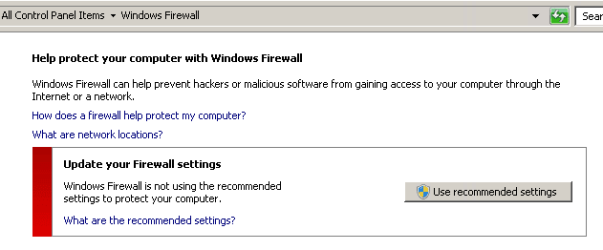
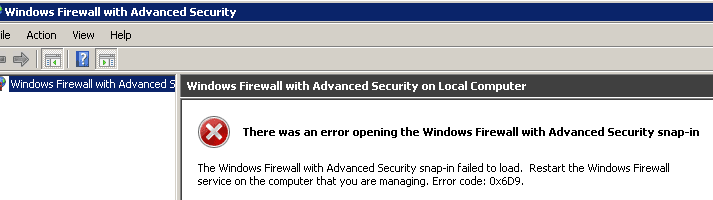
The Windows Firewall is in whatever state these screens indicate (off?):

WFW1.png

WFW2.png

SFC and CHKDSK came up clean.


The NAS array that some of the shortcuts pointed to is weird...
...so I guess it was this: Broken shortcuts are deleted from the desktop in Windows 7
What threw me were the local shortcuts to network adapters that threw me.

On this laptop - the shortcuts to network adapters go away (maybe other stuff too - hard to tell). I'm keeping an eye on that - but I've not found the events causing that. Maybe I rush undocking it while bit is going to sleep.
 

My Computer My Computer

Computer type
Laptop
Computer Manufacturer/Model Number
Employer provided Dell Latitude
OS
W7 Pro SP1 64bit
CPU
i7
Memory
8GB
Graphics Card(s)
Intel HD Graphics
Hard Drives
crappy SSD
Antivirus
Employer mandated Symantec Endpoint Protection
Browser
Pale Moon 64bit, IE11 64bit & Chrome 64bit
I'm not familiar with SEP - but it appears to have its own firewall and so should have switched the Windows firewall off (properly!).

Are these OEM installs - re-imaged? If the OEM install is still in use, then the chances are that the original AV wan't removed properly, and you need to address that, and possibly remove/reinstall SEP.
Obviously, if a clean image was used, then that wouldn't apply.

Nothing in the Event logs??
 

My Computer My Computer

Computer type
Laptop
Computer Manufacturer/Model Number
Asus K52F or Lenovo B51-80
OS
Win 7 x64 Home Premium (and x86 VirtualBox VM)/Win10
CPU
i3 370M/i7 6500U
Motherboard
Asus/Lenovo
Memory
8GB - finally :)/8GB
Graphics Card(s)
it's an i3, dude!/dual Intel&nVidia
Sound Card
onboard
Monitor(s) Displays
15.6" built-in
Screen Resolution
1366x768/1920x1080
Hard Drives
750GB Seagate internal
Sundry external drives attached to other computers on the local network
1TB SSD on the Lenovo
PSU
n/a
Internet Speed
as much as I can get - usually on a dongle/phone, so <1MB/s
Antivirus
MSE/Defender
Browser
IE11/12/Edge/Chrome/FF(if I must)
I think that the computers are re-imaged with a company build.

I've looked thru the event logs several times - finding nothing - but I was looking in the regular app and system logs.

Searching for "System Maintenance troubleshooter" "event log"...
...lead me to this:
Control Windows 7 Scheduled Maintenance Behavior Through Group Policy | Anything about IT
...which says to look here:
"...event log under Application and Service Logs \ Microsoft \ Windows \ Diagnosis-Scheduled"

I do see a couple of events like those shown at the bottom of that article. And I guess it decided to remove some local shortcuts that should not have been considered broken*. I see the same events logged on other boxes too. I'll keep an eye on the desktop and see if it removes local shortcuts again.

*I do not see any entries for the unused shortcuts/file/folders part of this task and yet shortcuts to local folders were removed too.


I see several of these "remove broken shortcuts" events on my laptop's logs too - which is scary since it does not detail which shortcuts it opted to remove. There are entries indicating that info was sent to the action center. I see the action center's flag in the notification area, but I don't recall ever seeing a notice relating to broken or old shortcuts.
 

My Computer My Computer

Computer type
Laptop
Computer Manufacturer/Model Number
Employer provided Dell Latitude
OS
W7 Pro SP1 64bit
CPU
i7
Memory
8GB
Graphics Card(s)
Intel HD Graphics
Hard Drives
crappy SSD
Antivirus
Employer mandated Symantec Endpoint Protection
Browser
Pale Moon 64bit, IE11 64bit & Chrome 64bit
Back
Top