Desktop Slideshow

How to Create a Desktop Slideshow in Windows 7

   Information
This will show you how to create a slideshow of wallpaper images (pictures) on your Windows 7 desktop. You will have the option to select how often the pictures change and to shuffle them.

The default folder that Windows 7 uses to store the pictures in is located at:
C:\Windows\Web\Wallpaper.

   Note
The Windows 7 Starter and Home Basic editions do not include the Desktop Slideshow feature.

Lets talk about Windows 7 Starter - Windows 7 Team Blog - The Windows Blog

Instead, you will need to use the tutorial in the link below to have a Desktop Slideshow in the Windows 7 Starter and Home Basic editions.

How to Change the Desktop Background in Windows 7 Starter Edition

   Warning
If you checked the Turn off all unnecceassary animations box in the Ease of Access Center, or uncheck the Animate controls and elements inside windows option in the Visual Effects settings, then this will also remove the fade effect between wallpapers in the desktop slideshow.

You must also be using a Aero theme to be able to use and set the desktop slideshow.


Here's How:
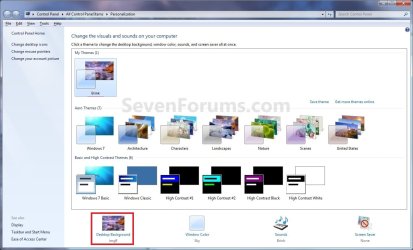
1. Right click on a empty space on the desktop and click on Personalize.

2. Click on the Desktop Background link at the bottom of the window. (see screenshot below)
NOTE: The name in gray under Desktop Background is the current desktop background file name.
Personalize.jpg
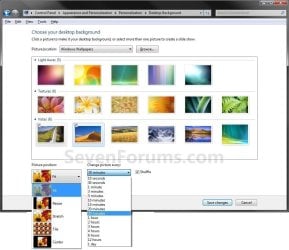
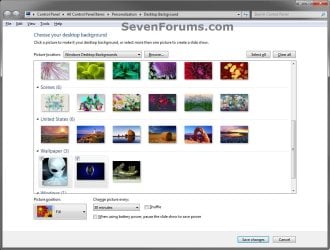
3. You will now see this window. (see screenshots below)
NOTE: You may need to scroll down or enlarge the window to see all available options like below.
change-2.jpg

Desktop_Background.jpg

4. Select a Picture Location
A) Click on the drop down arrow menu to select from the list of available picture folder locations, or click on the Browse button to navigate to the picture folder or library location. (see screenshots above)

B) Select the picture folder and click on Select Folder.
5. Select Desktop Background Pictures
A) Select more than one picture by right clicking on an available picture, or clicking on the check box (to check) in the upper left corner of the picture. (see screenshots below and below step 3)
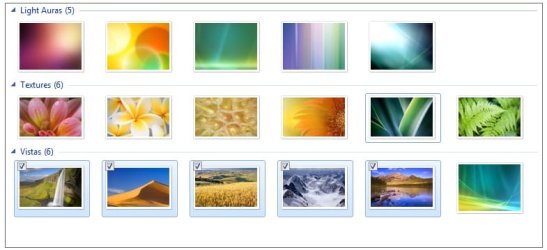
Select_Images.jpg
6. Select the Picture Position
A) Click on the drop down arrow menu, and click on the picture position you want for the desktop background images. (see screenshots below and below step 3)
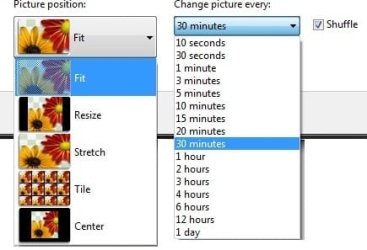
Options.jpg
7. Select How Often to Change Pictures
A) Click on the drop down arrow menu, and click on how often you want the pictures to change. (see screenshots above and below step 3)
8. To Shuffle the Pictures
A) Check the Shuffle box to shuffle the selected pictures to change in a random order. (see screenshot below step 3 and below step 6)
NOTE: Uncheck the Shuffle box to have the selected pictures change in order.
9. To Pause Slide Show when on Battery Power
A) Check or uncheck the When using battery, pause the slide show to save power box for what you would like. (see left screenshot below step 3)
NOTE: This option is only available if you have a PC that has a battery (ex: laptop), or a destop with a UPS and it's data cable connected.
10. Click on Save changes to apply the changes. (see screenshots below step 3)

11. Close the Personalize window when done. (see screenshots below step 2)

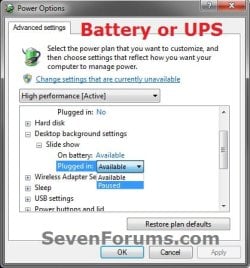
12. Open your Advanced Power Plan Settings. Under Desktop background settings for Slide show, make sure that you have the setting as Available for both "Plugged in" or "On battery" (if available), and click on OK. (see screenshots below)
NOTE: The "On battery" option is the same setting in step 9 above.
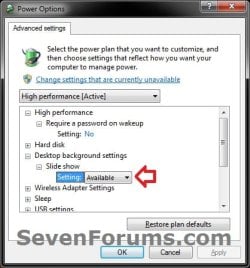
Slide_Show.jpgPower_Options-2.jpg
13. You will now have your selected images (step 5) change automatically on your desktop for how often (step 7) you set it to.

   Tip
You can now also right click on your desktop, and click on Next desktop background to change or scroll your desktop background to the next image you had selected (step 5) in the slideshow.

The keyboard shortcut for this is:
Shift+F10 and press N
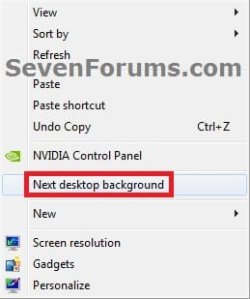
Next_desktop_background.jpg


That's it,
Shawn


Last edited:
Just wanted to let you know the problem started again and I found out the cause. Windows Update always wants to install an older driver for my video card. I had hid the update, but I had also hidden a update I later decided I wanted. I forgot about the video card update and unhid both and installed. I was checking driver dates today and noticed the date for the video card driver was wrong. I updated the driver again (along with a couple others) and no more flashing. I also found a post in another forum stating that the update I installed was made specifically to fix the problem.
 

My Computer

Computer type
Laptop
Computer Manufacturer/Model Number
Toshiba P775-S7100
OS
Windows 7 Professional SP1 64-bit
CPU
Intel Core i5-2450M @2.5 GHz
Memory
6 GB DDR3 1333MHz
Graphics Card(s)
Intel HD 3000
Monitor(s) Displays
Built-in 17.3" LED; 22" Insignia NS-L22Q-10A
Screen Resolution
1600x900; 1360x768
Hard Drives
750 GB Hitachi
1TB Seagate FreeAgent External
Internet Speed
Verizon DSL Speed(Down/Up): 3360 Kbps / 800 Kbps
Antivirus
MSE and MBAM Pro
Browser
IE10
That's great news Petey. Thank you for posting back with your findings. :)
 

My Computer

Computer type
PC/Desktop
Computer Manufacturer/Model Number
Self built custom
OS
64-bit Windows 11 Pro for Workstations
CPU
Intel i7-8700K OC'd to 5 GHz
Motherboard
ASUS ROG Maximus XI Formula Z390
Memory
64 GB (4x16GB) G.SKILL TridentZ RGB DDR4 3600 MHz
Graphics Card(s)
ASUS ROG-STRIX-GTX1080TI-O11G-GAMING
Sound Card
Integrated
Monitor(s) Displays
2 x Samsung Odyssey G7 27"
Screen Resolution
2560x1440
Hard Drives
1TB Samsung 990 PRO M.2,
4TB Samsung 990 PRO PRO M.2,
TerraMaster F8 SSD Plus NAS
PSU
Seasonic Prime Titanium 850W
Case
Thermaltake Core P3
Cooling
Corsair Hydro H115i
Keyboard
Logitech wireless K800
Mouse
Logitech MX Master 4
Internet Speed
2 Gb/s Download and 100 Mb/s Upload
Antivirus
Malwarebyte Anti-Malware Premium
Browser
Google Chrome
Other Info
Logitech Z625 speaker system,
Logitech BRIO 4K Pro webcam,
HP Color LaserJet Pro MFP M477fdn,
APC SMART-UPS RT 1000 XL - SURT1000XLI,
Galaxy S23 Plus phone
Thank you! This helped a lot!
 

My Computer

OS
Windows 7 Home Premium 64bit
CPU
AMD Phenom X2 3.1 GHz
Motherboard
ASUS M4A785T-M/CSM
Memory
4 GB
Graphics Card(s)
ATI Radeon 5870 1GB
Sound Card
On-board Audio
Monitor(s) Displays
Samsung PX2370 23 Inch
Screen Resolution
1920x1080
Keyboard
Razer Lycosa
Mouse
Razer DeathAdder
You're most welcome Luke, and welcome to Seven Forums. Thank you.
smile.gif
 

My Computer

Computer type
PC/Desktop
Computer Manufacturer/Model Number
Self built custom
OS
64-bit Windows 11 Pro for Workstations
CPU
Intel i7-8700K OC'd to 5 GHz
Motherboard
ASUS ROG Maximus XI Formula Z390
Memory
64 GB (4x16GB) G.SKILL TridentZ RGB DDR4 3600 MHz
Graphics Card(s)
ASUS ROG-STRIX-GTX1080TI-O11G-GAMING
Sound Card
Integrated
Monitor(s) Displays
2 x Samsung Odyssey G7 27"
Screen Resolution
2560x1440
Hard Drives
1TB Samsung 990 PRO M.2,
4TB Samsung 990 PRO PRO M.2,
TerraMaster F8 SSD Plus NAS
PSU
Seasonic Prime Titanium 850W
Case
Thermaltake Core P3
Cooling
Corsair Hydro H115i
Keyboard
Logitech wireless K800
Mouse
Logitech MX Master 4
Internet Speed
2 Gb/s Download and 100 Mb/s Upload
Antivirus
Malwarebyte Anti-Malware Premium
Browser
Google Chrome
Other Info
Logitech Z625 speaker system,
Logitech BRIO 4K Pro webcam,
HP Color LaserJet Pro MFP M477fdn,
APC SMART-UPS RT 1000 XL - SURT1000XLI,
Galaxy S23 Plus phone
Please help me!

I have Windows 7 Ultimate and I can select multiple images but I am not able to change the time of the slideshow! I don't even have that option.. neither shuffle.. I only have the dropdown menu to change the way Windows should adjust the image (stretch the image, center..)

Help?
 

My Computer

Computer Manufacturer/Model Number
HP
OS
Windows 7 Ultimate x64
CPU
Intel Core i7-720QM 1,60 GHz
Motherboard
Hewlett-Packard 1448 65.35
Memory
6 GB DDR3 (1 x 2.048 MB + 1 x 4.096 MB)
Graphics Card(s)
ATI Mobility Radeon HD 5650
Sound Card
Altec Lansing
Monitor(s) Displays
Monitor LED HP BrightView HD
Screen Resolution
1.366 x 768
Hello Difusal,

Are you using a Aero theme?

Did you have DreamScene installed in Vista, and did a upgrade install to Windows 7?
 

My Computer

Computer type
PC/Desktop
Computer Manufacturer/Model Number
Self built custom
OS
64-bit Windows 11 Pro for Workstations
CPU
Intel i7-8700K OC'd to 5 GHz
Motherboard
ASUS ROG Maximus XI Formula Z390
Memory
64 GB (4x16GB) G.SKILL TridentZ RGB DDR4 3600 MHz
Graphics Card(s)
ASUS ROG-STRIX-GTX1080TI-O11G-GAMING
Sound Card
Integrated
Monitor(s) Displays
2 x Samsung Odyssey G7 27"
Screen Resolution
2560x1440
Hard Drives
1TB Samsung 990 PRO M.2,
4TB Samsung 990 PRO PRO M.2,
TerraMaster F8 SSD Plus NAS
PSU
Seasonic Prime Titanium 850W
Case
Thermaltake Core P3
Cooling
Corsair Hydro H115i
Keyboard
Logitech wireless K800
Mouse
Logitech MX Master 4
Internet Speed
2 Gb/s Download and 100 Mb/s Upload
Antivirus
Malwarebyte Anti-Malware Premium
Browser
Google Chrome
Other Info
Logitech Z625 speaker system,
Logitech BRIO 4K Pro webcam,
HP Color LaserJet Pro MFP M477fdn,
APC SMART-UPS RT 1000 XL - SURT1000XLI,
Galaxy S23 Plus phone
Dream scene? What is that?

Problem is solved!! I didn't notice there was a bar we could scroll down.. It's nonsense.. Just because I'm using a portuguese language pack.. The problem is that there is a large sentence which doesn't feet the window size.. So the window would reorganise and make several paragraphs! If I scroll down, voilla! The options are just right there.. Too stupid to be true.. But a lot of people have had this problem from what I've searched. But as this kind of personalization windows aren't usually that big, people would have never thought that we just needed to scroll down..

Thanks anyway!
 

My Computer

Computer Manufacturer/Model Number
HP
OS
Windows 7 Ultimate x64
CPU
Intel Core i7-720QM 1,60 GHz
Motherboard
Hewlett-Packard 1448 65.35
Memory
6 GB DDR3 (1 x 2.048 MB + 1 x 4.096 MB)
Graphics Card(s)
ATI Mobility Radeon HD 5650
Sound Card
Altec Lansing
Monitor(s) Displays
Monitor LED HP BrightView HD
Screen Resolution
1.366 x 768
DreamScene was a bonus feature in Vista Ultimate that allowed you to have animated desktops. It was removed in Windows 7 though.

LOL, I'm happy to hear that it was only somthing simple that you got sorted out. I'll add a note in the tutorial to help with this. :)
 

My Computer

Computer type
PC/Desktop
Computer Manufacturer/Model Number
Self built custom
OS
64-bit Windows 11 Pro for Workstations
CPU
Intel i7-8700K OC'd to 5 GHz
Motherboard
ASUS ROG Maximus XI Formula Z390
Memory
64 GB (4x16GB) G.SKILL TridentZ RGB DDR4 3600 MHz
Graphics Card(s)
ASUS ROG-STRIX-GTX1080TI-O11G-GAMING
Sound Card
Integrated
Monitor(s) Displays
2 x Samsung Odyssey G7 27"
Screen Resolution
2560x1440
Hard Drives
1TB Samsung 990 PRO M.2,
4TB Samsung 990 PRO PRO M.2,
TerraMaster F8 SSD Plus NAS
PSU
Seasonic Prime Titanium 850W
Case
Thermaltake Core P3
Cooling
Corsair Hydro H115i
Keyboard
Logitech wireless K800
Mouse
Logitech MX Master 4
Internet Speed
2 Gb/s Download and 100 Mb/s Upload
Antivirus
Malwarebyte Anti-Malware Premium
Browser
Google Chrome
Other Info
Logitech Z625 speaker system,
Logitech BRIO 4K Pro webcam,
HP Color LaserJet Pro MFP M477fdn,
APC SMART-UPS RT 1000 XL - SURT1000XLI,
Galaxy S23 Plus phone
Hey shawn, can we reduce the interval to less than one second i.e. in milliseconds, I tried to put 0.1 and 1/10 but none of them is working, though msdn site says interval time can be reduced to milliseconds. See here: Theme File Format (Windows)
 

My Computer

OS
Windows 7 Ultimate
Hello Niceguy,

In the registry, the value is in milliseconds, but it can still only be set with the millisecond equavalent of seconds for what you can in step 6. :(
 

My Computer

Computer type
PC/Desktop
Computer Manufacturer/Model Number
Self built custom
OS
64-bit Windows 11 Pro for Workstations
CPU
Intel i7-8700K OC'd to 5 GHz
Motherboard
ASUS ROG Maximus XI Formula Z390
Memory
64 GB (4x16GB) G.SKILL TridentZ RGB DDR4 3600 MHz
Graphics Card(s)
ASUS ROG-STRIX-GTX1080TI-O11G-GAMING
Sound Card
Integrated
Monitor(s) Displays
2 x Samsung Odyssey G7 27"
Screen Resolution
2560x1440
Hard Drives
1TB Samsung 990 PRO M.2,
4TB Samsung 990 PRO PRO M.2,
TerraMaster F8 SSD Plus NAS
PSU
Seasonic Prime Titanium 850W
Case
Thermaltake Core P3
Cooling
Corsair Hydro H115i
Keyboard
Logitech wireless K800
Mouse
Logitech MX Master 4
Internet Speed
2 Gb/s Download and 100 Mb/s Upload
Antivirus
Malwarebyte Anti-Malware Premium
Browser
Google Chrome
Other Info
Logitech Z625 speaker system,
Logitech BRIO 4K Pro webcam,
HP Color LaserJet Pro MFP M477fdn,
APC SMART-UPS RT 1000 XL - SURT1000XLI,
Galaxy S23 Plus phone
I'm afraid not less than 10 seconds. :(
 

My Computer

Computer type
PC/Desktop
Computer Manufacturer/Model Number
Self built custom
OS
64-bit Windows 11 Pro for Workstations
CPU
Intel i7-8700K OC'd to 5 GHz
Motherboard
ASUS ROG Maximus XI Formula Z390
Memory
64 GB (4x16GB) G.SKILL TridentZ RGB DDR4 3600 MHz
Graphics Card(s)
ASUS ROG-STRIX-GTX1080TI-O11G-GAMING
Sound Card
Integrated
Monitor(s) Displays
2 x Samsung Odyssey G7 27"
Screen Resolution
2560x1440
Hard Drives
1TB Samsung 990 PRO M.2,
4TB Samsung 990 PRO PRO M.2,
TerraMaster F8 SSD Plus NAS
PSU
Seasonic Prime Titanium 850W
Case
Thermaltake Core P3
Cooling
Corsair Hydro H115i
Keyboard
Logitech wireless K800
Mouse
Logitech MX Master 4
Internet Speed
2 Gb/s Download and 100 Mb/s Upload
Antivirus
Malwarebyte Anti-Malware Premium
Browser
Google Chrome
Other Info
Logitech Z625 speaker system,
Logitech BRIO 4K Pro webcam,
HP Color LaserJet Pro MFP M477fdn,
APC SMART-UPS RT 1000 XL - SURT1000XLI,
Galaxy S23 Plus phone
That's good news then. :)
 

My Computer

Computer type
PC/Desktop
Computer Manufacturer/Model Number
Self built custom
OS
64-bit Windows 11 Pro for Workstations
CPU
Intel i7-8700K OC'd to 5 GHz
Motherboard
ASUS ROG Maximus XI Formula Z390
Memory
64 GB (4x16GB) G.SKILL TridentZ RGB DDR4 3600 MHz
Graphics Card(s)
ASUS ROG-STRIX-GTX1080TI-O11G-GAMING
Sound Card
Integrated
Monitor(s) Displays
2 x Samsung Odyssey G7 27"
Screen Resolution
2560x1440
Hard Drives
1TB Samsung 990 PRO M.2,
4TB Samsung 990 PRO PRO M.2,
TerraMaster F8 SSD Plus NAS
PSU
Seasonic Prime Titanium 850W
Case
Thermaltake Core P3
Cooling
Corsair Hydro H115i
Keyboard
Logitech wireless K800
Mouse
Logitech MX Master 4
Internet Speed
2 Gb/s Download and 100 Mb/s Upload
Antivirus
Malwarebyte Anti-Malware Premium
Browser
Google Chrome
Other Info
Logitech Z625 speaker system,
Logitech BRIO 4K Pro webcam,
HP Color LaserJet Pro MFP M477fdn,
APC SMART-UPS RT 1000 XL - SURT1000XLI,
Galaxy S23 Plus phone
How do I combine pictures from different locations?

I can't find a way to combine pictures in the "Windows Desktop Backgrounds" (C:\Windows\Web\Wallpaper) with pictures that I have saved in another folder into a single slideshow. Could you please update the article to tell how this can be done? Thanks.
 

My Computer

Computer type
PC/Desktop
Computer Manufacturer/Model Number
Custom Build
OS
Windows 7 Home Premium 64 Bit
CPU
Pentium G3220
Motherboard
MSI H81M-E33 V2
Memory
8 GB
Graphics Card(s)
ATI Radeon HD 5450
Hard Drives
Seagate ST1000DM03-1CH162
WDC WD1200SD-01KCC0
Antivirus
AVG
Browser
Google Chrome

My Computer

Computer type
PC/Desktop
Computer Manufacturer/Model Number
Self built custom
OS
64-bit Windows 11 Pro for Workstations
CPU
Intel i7-8700K OC'd to 5 GHz
Motherboard
ASUS ROG Maximus XI Formula Z390
Memory
64 GB (4x16GB) G.SKILL TridentZ RGB DDR4 3600 MHz
Graphics Card(s)
ASUS ROG-STRIX-GTX1080TI-O11G-GAMING
Sound Card
Integrated
Monitor(s) Displays
2 x Samsung Odyssey G7 27"
Screen Resolution
2560x1440
Hard Drives
1TB Samsung 990 PRO M.2,
4TB Samsung 990 PRO PRO M.2,
TerraMaster F8 SSD Plus NAS
PSU
Seasonic Prime Titanium 850W
Case
Thermaltake Core P3
Cooling
Corsair Hydro H115i
Keyboard
Logitech wireless K800
Mouse
Logitech MX Master 4
Internet Speed
2 Gb/s Download and 100 Mb/s Upload
Antivirus
Malwarebyte Anti-Malware Premium
Browser
Google Chrome
Other Info
Logitech Z625 speaker system,
Logitech BRIO 4K Pro webcam,
HP Color LaserJet Pro MFP M477fdn,
APC SMART-UPS RT 1000 XL - SURT1000XLI,
Galaxy S23 Plus phone
This tutorial is great!!!

I already answered a few of my questions from it, but I have a few additional ones:

I previously was using Wallpaper Master to change my desktop wallpaper - but it is marginally compatible with Win7. It worked okay on a previous install, it works half the time on this one, half the time it say "Wallpaper Changer needs to close before it does anything." I don't want to install additional software, though, so I just disabled it.

I found out from the replies that the slideshow interval is from the re-boot or login time of the computer, not a running interval. (Although if you let the computer sleep, it apparently will catch up when it wakes up). It would be helpful if someone could add this to the tutorial so newbies like me don't have to read through 8 pages of replies.

I also found out that I could use libraries rather than one individual folder - but I have it in one folder for now. It would be nice if the tutorial specified that (it's been asked twice in the replies so far.)

There are a couple of features that I liked in Wallpaper Master that I don't see a way to implement in Win7 (and suspect they can't be implemented).

Change at startup - Mainly, I only want to change the wallpaper once initially when I log on. I did some digging and http://www.sevenforums.com/tutorials/160414-desktop-background-shortcut-create.html sent me to Is there a Windows 7 keyboard shortcut to change the desktop background? - Super User That should do what I want and then I could set the slideshow to 1-day (I'm not logged in for more than 24-hours), but I couldn't make it work - i.e., I run Autohotkey, but mainly to send hotkey combos.

Is there anyway to know the name of the image that was selected. I would like this for two reasons - right now I have 1300 pictures in a single folder - if I don't like one as wallpaper, it would be nice to not have to look through 1300 thumbnails for a match to remove it. Some of the pictures are of tanks and the name tells me what type of tank it is - but if I can't see the name, I'm again back to looking though 1300 thumbnails.

Thanks in advance!!!
 

My Computer

OS
WinXP SP2
Hello TigerHeli, :)

You can look at the WallpaperSource string value in the registry key below to see what your current wallpaper is.

HKEY_CURRENT_USER\Software\Microsoft\Internet Explorer\Desktop\General
 

My Computer

Computer type
PC/Desktop
Computer Manufacturer/Model Number
Self built custom
OS
64-bit Windows 11 Pro for Workstations
CPU
Intel i7-8700K OC'd to 5 GHz
Motherboard
ASUS ROG Maximus XI Formula Z390
Memory
64 GB (4x16GB) G.SKILL TridentZ RGB DDR4 3600 MHz
Graphics Card(s)
ASUS ROG-STRIX-GTX1080TI-O11G-GAMING
Sound Card
Integrated
Monitor(s) Displays
2 x Samsung Odyssey G7 27"
Screen Resolution
2560x1440
Hard Drives
1TB Samsung 990 PRO M.2,
4TB Samsung 990 PRO PRO M.2,
TerraMaster F8 SSD Plus NAS
PSU
Seasonic Prime Titanium 850W
Case
Thermaltake Core P3
Cooling
Corsair Hydro H115i
Keyboard
Logitech wireless K800
Mouse
Logitech MX Master 4
Internet Speed
2 Gb/s Download and 100 Mb/s Upload
Antivirus
Malwarebyte Anti-Malware Premium
Browser
Google Chrome
Other Info
Logitech Z625 speaker system,
Logitech BRIO 4K Pro webcam,
HP Color LaserJet Pro MFP M477fdn,
APC SMART-UPS RT 1000 XL - SURT1000XLI,
Galaxy S23 Plus phone
Registry key works great.

No luck so far with the script to change it.

http://www.sevenforums.com/general-...t-desktop-background-keyboard-shortcut-2.html

Keyboard Shortcut or Hotkey To Switch To Next Windows 7 Desktop Wallpaper

Neither of the AutoHotKey scripts on Superuser seem to do anything here when I run them. Same for the scripts on TechnixUpdate. The vbs script says there is an invalid character at Line 1, Character 37, which would be the "(".

I did verify the idea works manually - i.e if I show the desktop, click the mouse, and press Shift-F10, n it changes, but I can't seem to automate it.

Thanks again!!!
 

My Computer

OS
WinXP SP2
Back
Top