
You are using an out of date browser. It may not display this or other websites correctly.
You should upgrade or use an alternative browser.
You should upgrade or use an alternative browser.
Solved Desktop, Taskbar, and Start button change mysteriously?
- Thread starter Kuuhaku
- Start date


Go into Control Panel under Personalization. Make sure you do not have "Windows Classic" checked. You can change your themes to anything you want from there.
My Computer
- Computer type
- PC/Desktop
- Computer Manufacturer/Model Number
- Custom Build
- OS
- Windows 7 Home Premium 32-Bit - Build 7600 SP1
- CPU
- Intel Core i3-2120 3.30Ghz
- Motherboard
- Asus P8Z68-V LX Intel Z68 Socket H2 ATX
- Memory
- Kingston 4 GB DDR3 1333 mhz
- Graphics Card(s)
- AMD Radeon HD6670
- Sound Card
- Sound Blaster Audigy SE 24-Bit
- Monitor(s) Displays
- Asus VE228
- Screen Resolution
- 1440 X 900
- Hard Drives
- OCZ Vertex 3 120 GB Sata 3 SSD ==
Kingston SH103/S3 120 G Hyper X 120 GB SSD ==
Western Digital 500 GB Caviar Green 7200 RPM ==
- PSU
- Corsair CX600M == 600 Watt
- Case
- NZXT Apollo - Silver with Clear Side Panel
- Cooling
- Three 120 mm Fans
- Keyboard
- Microsoft Natural 4000
- Mouse
- Microsoft Custom Optical 3000
- Internet Speed
- AT&T Fiber Optic Wireless Network
- Antivirus
- Microsoft Security Essentials
- Browser
- Chrome
- Other Info
- 120 mm Blue LED Fan -- Three Blue LED Lazer Light Sticks
Go into Control Panel under Personalization. Make sure you do not have "Windows Classic" checked. You can change your themes to anything you want from there.
What do you mean? Do you mean I go to Control Panel first and then click Personalization? If so, I don't see any
thing that can be checked or unchecked. It just bring up stuffs like My Themes, Aero Themes, Installed Themes, and Basic and High Contrast Themes.
My Computer
- Computer type
- PC/Desktop
- Computer Manufacturer/Model Number
- Dell
- OS
- 32 bit
Go into Control Panel under Personalization. Make sure you do not have "Windows Classic" checked. You can change your themes to anything you want from there.
What do you mean? Do you mean I go to Control Panel first and then click Personalization? If so, I don't see any
thing that can be checked or unchecked. It just bring up stuffs like My Themes, Aero Themes, Installed Themes, and Basic and High Contrast Themes.
That is correct. That is where you change your themes. If you have "Windows Classic" marked as your theme, it will look just as yours does.
Attachments

My Computer
- Computer type
- PC/Desktop
- Computer Manufacturer/Model Number
- Custom Build
- OS
- Windows 7 Home Premium 32-Bit - Build 7600 SP1
- CPU
- Intel Core i3-2120 3.30Ghz
- Motherboard
- Asus P8Z68-V LX Intel Z68 Socket H2 ATX
- Memory
- Kingston 4 GB DDR3 1333 mhz
- Graphics Card(s)
- AMD Radeon HD6670
- Sound Card
- Sound Blaster Audigy SE 24-Bit
- Monitor(s) Displays
- Asus VE228
- Screen Resolution
- 1440 X 900
- Hard Drives
- OCZ Vertex 3 120 GB Sata 3 SSD ==
Kingston SH103/S3 120 G Hyper X 120 GB SSD ==
Western Digital 500 GB Caviar Green 7200 RPM ==
- PSU
- Corsair CX600M == 600 Watt
- Case
- NZXT Apollo - Silver with Clear Side Panel
- Cooling
- Three 120 mm Fans
- Keyboard
- Microsoft Natural 4000
- Mouse
- Microsoft Custom Optical 3000
- Internet Speed
- AT&T Fiber Optic Wireless Network
- Antivirus
- Microsoft Security Essentials
- Browser
- Chrome
- Other Info
- 120 mm Blue LED Fan -- Three Blue LED Lazer Light Sticks

- Local time
- 7:03 AM
- Messages
- 4,563
Choose windows 7 under aero themes. Then pick what color you want, screensaver etc. Then adjust your visual settings under control panel-system- performance information and tools-adjust visual effects. There you can decide what visual items you want to see.
The following are required to be enabled for aero:
-Desktop composition
-Use visual styles on windows and buttons
-Enable aero peek
The following are required to be enabled for aero:
-Desktop composition
-Use visual styles on windows and buttons
-Enable aero peek
My Computer
- Computer type
- PC/Desktop
- Computer Manufacturer/Model Number
- Custom Built
- OS
- Windows 10 Pro
- CPU
- AMD Ryzen 5 2400G Processor with Radeon RX Vega 11 Graphics
- Motherboard
- ASRock X470 Master SLI/AC AM4 AMD Promontory X470 SATA 6Gb/s
- Memory
- G.SKILL Ripjaws V Series 16GB (2 x 8GB) 288-Pin DDR4 SDRAM D
- Graphics Card(s)
- 2047MB NVIDIA GeForce GTX 1060 6GB (EVGA)
- Sound Card
- Motherboard Built in
- Monitor(s) Displays
- Acer R240HY bidx 23.8-Inch IPS HDMI DVI VGA (1920 x 1080) Wi
- Screen Resolution
- 1920 x 1080
- Hard Drives
- 1TB Sandisk SSD PLUS (Main drive)
500 GB Seagate 7200 RPM (Games)
500 GB Western Digital 7200 RPM (Virtual Machines)
- PSU
- CORSAIR TX Series TX650M 650W 80+ Gold Modular Power Supply
- Case
- CORSAIR CARBIDE SPEC-02 Mid-Tower Gaming Case, Red LED Fan
- Cooling
- 220mm, two 120mm, and four 60mm fans
- Keyboard
- Wired Dell keyboard
- Mouse
- Wireless Logitech mouse
- Internet Speed
- 250mb down, 30mb up
- Antivirus
- Panda Cloud Antivirus
- Browser
- Chrome-ish x64
- Other Info
- Your awesome for reading this.
Go into Control Panel under Personalization. Make sure you do not have "Windows Classic" checked. You can change your themes to anything you want from there.
What do you mean? Do you mean I go to Control Panel first and then click Personalization? If so, I don't see any
thing that can be checked or unchecked. It just bring up stuffs like My Themes, Aero Themes, Installed Themes, and Basic and High Contrast Themes.
That is correct. That is where you change your themes. If you have "Windows Classic" marked as your theme, it will look just as yours does.
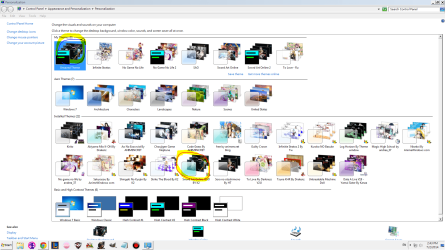
That's not what I meant. My installed themes is usually in Windows Basic but now every time I click on my installed themes, it makes a new theme in My Themes area that's in Windows Classic or High Contrast.
Attachments
My Computer
- Computer type
- PC/Desktop
- Computer Manufacturer/Model Number
- Dell
- OS
- 32 bit
Are you saying that if you change your Theme to Windows Basic and shut off your PC that next time you boot the Theme will be in Windows Classic?
My Computer
- Computer type
- PC/Desktop
- Computer Manufacturer/Model Number
- Custom Build
- OS
- Windows 7 Home Premium 32-Bit - Build 7600 SP1
- CPU
- Intel Core i3-2120 3.30Ghz
- Motherboard
- Asus P8Z68-V LX Intel Z68 Socket H2 ATX
- Memory
- Kingston 4 GB DDR3 1333 mhz
- Graphics Card(s)
- AMD Radeon HD6670
- Sound Card
- Sound Blaster Audigy SE 24-Bit
- Monitor(s) Displays
- Asus VE228
- Screen Resolution
- 1440 X 900
- Hard Drives
- OCZ Vertex 3 120 GB Sata 3 SSD ==
Kingston SH103/S3 120 G Hyper X 120 GB SSD ==
Western Digital 500 GB Caviar Green 7200 RPM ==
- PSU
- Corsair CX600M == 600 Watt
- Case
- NZXT Apollo - Silver with Clear Side Panel
- Cooling
- Three 120 mm Fans
- Keyboard
- Microsoft Natural 4000
- Mouse
- Microsoft Custom Optical 3000
- Internet Speed
- AT&T Fiber Optic Wireless Network
- Antivirus
- Microsoft Security Essentials
- Browser
- Chrome
- Other Info
- 120 mm Blue LED Fan -- Three Blue LED Lazer Light Sticks
Are you saying that if you change your Theme to Windows Basic and shut off your PC that next time you boot the Theme will be in Windows Classic?
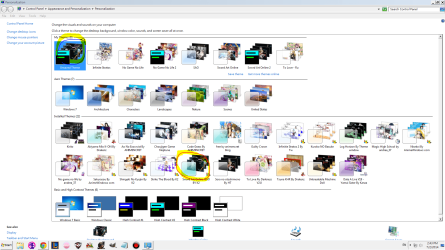
No. If I change it to Windows Basic then it stays at Windows Basic but if I click any of my Installed Themes, it automatically make a new theme under My Themes area that's in Window Classic
Attachments
My Computer
- Computer type
- PC/Desktop
- Computer Manufacturer/Model Number
- Dell
- OS
- 32 bit
- Local time
- 7:03 AM
- Messages
- 4,563
Are you using supported windows 7 themes? Some themes found online only work in vista or 8 which is why aero would not work.
Also, please look at post 5.
And if you choose windows 7 aero theme and reboot does it stay with that?
Also, please look at post 5.
And if you choose windows 7 aero theme and reboot does it stay with that?
My Computer
- Computer type
- PC/Desktop
- Computer Manufacturer/Model Number
- Custom Built
- OS
- Windows 10 Pro
- CPU
- AMD Ryzen 5 2400G Processor with Radeon RX Vega 11 Graphics
- Motherboard
- ASRock X470 Master SLI/AC AM4 AMD Promontory X470 SATA 6Gb/s
- Memory
- G.SKILL Ripjaws V Series 16GB (2 x 8GB) 288-Pin DDR4 SDRAM D
- Graphics Card(s)
- 2047MB NVIDIA GeForce GTX 1060 6GB (EVGA)
- Sound Card
- Motherboard Built in
- Monitor(s) Displays
- Acer R240HY bidx 23.8-Inch IPS HDMI DVI VGA (1920 x 1080) Wi
- Screen Resolution
- 1920 x 1080
- Hard Drives
- 1TB Sandisk SSD PLUS (Main drive)
500 GB Seagate 7200 RPM (Games)
500 GB Western Digital 7200 RPM (Virtual Machines)
- PSU
- CORSAIR TX Series TX650M 650W 80+ Gold Modular Power Supply
- Case
- CORSAIR CARBIDE SPEC-02 Mid-Tower Gaming Case, Red LED Fan
- Cooling
- 220mm, two 120mm, and four 60mm fans
- Keyboard
- Wired Dell keyboard
- Mouse
- Wireless Logitech mouse
- Internet Speed
- 250mb down, 30mb up
- Antivirus
- Panda Cloud Antivirus
- Browser
- Chrome-ish x64
- Other Info
- Your awesome for reading this.
Are you using supported windows 7 themes? Some themes found online only work in vista or 8 which is why aero would not work.
Also, please look at post 5.
And if you choose windows 7 aero theme and reboot does it stay with that?
The theme i installed worked for all window 7. You mean I have to reboot after I pick Window Aero 7 theme?
Because even if I don't reboot my computer if i change the theme to Aero 7 theme it stays at Aero 7 theme but I don't like Aero 7 theme and want to use my installed theme.
My Computer
- Computer type
- PC/Desktop
- Computer Manufacturer/Model Number
- Dell
- OS
- 32 bit
https://www.youtube.com/watch?v=iVpfCMu55i4
It's in that video that I made if my explaining wasn't clear
It's in that video that I made if my explaining wasn't clear
My Computer
- Computer type
- PC/Desktop
- Computer Manufacturer/Model Number
- Dell
- OS
- 32 bit
Are you saying that if you change your Theme to Windows Basic and shut off your PC that next time you boot the Theme will be in Windows Classic?
No. If I change it to Windows Basic then it stays at Windows Basic but if I click any of my Installed Themes, it automatically make a new theme under My Themes area that's in Window Classic
Has it always done this or is it something that just recently started?
My Computer
- Computer type
- PC/Desktop
- Computer Manufacturer/Model Number
- Custom Build
- OS
- Windows 7 Home Premium 32-Bit - Build 7600 SP1
- CPU
- Intel Core i3-2120 3.30Ghz
- Motherboard
- Asus P8Z68-V LX Intel Z68 Socket H2 ATX
- Memory
- Kingston 4 GB DDR3 1333 mhz
- Graphics Card(s)
- AMD Radeon HD6670
- Sound Card
- Sound Blaster Audigy SE 24-Bit
- Monitor(s) Displays
- Asus VE228
- Screen Resolution
- 1440 X 900
- Hard Drives
- OCZ Vertex 3 120 GB Sata 3 SSD ==
Kingston SH103/S3 120 G Hyper X 120 GB SSD ==
Western Digital 500 GB Caviar Green 7200 RPM ==
- PSU
- Corsair CX600M == 600 Watt
- Case
- NZXT Apollo - Silver with Clear Side Panel
- Cooling
- Three 120 mm Fans
- Keyboard
- Microsoft Natural 4000
- Mouse
- Microsoft Custom Optical 3000
- Internet Speed
- AT&T Fiber Optic Wireless Network
- Antivirus
- Microsoft Security Essentials
- Browser
- Chrome
- Other Info
- 120 mm Blue LED Fan -- Three Blue LED Lazer Light Sticks

I'm not sure I follow - it sounds as though Themes is working normally.
Any time you have a Theme installed / chosen and make a change, a new theme is created. You can save that theme or just run with it as a current theme. The only time it should save it is if you tell it to save the theme.
That's the whole idea behind themes - set it the way you want it, save for later, make changes and save it if you like the new one better.
You can if you choose, select a saved theme, switch back to the previous theme (top area of themes), right click and delete the saved theme that was loaded when you selected the saved theme. You cannot delete the active theme, so you have to switch.
If I'm not reading the issue correctly, you might want to look at
Personalize > Change Desktop icons
and untick the Allow themes to change desktop icons
But I think your question is about more just desktop icons.
Any time you have a Theme installed / chosen and make a change, a new theme is created. You can save that theme or just run with it as a current theme. The only time it should save it is if you tell it to save the theme.
That's the whole idea behind themes - set it the way you want it, save for later, make changes and save it if you like the new one better.
You can if you choose, select a saved theme, switch back to the previous theme (top area of themes), right click and delete the saved theme that was loaded when you selected the saved theme. You cannot delete the active theme, so you have to switch.
If I'm not reading the issue correctly, you might want to look at
Personalize > Change Desktop icons
and untick the Allow themes to change desktop icons
But I think your question is about more just desktop icons.
My Computer
- Computer type
- Laptop
- Computer Manufacturer/Model Number
- HP Pavilion dv6-6c10us
- OS
- x64 (6.3.9600) Win8.1 Pro & soon dual boot x64 (6.1.7601) Win7_SP1 HomePrem
- CPU
- AMD A6-3420M APU with Radeon(tm) HD Graphics
- Motherboard
- Hewlett-Packard 1805
- Memory
- 6.00 GB
- Graphics Card(s)
- AMD Radeon(TM) HD 6520G
- Sound Card
- (1) AMD High Definition Audio Device (2) IDT High Definiti
- Monitor(s) Displays
- HP W2072a 20" LCD (1600 x 900) @ 60 Hz
- Screen Resolution
- 1366 x 768 x 32 bits (4294967296 colors) @ 60 Hz
- Hard Drives
- ST640LM0 00 HM641JI SATA Disk Device
- Keyboard
- Logitech k520 wireless KB
- Mouse
- Logitech m320 wireless mouse (bundled with KB)
- Internet Speed
- 15/5 | 54 MB Wireless 'n'
- Antivirus
- Realtime: Defender or Avast | On-demand: Malwarebytes, ESET
- Browser
- IE 11 on Win8, IE 10 on win 7
- Other Info
- Media: [Gimp, Audacity, VLC] || Comm: [WEmail 2012, Skype] || Productivity: [OpenOffice,| Textpad] || Utils: [Sysinternals, cCleaner, Speccy, Defraggler]
Are you saying that if you change your Theme to Windows Basic and shut off your PC that next time you boot the Theme will be in Windows Classic?
No. If I change it to Windows Basic then it stays at Windows Basic but if I click any of my Installed Themes, it automatically make a new theme under My Themes area that's in Window Classic
Has it always done this or is it something that just recently started?
It just recently started. I'm sorry to reply so late because I have something to do
My Computer
- Computer type
- PC/Desktop
- Computer Manufacturer/Model Number
- Dell
- OS
- 32 bit

I'm not sure I follow - it sounds as though Themes is working normally.
Any time you have a Theme installed / chosen and make a change, a new theme is created. You can save that theme or just run with it as a current theme. The only time it should save it is if you tell it to save the theme.
That's the whole idea behind themes - set it the way you want it, save for later, make changes and save it if you like the new one better.
You can if you choose, select a saved theme, switch back to the previous theme (top area of themes), right click and delete the saved theme that was loaded when you selected the saved theme. You cannot delete the active theme, so you have to switch.
If I'm not reading the issue correctly, you might want to look at
Personalize > Change Desktop icons
and untick the Allow themes to change desktop icons
But I think your question is about more just desktop icons.
This is exactly what mine does. If you want to change themes then you need to select the theme you want & save it with a name. If you want to go back to an old saved theme you can. All your saved themes need to be in "My Themes".
My Computer
- Computer type
- PC/Desktop
- Computer Manufacturer/Model Number
- Self built using existing case
- OS
- Windows 7 Home Premium 64 bit sp1
- CPU
- Intel i5 3570 3.4Ghz Ivy Bridge SKT 1155 quad core
- Motherboard
- Gigabyte Z77-HD3 SKT 1155 2xSata 3, 4x USB 3.0
- Memory
- G-Skill Rip Jaws 16Gb (8x2) DDR3 -1600 PC3 12800 CL 10 red
- Graphics Card(s)
- Gigabyte NVIDIA GT610 1Gb DDR3 810/1200 PCI-E 2.0 Silent
- Sound Card
- NVIDIA High Definition & Realtech High Definition Audio
- Monitor(s) Displays
- 2 x Philips 226V4L 16:9 aspect ratio
- Screen Resolution
- 1920 x 1080 HD
- Hard Drives
- Samsung 840 Pro 256gb SSD, SATA 3.
Hitachi Touro Portable 1tb, USB 3.0 HDD used for image b/ups.
- PSU
- Corsair VS450
- Case
- Codeng
- Cooling
- PSU fan & CPU fan
- Keyboard
- Logitech
- Mouse
- Logitech Wireless trackball M570
- Internet Speed
- Wireless 3G. 3mg down & 550kb up.
- Antivirus
- Bitdefender Internet Security 2020
- Browser
- Opera (Current Version) & Firefox
- Other Info
- MS Office 2013 Pro. Davis weather station software. MGE Nova 600 avr UPS.
Has it always done this or is it something that just recently started?
It just recently started. I'm sorry to reply so late because I have something to do
You need to try a http://www.sevenforums.com/tutorials/700-system-restore.html This will put your computer as it was. Do a Restore to a date before you had the problem and you will be good.
My Computer
- Computer type
- PC/Desktop
- Computer Manufacturer/Model Number
- Custom Build
- OS
- Windows 7 Home Premium 32-Bit - Build 7600 SP1
- CPU
- Intel Core i3-2120 3.30Ghz
- Motherboard
- Asus P8Z68-V LX Intel Z68 Socket H2 ATX
- Memory
- Kingston 4 GB DDR3 1333 mhz
- Graphics Card(s)
- AMD Radeon HD6670
- Sound Card
- Sound Blaster Audigy SE 24-Bit
- Monitor(s) Displays
- Asus VE228
- Screen Resolution
- 1440 X 900
- Hard Drives
- OCZ Vertex 3 120 GB Sata 3 SSD ==
Kingston SH103/S3 120 G Hyper X 120 GB SSD ==
Western Digital 500 GB Caviar Green 7200 RPM ==
- PSU
- Corsair CX600M == 600 Watt
- Case
- NZXT Apollo - Silver with Clear Side Panel
- Cooling
- Three 120 mm Fans
- Keyboard
- Microsoft Natural 4000
- Mouse
- Microsoft Custom Optical 3000
- Internet Speed
- AT&T Fiber Optic Wireless Network
- Antivirus
- Microsoft Security Essentials
- Browser
- Chrome
- Other Info
- 120 mm Blue LED Fan -- Three Blue LED Lazer Light Sticks
Has it always done this or is it something that just recently started?
It just recently started. I'm sorry to reply so late because I have something to do
You need to try a http://www.sevenforums.com/tutorials/700-system-restore.html This will put your computer as it was. Do a Restore to a date before you had the problem and you will be good.
When I go to system restore nothing comes up except for the date 2 days ago and the problem starts at June 10
My Computer
- Computer type
- PC/Desktop
- Computer Manufacturer/Model Number
- Dell
- OS
- 32 bit
The System Restore can't help this time, but in the future manually made a Restore Point once a week and you will always have one. == Read Message #15.
My Computer
- Computer type
- PC/Desktop
- Computer Manufacturer/Model Number
- Custom Build
- OS
- Windows 7 Home Premium 32-Bit - Build 7600 SP1
- CPU
- Intel Core i3-2120 3.30Ghz
- Motherboard
- Asus P8Z68-V LX Intel Z68 Socket H2 ATX
- Memory
- Kingston 4 GB DDR3 1333 mhz
- Graphics Card(s)
- AMD Radeon HD6670
- Sound Card
- Sound Blaster Audigy SE 24-Bit
- Monitor(s) Displays
- Asus VE228
- Screen Resolution
- 1440 X 900
- Hard Drives
- OCZ Vertex 3 120 GB Sata 3 SSD ==
Kingston SH103/S3 120 G Hyper X 120 GB SSD ==
Western Digital 500 GB Caviar Green 7200 RPM ==
- PSU
- Corsair CX600M == 600 Watt
- Case
- NZXT Apollo - Silver with Clear Side Panel
- Cooling
- Three 120 mm Fans
- Keyboard
- Microsoft Natural 4000
- Mouse
- Microsoft Custom Optical 3000
- Internet Speed
- AT&T Fiber Optic Wireless Network
- Antivirus
- Microsoft Security Essentials
- Browser
- Chrome
- Other Info
- 120 mm Blue LED Fan -- Three Blue LED Lazer Light Sticks
Similar threads
- Replies
- 0
- Views
- 3K
- Replies
- 4
- Views
- 3K
- Replies
- 29
- Views
- 19K

- Replies
- 6
- Views
- 4K
