Solved (Desktop with two monitors) + Laptop

sadhammer

New member
Local time
9:04 AM
Messages
4
Greetings,

This is my first time posting on this forum. I consider my computer literacy to be "moderate".

I have a desktop (Windows 7, 64 bit), which is currently connected to two monitors. I have no use for this desktop, as I have my own laptop (also Windows 7, 64 bit). However, I would like to make use of one or both of the desktop monitors with my laptop. For bureaucratic reasons, I do not want to "significantly alter" the desktop setup, such as unplugging the monitors from the desktop and connecting them to my laptop (which would solve the problem). Is there some "simple" way I can connect my laptop to one or both monitors through the desktop, merely use the desktop as a sort of "hub"?

Thank you, Andrew
 

My Computer My Computer

At a glance

Windows 7 64bit
Computer type
PC/Desktop
OS
Windows 7 64bit

My Computer My Computer

At a glance

W7 Pro SP1 64biti78GBIntel HD Graphics
Computer type
Laptop
Computer Manufacturer/Model Number
Employer provided Dell Latitude
OS
W7 Pro SP1 64bit
CPU
i7
Memory
8GB
Graphics Card(s)
Intel HD Graphics
Hard Drives
crappy SSD
Antivirus
Employer mandated Symantec Endpoint Protection
Browser
Pale Moon 64bit, IE11 64bit & Chrome 64bit
Dear UsernameIssues,

Thank you for this information. I have considered the remote desktop option and will look into it further. Is there any way to achieve the same effect by physically linking the two computers, such as an Ethernet cable?

Regards, Andrew

PS: Was this thread moved to the Graphic Cards section? Unless I am mistaken, I posted it in the Network & Sharing section.
 

My Computer My Computer

At a glance

Windows 7 64bit
Computer type
PC/Desktop
OS
Windows 7 64bit
There are KVM switches...
...but I would not consider that as simple of a solution as using remote desktop software.

I'm not sure where your original post was - but the Graphic Cards section seems like a good place.
 

My Computer My Computer

At a glance

W7 Pro SP1 64biti78GBIntel HD Graphics
Computer type
Laptop
Computer Manufacturer/Model Number
Employer provided Dell Latitude
OS
W7 Pro SP1 64bit
CPU
i7
Memory
8GB
Graphics Card(s)
Intel HD Graphics
Hard Drives
crappy SSD
Antivirus
Employer mandated Symantec Endpoint Protection
Browser
Pale Moon 64bit, IE11 64bit & Chrome 64bit
Dear UsernameIssues,

Thank you again for this additional information. I am able to successfully establish a remote connection from the desktop to the laptop. However, only the primary desktop monitor displays (and has the incorrect screen resolution). When I go to the Screen Resolution page to extend to two-monitor display (and correct the screen resolution), I receive the message: The display settings can't be changes from a remote session. Thus, I am stumped. Any more suggestions?

Thanks again, Andrew
 

My Computer My Computer

At a glance

Windows 7 64bit
Computer type
PC/Desktop
OS
Windows 7 64bit
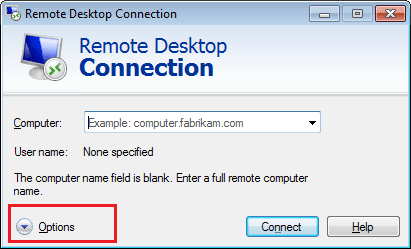
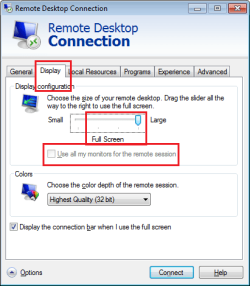
I don't have a setup like you have so that I can test where to make the changes - but my guess is that you would want to look on the remote desktop settings before you establish a connection to the laptop. Maybe these setting:

RDC1.png

RDC2.png

The computer that I took those screenshots from only has one display - thus the option to "use all my monitors..." is greyed out. Hopefully you will be able to place a check mark by that option.
 

My Computer My Computer

At a glance

W7 Pro SP1 64biti78GBIntel HD Graphics
Computer type
Laptop
Computer Manufacturer/Model Number
Employer provided Dell Latitude
OS
W7 Pro SP1 64bit
CPU
i7
Memory
8GB
Graphics Card(s)
Intel HD Graphics
Hard Drives
crappy SSD
Antivirus
Employer mandated Symantec Endpoint Protection
Browser
Pale Moon 64bit, IE11 64bit & Chrome 64bit
Why can`t you just connect the laptop to the display using the vga out from the laptop ? ( If it has one )The monitor does at least have a dvi AND a vga input doesn`t it ?

This wouldn`t be significantly altering anything at all, you just add a 2nd cable to the monitor.
 

My Computer My Computer

At a glance

Windows 10 Pro x64Intel Core i7 6700KGSkill TridentZ RGB 16GB 3600 16-16-16-36EVGA GTX 980 Ti SC x2
Computer type
PC/Desktop
Computer Manufacturer/Model Number
Skylake Special #666
OS
Windows 10 Pro x64
CPU
Intel Core i7 6700K
Motherboard
Asus Sabertooth Z170 Mark 1
Memory
GSkill TridentZ RGB 16GB 3600 16-16-16-36
Graphics Card(s)
EVGA GTX 980 Ti SC x2
Sound Card
Realtek High Definition
Monitor(s) Displays
AOC G2460PG
Screen Resolution
1920 x 1080 144Hz
Hard Drives
Samsung 860 Pro 256GB, Seagate Barracuda 4TB x2
PSU
EVGA 1000 P2, EVGA White Custom Braided Cables
Case
Corsair Vengeance C70 Gunmetal Black
Cooling
Corsair H100i v2, Corsair ML120 x2, Thermal Grizzly Kryonaut
Keyboard
Logitech G910 Orion Spectrum
Mouse
Logitech G700s
Internet Speed
Verizon Fios Quantum Gateway 75/75
Antivirus
Windows Defender, Malwarebytes Free 3.8.3
Browser
Chrome
Other Info
Corsair SP120 x4, LG Blu-ray Drive, Durabrand HT-395 100 Watt Dolby Digital Amp, Corsair H2100 Wireless 7.1 Headset
Brief update:

UsernameIssues: Tried the "use all my monitors" option, but it still did not work correctly. The second desktop monitored became "active", but I could not get the laptop (which was being remoted into) to recognize it.

AddRAM: Connecting the laptop directly to one of the desktop monitors using this monitor's second input cable worked well.

Thank you both!
 

My Computer My Computer

At a glance

Windows 7 64bit
Computer type
PC/Desktop
OS
Windows 7 64bit
Back
Top