Solved Desperate for C Drive Extension Help

oajulo5827

New member
Local time
1:42 AM
Messages
5
I apologize in advance being that I am a novice. (Below is what my situation currently looks like)
Drive.png

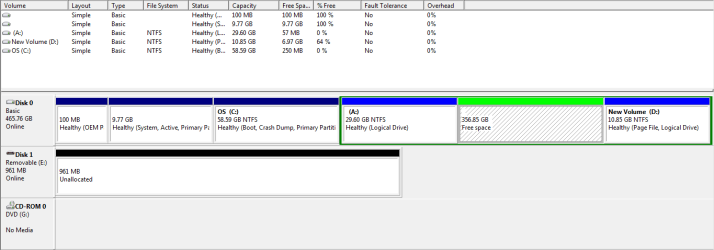
So this summer i decided to take on beat making. I found a software to download, but unfortunately when I attempted to download the software my computer revealed to me that my (C) Drive was full. I decided that I should extend the c drive by using the disk management on my laptop. I proceeded to shrink the (D) Drive (the Data drive), and created roughly 350gb of free space. Then I right clicked on my (C) Drive in an effort to extend it when to my surprise there was no option for that.

To cut the long story short i googled my problem and found this forum with problems similiar to mine. I discovered that the reason why I cannot extend my (C) drive is because of the green envelope, (which the computer labeled an extended partition), surrounding my unallocated, or "Free space". I have downloaded a partition wizard and done many other things yet i still have no luck with dropping the envelope.

In the picture above is where I am now. I know that my unallocated or "Free space " must be adjacent to the drive I want to extend, and I know how to do that with my partition wizard, but the only question I have is when I finally move the (A) Drive so that my (C) Drive and unallocated or "Free Space" are adjacent, how then do I drop the dark green envelope around the "Free Space" so that I may extend my (C) drive into the "Free Space"!

Help soon would be appreciated!
 

My Computer

Computer type
PC/Desktop
OS
Windows 7
You need to delete all 3 of those partitions then delete the entire extended partition, then add space to C:

Backup your data 1st, I see no reason to put the page file way over there, probably just makes it slower, keep it with C:

What is the point in having such small partitions ?

The Windows partition should be at least 100 to 150 GBs ;)

DO NOT try to make another Primary Partition with Disk Management, use Partition Wizard.
 

My Computer

Computer type
PC/Desktop
Computer Manufacturer/Model Number
Skylake Special #666
OS
Windows 10 Pro x64
CPU
Intel Core i7 6700K
Motherboard
Asus Sabertooth Z170 Mark 1
Memory
GSkill TridentZ RGB 16GB 3600 16-16-16-36
Graphics Card(s)
EVGA GTX 980 Ti SC x2
Sound Card
Realtek High Definition
Monitor(s) Displays
AOC G2460PG
Screen Resolution
1920 x 1080 144Hz
Hard Drives
Samsung 860 Pro 256GB, Seagate Barracuda 4TB x2
PSU
EVGA 1000 P2, EVGA White Custom Braided Cables
Case
Corsair Vengeance C70 Gunmetal Black
Cooling
Corsair H100i v2, Corsair ML120 x2, Thermal Grizzly Kryonaut
Keyboard
Logitech G910 Orion Spectrum
Mouse
Logitech G700s
Internet Speed
Verizon Fios Quantum Gateway 75/75
Antivirus
Windows Defender, Malwarebytes Free 3.8.3
Browser
Chrome
Other Info
Corsair SP120 x4, LG Blu-ray Drive, Durabrand HT-395 100 Watt Dolby Digital Amp, Corsair H2100 Wireless 7.1 Headset
Agreed. The free space you seek to add to C: is on an extended partition.
You must delete the extended partition in order to make the free space available to add to C:

Good luck
 

My Computer

Computer type
PC/Desktop
OS
Windows 7 Pro x64

My Computer

Computer type
Laptop
Computer Manufacturer/Model Number
HP Pavilion dv6-6c10us
OS
x64 (6.3.9600) Win8.1 Pro & soon dual boot x64 (6.1.7601) Win7_SP1 HomePrem
CPU
AMD A6-3420M APU with Radeon(tm) HD Graphics
Motherboard
Hewlett-Packard 1805
Memory
6.00 GB
Graphics Card(s)
AMD Radeon(TM) HD 6520G
Sound Card
(1) AMD High Definition Audio Device (2) IDT High Definiti
Monitor(s) Displays
HP W2072a 20" LCD (1600 x 900) @ 60 Hz
Screen Resolution
1366 x 768 x 32 bits (4294967296 colors) @ 60 Hz
Hard Drives
ST640LM0 00 HM641JI SATA Disk Device
Keyboard
Logitech k520 wireless KB
Mouse
Logitech m320 wireless mouse (bundled with KB)
Internet Speed
15/5 | 54 MB Wireless 'n'
Antivirus
Realtime: Defender or Avast | On-demand: Malwarebytes, ESET
Browser
IE 11 on Win8, IE 10 on win 7
Other Info
Media: [Gimp, Audacity, VLC] || Comm: [WEmail 2012, Skype] || Productivity: [OpenOffice,| Textpad] || Utils: [Sysinternals, cCleaner, Speccy, Defraggler]
Ok Thank you for even replying to my post. First of all when you say delete the 3 partitions do you mean that I delete the (A), the "free space", and the (D)? If so would I execute this on the drive manager? And the reasoning for my small partitions is a result of my ignorant experimentation.
 

My Computer

Computer type
PC/Desktop
OS
Windows 7
After resizing be sure to place the pagefile on C:. From a performance standpoint the current location is the worst possible.
 

My Computer

Computer type
PC/Desktop
Computer Manufacturer/Model Number
HP
OS
Windows 7 Pro 64 bit
CPU
Xeon W3520
Memory
8 GB
Graphics Card(s)
Nvidia Geforce 210
After resizing be sure to place the pagefile on C:. From a performance standpoint the current location is the worst possible.

What do you mean by all this? I apologize for my inexperience so if you could be as detailed as possible that would help alot.
 

My Computer

Computer type
PC/Desktop
OS
Windows 7
You need to delete all 3 of those partitions then delete the entire extended partition, then add space to C:

Backup your data 1st, I see no reason to put the page file way over there, probably just makes it slower, keep it with C:

What is the point in having such small partitions ?

The Windows partition should be at least 100 to 150 GBs ;)

DO NOT try to make another Primary Partition with Disk Management, use Partition Wizard.

Thanks so much i followed your advice in the partition wizard and it worked!! God bless.
 

My Computer

Computer type
PC/Desktop
OS
Windows 7

My Computer

Computer type
PC/Desktop
Computer Manufacturer/Model Number
Skylake Special #666
OS
Windows 10 Pro x64
CPU
Intel Core i7 6700K
Motherboard
Asus Sabertooth Z170 Mark 1
Memory
GSkill TridentZ RGB 16GB 3600 16-16-16-36
Graphics Card(s)
EVGA GTX 980 Ti SC x2
Sound Card
Realtek High Definition
Monitor(s) Displays
AOC G2460PG
Screen Resolution
1920 x 1080 144Hz
Hard Drives
Samsung 860 Pro 256GB, Seagate Barracuda 4TB x2
PSU
EVGA 1000 P2, EVGA White Custom Braided Cables
Case
Corsair Vengeance C70 Gunmetal Black
Cooling
Corsair H100i v2, Corsair ML120 x2, Thermal Grizzly Kryonaut
Keyboard
Logitech G910 Orion Spectrum
Mouse
Logitech G700s
Internet Speed
Verizon Fios Quantum Gateway 75/75
Antivirus
Windows Defender, Malwarebytes Free 3.8.3
Browser
Chrome
Other Info
Corsair SP120 x4, LG Blu-ray Drive, Durabrand HT-395 100 Watt Dolby Digital Amp, Corsair H2100 Wireless 7.1 Headset

My Computer

Computer type
PC/Desktop
OS
Windows 7
Very Good, that`s excellent, now if you want, you can make a 4th Primary partition using Partition Wizard.

But keep C at least 100 GBs or more ;)

That way, in the future, you can create a disk image of windows and store it there. If you have a problem with windows, all you do is restore it from the image instead of installing windows all over again :D
 

My Computer

Computer type
PC/Desktop
Computer Manufacturer/Model Number
Skylake Special #666
OS
Windows 10 Pro x64
CPU
Intel Core i7 6700K
Motherboard
Asus Sabertooth Z170 Mark 1
Memory
GSkill TridentZ RGB 16GB 3600 16-16-16-36
Graphics Card(s)
EVGA GTX 980 Ti SC x2
Sound Card
Realtek High Definition
Monitor(s) Displays
AOC G2460PG
Screen Resolution
1920 x 1080 144Hz
Hard Drives
Samsung 860 Pro 256GB, Seagate Barracuda 4TB x2
PSU
EVGA 1000 P2, EVGA White Custom Braided Cables
Case
Corsair Vengeance C70 Gunmetal Black
Cooling
Corsair H100i v2, Corsair ML120 x2, Thermal Grizzly Kryonaut
Keyboard
Logitech G910 Orion Spectrum
Mouse
Logitech G700s
Internet Speed
Verizon Fios Quantum Gateway 75/75
Antivirus
Windows Defender, Malwarebytes Free 3.8.3
Browser
Chrome
Other Info
Corsair SP120 x4, LG Blu-ray Drive, Durabrand HT-395 100 Watt Dolby Digital Amp, Corsair H2100 Wireless 7.1 Headset
Back
Top