JavaScript is disabled. For a better experience, please enable JavaScript in your browser before proceeding.
You are using an out of date browser. It may not display this or other websites correctly.
You should upgrade or use an
alternative browser .
Solved Device driver installation will not see the hardware
New member
Member
Thread Starter
When I followed the instructions (easy to follow, well wrtitten) it made no difference to the nothingness within the "Change Adapter Settings" window. I even restarted the PC and checked the registry. That key is gone
Computer Manufacturer/Model Number home built OS Windows 7 Pro 64 bit CPU AMD Phenom II X4 965 3.4GHz (not overclocked) Motherboard Gigabyte 890FXA-UD5 AMD890FX Memory Corsair XMS3 8GB DDR3-1333 9-9-9-24 Graphics Card(s) Asus Radeon EAH5850 x2 in crossfire Sound Card Creative Labs X-Fi Titanium FATAL1TY Champion Monitor(s) Displays BENQ G2412HD Screen Resolution 1920x1080 Hard Drives WD Caviar Black 1TB SATA3 64MB x2 (not in Raid) PSU Corsair Professional HX850W Case Cooler Master Haf 932 Full Tower EATX Cooling Corsair Hydro Series H50 Keyboard Microsoft Comfort Curve 2000
New member
Member
Thread Starter
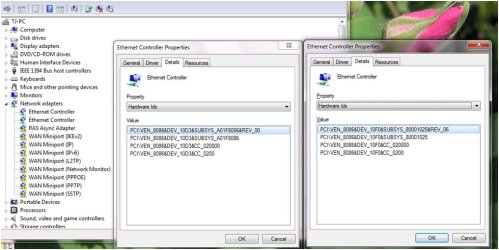
the hardware ID #'s hard to read? I'll edit the pics to just that portion
Computer Manufacturer/Model Number home built OS Windows 7 Pro 64 bit CPU AMD Phenom II X4 965 3.4GHz (not overclocked) Motherboard Gigabyte 890FXA-UD5 AMD890FX Memory Corsair XMS3 8GB DDR3-1333 9-9-9-24 Graphics Card(s) Asus Radeon EAH5850 x2 in crossfire Sound Card Creative Labs X-Fi Titanium FATAL1TY Champion Monitor(s) Displays BENQ G2412HD Screen Resolution 1920x1080 Hard Drives WD Caviar Black 1TB SATA3 64MB x2 (not in Raid) PSU Corsair Professional HX850W Case Cooler Master Haf 932 Full Tower EATX Cooling Corsair Hydro Series H50 Keyboard Microsoft Comfort Curve 2000
New member
Member
Thread Starter
This legible? While restarting the PC (see above) I reenabled the adapter in the BIOS. That odd one disappeared and was replaced with something else. I'll get a shot of that like this attachment if it worked for you
Hardware id1a.jpg
63.9 KB
· Views: 4
Computer Manufacturer/Model Number home built OS Windows 7 Pro 64 bit CPU AMD Phenom II X4 965 3.4GHz (not overclocked) Motherboard Gigabyte 890FXA-UD5 AMD890FX Memory Corsair XMS3 8GB DDR3-1333 9-9-9-24 Graphics Card(s) Asus Radeon EAH5850 x2 in crossfire Sound Card Creative Labs X-Fi Titanium FATAL1TY Champion Monitor(s) Displays BENQ G2412HD Screen Resolution 1920x1080 Hard Drives WD Caviar Black 1TB SATA3 64MB x2 (not in Raid) PSU Corsair Professional HX850W Case Cooler Master Haf 932 Full Tower EATX Cooling Corsair Hydro Series H50 Keyboard Microsoft Comfort Curve 2000
New member
Guru
Gold Member
Computer Manufacturer/Model Number Custom Built OS Windows 7 Ultimate 32-Bit & Windows 7 Ultimate 64-Bit CPU Intel Core i7 CPU 950 @ 3.07GHz Motherboard ASUS P6T DELUXE V2 Memory OCZ 6GB (3 x 2GB) 240-Pin DDR3 SDRAM DDR3 1600 OCZ3X1600R2 Graphics Card(s) ATI Radeon HD 5700 Series Sound Card OnBoard Hard Drives WD6400AACS-00M3B0 (640GB SATA ) PSU CORSAIR 850w Case NZXT LEXA Cooling Intel Stock Heatsink Fan Keyboard Microsoft Wireless Laser Keyboard 7000 Mouse Microsoft Wireless Laser Mouse 7000
New member
Member
Thread Starter
You found the driver I used for the CT adapter. Made no difference which driver set I used, the result was the same.
Onboard enabled.jpg
90.2 KB
· Views: 3
Computer Manufacturer/Model Number home built OS Windows 7 Pro 64 bit CPU AMD Phenom II X4 965 3.4GHz (not overclocked) Motherboard Gigabyte 890FXA-UD5 AMD890FX Memory Corsair XMS3 8GB DDR3-1333 9-9-9-24 Graphics Card(s) Asus Radeon EAH5850 x2 in crossfire Sound Card Creative Labs X-Fi Titanium FATAL1TY Champion Monitor(s) Displays BENQ G2412HD Screen Resolution 1920x1080 Hard Drives WD Caviar Black 1TB SATA3 64MB x2 (not in Raid) PSU Corsair Professional HX850W Case Cooler Master Haf 932 Full Tower EATX Cooling Corsair Hydro Series H50 Keyboard Microsoft Comfort Curve 2000
New member
Guru
Gold Member
Disable the Onboard LAN inside the BIOS
Computer Manufacturer/Model Number Custom Built OS Windows 7 Ultimate 32-Bit & Windows 7 Ultimate 64-Bit CPU Intel Core i7 CPU 950 @ 3.07GHz Motherboard ASUS P6T DELUXE V2 Memory OCZ 6GB (3 x 2GB) 240-Pin DDR3 SDRAM DDR3 1600 OCZ3X1600R2 Graphics Card(s) ATI Radeon HD 5700 Series Sound Card OnBoard Hard Drives WD6400AACS-00M3B0 (640GB SATA ) PSU CORSAIR 850w Case NZXT LEXA Cooling Intel Stock Heatsink Fan Keyboard Microsoft Wireless Laser Keyboard 7000 Mouse Microsoft Wireless Laser Mouse 7000
New member
Member
Thread Starter
Someone bugging me to knock it off for the night so will check back later
Computer Manufacturer/Model Number home built OS Windows 7 Pro 64 bit CPU AMD Phenom II X4 965 3.4GHz (not overclocked) Motherboard Gigabyte 890FXA-UD5 AMD890FX Memory Corsair XMS3 8GB DDR3-1333 9-9-9-24 Graphics Card(s) Asus Radeon EAH5850 x2 in crossfire Sound Card Creative Labs X-Fi Titanium FATAL1TY Champion Monitor(s) Displays BENQ G2412HD Screen Resolution 1920x1080 Hard Drives WD Caviar Black 1TB SATA3 64MB x2 (not in Raid) PSU Corsair Professional HX850W Case Cooler Master Haf 932 Full Tower EATX Cooling Corsair Hydro Series H50 Keyboard Microsoft Comfort Curve 2000
New member
Member
Thread Starter
Onboard LAN was disabled until 1/2 hr ago. Will go do that now. (Did not see your reply)
Computer Manufacturer/Model Number home built OS Windows 7 Pro 64 bit CPU AMD Phenom II X4 965 3.4GHz (not overclocked) Motherboard Gigabyte 890FXA-UD5 AMD890FX Memory Corsair XMS3 8GB DDR3-1333 9-9-9-24 Graphics Card(s) Asus Radeon EAH5850 x2 in crossfire Sound Card Creative Labs X-Fi Titanium FATAL1TY Champion Monitor(s) Displays BENQ G2412HD Screen Resolution 1920x1080 Hard Drives WD Caviar Black 1TB SATA3 64MB x2 (not in Raid) PSU Corsair Professional HX850W Case Cooler Master Haf 932 Full Tower EATX Cooling Corsair Hydro Series H50 Keyboard Microsoft Comfort Curve 2000
New member
Member
Thread Starter
Onboard is off, only one controller now in device manager. Don't know why that odd controller was showing up earlier when the onboard was off then as well.
Computer Manufacturer/Model Number home built OS Windows 7 Pro 64 bit CPU AMD Phenom II X4 965 3.4GHz (not overclocked) Motherboard Gigabyte 890FXA-UD5 AMD890FX Memory Corsair XMS3 8GB DDR3-1333 9-9-9-24 Graphics Card(s) Asus Radeon EAH5850 x2 in crossfire Sound Card Creative Labs X-Fi Titanium FATAL1TY Champion Monitor(s) Displays BENQ G2412HD Screen Resolution 1920x1080 Hard Drives WD Caviar Black 1TB SATA3 64MB x2 (not in Raid) PSU Corsair Professional HX850W Case Cooler Master Haf 932 Full Tower EATX Cooling Corsair Hydro Series H50 Keyboard Microsoft Comfort Curve 2000
New member
Member
Thread Starter
Green light by port is flashing off approx every 2 to 3 seconds. Don't know when that started
Computer Manufacturer/Model Number home built OS Windows 7 Pro 64 bit CPU AMD Phenom II X4 965 3.4GHz (not overclocked) Motherboard Gigabyte 890FXA-UD5 AMD890FX Memory Corsair XMS3 8GB DDR3-1333 9-9-9-24 Graphics Card(s) Asus Radeon EAH5850 x2 in crossfire Sound Card Creative Labs X-Fi Titanium FATAL1TY Champion Monitor(s) Displays BENQ G2412HD Screen Resolution 1920x1080 Hard Drives WD Caviar Black 1TB SATA3 64MB x2 (not in Raid) PSU Corsair Professional HX850W Case Cooler Master Haf 932 Full Tower EATX Cooling Corsair Hydro Series H50 Keyboard Microsoft Comfort Curve 2000
New member
Guru
Gold Member
Computer Manufacturer/Model Number Custom Built OS Windows 7 Ultimate 32-Bit & Windows 7 Ultimate 64-Bit CPU Intel Core i7 CPU 950 @ 3.07GHz Motherboard ASUS P6T DELUXE V2 Memory OCZ 6GB (3 x 2GB) 240-Pin DDR3 SDRAM DDR3 1600 OCZ3X1600R2 Graphics Card(s) ATI Radeon HD 5700 Series Sound Card OnBoard Hard Drives WD6400AACS-00M3B0 (640GB SATA ) PSU CORSAIR 850w Case NZXT LEXA Cooling Intel Stock Heatsink Fan Keyboard Microsoft Wireless Laser Keyboard 7000 Mouse Microsoft Wireless Laser Mouse 7000
New member
Member
Thread Starter
No, I get "You're not connected to a network". Norton Internet security stating no connection either. The icon in the lower right has a red X.
Computer Manufacturer/Model Number home built OS Windows 7 Pro 64 bit CPU AMD Phenom II X4 965 3.4GHz (not overclocked) Motherboard Gigabyte 890FXA-UD5 AMD890FX Memory Corsair XMS3 8GB DDR3-1333 9-9-9-24 Graphics Card(s) Asus Radeon EAH5850 x2 in crossfire Sound Card Creative Labs X-Fi Titanium FATAL1TY Champion Monitor(s) Displays BENQ G2412HD Screen Resolution 1920x1080 Hard Drives WD Caviar Black 1TB SATA3 64MB x2 (not in Raid) PSU Corsair Professional HX850W Case Cooler Master Haf 932 Full Tower EATX Cooling Corsair Hydro Series H50 Keyboard Microsoft Comfort Curve 2000
New member
Guru
Gold Member
Computer Manufacturer/Model Number Custom Built OS Windows 7 Ultimate 32-Bit & Windows 7 Ultimate 64-Bit CPU Intel Core i7 CPU 950 @ 3.07GHz Motherboard ASUS P6T DELUXE V2 Memory OCZ 6GB (3 x 2GB) 240-Pin DDR3 SDRAM DDR3 1600 OCZ3X1600R2 Graphics Card(s) ATI Radeon HD 5700 Series Sound Card OnBoard Hard Drives WD6400AACS-00M3B0 (640GB SATA ) PSU CORSAIR 850w Case NZXT LEXA Cooling Intel Stock Heatsink Fan Keyboard Microsoft Wireless Laser Keyboard 7000 Mouse Microsoft Wireless Laser Mouse 7000
New member
Member
Thread Starter
Why do you say remove NIS? It was just an example of one of the programs that cannot access the internet during startup. Another is Outlook.
Computer Manufacturer/Model Number home built OS Windows 7 Pro 64 bit CPU AMD Phenom II X4 965 3.4GHz (not overclocked) Motherboard Gigabyte 890FXA-UD5 AMD890FX Memory Corsair XMS3 8GB DDR3-1333 9-9-9-24 Graphics Card(s) Asus Radeon EAH5850 x2 in crossfire Sound Card Creative Labs X-Fi Titanium FATAL1TY Champion Monitor(s) Displays BENQ G2412HD Screen Resolution 1920x1080 Hard Drives WD Caviar Black 1TB SATA3 64MB x2 (not in Raid) PSU Corsair Professional HX850W Case Cooler Master Haf 932 Full Tower EATX Cooling Corsair Hydro Series H50 Keyboard Microsoft Comfort Curve 2000
New member
Member
Thread Starter
Out of curiosity I entered: ipconfig /all at the cmd prompt, and I got back
Last edited: Aug 5, 2013
Computer Manufacturer/Model Number home built OS Windows 7 Pro 64 bit CPU AMD Phenom II X4 965 3.4GHz (not overclocked) Motherboard Gigabyte 890FXA-UD5 AMD890FX Memory Corsair XMS3 8GB DDR3-1333 9-9-9-24 Graphics Card(s) Asus Radeon EAH5850 x2 in crossfire Sound Card Creative Labs X-Fi Titanium FATAL1TY Champion Monitor(s) Displays BENQ G2412HD Screen Resolution 1920x1080 Hard Drives WD Caviar Black 1TB SATA3 64MB x2 (not in Raid) PSU Corsair Professional HX850W Case Cooler Master Haf 932 Full Tower EATX Cooling Corsair Hydro Series H50 Keyboard Microsoft Comfort Curve 2000
New member
Member
Thread Starter
During first restart during Norton removal process I went into the Intel(R) Boot Agent and found that at this level the PWA Number and the MAC Address of the CT Adapter card I bought yesterday is correctly identified and matches the sticker on the adapter. JUst not showing up in the "ipconfig /all" results.
Computer Manufacturer/Model Number home built OS Windows 7 Pro 64 bit CPU AMD Phenom II X4 965 3.4GHz (not overclocked) Motherboard Gigabyte 890FXA-UD5 AMD890FX Memory Corsair XMS3 8GB DDR3-1333 9-9-9-24 Graphics Card(s) Asus Radeon EAH5850 x2 in crossfire Sound Card Creative Labs X-Fi Titanium FATAL1TY Champion Monitor(s) Displays BENQ G2412HD Screen Resolution 1920x1080 Hard Drives WD Caviar Black 1TB SATA3 64MB x2 (not in Raid) PSU Corsair Professional HX850W Case Cooler Master Haf 932 Full Tower EATX Cooling Corsair Hydro Series H50 Keyboard Microsoft Comfort Curve 2000
New member
Member
Thread Starter
I downloaded that Norton app at 5:33 this am. It is now 8:33. Took 3 hours to get that thing to run.
Computer Manufacturer/Model Number home built OS Windows 7 Pro 64 bit CPU AMD Phenom II X4 965 3.4GHz (not overclocked) Motherboard Gigabyte 890FXA-UD5 AMD890FX Memory Corsair XMS3 8GB DDR3-1333 9-9-9-24 Graphics Card(s) Asus Radeon EAH5850 x2 in crossfire Sound Card Creative Labs X-Fi Titanium FATAL1TY Champion Monitor(s) Displays BENQ G2412HD Screen Resolution 1920x1080 Hard Drives WD Caviar Black 1TB SATA3 64MB x2 (not in Raid) PSU Corsair Professional HX850W Case Cooler Master Haf 932 Full Tower EATX Cooling Corsair Hydro Series H50 Keyboard Microsoft Comfort Curve 2000
New member
Member
Thread Starter
Went into Services and checked to see if Win Firewall set to automatic. It is. I get a 1068 if I try to start it.
Computer Manufacturer/Model Number home built OS Windows 7 Pro 64 bit CPU AMD Phenom II X4 965 3.4GHz (not overclocked) Motherboard Gigabyte 890FXA-UD5 AMD890FX Memory Corsair XMS3 8GB DDR3-1333 9-9-9-24 Graphics Card(s) Asus Radeon EAH5850 x2 in crossfire Sound Card Creative Labs X-Fi Titanium FATAL1TY Champion Monitor(s) Displays BENQ G2412HD Screen Resolution 1920x1080 Hard Drives WD Caviar Black 1TB SATA3 64MB x2 (not in Raid) PSU Corsair Professional HX850W Case Cooler Master Haf 932 Full Tower EATX Cooling Corsair Hydro Series H50 Keyboard Microsoft Comfort Curve 2000
New member
Guru
Gold Member
On a PC that has Internet download the tool below and use a USB drive to transfer it to the PC that can't go on the Internet
Farbar Service Scanner
Click here :ar:
Farbar Service Scanner to DOWNLOAD
Place the file onto your desktop
Right click on FSS.exe select
Place a check mark next to the following options
Press the
Scan button
Farbar Service Scanner will create a log, called FSS.txt, on the Desktop. Place the fss.txt file inside the usb drive . Upload the FSS.txt with your reply
Computer Manufacturer/Model Number Custom Built OS Windows 7 Ultimate 32-Bit & Windows 7 Ultimate 64-Bit CPU Intel Core i7 CPU 950 @ 3.07GHz Motherboard ASUS P6T DELUXE V2 Memory OCZ 6GB (3 x 2GB) 240-Pin DDR3 SDRAM DDR3 1600 OCZ3X1600R2 Graphics Card(s) ATI Radeon HD 5700 Series Sound Card OnBoard Hard Drives WD6400AACS-00M3B0 (640GB SATA ) PSU CORSAIR 850w Case NZXT LEXA Cooling Intel Stock Heatsink Fan Keyboard Microsoft Wireless Laser Keyboard 7000 Mouse Microsoft Wireless Laser Mouse 7000
New member
Member
Thread Starter
Computer Manufacturer/Model Number home built OS Windows 7 Pro 64 bit CPU AMD Phenom II X4 965 3.4GHz (not overclocked) Motherboard Gigabyte 890FXA-UD5 AMD890FX Memory Corsair XMS3 8GB DDR3-1333 9-9-9-24 Graphics Card(s) Asus Radeon EAH5850 x2 in crossfire Sound Card Creative Labs X-Fi Titanium FATAL1TY Champion Monitor(s) Displays BENQ G2412HD Screen Resolution 1920x1080 Hard Drives WD Caviar Black 1TB SATA3 64MB x2 (not in Raid) PSU Corsair Professional HX850W Case Cooler Master Haf 932 Full Tower EATX Cooling Corsair Hydro Series H50 Keyboard Microsoft Comfort Curve 2000





 Internet Services