Device Manager - Access During Windows 7 Installation

How to Access Device Manager During Installation of Windows 7


   Information
This tutorial can be used to disable problem devices during install of Windows 7. This can solve some problems including hanging and crashing during installation.

For this tutorial I have selected to do a 'Custom (Advanced)' install on a newly created un-active partition.


Here's How:

1, Boot normally with the Windows 7 DVD in your CD/DVD drive. When prompted to 'Press any key to boot from CD DVD....' just press any key.


NOTE: You only have 8 seconds to take action


2, Select your regional settings & click 'Next' to continue
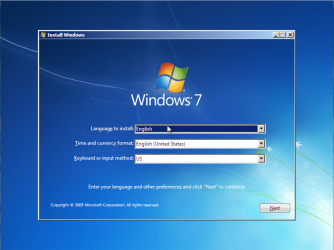
Install 7 Step 1 (Main Menu).PNG
3, Click 'Install Now'
Install 7 Step 2 (Install).PNG
4, Click to accept the terms of the licence agreement then click 'Next'
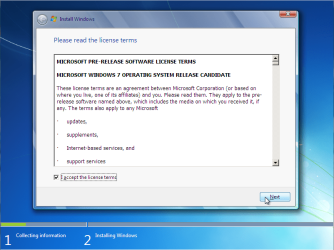
Install 7 Step 3 (Licence Agreement).PNG
5, Select the type of install and click 'Next'
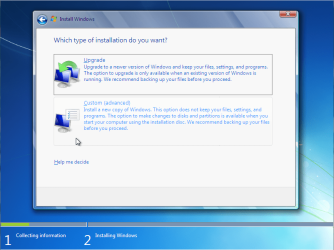
Install 7 Step 4 (Custom Install).PNG
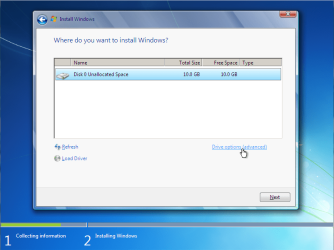
6, Click 'Drive options'
Install 7 Step 5 (Drive Options).PNG
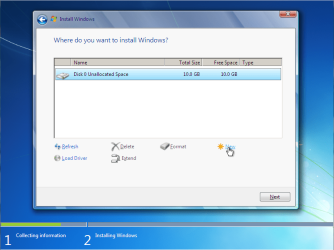
7, Click 'New'
Install 7 Step 6 (New Partition).PNG
and enter partition size then click 'Apply'



Install 7 Step 6.1 (New Partition - Size).PNG


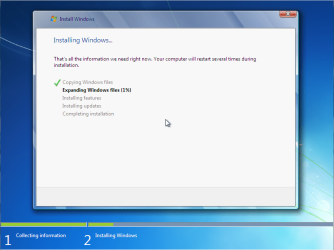
8, Click 'Next' to start the copying process of the installation
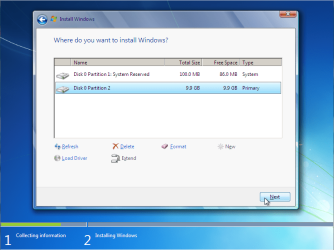
Install 7 Step 7 (Next).PNG

Install 7 Step 8 (Install).PNG

9, Install will restart after the copying process has finished.


Now for Safe Mode:
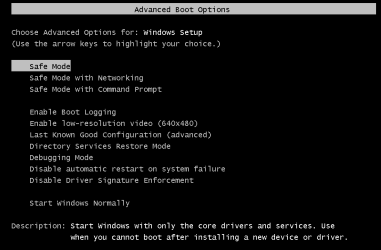
1, Before bootup, press F8 to enter the boot menu
Install 7 Step 1a (Safe Mode).PNG
2, Select 'Safe Mode' and the boot process will begin
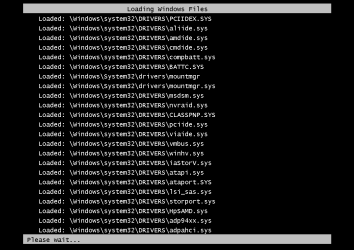
Install 7 Step 2a (Safe Mode Booting).PNG
3, Once booted you will be presented with the following warning
NOTE: Do not click 'OK' or press Space/Enter
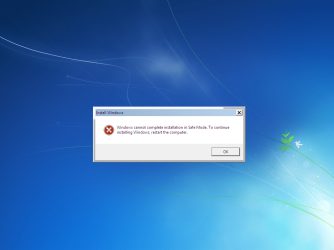
Install 7 Step 3a (Safe Mode Warning).PNG
4, Press SHIFT+F10 to open the Command Prompt
Install 7 Step 4a (Safe Mode Command Prompt).PNG
5, Type compmgmtlauncher into Command Prompt and press 'Enter'
NOTE: It can take a few seconds to display Computer Management
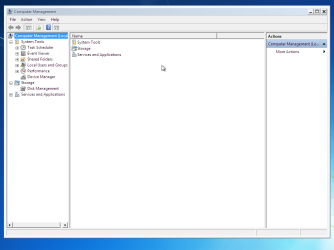
Install 7 Step 5a (Safe Mode Computer Management).PNG


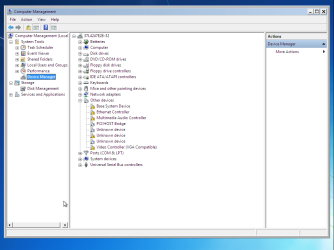
6, Click on 'Device Manager'

Install 7 Step 6a (Safe Mode Device Manager).PNG


You can now disable (not uninstall) any device that you believe is causing the failure to boot
   Information
E.G. If your GFX card is whats causing the issue then you can disable it, causing Windows to use the default 'Standard VGA Adapter'. Once you have booted to your desktop you can download & install the latest drivers

 
Last edited by a moderator:
I abosultely did not know about the Device Manager in windows installation...kudos to you Orbital, this can solve alot of installation issues.
 

My Computer

Computer Manufacturer/Model Number
Compal JFT02 (Custom Build Laptop)
OS
Windows 7 Home Premium x64 - Mac OS X 10.6.4 x64
CPU
Intel Core 2 Duo T9300 2.5 GHz
Motherboard
JFT02
Memory
4GB Kingston DDR2-800
Graphics Card(s)
NVIDIA Geforce 8600M GT (512MB Model)
Sound Card
Realtek HD Audio
Monitor(s) Displays
WUXGA Standard Laptop Display
Screen Resolution
1680*1050
Hard Drives
Toshiba 320GB 5400RPM Laptop HD
PSU
Standard Laptop Power Supply
Case
Standard Laptop Case
Cooling
Standard Laptop Cooling
Keyboard
Standard Laptop 105 Key-Keyboard
Mouse
Synaptics Touchpad
Internet Speed
Verizion Online DSL 3360/864 kbs (dl/up)
Awesome.
 

My Computer

Computer Manufacturer/Model Number
Samsung NP530U4B-S02IN
OS
Windows® 8 Pro (64-bit)
CPU
Intel® Core™ i5 Processor 2467M (1.60GHz, 3MB L3 Cache)
Motherboard
Samsung Electronics
Memory
6GB DDR3 System Memory at 1,333MHz (on BD 4GB + 2GB x 1)
Graphics Card(s)
AMD Radeon™ HD7550M 1GB DDR3 (Ext. Graphic)
Sound Card
Realtek High Definition Audio
Monitor(s) Displays
35.56cm (14.0) SuperBright 300nit HD LED Display
Screen Resolution
1366x768
Hard Drives
1TB S-ATA II Hard Drive (5400RPM) with ExpressCache 16GB SSD
Internet Speed
sucks
Antivirus
Microsoft Security Essentials
Browser
Google Chrome (Sync enabled)
Thanks guys ;)
 

My Computer

Computer Manufacturer/Model Number
Compaq Desktop
OS
Windows 7 Ultimate x64
CPU
AMD Sempron Dual Core
Memory
3GB
Graphics Card(s)
NVIDIA GeForce 6150SE nForce 430
Screen Resolution
1024x768
Hard Drives
150GB Sata
Nice tutorial mate...:D
 

My Computer

Computer Manufacturer/Model Number
Custom made
OS
Window 7 build 7600, Xp pro(VM)
CPU
Amd Athlon 2000 xp+
Motherboard
Asus x series
Memory
kingstone(1gb+256MB)
Graphics Card(s)
Nvdia 6200(256 mb+255mb(shared))
Sound Card
soundmax
Monitor(s) Displays
Lg Flatron w1943
Screen Resolution
1360x768
Hard Drives
segate 80GB
Case
i-ball
Keyboard
i-ball
Mouse
i-ball
Internet Speed
256kbps up and 256 kbps down
This is truly useful, hats off to you!
 

My Computer

Computer Manufacturer/Model Number
Me :P
OS
Windows 7 build 7600
CPU
Intel C2D E6600
Motherboard
Asus P5B-Plus
Memory
Kingmax 4gb (2gb x2)
Graphics Card(s)
Asus 9800 GTX+
Sound Card
Creative Audigy 4
Monitor(s) Displays
LG 20" wide
Screen Resolution
1680x1050
Hard Drives
2xMaxtor 320GB
PSU
630W
Case
IBM Intellistation
Cooling
Stock intel
Keyboard
Microsoft Media Keyboard 3000
Mouse
Steelseries Ideazon Reaper Edge
Internet Speed
100MB/s local 20MB/s external
Thanks Orbital. Nice job.
 

My Computer

Computer Manufacturer/Model Number
Dell XPS420
OS
Vista Ult 64 bit Seven Ult RTM x64
CPU
Intel Core2 Quad Q6600 2.40 gigahertz
Memory
Crucial Ballistix 4x2GB PC2 6400
Graphics Card(s)
NVIDIA GeForce 8600 GTS 256 MB
Sound Card
Creative SB X-Fi audio
Monitor(s) Displays
HP w2207 + HPvs15
Screen Resolution
1680x1050 + 1024x768
Hard Drives
2-WD5000AAKS-500 GB
WD5000AAV-500 GB external
Keyboard
Microsoft Comfort Curve
Mouse
MX Revolution
Other Info
Wacom Intuos 2 Graphics Tablet
Experience Index=5.5

My Computer

Computer Manufacturer/Model Number
Compaq Desktop
OS
Windows 7 Ultimate x64
CPU
AMD Sempron Dual Core
Memory
3GB
Graphics Card(s)
NVIDIA GeForce 6150SE nForce 430
Screen Resolution
1024x768
Hard Drives
150GB Sata
woah cool info man:D
 

My Computer

OS
Windows 7 ultimate RTM x64
CPU
C2D E4500
Motherboard
Intel DG965WH
Memory
2gb
Hard Drives
in need of many :P
I never knew about this.

That's way :cool:
 

My Computer

Computer type
PC/Desktop
Computer Manufacturer/Model Number
76~2.0
OS
Windows 7 Ult x64 - SP1/ Windows 8 Pro x64
CPU
Intel Core i5-3570K 4.6GHz
Motherboard
Gigabyte GA-Z77X UD3H, f18
Memory
8GB (2X4GB) DDR3 1600 Corsair Vengeance CL8 1.5v
Graphics Card(s)
Sapphire HD 7770 Vapor-X OC 1GB DDR5
Sound Card
Onboard VIA VT2021
Monitor(s) Displays
22" LCD Dell
Screen Resolution
1680x1050
Hard Drives
Samsung 840Pro 128GB SSD,
Seagate Barracuda 500GB SATA2 7200rpm 32MB cache, Seagate Barracuda 1TB SATA2 7200rpm 32MB cache,
PSU
Corsair HX650W
Case
Cooler Master Storm Scout
Cooling
Corsair H80 2x12cm Noctua NF P12 , 2x14cm case fans
Keyboard
Logitech Wave
Mouse
CM Sentinel
Internet Speed
Dismal
Antivirus
Avast
Browser
Opera Next
Other Info
Haswell laptop: HP Envy 17t-j, i7-4700MQ, GeForce 740M 2GB DDR3, 17.3" Full HD 1920x1080, 16GB RAM, Samsung 840 Pro 128GB, 1TB Hitachi 7200 HDD,
Desktop: eSATA ports,
External eSATA Seagate 500GB SATA2 7200rpm,
External WD USB 500GB

My Computer

Computer Manufacturer/Model Number
Compaq Desktop
OS
Windows 7 Ultimate x64
CPU
AMD Sempron Dual Core
Memory
3GB
Graphics Card(s)
NVIDIA GeForce 6150SE nForce 430
Screen Resolution
1024x768
Hard Drives
150GB Sata
I have no idea how you figured this out but its very cool to be able to use it
 

My Computer

Computer Manufacturer/Model Number
HP Pavillion dv-7 1005 Tx
OS
Win 8 Release candidate 8400
CPU
[email protected]
Memory
4 gigs
Graphics Card(s)
Nvidia 9600M
Sound Card
HD built-in
Monitor(s) Displays
17" Wxga
Screen Resolution
1440x900
Cooling
none
Internet Speed
45Mb down 5Mb up
I have no idea how you figured this out but its very cool to be able to use it

Cheers Ken, i found it by accident when trying to install Vista on my old laptop with a faulty CPU. I found an article pertaining to the SHIFT+F10 then done the rest myself ;)
 

My Computer

Computer Manufacturer/Model Number
Compaq Desktop
OS
Windows 7 Ultimate x64
CPU
AMD Sempron Dual Core
Memory
3GB
Graphics Card(s)
NVIDIA GeForce 6150SE nForce 430
Screen Resolution
1024x768
Hard Drives
150GB Sata
that gonna save us all a ton of trouble. thanks
 

My Computer

Computer Manufacturer/Model Number
HP Pavillion dv-7 1005 Tx
OS
Win 8 Release candidate 8400
CPU
[email protected]
Memory
4 gigs
Graphics Card(s)
Nvidia 9600M
Sound Card
HD built-in
Monitor(s) Displays
17" Wxga
Screen Resolution
1440x900
Cooling
none
Internet Speed
45Mb down 5Mb up
Thanks for this! I'm using this right now to try to get my installation to finish. So far no luck, haha, but this is a great tool I didn't know about! Thanks!
 

My Computer

Computer Manufacturer/Model Number
Custom Built
OS
Windows 7
CPU
Intel i7 Quad-core 2.66 Ghz
Memory
6GB DDR3 Triple-Channel
Graphics Card(s)
Nvidia 9800GT 1GB
Hard Drives
1TB WD
Thx alot for the support guys and i will check this out right after my din dins I appriecate all of your help!!! hopefully it works!
 

My Computer

Computer Manufacturer/Model Number
Asus
OS
Windows 7
CPU
I7 core
Motherboard
Asus P6T SE
Memory
Corsiar 6gb ram
Graphics Card(s)
Sapphire radeon HD 4870 Vapor X 2gb GDDR5
Sound Card
N/A
Monitor(s) Displays
HANNS-G
Hard Drives
SATA 320 Maxtor

Sony DVD RW
PSU
750 WAT CiT
Case
NZXT
Keyboard
Cyborg
Mouse
wireless crap
Excellent stuff Orbital Shark.
Was tearing my hair out with
the dreaded blank screen just
after "completing installation".
(GeForce 8500GT didn't like
the official driver set).
 

My Computer

Computer Manufacturer/Model Number
XFX 680i LT SLI MB-N680-I5H9
OS
Win7x64 XPx86 sometimes Win2K/98se/BeOS/ZetaOS
CPU
Intel Q6600
Motherboard
XFX 680i LT SLI
Memory
8 gB
Graphics Card(s)
POV GeForce 8500 GT 512 mB
Sound Card
onboard Realtek
Monitor(s) Displays
Packard Bell Maestro 24"
Screen Resolution
1920x1080
Hard Drives
Intel 320 SSD 160gB / WD 500gB / Samsung 750 gB
PSU
Corsair 550W
Case
Antec 900
Internet Speed
25 m/Bit
Other Info
+ P4 3 gHz / Eeepc701 / P3 550 / P2 Dell dimension V350 / Mac PB DVI 800 mHz / PPC6100/66. CX5M
You are my savior! I've spent the past week without my computer, trying to figure out why I could not install any OS to it. Turns out that Windows doesn't come stock with drivers for some of my hardware. I am so happy to have my computer back!
 

My Computer

OS
Windows 7
Welcome to Seven Forums UberDan.

Gary
 

My Computer

Computer Manufacturer/Model Number
Dell XPS420
OS
Vista Ult 64 bit Seven Ult RTM x64
CPU
Intel Core2 Quad Q6600 2.40 gigahertz
Memory
Crucial Ballistix 4x2GB PC2 6400
Graphics Card(s)
NVIDIA GeForce 8600 GTS 256 MB
Sound Card
Creative SB X-Fi audio
Monitor(s) Displays
HP w2207 + HPvs15
Screen Resolution
1680x1050 + 1024x768
Hard Drives
2-WD5000AAKS-500 GB
WD5000AAV-500 GB external
Keyboard
Microsoft Comfort Curve
Mouse
MX Revolution
Other Info
Wacom Intuos 2 Graphics Tablet
Experience Index=5.5
Glad I could help guys & gals ;)
 

My Computer

Computer Manufacturer/Model Number
Compaq Desktop
OS
Windows 7 Ultimate x64
CPU
AMD Sempron Dual Core
Memory
3GB
Graphics Card(s)
NVIDIA GeForce 6150SE nForce 430
Screen Resolution
1024x768
Hard Drives
150GB Sata
Back
Top