Device Manager - Access During Windows 7 Installation

How to Access Device Manager During Installation of Windows 7


   Information
This tutorial can be used to disable problem devices during install of Windows 7. This can solve some problems including hanging and crashing during installation.

For this tutorial I have selected to do a 'Custom (Advanced)' install on a newly created un-active partition.


Here's How:

1, Boot normally with the Windows 7 DVD in your CD/DVD drive. When prompted to 'Press any key to boot from CD DVD....' just press any key.


NOTE: You only have 8 seconds to take action


2, Select your regional settings & click 'Next' to continue
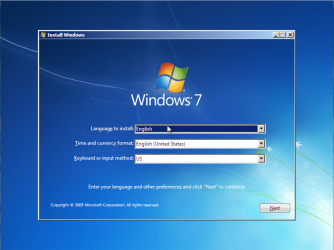
Install 7 Step 1 (Main Menu).PNG
3, Click 'Install Now'
Install 7 Step 2 (Install).PNG
4, Click to accept the terms of the licence agreement then click 'Next'
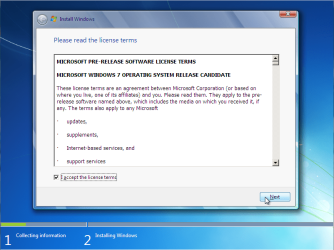
Install 7 Step 3 (Licence Agreement).PNG
5, Select the type of install and click 'Next'
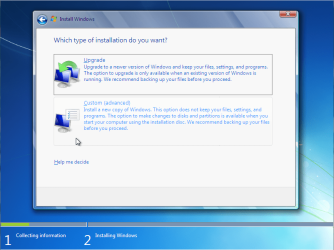
Install 7 Step 4 (Custom Install).PNG
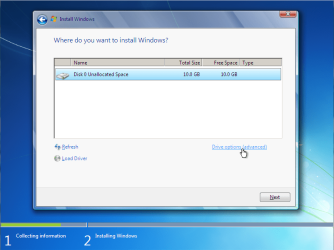
6, Click 'Drive options'
Install 7 Step 5 (Drive Options).PNG
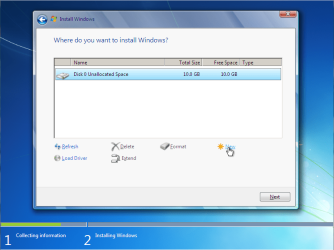
7, Click 'New'
Install 7 Step 6 (New Partition).PNG
and enter partition size then click 'Apply'



Install 7 Step 6.1 (New Partition - Size).PNG


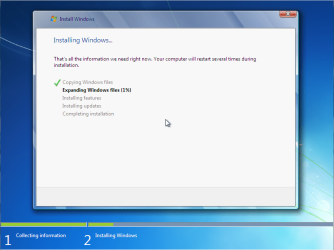
8, Click 'Next' to start the copying process of the installation
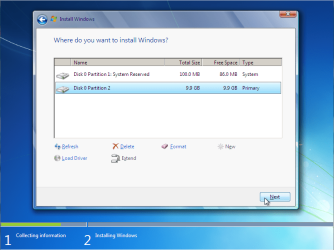
Install 7 Step 7 (Next).PNG

Install 7 Step 8 (Install).PNG

9, Install will restart after the copying process has finished.


Now for Safe Mode:
1, Before bootup, press F8 to enter the boot menu
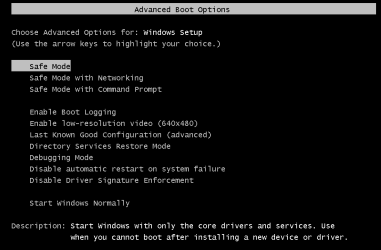
Install 7 Step 1a (Safe Mode).PNG
2, Select 'Safe Mode' and the boot process will begin
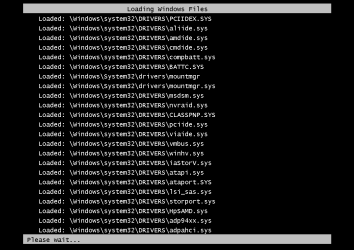
Install 7 Step 2a (Safe Mode Booting).PNG
3, Once booted you will be presented with the following warning
NOTE: Do not click 'OK' or press Space/Enter
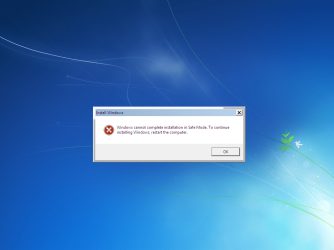
Install 7 Step 3a (Safe Mode Warning).PNG
4, Press SHIFT+F10 to open the Command Prompt
Install 7 Step 4a (Safe Mode Command Prompt).PNG
5, Type compmgmtlauncher into Command Prompt and press 'Enter'
NOTE: It can take a few seconds to display Computer Management
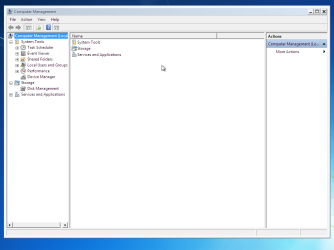
Install 7 Step 5a (Safe Mode Computer Management).PNG


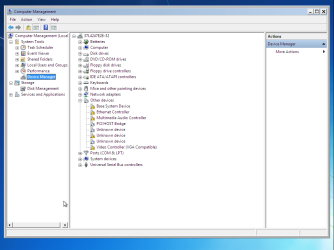
6, Click on 'Device Manager'

Install 7 Step 6a (Safe Mode Device Manager).PNG


You can now disable (not uninstall) any device that you believe is causing the failure to boot
   Information
E.G. If your GFX card is whats causing the issue then you can disable it, causing Windows to use the default 'Standard VGA Adapter'. Once you have booted to your desktop you can download & install the latest drivers

 
Last edited by a moderator:

My Computer

Computer type
PC/Desktop
Computer Manufacturer/Model Number
Self built custom
OS
64-bit Windows 11 Pro for Workstations
CPU
Intel i7-8700K OC'd to 5 GHz
Motherboard
ASUS ROG Maximus XI Formula Z390
Memory
64 GB (4x16GB) G.SKILL TridentZ RGB DDR4 3600 MHz
Graphics Card(s)
ASUS ROG-STRIX-GTX1080TI-O11G-GAMING
Sound Card
Integrated
Monitor(s) Displays
2 x Samsung Odyssey G7 27"
Screen Resolution
2560x1440
Hard Drives
1TB Samsung 990 PRO M.2,
4TB Samsung 990 PRO PRO M.2,
TerraMaster F8 SSD Plus NAS
PSU
Seasonic Prime Titanium 850W
Case
Thermaltake Core P3
Cooling
Corsair Hydro H115i
Keyboard
Logitech wireless K800
Mouse
Logitech MX Master 4
Internet Speed
2 Gb/s Download and 100 Mb/s Upload
Antivirus
Malwarebyte Anti-Malware Premium
Browser
Google Chrome
Other Info
Logitech Z625 speaker system,
Logitech BRIO 4K Pro webcam,
HP Color LaserJet Pro MFP M477fdn,
APC SMART-UPS RT 1000 XL - SURT1000XLI,
Galaxy S23 Plus phone
That's what I thought. Would be nice to have one in the eightforums tutorials with the correct screen shots.

Thanks Shawn.
 

My Computer

Computer type
PC/Desktop
Computer Manufacturer/Model Number
Lenovo IdeaCenter 450
OS
Windows 10 Pro X64
CPU
Intel Quad Core i7-4770 @ 3.4Ghz
Memory
16.0GB PC3-12800 DDR3 SDRAM 1600 MHz
Graphics Card(s)
Intel Integrated HD Graphics
Sound Card
Realtek HD Audio
Monitor(s) Displays
HP 22" LCD
Screen Resolution
1680 x 1050
Hard Drives
250GB Samsung EVO SATA-3 SSD
2TB Seagate ST2000DM001 SATA-2
1.5TB Seagate ST3150041AS SATA
Keyboard
Dell USB
Mouse
Lenovo USB
Internet Speed
Cable via Road Runner 3MB Upload, 30MB Download
Antivirus
Windows Defender, MBAM Pro, MBAE
Browser
Seamonkey
Other Info
UEFI/GPT
PLDS DVD-RW DH16AERSH
I'll add it to the list. :)
 

My Computer

Computer type
PC/Desktop
Computer Manufacturer/Model Number
Self built custom
OS
64-bit Windows 11 Pro for Workstations
CPU
Intel i7-8700K OC'd to 5 GHz
Motherboard
ASUS ROG Maximus XI Formula Z390
Memory
64 GB (4x16GB) G.SKILL TridentZ RGB DDR4 3600 MHz
Graphics Card(s)
ASUS ROG-STRIX-GTX1080TI-O11G-GAMING
Sound Card
Integrated
Monitor(s) Displays
2 x Samsung Odyssey G7 27"
Screen Resolution
2560x1440
Hard Drives
1TB Samsung 990 PRO M.2,
4TB Samsung 990 PRO PRO M.2,
TerraMaster F8 SSD Plus NAS
PSU
Seasonic Prime Titanium 850W
Case
Thermaltake Core P3
Cooling
Corsair Hydro H115i
Keyboard
Logitech wireless K800
Mouse
Logitech MX Master 4
Internet Speed
2 Gb/s Download and 100 Mb/s Upload
Antivirus
Malwarebyte Anti-Malware Premium
Browser
Google Chrome
Other Info
Logitech Z625 speaker system,
Logitech BRIO 4K Pro webcam,
HP Color LaserJet Pro MFP M477fdn,
APC SMART-UPS RT 1000 XL - SURT1000XLI,
Galaxy S23 Plus phone
Thanks Shawn.
 

My Computer

Computer type
PC/Desktop
Computer Manufacturer/Model Number
Lenovo IdeaCenter 450
OS
Windows 10 Pro X64
CPU
Intel Quad Core i7-4770 @ 3.4Ghz
Memory
16.0GB PC3-12800 DDR3 SDRAM 1600 MHz
Graphics Card(s)
Intel Integrated HD Graphics
Sound Card
Realtek HD Audio
Monitor(s) Displays
HP 22" LCD
Screen Resolution
1680 x 1050
Hard Drives
250GB Samsung EVO SATA-3 SSD
2TB Seagate ST2000DM001 SATA-2
1.5TB Seagate ST3150041AS SATA
Keyboard
Dell USB
Mouse
Lenovo USB
Internet Speed
Cable via Road Runner 3MB Upload, 30MB Download
Antivirus
Windows Defender, MBAM Pro, MBAE
Browser
Seamonkey
Other Info
UEFI/GPT
PLDS DVD-RW DH16AERSH

My Computer

Computer type
PC/Desktop
Computer Manufacturer/Model Number
Self built custom
OS
64-bit Windows 11 Pro for Workstations
CPU
Intel i7-8700K OC'd to 5 GHz
Motherboard
ASUS ROG Maximus XI Formula Z390
Memory
64 GB (4x16GB) G.SKILL TridentZ RGB DDR4 3600 MHz
Graphics Card(s)
ASUS ROG-STRIX-GTX1080TI-O11G-GAMING
Sound Card
Integrated
Monitor(s) Displays
2 x Samsung Odyssey G7 27"
Screen Resolution
2560x1440
Hard Drives
1TB Samsung 990 PRO M.2,
4TB Samsung 990 PRO PRO M.2,
TerraMaster F8 SSD Plus NAS
PSU
Seasonic Prime Titanium 850W
Case
Thermaltake Core P3
Cooling
Corsair Hydro H115i
Keyboard
Logitech wireless K800
Mouse
Logitech MX Master 4
Internet Speed
2 Gb/s Download and 100 Mb/s Upload
Antivirus
Malwarebyte Anti-Malware Premium
Browser
Google Chrome
Other Info
Logitech Z625 speaker system,
Logitech BRIO 4K Pro webcam,
HP Color LaserJet Pro MFP M477fdn,
APC SMART-UPS RT 1000 XL - SURT1000XLI,
Galaxy S23 Plus phone
Excellent as usual Shawn, great job.

Thank you.
 

My Computer

Computer type
PC/Desktop
Computer Manufacturer/Model Number
Lenovo IdeaCenter 450
OS
Windows 10 Pro X64
CPU
Intel Quad Core i7-4770 @ 3.4Ghz
Memory
16.0GB PC3-12800 DDR3 SDRAM 1600 MHz
Graphics Card(s)
Intel Integrated HD Graphics
Sound Card
Realtek HD Audio
Monitor(s) Displays
HP 22" LCD
Screen Resolution
1680 x 1050
Hard Drives
250GB Samsung EVO SATA-3 SSD
2TB Seagate ST2000DM001 SATA-2
1.5TB Seagate ST3150041AS SATA
Keyboard
Dell USB
Mouse
Lenovo USB
Internet Speed
Cable via Road Runner 3MB Upload, 30MB Download
Antivirus
Windows Defender, MBAM Pro, MBAE
Browser
Seamonkey
Other Info
UEFI/GPT
PLDS DVD-RW DH16AERSH
You're most welcome Rich. :)
 

My Computer

Computer type
PC/Desktop
Computer Manufacturer/Model Number
Self built custom
OS
64-bit Windows 11 Pro for Workstations
CPU
Intel i7-8700K OC'd to 5 GHz
Motherboard
ASUS ROG Maximus XI Formula Z390
Memory
64 GB (4x16GB) G.SKILL TridentZ RGB DDR4 3600 MHz
Graphics Card(s)
ASUS ROG-STRIX-GTX1080TI-O11G-GAMING
Sound Card
Integrated
Monitor(s) Displays
2 x Samsung Odyssey G7 27"
Screen Resolution
2560x1440
Hard Drives
1TB Samsung 990 PRO M.2,
4TB Samsung 990 PRO PRO M.2,
TerraMaster F8 SSD Plus NAS
PSU
Seasonic Prime Titanium 850W
Case
Thermaltake Core P3
Cooling
Corsair Hydro H115i
Keyboard
Logitech wireless K800
Mouse
Logitech MX Master 4
Internet Speed
2 Gb/s Download and 100 Mb/s Upload
Antivirus
Malwarebyte Anti-Malware Premium
Browser
Google Chrome
Other Info
Logitech Z625 speaker system,
Logitech BRIO 4K Pro webcam,
HP Color LaserJet Pro MFP M477fdn,
APC SMART-UPS RT 1000 XL - SURT1000XLI,
Galaxy S23 Plus phone
Hey all. I'm having a problem with Windows 7 giving me a BSOD while "completing installation". I suspect it might be the video drivers, as it has been for several of the other posters here. I've tried all the steps listed in this tutorial. When I get to the step where I have to boot windows in safe mode after it restarts, I do so... but then windows literally starts the whole installation over from step 1. There's no point in the installation process where SHIFT-F10 opens the command prompt. Any suggestions?
 

My Computer

Computer type
PC/Desktop
Computer Manufacturer/Model Number
custom build
OS
Windows 7 Home Premium 64 bit
CPU
AMD FX 6300 Black
I actually used this on an older laptop that originally had vista, it was the graphics card, an ati/amd, with that disabled win7 used the standard vga graphics during intall and I could install the proper drivers afterwards. Thank you for this cool trick :)

... There's no point in the installation process where SHIFT-F10 opens the command prompt..../QUOTE]
It might sound silly, maybe your keyboard has an F-Lock key or it defaults to eg volume up/down instead of the actual F keys. I had spend a few minutes wondering why I couldn't press F8 (I agree) on a windows XP installation many years back cause of a MS keyboard with Flock key
 
Last edited:

My Computer

Computer type
PC/Desktop
Computer Manufacturer/Model Number
Custom build
OS
Win10 x64
10 years later after this thread was posted, i registered on W7 forums just to say thank you to the OP, Orbital Shark.

Was busting my head for hours , till you saved a not so rich familys old laptop for their children.
 

My Computer

Computer type
Laptop
Computer Manufacturer/Model Number
Toshiba P200d
OS
Win 7 32bit
CPU
AMD Turion 64 x2
Back
Top