
Device Manager - Finding Unknown Devices

Find and Identify Unknown Devices through Device Manager


   Information
This guide will show you how to locate the unidentified hardware in your device manager by using Hardware Identification. The goal of this tutorial is to help identify an unidentified device.
   Note
Prerequisite knowledge includes opening windows device manager, surfing the internet, data entry and basic windows navigation skills
   Warning

  • Installing the wrong driver can crash your system, this technique revolves around the use of a 3rd party online hardware ID database.
  • Some devices (such as legacy devices) may not have hardware ID's. See the "But what if there's no Hardware ID in the drop down box?" for tips on finding out what these devices are.


Here's how
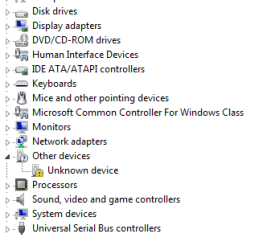
  1. Open Device Manager and find the device. It most likely has a yellow exclamation mark on it like the one in this screenshot below.
    device.PNG
       Tip
    You can open Device Manager quickly by typing devmgmt.msc into RUN or SEARCH and pressing ENTER.

  2. Now that you've found your device, right click on it and select properties.
  3. Click on the Details Tab.
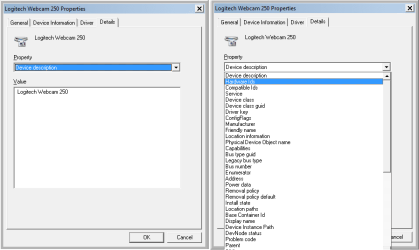
  4. Drop the 'Property' box until you find 'Hardware Id's".
    This picture shows my webcam, but unknown devices have hardware ID's too
    Property box.png
  5. You'll find some number-letter combinations, here's what they mean:
    HID = Hardware ID
    PID = Product ID
    VID = Vendor ID
       Note
    The Vendor ID may also be called VEN, so look out for this too. If you're having trouble locating these then please take a look at this great Hardware Identification tutorial by Dwarf
       Tip
    If you need a driver for this unknown device, then you could do this below by Kari:

    Copy the Hardware IDs value.

    2012-11-17_193110.png

    Go directly to a driver database site, for instance Drivers Lookup and search there with the hardware id.

    2012-11-17_193306.png

  6. In my screen print I've looked up my Webcam again. My PID=0804, My VID = 046D.
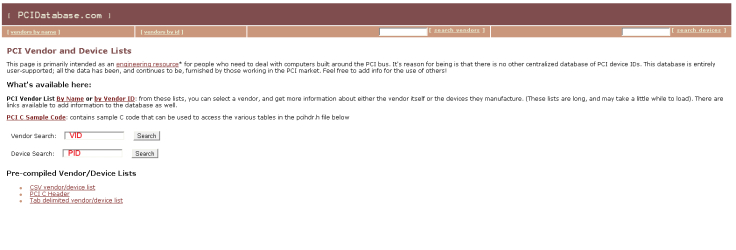
  7. We need to reference these, so open your browser of choice and navigate to the www.pcidatabase.com website.
  8. There are other websites, but I think that the PCIdatabase.com team has put together a great site with a lot of information should you need to know more about devices and drivers.
    PCIDATABASE.png
  9. Type your PID where it says Device Search and press SEARCH (e.g. for my example I type in 0804 and click on the Search button to the right of the Device Search box).
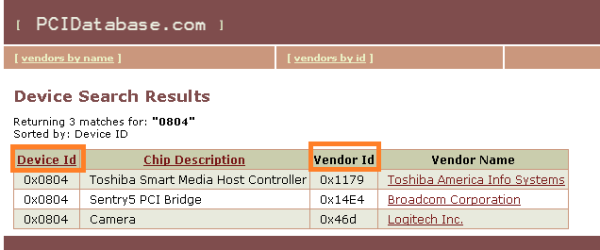
  10. All Devices with that PID show. This is usually enough; but sometimes multiple devices will show.
    deviceID search.png
  11. If you have multiple Devices, then you need your VID, so look back to your details column under Hardware ID's and reference it against the Vendor ID column with your VID. Mine was 046D and you can see 0x46d in the Vendor column. That's a match.
  12. You've now identified your device and can now search for the correct drivers for it.

But what if there's no Hardware ID in the drop down box?

With older legacy devices, some virtual devices, non-plug and play devices, and some viruses there may not be a hardware ID, however there there are other things you can do to find your unrecognized device.


Have a look at these entries in the drop down, there are others, but these are the most common that you will find when the Hardware ID is missing.
  • DevNode status - This will tell us the current status of the device and differentiate between a driver existing and a driver loading. If the driver exists you can look at it's *.inf file (the inf file name is in the Inf Name drop down)
  • Device Instance path - Often contains Vendor and hardware information, if not than it may contain an ACPI linking it to a processor group.
  • Class Long Name - It's group name (e.g. Processors)
  • Class Short Name - It's short (actual) name (e.g. Processor)
  • Class icon path - The path to a dll that houses this devices icons. Although this is likely to be windows generic, it;s worthwhile taking a look at the icons in the *.dll, the easiest way to do this is to change an icon on any shortcut or folder and navigate to that *.dll to browse the icons.
  • siblings - Any related siblings
  • parent - any related parents
If you are trying to find a Legacy item, it will likely be at this registry address
HKEY_LOCAL_MACHINE\SYSTEM\ControlSet001\Enum\Root\. It should begin with the LEGACY_ (e.g. HKEY_LOCAL_MACHINE\SYSTEM\ControlSet001\Enum\Root\LEGACY_CPUZ132)

The Windows Registry Editor can be opened by typing REGEDIT into RUN or SEARCH.
Some other locations that you may find this information (with thanks to WindowsStar)are:
HKEY_LOCAL_MACHINE\SYSTEM\CurrentControlSet\Enum\Root
HKEY_LOCAL_MACHINE\SYSTEM\ControlSet002\Enum\Root\
   Warning
Edit the registry can crash your machine, use this as a research tool only, unless you know what you are doing


Enjoy!

TimStitt

REFERENCES


These References have been added after additional information was provided. The added dates refer to when this tutorial was updated with the additional information.


Last edited by a moderator:
Hey

thank you but I don't understand how can I get VID and PID ?


My Computer

OS
windows 7
Hi dew1,

To find this information, please see my post on this topic (link at bottom of above Tutorial).
 

My Computer

Computer type
PC/Desktop
Computer Manufacturer/Model Number
Dwarf Dwf/11/2012 r09/2013
OS
Windows 8.1 Pro RTM x64
CPU
Intel Core-i5-3570K 4-core @ 3.4GHz (Ivy Bridge) (OC 4.4GHz)
Motherboard
ASRock Z77 Extreme4-M
Memory
4 x 4GB DDR3-1600 Corsair Vengeance CMZ8GX3M2A1600C9B (16GB)
Graphics Card(s)
MSI GeForce GTX770 Gaming OC 2GB
Sound Card
Realtek High Definition on board solution (ALC 898)
Monitor(s) Displays
ViewSonic VA1912w Widescreen (VGA)
Screen Resolution
1440x900
Hard Drives
OCZ Agility 3 SSD 120GB SATA III x2 (RAID 0)
Samsung HD501LJ 500GB SATA II x2
Hitachi HDS721010CLA332 1TB SATA II
Iomega 1.5TB Ext USB 2.0
WD 2.0TB Ext USB 3.0
PSU
XFX Pro Series 850W Semi-Modular
Case
Gigabyte IF233
Cooling
1 x 120mm Front Inlet 1 x 120mm Rear Exhaust
Keyboard
Microsoft Comfort Curve Keyboard 3000 (USB)
Mouse
Microsoft Comfort Mouse 3000 for Business (USB)
Internet Speed
NetGear DG834Gv3 ADSL Modem/Router (Ethernet) ~4.0 Mb/s (O2)
Antivirus
Avast! 8.0.1497
Browser
IE 11
Other Info
Optical Drive: HL-DT-ST BD-RE BH10LS30 SATA Bluray
Lexmark S305 Printer/Scanner/Copier (USB)
WEI Score: 8.1/8.1/8.5/8.5/8.25
Asus Eee PC 1011PX Netbook (Windows 7 x86 Starter)
Hi dew1,

To find this information, please see my post on this topic (link at bottom of above Tutorial).

Hi Dwarf,

I feel like I've tried to reinvented the wheel and didn't know that you'd already written one of these. :o I searched but didn't find.

I like your use on RED and BLUE to show the VENDER and DEVICE ID's and it points out that Vender ID's can be called VEN as well. I'll make a few edits in regards to the later and link to yours in regards to colors.

Good Post mate.

-Timo

EDIT: Updated with some new info that you provided and referenced. :D
 

My Computer

Computer Manufacturer/Model Number
Custom Hack job
OS
Windows 7 Ultimate 64 bit
CPU
Intel(R) Core(TM)2 Quad CPU Q8200 @ 2.33GHz
Motherboard
GigaByte EP45-UD3
Memory
8 GB Kingston
Graphics Card(s)
Nvidia GeForce 9600GT
Sound Card
Soundblaster Audigy
Monitor(s) Displays
AOC x2 22"
Hard Drives
2 x Samsung 500GB (RAID)
2 x Samsung 2TB
1 x WD Green 2TB
1 x Seagate 1TB
1 x Samsung 500GB
PSU
Thermaltake QFan 750W
Case
CM Scout Gaming
Cooling
Coolermaster V10
Keyboard
Microsoft Wireless Keyboard 1000
Mouse
Microsoft Wireless Optical 2000
Internet Speed
320
Other Info
Winfast PVR2000CP
LG DVD-RAM DVD/RW/DL Super Multi
Linksys WMP300Nx2 Wireless Adapter
Hey

thank you but I don't understand how can I get VID and PID ?


Hi Dew1,

I've updated the tutorial today with a little new info from Dwarf, if after looking at this and his tutorial you're still lost, then please let me know at which step you lose you way and please post a screen shot of what your looking at. I'm quite happy to help. :D
 

My Computer

Computer Manufacturer/Model Number
Custom Hack job
OS
Windows 7 Ultimate 64 bit
CPU
Intel(R) Core(TM)2 Quad CPU Q8200 @ 2.33GHz
Motherboard
GigaByte EP45-UD3
Memory
8 GB Kingston
Graphics Card(s)
Nvidia GeForce 9600GT
Sound Card
Soundblaster Audigy
Monitor(s) Displays
AOC x2 22"
Hard Drives
2 x Samsung 500GB (RAID)
2 x Samsung 2TB
1 x WD Green 2TB
1 x Seagate 1TB
1 x Samsung 500GB
PSU
Thermaltake QFan 750W
Case
CM Scout Gaming
Cooling
Coolermaster V10
Keyboard
Microsoft Wireless Keyboard 1000
Mouse
Microsoft Wireless Optical 2000
Internet Speed
320
Other Info
Winfast PVR2000CP
LG DVD-RAM DVD/RW/DL Super Multi
Linksys WMP300Nx2 Wireless Adapter
Thanks for the tutorial :)
 

My Computer

Computer Manufacturer/Model Number
Custom
OS
Win7 HP (x64)/Win7 Ultimate (x64)
CPU
Core i7 920
Motherboard
Intel X58
Memory
6 x 2GB Corsair XMS3
Graphics Card(s)
CF HD4890
Sound Card
Asus Xonar
Monitor(s) Displays
Dell 2408WFP
Screen Resolution
1920 x 1200
Hard Drives
2 x 150GB WDC Velociraptors (Raid 0)
1 x 1TB Seagate
1 x 1.5TB Seagate
PSU
Corsair HX1000W
Case
Antec 1200
Keyboard
Razer Lycosa/N52te
Mouse
Razer Lachesis
Thanks for the tutorial :)

Bula Lomai!

You're welcome mate.

:D


EDIT: To meet the forum regulations I need to translate Bula into Hello for other readers :p
 

My Computer

Computer Manufacturer/Model Number
Custom Hack job
OS
Windows 7 Ultimate 64 bit
CPU
Intel(R) Core(TM)2 Quad CPU Q8200 @ 2.33GHz
Motherboard
GigaByte EP45-UD3
Memory
8 GB Kingston
Graphics Card(s)
Nvidia GeForce 9600GT
Sound Card
Soundblaster Audigy
Monitor(s) Displays
AOC x2 22"
Hard Drives
2 x Samsung 500GB (RAID)
2 x Samsung 2TB
1 x WD Green 2TB
1 x Seagate 1TB
1 x Samsung 500GB
PSU
Thermaltake QFan 750W
Case
CM Scout Gaming
Cooling
Coolermaster V10
Keyboard
Microsoft Wireless Keyboard 1000
Mouse
Microsoft Wireless Optical 2000
Internet Speed
320
Other Info
Winfast PVR2000CP
LG DVD-RAM DVD/RW/DL Super Multi
Linksys WMP300Nx2 Wireless Adapter
Great work Timo ! Just found this one now.
 

My Computer

Computer Manufacturer/Model Number
Samsung NP550P5C-S02IN
OS
Windows 7 Ultimate - 64-bit | Windows 8 Pro - 64-bit
CPU
Intel® Core™ i7 Processor 3,610QM (2.30Hz, 6MB L3 Cach
Memory
8 GB
Graphics Card(s)
NVIDIA® GeForce® GT 650M 2GB Graphics, Optimus™ techno
Sound Card
SoundAlive™ JBL 3 Speakers (With sub-Woofer)
Monitor(s) Displays
39.62cm (15.6) SuperBright 300nit HD+ LED Display
Screen Resolution
1,600 x 900, Anti-Reflective
Hard Drives
1TB S-ATA II Hard Drive (5,400RPM)
Thanks TimStitt, knew some of the registry edit for hardware legacy, you made it as a tutorial to refer.:)
 

My Computer

Computer type
PC/Desktop
Computer Manufacturer/Model Number
Custom Build
OS
Windows 7 Professional SP1 - x64 [Non-UEFI Boot]
CPU
Ivy Bridge Core i5 3570K (Delidded)
Motherboard
Asus P8Z77-V LE PLUS
Memory
G.Skill "Ares" DDR3 PC3-12800 - 1600MHz (16Gb)
Graphics Card(s)
Asus Dual-RX480-O4G
Sound Card
Creative Sound Blaster Z w/5.1 sound system
Monitor(s) Displays
Asus IPS 23"
Screen Resolution
16/9
Hard Drives
Internal:
500Go Sata 6Gb/s (x2)
500Go Sata 3Gb/s (x2)
SSD 60Go Sata 6Gb/s
PSU
In Win C 900W Series 80+ Platinum
Case
Thermaltake Chaser A71
Cooling
Custom Water Cooling Loop
Keyboard
Cooler Master QuickFire XTi
Mouse
Razer Imperator 2012 (4G)
Antivirus
MSE
Browser
IE 11.0.xxx Rtm
Other Info
"Raid0" with Intel Smart Response Technology (HDD/SSD)
Thanks TimStitt, knew some of the registry edit for hardware legacy, you made it as a tutorial to refer.:)

Thanks Non :D
 

My Computer

Computer Manufacturer/Model Number
Custom Hack job
OS
Windows 7 Ultimate 64 bit
CPU
Intel(R) Core(TM)2 Quad CPU Q8200 @ 2.33GHz
Motherboard
GigaByte EP45-UD3
Memory
8 GB Kingston
Graphics Card(s)
Nvidia GeForce 9600GT
Sound Card
Soundblaster Audigy
Monitor(s) Displays
AOC x2 22"
Hard Drives
2 x Samsung 500GB (RAID)
2 x Samsung 2TB
1 x WD Green 2TB
1 x Seagate 1TB
1 x Samsung 500GB
PSU
Thermaltake QFan 750W
Case
CM Scout Gaming
Cooling
Coolermaster V10
Keyboard
Microsoft Wireless Keyboard 1000
Mouse
Microsoft Wireless Optical 2000
Internet Speed
320
Other Info
Winfast PVR2000CP
LG DVD-RAM DVD/RW/DL Super Multi
Linksys WMP300Nx2 Wireless Adapter
Just subscribing to this thread. And thanks, it is very helpful.
 

My Computer

Computer Manufacturer/Model Number
Dell
OS
Windows 7 Home Premium x64
Usually, when you buy any hardware the drivers come along with it on a disc. If you lose the driver disc you can always download the necessary drivers from the manufacturer's website. But what do you do when you are not sure of the manufacturer of the hardware?


Every device has a Vendor and Device id associated with it. If you can find this ID, you can find the manufacturer. In Windows it's easy to find the vendor and device id.

http://www.sevenforums.com/tutorials/73420-hardware-identification.html
  1. Open Device Manager (Control Panel>System>Hardware>Device Manager)
  2. The hardware whose drivers are missing will appear as Unknown device, so it's easier to locate the device.
  3. Right click on the unknown device and click on Properties.
  4. Under the Properties window click on Details tab and select Device Instance Id from the drop down box.
  5. You should see a code similar to this

    PCI\VEN_8086&DEV_27DC&SUBSYS_30868086
    &REV_01\4&1E46F438&0&40F0
  6. The portion of the code highlighted in RED is the Vendor ID and the portion highlighted in GREEN is the Device ID. In this example:

    Vendor ID = 8086
    Device ID = 27DC
  7. Once you have obtained both the IDs, proceed to PCI Database. There you can either search for the vendor from the vendor ID or directly get information about the device along with the vendor name by searching with the device ID.
Great isn't it? Now you will never have to go hunting for correct drivers.
 
Last edited by a moderator:

My Computer

Computer Manufacturer/Model Number
HP/ Pavilion P6751C
OS
windows 7 home premium 64 bit
CPU
AMD Phenom(tm) II X4 830 Processor, 2800 Mhz, 4 core
Motherboard
N-Alvorix-RS880-uATX (Alvorix) motherboard
Memory
12.00 GB
Graphics Card(s)
ATI Radeon 4200
Sound Card
Creative Labs Sound Blaster Recon3D
Monitor(s) Displays
46" Sony TV KDL-46NX810
Screen Resolution
1920x1090P
Hard Drives
1 TB
PSU
Internal 250W
Case
Mid-size ATX
Cooling
1 rear case fan
Keyboard
Logitech USB Wireless K800
Mouse
Logitech USB Wireless M305
Internet Speed
22mb-28mb
Hi,
I have tried to find the solution to my unknown device drivers from your post. But i was not successful till now. It has no hardware id, the device that has exclamatory mark is my computer name , which is shown as an icon in hardware and printers in control panel .
I have tried your second part, where some details are given.
I enclose the details and would like you to find my unknown device
I have speccy as a system information tool but that is software . What should i do if i have. expecting your reply..pci z tool does not show the unknown device in its show list.
and one more information is
device info path is ROOT\LEGACY_MFESAPSN\0000
 

Attachments

My Computer

Computer type
PC/Desktop
Computer Manufacturer/Model Number
custom build
OS
Microsoft Windows 7 Ultimate 64-bit 7601 Multiprocessor Free Service Pack 1
CPU
Intel(R) Core(TM)2 Duo CPU E7200 @ 2.53GHz
Motherboard
To be filled by O.E.M. To be filled by O.E.M.
Memory
4.00 GB
Graphics Card(s)
NVIDIA GeForce 210
Sound Card
(1) NVIDIA High Definition Audio (2) Realtek High Definiti
Screen Resolution
1920 x 1080 x 32 bits (4294967296 colors) @ 60 Hz
Hard Drives
ST3500312CS ATA Device
Hi, Why no reply to my query?
 

My Computer

Computer type
PC/Desktop
Computer Manufacturer/Model Number
custom build
OS
Microsoft Windows 7 Ultimate 64-bit 7601 Multiprocessor Free Service Pack 1
CPU
Intel(R) Core(TM)2 Duo CPU E7200 @ 2.53GHz
Motherboard
To be filled by O.E.M. To be filled by O.E.M.
Memory
4.00 GB
Graphics Card(s)
NVIDIA GeForce 210
Sound Card
(1) NVIDIA High Definition Audio (2) Realtek High Definiti
Screen Resolution
1920 x 1080 x 32 bits (4294967296 colors) @ 60 Hz
Hard Drives
ST3500312CS ATA Device
Its a MCAfee driver, try running thier own uninstaller to remove it.

Roy
 

My Computer

Computer type
PC/Desktop
Computer Manufacturer/Model Number
medionl/Aspire 6930G/acer x55a
OS
W7 home premium 32bit/W7HP 64bit/w10 tp insider ring
CPU
E5300 dual core
Motherboard
medion MS7366
Memory
3gb
Graphics Card(s)
Nvidia Geforce 7100 Nforce 630i
Monitor(s) Displays
avixc
Internet Speed
n (isp resticted to 72)
Antivirus
mse/pands
Browser
palemoon
Other Info
Belkin Fd7050 n USB using Railink RT2870 drivers, more upto date
Hi, I tried their installer. successfully done. But unknown device problem still exist
I mean i still have their mcafee problematic driver in the problem device in the msinfo32.exe. How to get rid of it
 
Last edited:

My Computer

Computer type
PC/Desktop
Computer Manufacturer/Model Number
custom build
OS
Microsoft Windows 7 Ultimate 64-bit 7601 Multiprocessor Free Service Pack 1
CPU
Intel(R) Core(TM)2 Duo CPU E7200 @ 2.53GHz
Motherboard
To be filled by O.E.M. To be filled by O.E.M.
Memory
4.00 GB
Graphics Card(s)
NVIDIA GeForce 210
Sound Card
(1) NVIDIA High Definition Audio (2) Realtek High Definiti
Screen Resolution
1920 x 1080 x 32 bits (4294967296 colors) @ 60 Hz
Hard Drives
ST3500312CS ATA Device
Hi, Is there any other way of knowing what that unknown device. I have unplugged all the usb printer scanner etc etc. But still has this error. Would it be controller drivers
 

My Computer

Computer type
PC/Desktop
Computer Manufacturer/Model Number
custom build
OS
Microsoft Windows 7 Ultimate 64-bit 7601 Multiprocessor Free Service Pack 1
CPU
Intel(R) Core(TM)2 Duo CPU E7200 @ 2.53GHz
Motherboard
To be filled by O.E.M. To be filled by O.E.M.
Memory
4.00 GB
Graphics Card(s)
NVIDIA GeForce 210
Sound Card
(1) NVIDIA High Definition Audio (2) Realtek High Definiti
Screen Resolution
1920 x 1080 x 32 bits (4294967296 colors) @ 60 Hz
Hard Drives
ST3500312CS ATA Device
Hi, I resolved the problem and thank you for guiding me that it is mcafee product residue.
I also knew that after surfing, and tried to uninstall. But it would again appear in the next boot and show as unknown device.
Then i tried to troubleshoot the unknown device main tab,in safe mode by right clicking it. It then triied to install two drivers, one for the i/o controllers and another for unkown device. It succeeded in the first and but failed in the second.
Then i boot in normally and found that no unknown device was shown in device manager, device and printers.
Then i checked the msinfo32 tool in the run command and checked the problematic device in the "components" tab. There is no problematic device shown.
I also wish the article owner to incorporate this in his article as an additional help.
The device info path: is where to look for the culprit device .
How software device could be shown as hardware device, is still a mystery. Will any one guide me on this?
 

My Computer

Computer type
PC/Desktop
Computer Manufacturer/Model Number
custom build
OS
Microsoft Windows 7 Ultimate 64-bit 7601 Multiprocessor Free Service Pack 1
CPU
Intel(R) Core(TM)2 Duo CPU E7200 @ 2.53GHz
Motherboard
To be filled by O.E.M. To be filled by O.E.M.
Memory
4.00 GB
Graphics Card(s)
NVIDIA GeForce 210
Sound Card
(1) NVIDIA High Definition Audio (2) Realtek High Definiti
Screen Resolution
1920 x 1080 x 32 bits (4294967296 colors) @ 60 Hz
Hard Drives
ST3500312CS ATA Device
Hi All,
Greets,
Like many other light weight 'NirSoft' apps, this is another good app. It explores Device Manager's important sections without any effort! I use it just for information purposes & don't consider it a real Device Manager Alternative!

The Utility DevManView offers options to load & analyze Offline OSs as well!

Alternative to device manager of Windows

Thanks & Regards. ...
 
Last edited:

My Computer

Computer type
Laptop
Computer Manufacturer/Model Number
hp compaq presario c795VU notebook pc
OS
Windows 7 Ultimate x32 With Sp1 + Vista Ultimate x32 with Sp1 & Sp2 !!
CPU
Intel Mobile Core 2 Duo T5750 @ 2.00GHz Merom 65nm Technolog
Motherboard
Hewlett-Packard 30D9 (CPU)
Memory
2.00GB Dual-Channel DDR2 @ 332MHz (5-5-5-15)
Graphics Card(s)
Mobile Intel(R) 965 Express Chipset Family
Sound Card
High Definition Audio Device
Monitor(s) Displays
LP154WX4-TLCB on Mobile Intel 965 Express Chipset Family
Screen Resolution
1280x800 @ 60Hz
Hard Drives
149GB Western Digital WDC WD1600BEVS-60VAT0 ATA Device (SATA)
Keyboard
Standard 101/102-Key or Microsoft Natural PS/2 Key + HP QLB
Mouse
ALPS pointing device
Antivirus
Kaspersky AV 2017(Win 7) & AVG AntiVirus Free 2016 (VISTA)
Browser
google chrome
Are these suppose to be disabled? My case fans are working.


K7sGDyT.jpg
 

My Computer

Computer type
PC/Desktop
OS
Windows 7 Ultimate x64
Back
Top