Device Manager : Hidden Devices

How to Show and Access Hidden and Ghost Devices and Drivers in Device Manager

This will show you the devices and drivers from programs you no longer use, it will free up some disk space, not to mention help resolve potential conflicts between drivers that are no longer needed.​

   Warning
You do not want delete any Generic Volume Shadow Copy Drivers or Non-Plug and Play Devices before you make sure of their functions as you could disable the PC entirely or at the least some programs / apps will fail to function.

Let's get started!


1) In the Windows 7 start menu right click computer and select properties, in the "System" window that opens in the upper left pane select Advanced System Settings.

Properties.jpg


Devices2.jpg
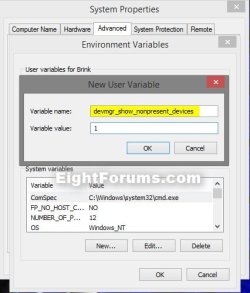
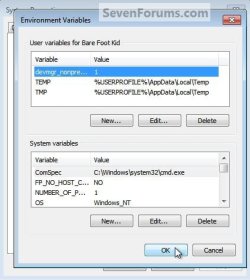
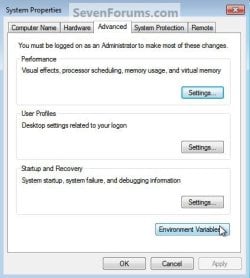
2) In the system properties window that opens under the advanced tab select the Environment Variables button, in the Environment Variables window select new, then in the New User Variable window type "devmgr_show_nonpresent_devices" (without the quotes) and give it a value of " 1 " then click ok to add the entry, then ok again to finish.
Devices3.jpgDevices4.jpg
Devices5.jpgDevices6.jpg
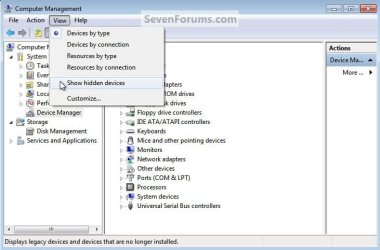
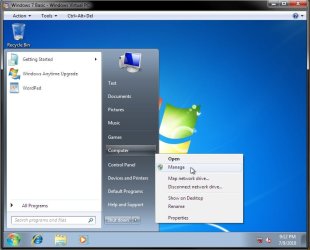
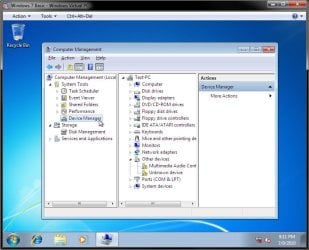
3) Again in the Windows start menu right click computer and this time select manage, in the window that opens in the left pane select Device Manager, at the top click view and select Show Hidden Devices.
Manage.jpg
Devices8.jpg
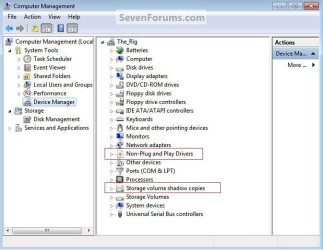
4) You can now see hidden / ghost drivers and devices by expanding the entry, they will be faded compared to the others.
Devices9.jpg
Enjoy! :)


Last edited by a moderator:
Hello, please look at this image, got directly from 'Show Hidden Devices' in the Device Manager View Menu. I'm using Windows 7 Ultimate x64 (french).
The red underlined items are the hidden devices and ghosts

Hello Johnatan, welcome to Seven Forums!

If I read French I may have an idea but, do you have a question?

Thanks for the work done and your time Ted

Regards

Hello Lomai, I'm glad it was a help.
 

My Computer

Computer Manufacturer/Model Number
* BFK Customs *
OS
W 7 64-bit Ultimate
CPU
Intel Q9550 Yorkfield
Motherboard
ASUS P5Q Pro
Memory
8GB Dominator 8500C5D
Graphics Card(s)
ATI : XFX 5870
Sound Card
Realtek HD Audio 7-1
Monitor(s) Displays
1x 47" LCD HDMI & 3x 26" LCD HDMI
Screen Resolution
1920x1080P & 1920x1200
Hard Drives
1x 80GB Intel X25-M G2 SSD : 1x 500GB & 1x 640GB WD Caviar Black(s)
PSU
Corsair 620HX
Case
Cooler Master RC-690
Cooling
Tuniq Tower 120, 2x 140mm and 3x 120mm case fans
Keyboard
Microsoft 500
Mouse
Razer Diamondback 3G
Internet Speed
14 Mb/s
Other Info
1x Koutech 3Gb/s SATA HDD Hot Swap Rack
hi Ted
thank you for tuttorial but i want to know someting;
allready when i open the device menager i can select "Show Hidden Devices" option and i can see the hidden / ghost drivers and whwn i do step 1-2 nothing changing
So why we are doing step 1 and 2 ?
Why it necessary?
 

My Computer

Computer Manufacturer/Model Number
asus f3sv240dr
OS
vista
CPU
t7700
Memory
2 gb
Graphics Card(s)
8600M
Hard Drives
250 GB
Hi Ted,

I just linked to your excellent tutorial on one that I wrote yesterday, due to the positive feedback on that Unknown Device thread (thanks for the rep too :-) ).

I see that you mentioned the Computer Management Console in your tutorial and I've been trying to get a answer on something without installing an earlier version of windows; perhaps you can help. Do you know if the compmgmt.msc (right click on computer and choose manage) is available on home basic and Home premium. Someone mentioned in another thread that it wasn't and I've kept it out of all posts since; but I've never got around to verifying this. Any ideas?

Thanks and great thread, I didn't know you could show Ghost devices (unfortunately I'm unable to tip the scales on it.... perhaps it's too old?)

-Timo
 

My Computer

Computer Manufacturer/Model Number
Custom Hack job
OS
Windows 7 Ultimate 64 bit
CPU
Intel(R) Core(TM)2 Quad CPU Q8200 @ 2.33GHz
Motherboard
GigaByte EP45-UD3
Memory
8 GB Kingston
Graphics Card(s)
Nvidia GeForce 9600GT
Sound Card
Soundblaster Audigy
Monitor(s) Displays
AOC x2 22"
Hard Drives
2 x Samsung 500GB (RAID)
2 x Samsung 2TB
1 x WD Green 2TB
1 x Seagate 1TB
1 x Samsung 500GB
PSU
Thermaltake QFan 750W
Case
CM Scout Gaming
Cooling
Coolermaster V10
Keyboard
Microsoft Wireless Keyboard 1000
Mouse
Microsoft Wireless Optical 2000
Internet Speed
320
Other Info
Winfast PVR2000CP
LG DVD-RAM DVD/RW/DL Super Multi
Linksys WMP300Nx2 Wireless Adapter
Hi Tim

Can confirm that it is available on HP x-64 :)
Not able to check Basic though

Regards
 

My Computer

Computer Manufacturer/Model Number
Custom
OS
Win7 HP (x64)/Win7 Ultimate (x64)
CPU
Core i7 920
Motherboard
Intel X58
Memory
6 x 2GB Corsair XMS3
Graphics Card(s)
CF HD4890
Sound Card
Asus Xonar
Monitor(s) Displays
Dell 2408WFP
Screen Resolution
1920 x 1200
Hard Drives
2 x 150GB WDC Velociraptors (Raid 0)
1 x 1TB Seagate
1 x 1.5TB Seagate
PSU
Corsair HX1000W
Case
Antec 1200
Keyboard
Razer Lycosa/N52te
Mouse
Razer Lachesis
I'm installin Basic on a VM now. I'll report back when it's done. :)

UPDATE:
Confirmed. All editions of Windows 7 have compmgmt.msc.

Confirmed-2.jpgConfirmed-1.jpg
 

My Computer

Computer type
PC/Desktop
Computer Manufacturer/Model Number
Self built custom
OS
64-bit Windows 11 Pro for Workstations
CPU
Intel i7-8700K OC'd to 5 GHz
Motherboard
ASUS ROG Maximus XI Formula Z390
Memory
64 GB (4x16GB) G.SKILL TridentZ RGB DDR4 3600 MHz
Graphics Card(s)
ASUS ROG-STRIX-GTX1080TI-O11G-GAMING
Sound Card
Integrated
Monitor(s) Displays
2 x Samsung Odyssey G7 27"
Screen Resolution
2560x1440
Hard Drives
1TB Samsung 990 PRO M.2,
4TB Samsung 990 PRO PRO M.2,
TerraMaster F8 SSD Plus NAS
PSU
Seasonic Prime Titanium 850W
Case
Thermaltake Core P3
Cooling
Corsair Hydro H115i
Keyboard
Logitech wireless K800
Mouse
Logitech MX Master 4
Internet Speed
2 Gb/s Download and 100 Mb/s Upload
Antivirus
Malwarebyte Anti-Malware Premium
Browser
Google Chrome
Other Info
Logitech Z625 speaker system,
Logitech BRIO 4K Pro webcam,
HP Color LaserJet Pro MFP M477fdn,
APC SMART-UPS RT 1000 XL - SURT1000XLI,
Galaxy S23 Plus phone
Thank you all for your assistance, nice tutorial Tim. ;)
 

My Computer

Computer Manufacturer/Model Number
* BFK Customs *
OS
W 7 64-bit Ultimate
CPU
Intel Q9550 Yorkfield
Motherboard
ASUS P5Q Pro
Memory
8GB Dominator 8500C5D
Graphics Card(s)
ATI : XFX 5870
Sound Card
Realtek HD Audio 7-1
Monitor(s) Displays
1x 47" LCD HDMI & 3x 26" LCD HDMI
Screen Resolution
1920x1080P & 1920x1200
Hard Drives
1x 80GB Intel X25-M G2 SSD : 1x 500GB & 1x 640GB WD Caviar Black(s)
PSU
Corsair 620HX
Case
Cooler Master RC-690
Cooling
Tuniq Tower 120, 2x 140mm and 3x 120mm case fans
Keyboard
Microsoft 500
Mouse
Razer Diamondback 3G
Internet Speed
14 Mb/s
Other Info
1x Koutech 3Gb/s SATA HDD Hot Swap Rack
Thanks Lomai! Thanks Brink! and thanks Ted!

I've been meaning to get off my backside and find that out and I thought since Ted put it in his Tutorial that he already had the answer........ as always the team network here is extremely fast, I don't often see Ted beaten to an answer . :)

Now to try to find the thread again that I read where it said it wasn't available......hmmm.
 

My Computer

Computer Manufacturer/Model Number
Custom Hack job
OS
Windows 7 Ultimate 64 bit
CPU
Intel(R) Core(TM)2 Quad CPU Q8200 @ 2.33GHz
Motherboard
GigaByte EP45-UD3
Memory
8 GB Kingston
Graphics Card(s)
Nvidia GeForce 9600GT
Sound Card
Soundblaster Audigy
Monitor(s) Displays
AOC x2 22"
Hard Drives
2 x Samsung 500GB (RAID)
2 x Samsung 2TB
1 x WD Green 2TB
1 x Seagate 1TB
1 x Samsung 500GB
PSU
Thermaltake QFan 750W
Case
CM Scout Gaming
Cooling
Coolermaster V10
Keyboard
Microsoft Wireless Keyboard 1000
Mouse
Microsoft Wireless Optical 2000
Internet Speed
320
Other Info
Winfast PVR2000CP
LG DVD-RAM DVD/RW/DL Super Multi
Linksys WMP300Nx2 Wireless Adapter
Thanks Lomai! Thanks Brink! and thanks Ted!

I've been meaning to get off my backside and find that out and I thought since Ted put it in his Tutorial that he already had the answer........ as always the team network here is extremely fast, I don't often see Ted beaten to an answer . :)

Now to try to find the thread again that I read where it said it wasn't available......hmmm.


Yeah, Brink is an alien machine. ;)
 

My Computer

Computer Manufacturer/Model Number
* BFK Customs *
OS
W 7 64-bit Ultimate
CPU
Intel Q9550 Yorkfield
Motherboard
ASUS P5Q Pro
Memory
8GB Dominator 8500C5D
Graphics Card(s)
ATI : XFX 5870
Sound Card
Realtek HD Audio 7-1
Monitor(s) Displays
1x 47" LCD HDMI & 3x 26" LCD HDMI
Screen Resolution
1920x1080P & 1920x1200
Hard Drives
1x 80GB Intel X25-M G2 SSD : 1x 500GB & 1x 640GB WD Caviar Black(s)
PSU
Corsair 620HX
Case
Cooler Master RC-690
Cooling
Tuniq Tower 120, 2x 140mm and 3x 120mm case fans
Keyboard
Microsoft 500
Mouse
Razer Diamondback 3G
Internet Speed
14 Mb/s
Other Info
1x Koutech 3Gb/s SATA HDD Hot Swap Rack
Thanks Lomai! Thanks Brink! and thanks Ted!

I've been meaning to get off my backside and find that out and I thought since Ted put it in his Tutorial that he already had the answer........ as always the team network here is extremely fast, I don't often see Ted beaten to an answer . :)

Now to try to find the thread again that I read where it said it wasn't available......hmmm.


Yeah, Brink is an alien machine. ;)

Sshhhh he's listening :D
 

My Computer

Computer Manufacturer/Model Number
Custom Hack job
OS
Windows 7 Ultimate 64 bit
CPU
Intel(R) Core(TM)2 Quad CPU Q8200 @ 2.33GHz
Motherboard
GigaByte EP45-UD3
Memory
8 GB Kingston
Graphics Card(s)
Nvidia GeForce 9600GT
Sound Card
Soundblaster Audigy
Monitor(s) Displays
AOC x2 22"
Hard Drives
2 x Samsung 500GB (RAID)
2 x Samsung 2TB
1 x WD Green 2TB
1 x Seagate 1TB
1 x Samsung 500GB
PSU
Thermaltake QFan 750W
Case
CM Scout Gaming
Cooling
Coolermaster V10
Keyboard
Microsoft Wireless Keyboard 1000
Mouse
Microsoft Wireless Optical 2000
Internet Speed
320
Other Info
Winfast PVR2000CP
LG DVD-RAM DVD/RW/DL Super Multi
Linksys WMP300Nx2 Wireless Adapter
I'm installin Basic on a VM now. I'll report back when it's done. :)

UPDATE:
Confirmed. All editions of Windows 7 have compmgmt.msc.

View attachment 84317View attachment 84316

I finally found that post.... and guess what? I must have had another late one on sevenforums that night.

I owe everyone an apology for wasted time :zip:. It turns out that the poster never said that the compmgmt.msc was missing, just that the functionality changes. I've just remembered it wrong and now feel like silly idiot.... the beginnings of old age... dementia... memory in need of de-fragmentation?.... or too many tasty beverages while I'm helping out... I don't know. :o

Apologies all, it's been a day of red faces for me.

-Timo
 

My Computer

Computer Manufacturer/Model Number
Custom Hack job
OS
Windows 7 Ultimate 64 bit
CPU
Intel(R) Core(TM)2 Quad CPU Q8200 @ 2.33GHz
Motherboard
GigaByte EP45-UD3
Memory
8 GB Kingston
Graphics Card(s)
Nvidia GeForce 9600GT
Sound Card
Soundblaster Audigy
Monitor(s) Displays
AOC x2 22"
Hard Drives
2 x Samsung 500GB (RAID)
2 x Samsung 2TB
1 x WD Green 2TB
1 x Seagate 1TB
1 x Samsung 500GB
PSU
Thermaltake QFan 750W
Case
CM Scout Gaming
Cooling
Coolermaster V10
Keyboard
Microsoft Wireless Keyboard 1000
Mouse
Microsoft Wireless Optical 2000
Internet Speed
320
Other Info
Winfast PVR2000CP
LG DVD-RAM DVD/RW/DL Super Multi
Linksys WMP300Nx2 Wireless Adapter
I'm installin Basic on a VM now. I'll report back when it's done. :)

UPDATE:
Confirmed. All editions of Windows 7 have compmgmt.msc.

View attachment 84317View attachment 84316

I finally found that post.... and guess what? I must have had another late one on sevenforums that night.

I owe everyone an apology for wasted time :zip:. It turns out that the poster never said that the compmgmt.msc was missing, just that the functionality changes. I've just remembered it wrong and now feel like silly idiot.... the beginnings of old age... dementia... memory in need of de-fragmentation?.... or too many tasty beverages while I'm helping out... I don't know. :o

Apologies all, it's been a day of red faces for me.

-Timo

Bula Tim

:party:

Been busy watching the soccer world cup matches - almost like a zombie now given the different timezones :eek:

Regards
 

My Computer

Computer Manufacturer/Model Number
Custom
OS
Win7 HP (x64)/Win7 Ultimate (x64)
CPU
Core i7 920
Motherboard
Intel X58
Memory
6 x 2GB Corsair XMS3
Graphics Card(s)
CF HD4890
Sound Card
Asus Xonar
Monitor(s) Displays
Dell 2408WFP
Screen Resolution
1920 x 1200
Hard Drives
2 x 150GB WDC Velociraptors (Raid 0)
1 x 1TB Seagate
1 x 1.5TB Seagate
PSU
Corsair HX1000W
Case
Antec 1200
Keyboard
Razer Lycosa/N52te
Mouse
Razer Lachesis
hi Ted
thank you for tuttorial but i want to know someting;
allready when i open the device menager i can select "Show Hidden Devices" option and i can see the hidden / ghost drivers and when i do step 1-2 nothing changing
So why we are doing step 1 and 2 ?
Why it necessary?
I guess nobody seen my post :(
 

My Computer

Computer Manufacturer/Model Number
asus f3sv240dr
OS
vista
CPU
t7700
Memory
2 gb
Graphics Card(s)
8600M
Hard Drives
250 GB
Hey, for you registry editing folks, create a raw (no word wrap) text file with the following lines:


Windows Registry Editor Version 5.00

[HKEY_LOCAL_MACHINE\SYSTEM\CurrentControlSet\Control\Session Manager\Environment]
"DEVMGR_SHOW_DETAILS"="1"
"DEVMGR_SHOW_NONPRESENT_DEVICES"="1"


Save it as SomeFileName.reg and double-click to merge into the registry.

Or you can use the attached reg file to double-click it and merge it into your registry.

Note: You will still have to click View -> Show Hidden Devices when in Device Mangler.
 

Attachments

Last edited by a moderator:

My Computer

OS
Windows 7 Pro, 32-bit, Windows XP Pro
HI,
I just replaced the contents of the PATH in the environment variables, can you please gv info abt resetting it to its prev value???Please help me ...
 

My Computer

Computer Manufacturer/Model Number
Inspiron 15R
OS
Windows 7 Home Basic x64
CPU
Intel Core i5
Motherboard
Intel
Memory
4 GB
Graphics Card(s)
ATI Mobility Radeon 550v
Sound Card
IDT
HI,
I just replaced the contents of the PATH in the environment variables, can you please gv info abt resetting it to its prev value???Please help me ...

One could set the default values as when the system was installed, but there may be other program installations that had modified if further, so you may run into issues with that.

Anyone: would a system restore fix this?
 

My Computer

OS
Windows 7 Pro, 32-bit, Windows XP Pro
Yes, a system restore using a restore point dated before he deleted the contents should be able to restore them. :)
 

My Computer

Computer type
PC/Desktop
Computer Manufacturer/Model Number
Self built custom
OS
64-bit Windows 11 Pro for Workstations
CPU
Intel i7-8700K OC'd to 5 GHz
Motherboard
ASUS ROG Maximus XI Formula Z390
Memory
64 GB (4x16GB) G.SKILL TridentZ RGB DDR4 3600 MHz
Graphics Card(s)
ASUS ROG-STRIX-GTX1080TI-O11G-GAMING
Sound Card
Integrated
Monitor(s) Displays
2 x Samsung Odyssey G7 27"
Screen Resolution
2560x1440
Hard Drives
1TB Samsung 990 PRO M.2,
4TB Samsung 990 PRO PRO M.2,
TerraMaster F8 SSD Plus NAS
PSU
Seasonic Prime Titanium 850W
Case
Thermaltake Core P3
Cooling
Corsair Hydro H115i
Keyboard
Logitech wireless K800
Mouse
Logitech MX Master 4
Internet Speed
2 Gb/s Download and 100 Mb/s Upload
Antivirus
Malwarebyte Anti-Malware Premium
Browser
Google Chrome
Other Info
Logitech Z625 speaker system,
Logitech BRIO 4K Pro webcam,
HP Color LaserJet Pro MFP M477fdn,
APC SMART-UPS RT 1000 XL - SURT1000XLI,
Galaxy S23 Plus phone
will there be any modifications to my data including deletion ?????? after restoring..............:o
 

My Computer

Computer Manufacturer/Model Number
Inspiron 15R
OS
Windows 7 Home Basic x64
CPU
Intel Core i5
Motherboard
Intel
Memory
4 GB
Graphics Card(s)
ATI Mobility Radeon 550v
Sound Card
IDT

My Computer

Computer type
PC/Desktop
Computer Manufacturer/Model Number
Self built custom
OS
64-bit Windows 11 Pro for Workstations
CPU
Intel i7-8700K OC'd to 5 GHz
Motherboard
ASUS ROG Maximus XI Formula Z390
Memory
64 GB (4x16GB) G.SKILL TridentZ RGB DDR4 3600 MHz
Graphics Card(s)
ASUS ROG-STRIX-GTX1080TI-O11G-GAMING
Sound Card
Integrated
Monitor(s) Displays
2 x Samsung Odyssey G7 27"
Screen Resolution
2560x1440
Hard Drives
1TB Samsung 990 PRO M.2,
4TB Samsung 990 PRO PRO M.2,
TerraMaster F8 SSD Plus NAS
PSU
Seasonic Prime Titanium 850W
Case
Thermaltake Core P3
Cooling
Corsair Hydro H115i
Keyboard
Logitech wireless K800
Mouse
Logitech MX Master 4
Internet Speed
2 Gb/s Download and 100 Mb/s Upload
Antivirus
Malwarebyte Anti-Malware Premium
Browser
Google Chrome
Other Info
Logitech Z625 speaker system,
Logitech BRIO 4K Pro webcam,
HP Color LaserJet Pro MFP M477fdn,
APC SMART-UPS RT 1000 XL - SURT1000XLI,
Galaxy S23 Plus phone

My Computer

OS
Windows 7 Pro, 32-bit, Windows XP Pro
Agreed. Always best to be safe and backup anything that you do not want to lose first.
 

My Computer

Computer type
PC/Desktop
Computer Manufacturer/Model Number
Self built custom
OS
64-bit Windows 11 Pro for Workstations
CPU
Intel i7-8700K OC'd to 5 GHz
Motherboard
ASUS ROG Maximus XI Formula Z390
Memory
64 GB (4x16GB) G.SKILL TridentZ RGB DDR4 3600 MHz
Graphics Card(s)
ASUS ROG-STRIX-GTX1080TI-O11G-GAMING
Sound Card
Integrated
Monitor(s) Displays
2 x Samsung Odyssey G7 27"
Screen Resolution
2560x1440
Hard Drives
1TB Samsung 990 PRO M.2,
4TB Samsung 990 PRO PRO M.2,
TerraMaster F8 SSD Plus NAS
PSU
Seasonic Prime Titanium 850W
Case
Thermaltake Core P3
Cooling
Corsair Hydro H115i
Keyboard
Logitech wireless K800
Mouse
Logitech MX Master 4
Internet Speed
2 Gb/s Download and 100 Mb/s Upload
Antivirus
Malwarebyte Anti-Malware Premium
Browser
Google Chrome
Other Info
Logitech Z625 speaker system,
Logitech BRIO 4K Pro webcam,
HP Color LaserJet Pro MFP M477fdn,
APC SMART-UPS RT 1000 XL - SURT1000XLI,
Galaxy S23 Plus phone
Back
Top