Devices and Printers - Change Device Icons with Custom Icons

How to Change Icons in "Devices and Printers" with Custom Icons

   Information
This tutorial will cover how to change the icons in Devices and Printers with a custom icon of your choosing and be device specific, eliminating resource hacking and/or overwriting Windows 7 default icons.

   Note
You'll need to be familiar with making multi-resolution icons to complete this tutorial. Many tutorials already exist, and one can be found at SevenForums here. Please take the time to familiarize yourself with the procedure before moving onto this tutorial.

   Tip
The icons used in this method must contain the following sizes:

256x256 32bit + Alpha​

48x48: 32bit + Alpha
48x48: 8bit 256
48x48: 4bit 16​

32x32: 32bit + Alpha
32x32: 8bit 256
32x32: 4bit 16​

24x24: 32bit + Alpha
24x24: 8bit 256
24x24: 4bit 16​

16x16: 32bit + Alpha
16x16: 8bit 256
16x16: 4bit 16​

More information about icon design can be found on MSDN.


Final Example: Custom Computer Icon
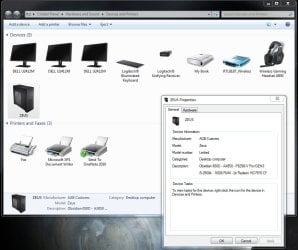
final.jpg


Step 1.
Create a multi-resolutioned icon, containing the appropriate sizes, using the tutorial mentioned in the Note pane above.
Step 2.
Download and install the Devices and Printers Metadata Authoring Wizard from MSDN.
Step 3.
Once installed, you'll have an added option called 'create metadata package' in your context menu for each device. Choose that option for the device icon you'd like to change.
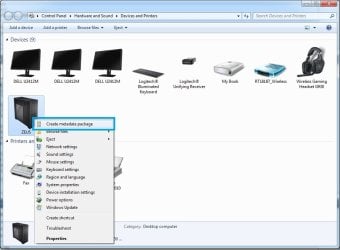
metascreen.jpg
Step 4.
Drag your created icon to the drop target area of the Icon Tab.
dndicon.jpg
Choose Next.
   Information
If your icon doesn't meet the required criteria, you'll be met with the following window. Adjust your icon as necessary.
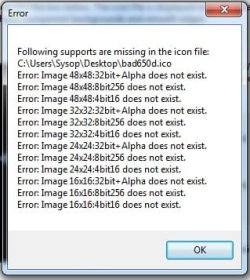
badicon.jpg
Step 5.
Fill out the fields in the Description Tab to your liking.
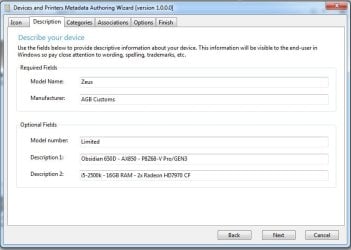
descrip.jpg
Choose Next.
Step 6.
Under the Categories Tab, select the category appropriate for your device. In this example, we're replacing the Desktop Computer icon.
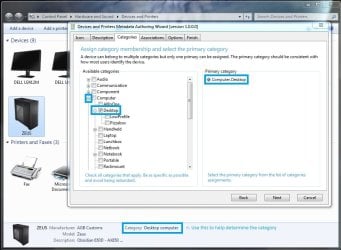
category.jpg
Choose Next.
Step 7. - See Other Devices section, below, for devices other than the Computer.
Under the Associations Tab, choose the proper association(s). For this example, the Computer icon, choose the 7 ComputerMetadata strings at the top of the Hardware ID list.
Assoc.jpg
Choose Next.
Other Devices
To determine the Hardware ID string for devices other than the Computer, use the following method to locate it.
A. From the Devices and Printers window, Right-Click your device and choose properties.
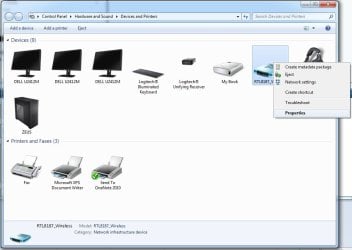
props1.jpg
B. From the Properties window, seclect the Hardware Tab at the top, and choose the Properties Button at the bottom.
props2.jpg
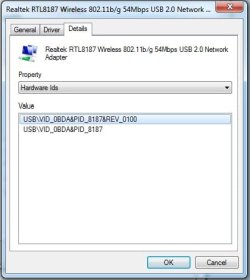
C. In the Properties Window, select the Details Tab at the top, and from the Property Pulldown menu, select Hardware Ids.
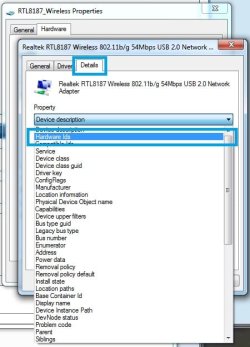
hids.jpg

hidstring.jpg
D. Using the Id from the previous step, you can verify the proper strings in the tool if multiple's are listed.
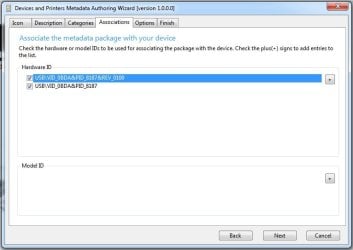
verified.jpg
Step 8.
You can select your locale from Options Tab. If you prefer USB, hot-swappable, etc. devices to be shown while disconnected, tick the Show device in disconnected state. For our example we'll leave it unchecked.
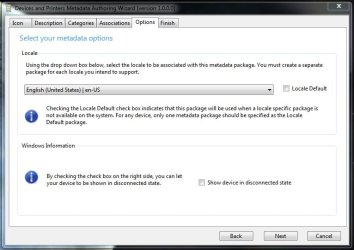
options.jpg
Choose Next.
Step 9.
From the Finish Tab, make sure to tick the Copy package to your system's local metadata store if you would like this to take immediate effect upon a refresh of your Devices and Printers window.
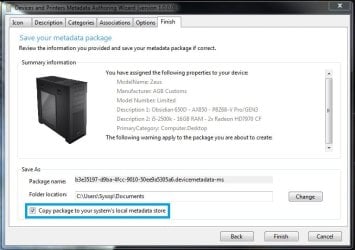
finish.jpg

   Tip
A backup of the package will be copied to your Documents folder for later use, i.e. after clean install. Copy the package to the following directory to install it if you didn't choose to tick Copy package to your system's local metadata store.
Code:
%PROGRAMDATA%\Microsoft\Windows\DeviceMetadataStore

That's it!
Ageeb


Last edited by a moderator:
Is there a way to go back to the default icons if you decide to go back?
I had asked this same question. Any replies? I don't seem to see any--except that the answer seems to be 'NO"
 

My Computer My Computer

At a glance

Windows 7 Home Premium 64Intel Core i5 760 @ 2800MHz12288MBAMD Radeon HD 7800 Series
Computer type
PC/Desktop
Computer Manufacturer/Model Number
OEM Designed by me :-)
OS
Windows 7 Home Premium 64
CPU
Intel Core i5 760 @ 2800MHz
Motherboard
Asus P7P55D-E LX
Memory
12288MB
Graphics Card(s)
AMD Radeon HD 7800 Series
Sound Card
ASUS Xonar DG
Monitor(s) Displays
ViewSonic VX2453 Series, HDMI 1080p Full HD
Screen Resolution
1920X1080
Hard Drives
Samsung SSD 840 EVO 250GB& two others
PSU
Tagan BZ Series, TG800-BZ 800W
Keyboard
Logitech MK250
Mouse
Logitech M310
Internet Speed
toppest, mostest :-) <-- bad, but fun English
Browser
Firefox, Crrome, IE
I found this thread last night. I've followed all of the instructions exactly as they were spelled out. However whenever I click on the finish button, nothing happens. No metadata package is created (Regardless if I choose to go directly to the metadata store folder, or my documents. I'm running 7 64bit ultimate. Can anyone help me out? I really would like to get this done. Thanks!
 

My Computer My Computer

At a glance

Windows 7 Ultimate X64
Computer type
PC/Desktop
OS
Windows 7 Ultimate X64
That's really cool but how do I change the icon on the Adobe PDF creator? There is no hardware to link to...
 

My Computer My Computer

At a glance

Win 7 64bit
Computer type
PC/Desktop
OS
Win 7 64bit
I found this thread last night. I've followed all of the instructions exactly as they were spelled out. However whenever I click on the finish button, nothing happens. No metadata package is created (Regardless if I choose to go directly to the metadata store folder, or my documents. I'm running 7 64bit ultimate. Can anyone help me out? I really would like to get this done. Thanks!
If you read all the comments, you would see that some of us had problems.. For ex. I ended up having 3 things with all the same icon and same name, definitely not something I wanted, seeing that in a way, it means it made things worse. And since no one replied as to how to revert anything you make I assumed it was not doable--revertible. Hence, I would be careful if I were you if things are not working out. Good luck :-)
 

My Computer My Computer

At a glance

Windows 7 Home Premium 64Intel Core i5 760 @ 2800MHz12288MBAMD Radeon HD 7800 Series
Computer type
PC/Desktop
Computer Manufacturer/Model Number
OEM Designed by me :-)
OS
Windows 7 Home Premium 64
CPU
Intel Core i5 760 @ 2800MHz
Motherboard
Asus P7P55D-E LX
Memory
12288MB
Graphics Card(s)
AMD Radeon HD 7800 Series
Sound Card
ASUS Xonar DG
Monitor(s) Displays
ViewSonic VX2453 Series, HDMI 1080p Full HD
Screen Resolution
1920X1080
Hard Drives
Samsung SSD 840 EVO 250GB& two others
PSU
Tagan BZ Series, TG800-BZ 800W
Keyboard
Logitech MK250
Mouse
Logitech M310
Internet Speed
toppest, mostest :-) <-- bad, but fun English
Browser
Firefox, Crrome, IE
I found this thread last night. I've followed all of the instructions exactly as they were spelled out. However whenever I click on the finish button, nothing happens. No metadata package is created (Regardless if I choose to go directly to the metadata store folder, or my documents. I'm running 7 64bit ultimate. Can anyone help me out? I really would like to get this done. Thanks!
If you read all the comments, you would see that some of us had problems.. For ex. I ended up having 3 things with all the same icon and same name, definitely not something I wanted, seeing that in a way, it means it made things worse. And since no one replied as to how to revert anything you make I assumed it was not doable--revertible. Hence, I would be careful if I were you if things are not working out. Good luck :-)

you have to delete all the metadata files in your system disk... just search for any file with .devicemetadata-ms extension and move them to the recicle bin... the custom ones will be removed and windows will redownload any oem metadata dile from the server... don't go crazy with the id... just select the first one to be sure it'll only affect that particular device ;)

too bad the tool doesn't work in windows 10, and it doesn't work in ALL the windows 8 versions... microsoft doesn't update the tool and we now have to download 10 gb of devkits and visualstudio installers just to change the metadata :(
 

My Computer My Computer

At a glance

windows 10 x64intel i716gbgeforce gtx760
Computer type
PC/Desktop
Computer Manufacturer/Model Number
custom build
OS
windows 10 x64
CPU
intel i7
Motherboard
asrock
Memory
16gb
Graphics Card(s)
geforce gtx760
Hard Drives
1 ssd
3 hdd
it may be that the icons are not packaged correctly, that's usually what ends up killing it. Its been a while since I toyed with this stuff as even the slightest mistake can end up killing or negatively impacting an entire device line, say USB sticks, etc. But it was fun and GIMP was the best editor to use- you have to make the Icons contain all the different sizes required by the OS for each use it might have for each.

You probably forgot 48x48 or some other size and that can very often lead to no error and nothing much else. This is a process that MS assumed would be undertaken by engineers and then only by a few specialized folks. It is tedious and can get you into reloading the OS. I would suggest you load a VM, snapshot and play till your hearts content, then revert and make the best of the default icons. This isn't something that will yield a lot of success or satisfaction.
 

My Computer My Computer

At a glance

Windows 7 Ultimate x64Core I7 920 (First Generation)12 GB Corsair Extreme XMS3NVIDIA GTX 295 1792MB
Computer Manufacturer/Model Number
Custom - Self Built
OS
Windows 7 Ultimate x64
CPU
Core I7 920 (First Generation)
Motherboard
Asus P6T6 WS Revloution
Memory
12 GB Corsair Extreme XMS3
Graphics Card(s)
NVIDIA GTX 295 1792MB
Sound Card
Integrated Sound Max
Monitor(s) Displays
Dell 30" 3007 HC - ASUS 24" VE247
Hard Drives
1 x INTEL SSDSA2BW160G3H (BOOT)
3 x WDC WD1001FALS-00J7B0 (3TB Spindle Storage)
PSU
Tagan BZ1100 Modular PS
Case
ZALMAN Z-MACHINE GT-1000 Titanium 5m Aluminum
Cooling
Noctua NH-U12P
NOTE: The error where "Nothing Happens" is likely due to access issue with the directory selected in "Folder Location:" i.e c:\Users\<name>\Documents.

The application may not have access to create the device meta file.

The quick work around is to use
"C:\usr\temp" as the location where the file can be created and copied to

the location -
%PROGRAMDATA%\Microsoft\Windows\DeviceMetadataStore
 

My Computer My Computer

At a glance

Windows 7 Ultimate x64Intel 980X16GBGTX Titan X, GTX 750
Computer type
PC/Desktop
Computer Manufacturer/Model Number
Dell Alienware Area-51
OS
Windows 7 Ultimate x64
CPU
Intel 980X
Motherboard
Alienware X58
Memory
16GB
Graphics Card(s)
GTX Titan X, GTX 750
Hello,

I have followed this tutorial and have made great icons (as you can see below), thank you very much!!! :D
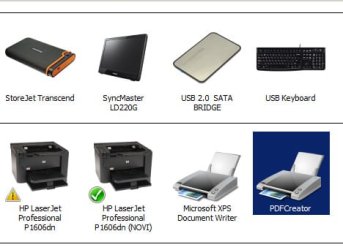
However, I want to change icons of the virtual system printers, like PDF Creator. But they don't have anything under "Properties/Hardware". How can I identify them?
 

Attachments

  • devices & printers.jpg
    devices & printers.jpg
    35.7 KB · Views: 1,340

My Computer My Computer

At a glance

Windows 7 Pro SP1 x64
Computer type
Laptop
Computer Manufacturer/Model Number
Dell Latitude E6420
OS
Windows 7 Pro SP1 x64
I appreciate the tutorials on this subject.

I was struggling with this and found the Icon Creation tutorial somewhat confusing as some things were left out or perhaps missed the 'cut & paste' when being posted. I added some updated/corrected instructions on that thread which included some details that us non-tech folk don't intuitively grasp. (Hopefully that will help the next bonehead like me who stumbles along!

THANKS SevenForums! My custom printer icon is now on the home network!
 

My Computer My Computer

At a glance

Win7 Ultimate x6416gb
Computer type
PC/Desktop
Computer Manufacturer/Model Number
custom
OS
Win7 Ultimate x64
Memory
16gb
Icons

The shortcut to the icon tutorial is broken, could you point to a icon software that can make what the app is asking for. Also would you upload the one you show on your post. the one of the pc would be very usefull for Assemblers.

Thanks
 

My Computer My Computer

At a glance

win 7 32 and 64Core 2 Duo2GbIntel Intergated
Computer type
PC/Desktop
Computer Manufacturer/Model Number
Dell
OS
win 7 32 and 64
CPU
Core 2 Duo
Motherboard
Donno
Memory
2Gb
Graphics Card(s)
Intel Intergated
Hello eblis, and welcome to Seven Forums. :-)

I have updated the link. It should work for you now.

:ar: Icons | Microsoft Docs
 

My Computer My Computer

At a glance

64-bit Windows 11 Pro for WorkstationsIntel i7-8700K OC'd to 5 GHz64 GB (4x16GB) G.SKILL TridentZ RGB DDR4 3600...ASUS ROG-STRIX-GTX1080TI-O11G-GAMING
Computer type
PC/Desktop
Computer Manufacturer/Model Number
Self built custom
OS
64-bit Windows 11 Pro for Workstations
CPU
Intel i7-8700K OC'd to 5 GHz
Motherboard
ASUS ROG Maximus XI Formula Z390
Memory
64 GB (4x16GB) G.SKILL TridentZ RGB DDR4 3600 MHz
Graphics Card(s)
ASUS ROG-STRIX-GTX1080TI-O11G-GAMING
Sound Card
Integrated
Monitor(s) Displays
2 x Samsung Odyssey G7 27"
Screen Resolution
2560x1440
Hard Drives
1TB Samsung 990 PRO M.2,
4TB Samsung 990 PRO PRO M.2,
TerraMaster F8 SSD Plus NAS
PSU
Seasonic Prime Titanium 850W
Case
Thermaltake Core P3
Cooling
Corsair Hydro H115i
Keyboard
Logitech wireless K800
Mouse
Logitech MX Master 4
Internet Speed
2 Gb/s Download and 100 Mb/s Upload
Antivirus
Malwarebyte Anti-Malware Premium
Browser
Google Chrome
Other Info
Logitech Z625 speaker system,
Logitech BRIO 4K Pro webcam,
HP Color LaserJet Pro MFP M477fdn,
APC SMART-UPS RT 1000 XL - SURT1000XLI,
Galaxy S23 Plus phone
Hi eblis, welcome to Seven Forums,

If you are talking about this one: How to Make a Icon with a Image, it works for me!

I hope this helps!

EDIT: Brink beat me to it!
 

My Computer My Computer

At a glance

Win 7 HP SP1 64-bit Vista HB SP2 32-bit Linux...Intel(R) Pentium(R) CPU P6200 @ 2.13GHz4.00 GBIntel(R) Graphics Media Accelerator HD
Computer type
Laptop
Computer Manufacturer/Model Number
Fujitsu LIFEBOOK
OS
Win 7 HP SP1 64-bit Vista HB SP2 32-bit Linux Mint 18.3
CPU
Intel(R) Pentium(R) CPU P6200 @ 2.13GHz
Motherboard
FUJITSU FJNBB06
Memory
4.00 GB
Graphics Card(s)
Intel(R) Graphics Media Accelerator HD
Sound Card
[1] Realtek High Definition Audio [2] Intel(R) Display Audio
Screen Resolution
1366 x 768 x 32 bits (4294967296 colors) @ 59 Hz
Hard Drives
TOSHIBA MK5076GSX
Antivirus
AVG FREE
Thank you, usufull and working. ill give it a try
 

My Computer My Computer

At a glance

win 7 32 and 64Core 2 Duo2GbIntel Intergated
Computer type
PC/Desktop
Computer Manufacturer/Model Number
Dell
OS
win 7 32 and 64
CPU
Core 2 Duo
Motherboard
Donno
Memory
2Gb
Graphics Card(s)
Intel Intergated
Does this work with Win 10 too??

new to this forum I came acrross this great tutorial, thread and tools to cutomize system icons...however, I am on win 10 and would be interrested to know if this would work on win 10 environement too? Alternatively is there the same tutorial (customized to win10) available somwhere??
 

My Computer My Computer

At a glance

Win10 64 bit
Computer type
PC/Desktop
OS
Win10 64 bit
Dear pintree3,


I had the exact same problem you did and found a way to solve it! I used the system prescribed to change a "Devices and Printers" icon with a custom icon, only to find that several device icons had their icon and name changed in the process to the only I had customized.


So I did some work, and found that the key to having different icons and names for each device rested solely with having distinctly different Hardware IDs. Then, instead of deriving each Hardware ID by right-clicking the item in the "Devices and Printers" window, I instead went to the "Device Manager" and right-clicked the relevant devices there to get distinct Hardware IDs. Once I did this, I was able to to use those distinct Hardware IDs to get different icons and names for each of the devices I customized in the "Devices and Printers" window.


I hope this helps!!!!


Bob
 

My Computer My Computer

At a glance

Windows 10 64-bitSurface Studio 2
Computer type
PC/Desktop
Computer Manufacturer/Model Number
Microsoft
OS
Windows 10 64-bit
CPU
Surface Studio 2
Good tutorial. :-)
 

My Computer My Computer

At a glance

Windows 7 Ultimate x64AMD E-450 APU with Raedon(tm) HD Graphics (2 ...6 GBAMD Raedon HD 6320 Graphics
Computer type
Laptop
Computer Manufacturer/Model Number
HP
OS
Windows 7 Ultimate x64
CPU
AMD E-450 APU with Raedon(tm) HD Graphics (2 CPUs), ~1.6GHz
Motherboard
Hewlett-Packard
Memory
6 GB
Graphics Card(s)
AMD Raedon HD 6320 Graphics
Sound Card
High Definition Audio
Monitor(s) Displays
Monitor PnP Generic
Screen Resolution
1024 x 728 (32 bit) (60Hz)
Keyboard
HP Key
Mouse
Perfect Choice
Internet Speed
1 MB/S
Antivirus
Windows Defender
Browser
Google Chrome
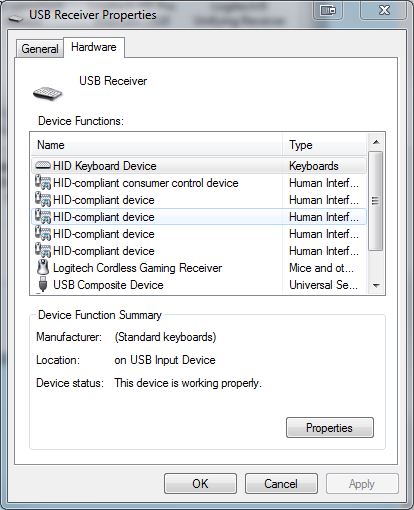
So this tutorial doesn't help much. I have a logitech g602 wireless gaming mouse. However Windows 7 doesn't read it correctly. Windows reads the mouse as USB receiver with a keyboard icon.

These are all the hardware associations and I'm not sure which to choose to find the correct correlation.
nDTLq3E.jpg


Please help. I can't find the correct hardware ID.
 

My Computer My Computer

At a glance

Windows 7Intel(R) Core(TM)2 Quad CPU Q6600 2.40 GHzDDR2 8192 MBytes (G.Skill)NVIDIA GeForce 8800 GT OC2
Computer Manufacturer/Model Number
Custom Built
OS
Windows 7
CPU
Intel(R) Core(TM)2 Quad CPU Q6600 2.40 GHz
Motherboard
ASUS Striker Extreme
Memory
DDR2 8192 MBytes (G.Skill)
Graphics Card(s)
NVIDIA GeForce 8800 GT OC2
Sound Card
Creative Sound Blaster X-Fi Fatality Professional Series
Monitor(s) Displays
Brand unknown (24in: 1920x1200)
Hard Drives
MVODOA STRIPE 279.47G (raided drives both WD Raptors)

WDC WD1600JB-00EVA0 ATA Device (IDE)

Maxtor 4G160J8 ATA Device (IDE)

WDC WD75 00AAKS-00RBA SCSI Disk Device
Does anyone know if there's an available online link for the Devices-and-Printers-Metadata-Authoring-Wizard.msi ? Or if someone still has a copy of it on their PC that they could upload? The Microsoft link is now a dead link.
 

My Computer My Computer

At a glance

Windows 7 Ultimate x64Intel i5 @ 4.2GhzCorsair Dominator 8GBNvidia GTX780Ti
Computer type
PC/Desktop
Computer Manufacturer/Model Number
Custom
OS
Windows 7 Ultimate x64
CPU
Intel i5 @ 4.2Ghz
Motherboard
Gigabyte Z97X
Memory
Corsair Dominator 8GB
Graphics Card(s)
Nvidia GTX780Ti
Hard Drives
Lots.. lol
Browser
Firefox
Code:
https://download.microsoft.com/download/f/5/4/f54f4af9-737a-4ee6-b3f8-bef68990cb62/devices-and-printers-metadata-authoring-wizard.msi
+1 Link dead. Please, need md5sum and new link.

:sick:
 

My Computer My Computer

At a glance

windows 7
OS
windows 7
Back
Top