oneandonlyone
New member
Hello, I am new to forums in general and wondered if anybody knew how to fix an issue I am having currently.
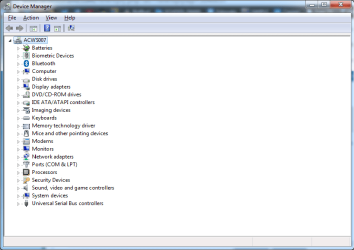
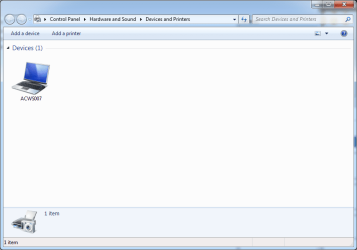
For about a week now, I have had nothing in my devices and printers window except for the computer itself. I have several printers installed, and normally my keyboard and webcam would appear as well, but they suddenly disappeared and I haven't been able to get them back.
I have tried several solutions:
Restarting "Bluetooth Support Service" - did nothing. (It suggested I restart "Bluetooth Service" as well - I don't have a "Bluetooth Service" though )
)
Restarting the "Print Spooler Service" - did nothing.
Restarting the computer - did nothing.
Removing all printers so at least I would see the other devices - did nothing.
I have read that it can be caused by something to do with the same driver being used across devices or accounts the only solution being to delete and re-create the user accounts, but I would like to know more about this before I go and mess with user accounts :huh:
I have been through many forum threads and haven't found a solution as of yet.
Any help would be much appreciated.
For about a week now, I have had nothing in my devices and printers window except for the computer itself. I have several printers installed, and normally my keyboard and webcam would appear as well, but they suddenly disappeared and I haven't been able to get them back.
I have tried several solutions:
Restarting "Bluetooth Support Service" - did nothing. (It suggested I restart "Bluetooth Service" as well - I don't have a "Bluetooth Service" though
)Restarting the "Print Spooler Service" - did nothing.
Restarting the computer - did nothing.
Removing all printers so at least I would see the other devices - did nothing.
I have read that it can be caused by something to do with the same driver being used across devices or accounts the only solution being to delete and re-create the user accounts, but I would like to know more about this before I go and mess with user accounts :huh:
I have been through many forum threads and haven't found a solution as of yet.
Any help would be much appreciated.
Attachments
My Computer
- Computer type
- Laptop
- Computer Manufacturer/Model Number
- Toshiba Tecra P11
- OS
- Windows 7 Professional x64
- CPU
- Intel Core i5 M560 @2.67GHz
- Motherboard
- Toshiba Tecra P11
- Memory
- 4.00GB
- Graphics Card(s)
- NVIDIA NVS 2100M
- Antivirus
- Bitdefender Antivirus Free Edition
- Browser
- Google Chrome