Solved dialog box after desktop is loaded

rintobs

New member
Local time
2:20 PM
Messages
27
Location
Bhutan
Hi,
I am using dell inspiron 15r. After I boot and the desktop is loaded I get a dialog box relating to some 'R' file. I have to close two times in order to use applications.
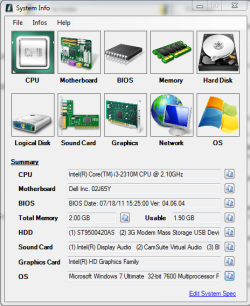
What would be the problem and how can it be solved? image of dialog box and system specifications as attached.
Help would be appreciated.
 

Attachments

  • initial screen.PNG
    initial screen.PNG
    24.3 KB · Views: 17
  • sys spec.PNG
    sys spec.PNG
    36.8 KB · Views: 17

My Computer

Computer type
Laptop
Computer Manufacturer/Model Number
Dell
OS
Windows 7 ultimate x32
CPU
Intel(R) Core(TM) i3-2310M CPU @ 2.10GHz
Motherboard
Dell Inc. 02J65Y
Memory
3 GB
Graphics Card(s)
Intel(R) HD Graphics Family
Sound Card
(1) High Definition Audio Device (2) Intel(R) Display Audi
Monitor(s) Displays
Generic PnP Monitor
Screen Resolution
1366 x 768(recommended)
Hard Drives
ST9500420AS ATA Device
Keyboard
HID Keyboard Device
Mouse
Dll Touchpad and HID-complaint mouse
Antivirus
Quick Heal Antivirus Pro
Browser
Google Chrome and Internet Explorer
Can you please go to Start > In search bar type "msconfig" press enter.

Click "Startup" tab and see if that program/file is being loaded at startup. If its there, disable it.

Assuming that fixes the problem, I suggest finding out what the file actually is and try to delete it.

You should run your antivirus/malware software as well just as a precaution.
 

My Computer

Computer type
PC/Desktop
Computer Manufacturer/Model Number
Custom
OS
Dual Boot: Windows 8.1 & Server 2012r2 VMs: Kali Linux, Backbox, Matriux, Windows 8.1
CPU
A10 7700 Kavari SteamRoller
Motherboard
ASUS A88XM-PLUS (FM2+ )
Memory
8GB DDR3 SDRAM PC3-8500
Graphics Card(s)
1024MB ATI AMD Radeon R7 Graphics
Sound Card
Realtek High Definition Audio
Monitor(s) Displays
Samsung
Hard Drives
SSD Crucial 120gb
WD VelociRaptor 1tb
PSU
Rosewill Gaming 650w
Case
Rosewill Galaxy 2
Internet Speed
55/12
Antivirus
Malwarebytes, MSE, SAS
Browser
FireFox, Chrome
Hi gator,
What actually do I have to do with msconfig? If you say I have to find the file 'R' in the startup tab and delete it, it isn't there. Will you please be specific.
 

My Computer

Computer type
Laptop
Computer Manufacturer/Model Number
Dell
OS
Windows 7 ultimate x32
CPU
Intel(R) Core(TM) i3-2310M CPU @ 2.10GHz
Motherboard
Dell Inc. 02J65Y
Memory
3 GB
Graphics Card(s)
Intel(R) HD Graphics Family
Sound Card
(1) High Definition Audio Device (2) Intel(R) Display Audi
Monitor(s) Displays
Generic PnP Monitor
Screen Resolution
1366 x 768(recommended)
Hard Drives
ST9500420AS ATA Device
Keyboard
HID Keyboard Device
Mouse
Dll Touchpad and HID-complaint mouse
Antivirus
Quick Heal Antivirus Pro
Browser
Google Chrome and Internet Explorer
Hi gator,
What actually do I have to do with msconfig? If you say I have to find the file 'R' in the startup tab and delete it, it isn't there. Will you please be specific.
Typically if something is opening up right when you boot, its in a place called msconfig.

Please go to Start > Search and type "msconfig" and press enter.

Open the "Startup" tab and take a screen shot, or use the snipping tool and post the picture here.
 

My Computer

Computer type
PC/Desktop
Computer Manufacturer/Model Number
Custom
OS
Dual Boot: Windows 8.1 & Server 2012r2 VMs: Kali Linux, Backbox, Matriux, Windows 8.1
CPU
A10 7700 Kavari SteamRoller
Motherboard
ASUS A88XM-PLUS (FM2+ )
Memory
8GB DDR3 SDRAM PC3-8500
Graphics Card(s)
1024MB ATI AMD Radeon R7 Graphics
Sound Card
Realtek High Definition Audio
Monitor(s) Displays
Samsung
Hard Drives
SSD Crucial 120gb
WD VelociRaptor 1tb
PSU
Rosewill Gaming 650w
Case
Rosewill Galaxy 2
Internet Speed
55/12
Antivirus
Malwarebytes, MSE, SAS
Browser
FireFox, Chrome
finally I could locate the file. I deleted it and its no more bugging me.
Thanks gator for your kind support
 
Last edited:

My Computer

Computer type
Laptop
Computer Manufacturer/Model Number
Dell
OS
Windows 7 ultimate x32
CPU
Intel(R) Core(TM) i3-2310M CPU @ 2.10GHz
Motherboard
Dell Inc. 02J65Y
Memory
3 GB
Graphics Card(s)
Intel(R) HD Graphics Family
Sound Card
(1) High Definition Audio Device (2) Intel(R) Display Audi
Monitor(s) Displays
Generic PnP Monitor
Screen Resolution
1366 x 768(recommended)
Hard Drives
ST9500420AS ATA Device
Keyboard
HID Keyboard Device
Mouse
Dll Touchpad and HID-complaint mouse
Antivirus
Quick Heal Antivirus Pro
Browser
Google Chrome and Internet Explorer
Back
Top