
Dim laptop screen through windows

kookster

New member
Power User
Local time
3:58 AM
Messages
134
Location
Silicon Valley
So I am trying to find a way of creating a shortcut or command to dim my laptop screen without using its function key. I know that you can dim/brighten in Control Panel\All Control Panel Items\Power Options or if you have a function key.
but I was wondering if there is anyway we can manipulate that command via a shortcut or anything else? Any ideas?
 

My Computer

Computer Manufacturer/Model Number
acer timeline 3810t
OS
Windows 7 64-bit Windows 7 32-bit
CPU
Intel Core 2 Solo (1.4 GHz)
Memory
4 GB DDR3 SDRAM - 1066 MHz SO DIMM 204-pin
Graphics Card(s)
Intel GMA 4500MHD Dynamic Video Memory Technology 5.0
Monitor(s) Displays
Widescreen 13.3 in TFT active matrix
Hard Drives
# 250 GB - Serial ATA-150 - 5400 rpm
Case
# Ultraportable (Under 4 lbs.) , Budget
This can be done.

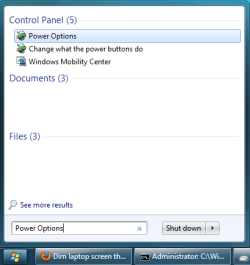
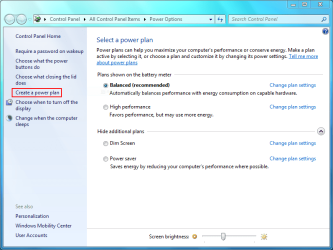
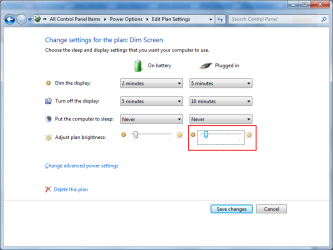
1. Create as many power schemes as per your requirements (Start -> type 'Power Options' -> click on 'Create a power plan')
Start Power Options.png Power Options.png Create Scheme.png Set Brightness.png
2. Open a command prompt (Start -> Run -> type 'cmd.exe')
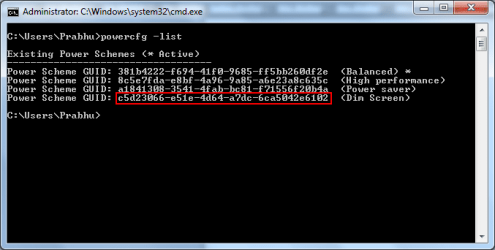
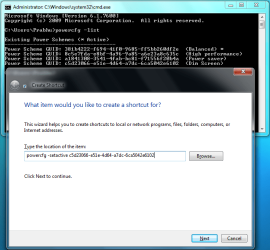
3. In the command prompt type 'powercfg -list'. You will get the list of power schemes (GUID and Name).
4. Copy the GUID for the power scheme you want.
Get GUID.png
5. Right click on the Windows Desktop and select New -> Shortcut.
6. Type 'powercfg -setactive <GUID you copied>' and click Next. Type a name for the shortcut and click Finish.
Create Shortcut.png

Done.
 
Last edited:

My Computer

Computer type
Laptop
Computer Manufacturer/Model Number
HP EliteBook 8530w Mobile Workstation
OS
Windows 7 Ultimate x64 (XP, 98SE, 95, 3.11, DOS 7.10 on VM) + Ubuntu 10.04 LTS Lucid Lynx
CPU
Intel Core 2 Duo Processor P8600 (2.40 GHz, 3 MB L2 cache)
Motherboard
Mobile Intel PM45 Express Chipset ICH9M-Enhanced
Memory
4GB 800 MHz DDR2 SDRAM
Graphics Card(s)
ATI Mobility FireGL V5700 with 256 MB
Sound Card
SoundMAX Integrated Digital HD Audio
Monitor(s) Displays
15.4-inch WXGA anti-glare (1280 x 800 resolution)
Screen Resolution
1280 x 800
Hard Drives
500GB + 1TB
Mouse
Synaptics PS/2 Port Touchpad, USB Mouse
Internet Speed
4 Mbps
Antivirus
MSE
Browser
Firefox, Chrome, IE
Other Info
Authentec AES2810 Fingerprint Reader
not very easy, but do able! I will give it a try hopefully tomorrow, thanks!
 

My Computer

Computer Manufacturer/Model Number
acer timeline 3810t
OS
Windows 7 64-bit Windows 7 32-bit
CPU
Intel Core 2 Solo (1.4 GHz)
Memory
4 GB DDR3 SDRAM - 1066 MHz SO DIMM 204-pin
Graphics Card(s)
Intel GMA 4500MHD Dynamic Video Memory Technology 5.0
Monitor(s) Displays
Widescreen 13.3 in TFT active matrix
Hard Drives
# 250 GB - Serial ATA-150 - 5400 rpm
Case
# Ultraportable (Under 4 lbs.) , Budget
Hey do you also know how to prevent the shortcuts from showing up on the taskbar at all?
 

My Computer

Computer Manufacturer/Model Number
acer timeline 3810t
OS
Windows 7 64-bit Windows 7 32-bit
CPU
Intel Core 2 Solo (1.4 GHz)
Memory
4 GB DDR3 SDRAM - 1066 MHz SO DIMM 204-pin
Graphics Card(s)
Intel GMA 4500MHD Dynamic Video Memory Technology 5.0
Monitor(s) Displays
Widescreen 13.3 in TFT active matrix
Hard Drives
# 250 GB - Serial ATA-150 - 5400 rpm
Case
# Ultraportable (Under 4 lbs.) , Budget
Hey do you also know how to prevent the shortcuts from showing up on the taskbar at all?

I'm not sure about that but you can set the shortcut to run minimized. This will prevent the command window flashing up for a second.

Right click on the Shortcut -> 'Properties' -> 'Shortcut' tab and select 'Minimized' for the Run option.
 

My Computer

Computer type
Laptop
Computer Manufacturer/Model Number
HP EliteBook 8530w Mobile Workstation
OS
Windows 7 Ultimate x64 (XP, 98SE, 95, 3.11, DOS 7.10 on VM) + Ubuntu 10.04 LTS Lucid Lynx
CPU
Intel Core 2 Duo Processor P8600 (2.40 GHz, 3 MB L2 cache)
Motherboard
Mobile Intel PM45 Express Chipset ICH9M-Enhanced
Memory
4GB 800 MHz DDR2 SDRAM
Graphics Card(s)
ATI Mobility FireGL V5700 with 256 MB
Sound Card
SoundMAX Integrated Digital HD Audio
Monitor(s) Displays
15.4-inch WXGA anti-glare (1280 x 800 resolution)
Screen Resolution
1280 x 800
Hard Drives
500GB + 1TB
Mouse
Synaptics PS/2 Port Touchpad, USB Mouse
Internet Speed
4 Mbps
Antivirus
MSE
Browser
Firefox, Chrome, IE
Other Info
Authentec AES2810 Fingerprint Reader
Yeah I did that from the start, its just the taskbar im trying to get rid of now. I also made a quick key program that cycles through the shortcuts so it acts just like a function key right now, its pretty sweet the only thing is the taskbar.

I even created a simple little bar graphic for each level of brightness.

I am still really curious what the command is that the function key sends to windows. There has to be some command it does, cause you can watch it change in the brightness settings as you change it.
 

My Computer

Computer Manufacturer/Model Number
acer timeline 3810t
OS
Windows 7 64-bit Windows 7 32-bit
CPU
Intel Core 2 Solo (1.4 GHz)
Memory
4 GB DDR3 SDRAM - 1066 MHz SO DIMM 204-pin
Graphics Card(s)
Intel GMA 4500MHD Dynamic Video Memory Technology 5.0
Monitor(s) Displays
Widescreen 13.3 in TFT active matrix
Hard Drives
# 250 GB - Serial ATA-150 - 5400 rpm
Case
# Ultraportable (Under 4 lbs.) , Budget
I don't know if this is possible, but could you add parameters to set it to start minimised to tray and then have the tray icon as never show?
If you can do this........ Would you please let me know?? :)
 

My Computer

OS
Windows 7 Ultimatum
That would solve the problem but I dont know how to do that.
 

My Computer

Computer Manufacturer/Model Number
acer timeline 3810t
OS
Windows 7 64-bit Windows 7 32-bit
CPU
Intel Core 2 Solo (1.4 GHz)
Memory
4 GB DDR3 SDRAM - 1066 MHz SO DIMM 204-pin
Graphics Card(s)
Intel GMA 4500MHD Dynamic Video Memory Technology 5.0
Monitor(s) Displays
Widescreen 13.3 in TFT active matrix
Hard Drives
# 250 GB - Serial ATA-150 - 5400 rpm
Case
# Ultraportable (Under 4 lbs.) , Budget
Try Volumouse
 

My Computer

Computer Manufacturer/Model Number
Toshiba p205-s7469
OS
Windows 7 Ultimate
CPU
intel Core 2 Duo t5250
Motherboard
Mobile Intel® GM965 Express Chipset
Memory
4gb PC2-5300 DDR2 SDRAM
Graphics Card(s)
Mobile Intel® Graphics Media Accelerator X3100 with 64MB-251
Sound Card
Toshiba w/Realtek Audio & Harmon Kardon Speakers(2)+ subwoof
Monitor(s) Displays
17.0” widescreen TruBrite TFT LCD 1440x900
Hard Drives
toshiba 500gb sata (primary) Toshiba 200gb (secondary)

My Computer

Computer Manufacturer/Model Number
acer timeline 3810t
OS
Windows 7 64-bit Windows 7 32-bit
CPU
Intel Core 2 Solo (1.4 GHz)
Memory
4 GB DDR3 SDRAM - 1066 MHz SO DIMM 204-pin
Graphics Card(s)
Intel GMA 4500MHD Dynamic Video Memory Technology 5.0
Monitor(s) Displays
Widescreen 13.3 in TFT active matrix
Hard Drives
# 250 GB - Serial ATA-150 - 5400 rpm
Case
# Ultraportable (Under 4 lbs.) , Budget
Anyone have an idea how to hide a task on the taskbar?
 

My Computer

Computer Manufacturer/Model Number
acer timeline 3810t
OS
Windows 7 64-bit Windows 7 32-bit
CPU
Intel Core 2 Solo (1.4 GHz)
Memory
4 GB DDR3 SDRAM - 1066 MHz SO DIMM 204-pin
Graphics Card(s)
Intel GMA 4500MHD Dynamic Video Memory Technology 5.0
Monitor(s) Displays
Widescreen 13.3 in TFT active matrix
Hard Drives
# 250 GB - Serial ATA-150 - 5400 rpm
Case
# Ultraportable (Under 4 lbs.) , Budget
Hey smart guys with Volumouse I simply hold down my shift key and roll my mouse wheel to increase or decrease screen brightness. This program also allow you to adjust window transparency it's not just for volume. As far as SPAM goes I'm only sharing information on applications that work well for me. I'm not in the business of selling anyone's products. Just trying to be helpful. Take it, leave it or shove it!
 

My Computer

Computer Manufacturer/Model Number
Toshiba p205-s7469
OS
Windows 7 Ultimate
CPU
intel Core 2 Duo t5250
Motherboard
Mobile Intel® GM965 Express Chipset
Memory
4gb PC2-5300 DDR2 SDRAM
Graphics Card(s)
Mobile Intel® Graphics Media Accelerator X3100 with 64MB-251
Sound Card
Toshiba w/Realtek Audio & Harmon Kardon Speakers(2)+ subwoof
Monitor(s) Displays
17.0” widescreen TruBrite TFT LCD 1440x900
Hard Drives
toshiba 500gb sata (primary) Toshiba 200gb (secondary)
but is it true screen dimming or is just putting up an overlay. As in is it turning down the back light? (thanks for the suggestion, I thought it was spam because thats all you said and it seemed audio based)
 

My Computer

Computer Manufacturer/Model Number
acer timeline 3810t
OS
Windows 7 64-bit Windows 7 32-bit
CPU
Intel Core 2 Solo (1.4 GHz)
Memory
4 GB DDR3 SDRAM - 1066 MHz SO DIMM 204-pin
Graphics Card(s)
Intel GMA 4500MHD Dynamic Video Memory Technology 5.0
Monitor(s) Displays
Widescreen 13.3 in TFT active matrix
Hard Drives
# 250 GB - Serial ATA-150 - 5400 rpm
Case
# Ultraportable (Under 4 lbs.) , Budget
It doesnt actually adjust the system screen brightness so I must assume it's an overlay, but it works quite well for me. Give it a try it only uses about 2000k in process memory. If you choose to try it it in options select more>type>on screen display(it looks better).
 

My Computer

Computer Manufacturer/Model Number
Toshiba p205-s7469
OS
Windows 7 Ultimate
CPU
intel Core 2 Duo t5250
Motherboard
Mobile Intel® GM965 Express Chipset
Memory
4gb PC2-5300 DDR2 SDRAM
Graphics Card(s)
Mobile Intel® Graphics Media Accelerator X3100 with 64MB-251
Sound Card
Toshiba w/Realtek Audio & Harmon Kardon Speakers(2)+ subwoof
Monitor(s) Displays
17.0” widescreen TruBrite TFT LCD 1440x900
Hard Drives
toshiba 500gb sata (primary) Toshiba 200gb (secondary)
Ok so I have all my shortcuts set up and I have a program that cycles through them when ever i press a certain key combination. But I find that every now and then the brightness level is adjusted on some of my power settings without me changing it! Do you know how I could make it so this doesn't happen, make it like read only or something.
 

My Computer

Computer Manufacturer/Model Number
acer timeline 3810t
OS
Windows 7 64-bit Windows 7 32-bit
CPU
Intel Core 2 Solo (1.4 GHz)
Memory
4 GB DDR3 SDRAM - 1066 MHz SO DIMM 204-pin
Graphics Card(s)
Intel GMA 4500MHD Dynamic Video Memory Technology 5.0
Monitor(s) Displays
Widescreen 13.3 in TFT active matrix
Hard Drives
# 250 GB - Serial ATA-150 - 5400 rpm
Case
# Ultraportable (Under 4 lbs.) , Budget
Back
Top