DirectX install error - An internal system error occurred.

callumshell1

New member
Local time
8:24 PM
Messages
3
Location
Oban
I recently re-installed windows and am now trying to install the DirectX End-User Runtimes (June 2010). All goes well, it installs everything, but as it finished I get this error:
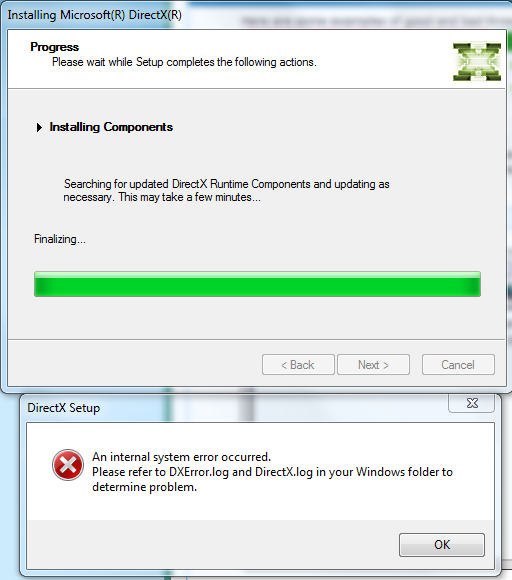
KVkYk.png


I have tried redownloading, using other installers and updating my graphics drivers. Nothing will work. It's probably worth mentioning that the first time I tried installing, about a week ago, my computer totally froze in the middle of the install and I had to force restart.

Any ideas on how to fix this problem?
 

My Computer

OS
Windows 7 Home Premium 64bit
CPU
Intel i7 860
Motherboard
Gigabyte GA-P55A-UD6
Memory
4GB Corsair DDR3 1600MHz
Graphics Card(s)
XFX 5870
Monitor(s) Displays
Samsung SyncMaster 226BW
Hard Drives
80GB SATA II
1TB SATA III
PSU
Hiper Power 800W
Case
CoolerMaster Cosmos

My Computer

Computer type
PC/Desktop
OS
Windows 10 Home x64
CPU
INTEL Core i5-750 Quad-Core 3.37GHz
Motherboard
ASUS P7P55D
Memory
HyperX Fury Black Series 8GB (2 x 4GB) 1866Mhz
Graphics Card(s)
EVGA GeForce GTX 750 Superclocked 1GB 128-Bit GDDR5
Monitor(s) Displays
LG 32MA68HY 32" IPS
Screen Resolution
1920 x 1080
Hard Drives
Samsung 840 Evo 120GB, SEAGATE 500GB Barracuda® 7200.12, SATA 3 Gb/s, 7200 RPM, 16MB cache
PSU
ANTEC TruePower New TP-550, 80 PLUS, 550W
Case
ANTEC Three Hundred Illusion
Cooling
COOLER MASTER Hyper 212 Plus, 4 x 120mm 1 x 140mm Noctua's
Internet Speed
85 + Mbps
Antivirus
Avast
Browser
Vivaldi
Thanks, I'll try that.

I forgot to mention, but I have no log files in my Windows folder.

Wait yes I do.
http://www.mediafire.com/?u2kmvyt6uryl0ea

I also ran that SFC scan, said there were errors but it couldn't fix them.
 

My Computer

OS
Windows 7 Home Premium 64bit
CPU
Intel i7 860
Motherboard
Gigabyte GA-P55A-UD6
Memory
4GB Corsair DDR3 1600MHz
Graphics Card(s)
XFX 5870
Monitor(s) Displays
Samsung SyncMaster 226BW
Hard Drives
80GB SATA II
1TB SATA III
PSU
Hiper Power 800W
Case
CoolerMaster Cosmos
If SFC could not fix something, then run the command again to see if it may be able to the next time. Sometimes it may take running the sfc /scannow command 3 or more times to completely fix everything that it's able to.

It found errors, that is where I would concentrate first. If it can't correct them, then the CBS log may point to where the issue lies. A Guy

P.S. From your DirectX.log

12/14/11 22:14:47: DXWSetup: A newer version of DirectX have been installed already.

Open regedit

Start> In search box type

regedit

Enter

Navigate to HKEY_LOCAL_MACHINE>Software>Microsoft>DirectX

Confirm version is 4.09.00.0904

This is the latest version, and the version your log says you have now.

12/14/11 22:14:47: DXWSetup: DirectX Version: 4.09.00.0904.00
12/14/11 22:14:47: DXWSetup: Setup Version: 4.09.00.0904.00
12/14/11 22:14:47: DXWSetup: A newer version of DirectX have been installed already.
 
Last edited:

My Computer

Computer type
PC/Desktop
OS
Windows 10 Home x64
CPU
INTEL Core i5-750 Quad-Core 3.37GHz
Motherboard
ASUS P7P55D
Memory
HyperX Fury Black Series 8GB (2 x 4GB) 1866Mhz
Graphics Card(s)
EVGA GeForce GTX 750 Superclocked 1GB 128-Bit GDDR5
Monitor(s) Displays
LG 32MA68HY 32" IPS
Screen Resolution
1920 x 1080
Hard Drives
Samsung 840 Evo 120GB, SEAGATE 500GB Barracuda® 7200.12, SATA 3 Gb/s, 7200 RPM, 16MB cache
PSU
ANTEC TruePower New TP-550, 80 PLUS, 550W
Case
ANTEC Three Hundred Illusion
Cooling
COOLER MASTER Hyper 212 Plus, 4 x 120mm 1 x 140mm Noctua's
Internet Speed
85 + Mbps
Antivirus
Avast
Browser
Vivaldi
Thanks, but there is still a problem. I'm trying to install Battlefield 3 but during the stage where it installs DirectX it fails, meaning I cannot play the game. Any ideas how I would fix this?
 

My Computer

OS
Windows 7 Home Premium 64bit
CPU
Intel i7 860
Motherboard
Gigabyte GA-P55A-UD6
Memory
4GB Corsair DDR3 1600MHz
Graphics Card(s)
XFX 5870
Monitor(s) Displays
Samsung SyncMaster 226BW
Hard Drives
80GB SATA II
1TB SATA III
PSU
Hiper Power 800W
Case
CoolerMaster Cosmos
Thanks, but there is still a problem. I'm trying to install Battlefield 3 but during the stage where it installs DirectX it fails, meaning I cannot play the game. Any ideas how I would fix this?

First go to Computer > C > Program Files (x86) > Origin Games

Once you are in the Origin folder go into your BF3 Folder > _Installer > DirectX > redist

Once you are in this folder you will notice a bunch of .rar's. Delete ALL of the .rar files OUT of the redist folder. DO NOT DELETE: DSETUP.dll, dsetup32.dll, or DXSETUP.exe

Once the redist folder only has those 3 files that you DIDN'T delete are left, go back into Origin and hit the "Ready to Install" button again and it should be all set..
 

My Computer

OS
Microsoft Windows 7 Home Premium , Service Pack 1, 64 bit
CPU
Intel(R) Core(TM) i7 CPU 860 @ 2.80GHz
Motherboard
Acer, H57M01, , U01L101701309
Memory
8.0GB Dual-Channel DDR3 @ 659MHz (9-9-9-24)
Graphics Card(s)
ATI Radeon HD 5700 Series, 1024 Mb
Hard Drives
C: Total - 468941 MB, Free - 269855 MB; D: Total - 469464 MB, Free - 282338 MB;
I found this page after googling about the problem for hours and since it was in the first listing on Google I figured I'd post my solution here because it's more likely to be seen than any other in the results. What you are encountering is a registry error. It has incorrect info about your Directx installation.

I got an idea that worked. I have a mulitboot system, though this should work even from another computer if it has the exact same OS installed, so what I did was navigate to HKEY_LOCAL_MACHINE\SOFTWARE\Microsoft\DirectX" and "HKEY_LOCAL_MACHINE\SOFTWARE\Wow6432Node\Microsoft\DirectX" on my second OS and exported them to a backup folder, rebooted into my 1st OS and doubleclicked them to import them into the 1st System's registry, then rebooted again. After doing this I was FINALLY able to install directx_Jun2010_redist.exe successfully!

That'll teach me to back up my whole system more frequently! :o
 
Last edited:

My Computer

Computer Manufacturer/Model Number
madhouserevival
OS
Window 7 x64
CPU
Intel Core 2 Quad Q6600 LGA 775 Quad-Core Processor
Motherboard
EVGA 132-YW-E178-A1 LGA 775 NVIDIA nForce 780i SLI
Memory
mushkin XP ASCENT w/ eVCI technology 8GB (2 x 2GB) 240-Pin
Graphics Card(s)
Nvidia GeForce GTX 280
Sound Card
PPA USB
Monitor(s) Displays
Samsung Syncmaster 2253 Digital LCD
Hard Drives
Samsung, Seagate, Maxtor 5 (5 altogether)
PSU
ENERMAX PRO82+ EPR525AWT 525W ATX12V Ver.2.3 SLI Ready
Case
Antec Nine Hundred Black Steel ATX Mid Tower Computer Case
Cooling
Tornado?
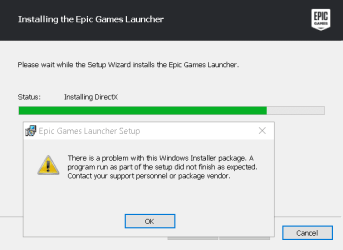
i have the same problem

i have the same problem when trying to download fortniteEpic Games Launcher Setup 12_8_2017 8_54_13 PM.png
 

My Computer

Computer type
PC/Desktop
Computer Manufacturer/Model Number
HP
OS
Windows 7 Ultimate x64
Browser
FireFox
Back
Top