Hello
Stigansven,
Although I can't say
why you are receiving those mails, I can help you get rid of them

When you have received one of those mails, you can simply check the checkbox next to it and then report it as junk/phishing via the "junk" menu;
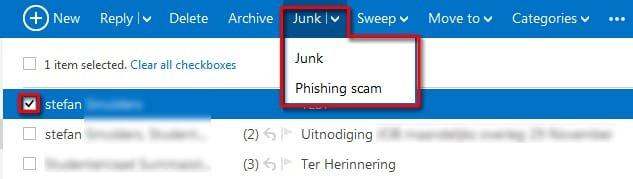
That way you won't receive anymore mails from them. After that simply delete the mail and empty the deleted mails list.
Alternatively, you can set Outlook so that it won't open any pictures, attachments and such in mails from unknown senders, and you could also make it so that all mails are automatically send to the junk folder, save for those from other accounts that you have whitelisted;
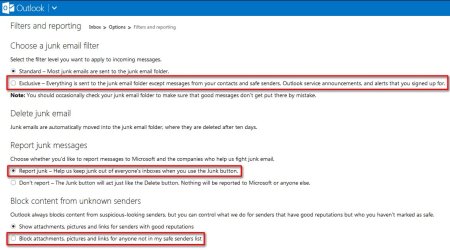
You can access this menu by clicking on the cog in the upper right corner, then clicking on "
More email settings" and then on "
Filters and reporting" in the upper right menu.
If you are receiving those mails from multiple accounts and the above options don't stop them, then it'd be a better and safer idea to, as
MilesAhead suggested, create a new, clean account for your grandchildren.
Good luck and keep us posted,
Nommy



