disable " Force Shutdown" confirm in windows ultimate

wr332

New member
Local time
6:13 AM
Messages
18
hey guys.

i like to know how to force the computer to shutdown when i click " shutdown".

after i got windows 7 every time i try to shutdown the computer it will tell me
" there are programs still running in the background" and you can either choose
" Force shutdown" or " cancel "

i want it to choose " force shutdown" automatic and to be able shut it down without the message popping up and just shutdown.

i have a program that shutdown always @ 4 am it will always stuck on the windows shutdown confirm , and i watch hulu videos in firefox, and at 4 am which i am sleeping , the message will be " firefox is still running " do you want to " force shutdown" or " Cancel" . i'l see that in the morning
 

My Computer My Computer

OS
windows 7
CPU
pentium duo core 2
Motherboard
asus p5g41-m le
Memory
4G
Graphics Card(s)
nvidia 7800 gts
Sound Card
onboard
Monitor(s) Displays
samsung 220wm
Hard Drives
1 raptor 150G
1 hitashi 1500 G
PSU
n/a
Case
n/a
Last edited by a moderator:

My Computer My Computer

Computer type
PC/Desktop
Computer Manufacturer/Model Number
Dell OP7010
OS
Windows 7 Enterprise (x64); Windows Server 2008 R2 (x64)
Memory
16GB
Monitor(s) Displays
4 Dell 24" LCD
Screen Resolution
1280x1024
Keyboard
Dell
Mouse
Dell Optical
Internet Speed
40meg
ahh!! it worked. thanks so much!!!!

is there any way to run this every day @ 4:30 am? i used a program in xp and it work wonders but in 7 it won't./
 

My Computer My Computer

OS
windows 7
CPU
pentium duo core 2
Motherboard
asus p5g41-m le
Memory
4G
Graphics Card(s)
nvidia 7800 gts
Sound Card
onboard
Monitor(s) Displays
samsung 220wm
Hard Drives
1 raptor 150G
1 hitashi 1500 G
PSU
n/a
Case
n/a
ahh!! it worked. thanks so much!!!!

is there any way to run this every day @ 4:30 am? i used a program in xp and it work wonders but in 7 it won't./


Type task scheduler in start menu. You can schedule it there.
 

My Computer My Computer

Computer type
PC/Desktop
Computer Manufacturer/Model Number
Dell XPS 420
OS
Windows 10, Home Clean Install
CPU
Intel Core2 processsor Q8200(2.33Ghz 1333FSB) Quad Core Tech
Motherboard
Dell
Memory
6 gb
Graphics Card(s)
ATI Radeon 256MB HD3650
Sound Card
Intergrated 7.1 Channel Audio
Monitor(s) Displays
Dell SP2009W 20"
Hard Drives
640 GB Serial ATA Hard drive
Cooling
Fan
Keyboard
Dell USB Keyboard
Mouse
Dell Premium Optical USB
Internet Speed
DSL 2.85
thanks for reply. i try that but it won't work.

this is what you put in cmd command

C:\>shutdown /f /s /t 0

i scheduled it and it run it but computer won't shutdown.

i even double click. it won't shut down. only if i type shutdown /f /s /t 0 in cmd it will.
 

My Computer My Computer

OS
windows 7
CPU
pentium duo core 2
Motherboard
asus p5g41-m le
Memory
4G
Graphics Card(s)
nvidia 7800 gts
Sound Card
onboard
Monitor(s) Displays
samsung 220wm
Hard Drives
1 raptor 150G
1 hitashi 1500 G
PSU
n/a
Case
n/a
maybe you can make a BAT file with "shutdown /f /s /t 0" and use Task Scheduler from Windows to run the BAT file every day.
 

My Computer My Computer

OS
Windows 7

My Computer My Computer

Computer type
PC/Desktop
Computer Manufacturer/Model Number
Dell XPS 420
OS
Windows 10, Home Clean Install
CPU
Intel Core2 processsor Q8200(2.33Ghz 1333FSB) Quad Core Tech
Motherboard
Dell
Memory
6 gb
Graphics Card(s)
ATI Radeon 256MB HD3650
Sound Card
Intergrated 7.1 Channel Audio
Monitor(s) Displays
Dell SP2009W 20"
Hard Drives
640 GB Serial ATA Hard drive
Cooling
Fan
Keyboard
Dell USB Keyboard
Mouse
Dell Premium Optical USB
Internet Speed
DSL 2.85
they won't work.

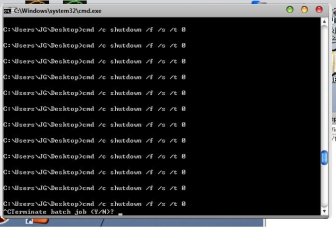
i need to find a way to use ( shutdown /f /s /t 0 ) command work but just double click or schedule.

for shutdown /f /s /t 0 command to work. i need to open cmd windows and type it in,.

if i try to double click it will give me errors

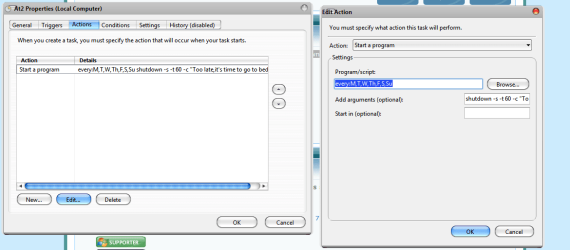
see the attached images
 

Attachments

  • asdasdasd.png
    asdasdasd.png
    24 KB · Views: 761
  • 2222222222.jpg
    2222222222.jpg
    32.8 KB · Views: 468

My Computer My Computer

OS
windows 7
CPU
pentium duo core 2
Motherboard
asus p5g41-m le
Memory
4G
Graphics Card(s)
nvidia 7800 gts
Sound Card
onboard
Monitor(s) Displays
samsung 220wm
Hard Drives
1 raptor 150G
1 hitashi 1500 G
PSU
n/a
Case
n/a
Try: "cmd /c shutdown /f /s /t 0"
 

My Computer My Computer

Computer type
PC/Desktop
Computer Manufacturer/Model Number
Dell OP7010
OS
Windows 7 Enterprise (x64); Windows Server 2008 R2 (x64)
Memory
16GB
Monitor(s) Displays
4 Dell 24" LCD
Screen Resolution
1280x1024
Keyboard
Dell
Mouse
Dell Optical
Internet Speed
40meg
man... this is hard.. all errors

view attached image

FYI: i put the commands in shutdown.bat and put the commands in and then double click it.
 

Attachments

  • fghfghfgh.jpg
    fghfghfgh.jpg
    34.5 KB · Views: 408

My Computer My Computer

OS
windows 7
CPU
pentium duo core 2
Motherboard
asus p5g41-m le
Memory
4G
Graphics Card(s)
nvidia 7800 gts
Sound Card
onboard
Monitor(s) Displays
samsung 220wm
Hard Drives
1 raptor 150G
1 hitashi 1500 G
PSU
n/a
Case
n/a
ok. i found a working way around this.

in task schedule set time. for the program to run choose c:windows/system32/cmd.exe and then for the " add arguments" put ( cmd /c shutdown /f /s /t 0 )

so it would look like

C:\Windows\System32\cmd.exe cmd /c shutdown /f /s /t 0

tested working. thanks guys for your fast replies
 

My Computer My Computer

OS
windows 7
CPU
pentium duo core 2
Motherboard
asus p5g41-m le
Memory
4G
Graphics Card(s)
nvidia 7800 gts
Sound Card
onboard
Monitor(s) Displays
samsung 220wm
Hard Drives
1 raptor 150G
1 hitashi 1500 G
PSU
n/a
Case
n/a
Ok here is a VBScript that will work if you double click on it.
 

Attachments

My Computer My Computer

Computer type
PC/Desktop
Computer Manufacturer/Model Number
Dell OP7010
OS
Windows 7 Enterprise (x64); Windows Server 2008 R2 (x64)
Memory
16GB
Monitor(s) Displays
4 Dell 24" LCD
Screen Resolution
1280x1024
Keyboard
Dell
Mouse
Dell Optical
Internet Speed
40meg
ok. i found a working way around this.

in task schedule set time. for the program to run choose c:windows/system32/cmd.exe and then for the " add arguments" put ( cmd /c shutdown /f /s /t 0 )

so it would look like

C:\Windows\System32\cmd.exe cmd /c shutdown /f /s /t 0

tested working. thanks guys for your fast replies


Don't forget to give some REP points if you feel I helped. Enjoy.
 

My Computer My Computer

Computer type
PC/Desktop
Computer Manufacturer/Model Number
Dell OP7010
OS
Windows 7 Enterprise (x64); Windows Server 2008 R2 (x64)
Memory
16GB
Monitor(s) Displays
4 Dell 24" LCD
Screen Resolution
1280x1024
Keyboard
Dell
Mouse
Dell Optical
Internet Speed
40meg
thanks guys. and i already added the REP points for everyone who helped me.
 

My Computer My Computer

OS
windows 7
CPU
pentium duo core 2
Motherboard
asus p5g41-m le
Memory
4G
Graphics Card(s)
nvidia 7800 gts
Sound Card
onboard
Monitor(s) Displays
samsung 220wm
Hard Drives
1 raptor 150G
1 hitashi 1500 G
PSU
n/a
Case
n/a
This is ok for a regular Force Shutdown, but I just want to get rid of the screen altogether. I leave Windows Explorer open so it reloads at boot. So I don't need 7 to tell me to close it. I use CloseAll to close everything else. The screen anyway disappears after 30 seconds but it would be good to stop it loading.
 

My Computer My Computer

OS
Windows 7 professional
force shutdown- desktop shortcut

Create a Desktop Shortcut with the switches /f/s/t 0

for auto-shudown without confirmation, You gotta make a registry edit to accomplish this.


I saw on some other forums this solution:
From: Didier Jonkers

Copy and paste the following into a text editor and save as ShutdownXPFast.reg. Right-click the newly created ShutdownXPFast.reg and select Merge.

Windows Registry Editor Version 5.00

[HKEY_CURRENT_USER\Control Panel\Desktop]
"AutoEndTasks"="1″
"HungAppTimeout"="1000″
"WaitToKillAppTimeout"="1000″

[HKEY_LOCAL_MACHINE\SYSTEM\CurrentControlSet\Control]
"WaitToKillServiceTimeout"="1000″

[HKEY_USERS\.DEFAULT\Control Panel\Desktop]
"AutoEndTasks"="1″
"HungAppTimeout"="1000″
"WaitToKillAppTimeout"="1000″
type REGEDIT in the command prompt.


Warning "Back-up your registry" before you try this.
Lower the respective values, Say from 5000 to 1000.

Note:
values are in milliseconds I believe. so if the a value of 5000 its 5000ms for the time to kill a process/app.
Some programs are in the 20000+ ms range as they do maintenance on closing.

Makes sure all values are Uniform. If you choose 1000 all Reg-edits must be 1000
 

My Computer My Computer

Computer Manufacturer/Model Number
Acer
OS
Windows 7
CPU
Turion 64x2
Motherboard
AMD
Memory
2056 DDR2
Graphics Card(s)
ATI 1250 Xpress
Hard Drives
160GB WD1600
AutoEndTasks is the most important one on that list. Those shutdown registry tweaks are really helpful, I've been using them since Windows 2000, they'll probably work on Windows 8 too :)
 

My Computer My Computer

Computer Manufacturer/Model Number
HP DV6 1330sa
OS
Windows 7 Professional 64 Bit SP1
CPU
INTEL DUAL CORE 2.1Ghz
Motherboard
N/A
Memory
4GB DDR3
Graphics Card(s)
INTEL
Sound Card
LAPTOP
Monitor(s) Displays
2
Screen Resolution
3200x1080
Hard Drives
250GB
PSU
LAPTOP
Case
LAPTOP
Cooling
LAPTOP
Keyboard
SOLID YEAR 260U
Mouse
USB
Internet Speed
20 MB/S
Please note: That the settings that Microsoft set in the above registry settings are set for a reason, to make sure your system shuts down correctly, safely and orderly. If you are a new to Windows or the registry you need to be very cautious making any of these changes. There is a good chance of greatly adversely affecting your system. Just because the machine shuts down quickly does not mean it is healthy for the machine to do so. I have seen many users get into deep trouble making their machine shutdown quickly. -WS
 

My Computer My Computer

Computer type
PC/Desktop
Computer Manufacturer/Model Number
Dell OP7010
OS
Windows 7 Enterprise (x64); Windows Server 2008 R2 (x64)
Memory
16GB
Monitor(s) Displays
4 Dell 24" LCD
Screen Resolution
1280x1024
Keyboard
Dell
Mouse
Dell Optical
Internet Speed
40meg
shortcut here:
http://www.sevenforums.com/tutorials/61294-shut-down-computer-shortcut-create.html

how to autoclose apps on shutdown or restart without confirm here:
http://www.trishtech.com/win7/turn_off_auto_termination_of_programs_in_windows_7.php
Code:
Windows Registry Editor Version 5.00

[HKEY_LOCAL_MACHINE\SOFTWARE\Policies\Microsoft\Windows\System]
"AllowBlockingAppsAtShutdown"=dword:00000001
Or
reg add HKLM\SOFTWARE\Policies\Microsoft\Windows\System /v AllowBlockingAppsAtShutdown /t REG_DWORD /d 0x1 /f
 
Last edited:

My Computer My Computer

OS
windows7 ultimate x32
CPU
DualCore Intel Core 2 Duo E8400, 3000 MHz (9 x 333)
Motherboard
ASRock 4Core1333-GLAN (3 PCI,1 PCI-E x16,4 DDR2 DIMM...)
Memory
4Gb (1x4 DDR2-800 DDR2 SDRAM)
Graphics Card(s)
NVIDIA GeForce 9600 GT (512 mb)
Sound Card
onboard
Monitor(s) Displays
lg flatron w2242t
Screen Resolution
1680 x 1050
Hard Drives
WDC WD5000AAJS-00YFA0 ATA Device
PSU
-
Case
-
Cooling
-
Other Info
d-link dir100
Thanks Nalbe.. I got it... great tip...
 

My Computer My Computer

OS
windows 7 Ultimate 32bit
Back
Top