shawn819
New member
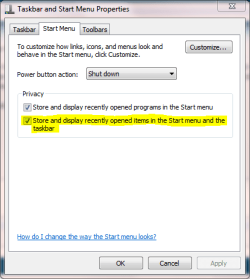
I searched a little on here and couldn't find an answer. I'm trying to disable the list of frequently opened folders when I click my Windows Explorer icon in the task bar. I just pin my commonly opened folders and the frequent list is redundant. I know I got rid of it in my beta build, but now I can't find the option for the life of me.
I'm using Build 7100 x64.
Thanks.
I'm using Build 7100 x64.
Thanks.
My Computer
- Computer Manufacturer/Model Number
- Custom
- OS
- Windows 7 Ultimate RC1 Build 7100 x64
- CPU
- AMD X3 8450 @ 2.31 GHz
- Motherboard
- Gigabyte MA790GP-DS4H
- Memory
- G.Skill 6GB DDR21066
- Graphics Card(s)
- PNY 9600GT
- Sound Card
- Creative X-Fi XtremeMusic
- Monitor(s) Displays
- BenQ 19" 4:3
- Screen Resolution
- 1280x1024
- Hard Drives
- WD Velociraptor 150GB
WD Raptor 74GB
WD Caviar SE 320GB
- PSU
- Thermaltake 500-Watt
- Case
- Thermaltake Soprano Black
- Cooling
- Fans
- Keyboard
- Logitech G11
- Mouse
- Logitech MX518
- Internet Speed
- DSL - 6 Down/512 Up (Ugh)
- Other Info
- Dual 20X DVD-RW Drives, Memory Card Reader, Fan Controller Bay, 5.1 Speakers