
I'm trying to disable Hardware acceleration of my Dell Inspiron 14R Laptop, with Intel(R) HD Graphics, Windows 7 Ultimate 32bit, 2GB Memory.
For that I tried to use the following path:
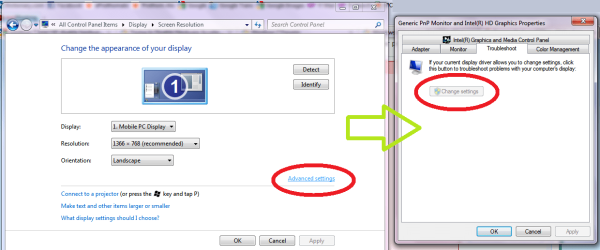
Start > Control Panel > Appearance and Personalization > Adjust screen resolution > Advanced Settings > Troubleshoot > Change settings
But the problem is my "Change settings" option is grayed out (disabled). I searched in Google & visited all the forums related with this. also tried to edit registry key
HKEY_CURRENT_USER\SOFTWARE\Microsoft\Avalon.Graphics\DisableHWAcceleration
This key was not in my registry, so I added it & changed the value. But... Nothing happened.
I want to play Rubik's cube (u can find the game here http://www.geometer.org/rubik/index.htmlhttp://www.geometer.org) in my laptop, but i can't see the rubik's cube coz it needs to disable hardware acceleration. Any help would be greatly appreciated.
Thank You...
For that I tried to use the following path:
Start > Control Panel > Appearance and Personalization > Adjust screen resolution > Advanced Settings > Troubleshoot > Change settings
But the problem is my "Change settings" option is grayed out (disabled). I searched in Google & visited all the forums related with this. also tried to edit registry key
HKEY_CURRENT_USER\SOFTWARE\Microsoft\Avalon.Graphics\DisableHWAcceleration
This key was not in my registry, so I added it & changed the value. But... Nothing happened.
I want to play Rubik's cube (u can find the game here http://www.geometer.org/rubik/index.htmlhttp://www.geometer.org) in my laptop, but i can't see the rubik's cube coz it needs to disable hardware acceleration. Any help would be greatly appreciated.
Thank You...
Attachments
Last edited:
My Computer
- Computer Manufacturer/Model Number
- Dell Inspiron 14R
- OS
- Windows 7 Ultimate 32bit
- CPU
- Intel Pentium P6100 - 2.00 GHz
- Memory
- 1910 MB
- Graphics Card(s)
- Intel(R) HD Graphics
- Sound Card
- IDT High Def Audio CODEC
- Monitor(s) Displays
- Generic PnP Monitor
- Hard Drives
- 320 GB


