Broken Jack/How to disable?

Summerbear5

New member
Member
VIP
Local time
1:38 AM
Messages
162
So I have a broken headphone jack on my laptop. Nothing is plugged into it however the computer believes something is and, because of this no audio plays out of the speakers. I had a thought if I could disable the headphone audio jack in device manager that way the audio is force to come out the speakers. Unfortunately I cannot figure out what to disable in device manager to fix this. I’ve already set in sound settings the speaker as default device and even disabled headphones from playback devices. It’s still broke.
 

My Computer

Computer type
PC/Desktop
OS
Microsoft Windows 7 Home Premium 64-bit 7601 Multiprocessor Free Service Pack 1
CPU
Intel(R) Core(TM)2 Quad CPU Q6700 @ 2.66GHz
Motherboard
PEGATRON CORPORATION Benicia
Memory
8.00 GB
Graphics Card(s)
(1) NVIDIA GeForce GT 520 (2) LogMeIn Mirror Driver
Sound Card
(1) Realtek High Definition Audio (2) Logitech Mic (QuickC
Screen Resolution
1920 x 1080 x 32 bits (4294967296 colors) @ 60 Hz
Hard Drives
(1) WDC WD10EALS-00Z8A0 (2) Generic- Compact Flash USB Device (3) Generic- MS/MS-Pro USB Device (4) Generic- SD/MMC USB Device (5) Generic- SM/xD-Picture USB Device
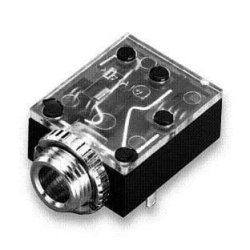
There's often a physical switch built into the headphone jack that disconnects the speakers. You may need to open the laptop and ensure that the contacts for the switch are closed.
 

My Computer

Computer type
PC/Desktop
Computer Manufacturer/Model Number
Home Built desktop, Dell G15 5511 Gaming laptop,MS Surface Pro 7 tablet
OS
W10 Pro desktop, W11 laptop, W11 Pro tablet (all 64-bit)
CPU
3.7Ghz 8700K i7, i7-11800H, i7-1065G7
Motherboard
ASUS TUF Z370-Pro Gaming in desktop
Memory
16G desktop, 16G laptop, 4G tablet
Graphics Card(s)
AMD Radeon RX580, RTX 3060, Intel Iris Plus
Sound Card
High Definition Audio (Built-in to mobo)
Monitor(s) Displays
Samsung U32J59 32" (2x), 15.6", 12"
Screen Resolution
3840x2160, 3840x2160, 1920x1080, 2160x1440
Hard Drives
500G SSD for OS; 2T, 10T & 15T HDDs for Data on Desktop, 1TB SSD laptop, 128G SSD tablet.
PSU
Corsair CX 750M
Case
Antec 100
Cooling
CM 212+
Keyboard
IBM Model M - used continuously since 1986
Mouse
Microsoft Pro IntelliMouse
Internet Speed
400M down 8M up
Antivirus
Windows Defender
Browser
FireFox
Other Info
Built my first computer (8Mhz 8088cpu, 640K RAM, 20MB HDD, 2 360K floppy drives) in 1985 and have been building them for myself, relatives and friends ever since.
Can you put a jack in if it thinks there is something there its likley bent and shorting pushing a jack in may free it
 

My Computer

Computer type
PC/Desktop
OS
win 8 32 bit
There is nothing in the jack and when you put headphones in they work. Strange thing is if the headphones are unplugged it still thinks they are plugged in and if you press on the jack on the side of the computer sound comes out of the speakers. Really strange.
 

My Computer

Computer type
PC/Desktop
OS
Microsoft Windows 7 Home Premium 64-bit 7601 Multiprocessor Free Service Pack 1
CPU
Intel(R) Core(TM)2 Quad CPU Q6700 @ 2.66GHz
Motherboard
PEGATRON CORPORATION Benicia
Memory
8.00 GB
Graphics Card(s)
(1) NVIDIA GeForce GT 520 (2) LogMeIn Mirror Driver
Sound Card
(1) Realtek High Definition Audio (2) Logitech Mic (QuickC
Screen Resolution
1920 x 1080 x 32 bits (4294967296 colors) @ 60 Hz
Hard Drives
(1) WDC WD10EALS-00Z8A0 (2) Generic- Compact Flash USB Device (3) Generic- MS/MS-Pro USB Device (4) Generic- SD/MMC USB Device (5) Generic- SM/xD-Picture USB Device
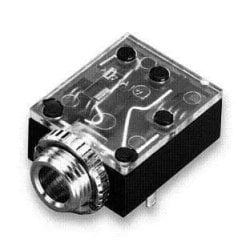
Like I said, the jack usually has a mechanical switch that is closed when no headphones are plugged in and the contacts are then separated when headphones are plugged in. The contacts may have gotten bent somehow so that they do not make contact when the plug is removed like they should. You pressing on the jack apparently flexes things enough so that the contacts close. In the attached picture, you can see the switch levers, they are the long metal strips on both sides. When the plug is inserted it pushes against those levers which then separate the switch contacts. When the plug is removed they close the contacts again.
 

Attachments

  • jack.jpg
    jack.jpg
    13.2 KB · Views: 12

My Computer

Computer type
PC/Desktop
Computer Manufacturer/Model Number
Home Built desktop, Dell G15 5511 Gaming laptop,MS Surface Pro 7 tablet
OS
W10 Pro desktop, W11 laptop, W11 Pro tablet (all 64-bit)
CPU
3.7Ghz 8700K i7, i7-11800H, i7-1065G7
Motherboard
ASUS TUF Z370-Pro Gaming in desktop
Memory
16G desktop, 16G laptop, 4G tablet
Graphics Card(s)
AMD Radeon RX580, RTX 3060, Intel Iris Plus
Sound Card
High Definition Audio (Built-in to mobo)
Monitor(s) Displays
Samsung U32J59 32" (2x), 15.6", 12"
Screen Resolution
3840x2160, 3840x2160, 1920x1080, 2160x1440
Hard Drives
500G SSD for OS; 2T, 10T & 15T HDDs for Data on Desktop, 1TB SSD laptop, 128G SSD tablet.
PSU
Corsair CX 750M
Case
Antec 100
Cooling
CM 212+
Keyboard
IBM Model M - used continuously since 1986
Mouse
Microsoft Pro IntelliMouse
Internet Speed
400M down 8M up
Antivirus
Windows Defender
Browser
FireFox
Other Info
Built my first computer (8Mhz 8088cpu, 640K RAM, 20MB HDD, 2 360K floppy drives) in 1985 and have been building them for myself, relatives and friends ever since.
Thank you strollin. I wasn’t wanting to take it apart though. I’ll have to take a look.
 

My Computer

Computer type
PC/Desktop
OS
Microsoft Windows 7 Home Premium 64-bit 7601 Multiprocessor Free Service Pack 1
CPU
Intel(R) Core(TM)2 Quad CPU Q6700 @ 2.66GHz
Motherboard
PEGATRON CORPORATION Benicia
Memory
8.00 GB
Graphics Card(s)
(1) NVIDIA GeForce GT 520 (2) LogMeIn Mirror Driver
Sound Card
(1) Realtek High Definition Audio (2) Logitech Mic (QuickC
Screen Resolution
1920 x 1080 x 32 bits (4294967296 colors) @ 60 Hz
Hard Drives
(1) WDC WD10EALS-00Z8A0 (2) Generic- Compact Flash USB Device (3) Generic- MS/MS-Pro USB Device (4) Generic- SD/MMC USB Device (5) Generic- SM/xD-Picture USB Device
Control panel > Sound > Playback tab. Look to see if headphones shows up (or something like that). If it does right click and select disable.
 

My Computers

System One System Two

Control panel > Sound > Playback tab. Look to see if headphones shows up (or something like that). If it does right click and select disable.

I’ve already done this as I’ve stated in my original post but, thank you.
 

My Computer

Computer type
PC/Desktop
OS
Microsoft Windows 7 Home Premium 64-bit 7601 Multiprocessor Free Service Pack 1
CPU
Intel(R) Core(TM)2 Quad CPU Q6700 @ 2.66GHz
Motherboard
PEGATRON CORPORATION Benicia
Memory
8.00 GB
Graphics Card(s)
(1) NVIDIA GeForce GT 520 (2) LogMeIn Mirror Driver
Sound Card
(1) Realtek High Definition Audio (2) Logitech Mic (QuickC
Screen Resolution
1920 x 1080 x 32 bits (4294967296 colors) @ 60 Hz
Hard Drives
(1) WDC WD10EALS-00Z8A0 (2) Generic- Compact Flash USB Device (3) Generic- MS/MS-Pro USB Device (4) Generic- SD/MMC USB Device (5) Generic- SM/xD-Picture USB Device
Hello,

I know you have already tried several fixes. Have you tried setting your Laptop's internal speakers as Default audio device in Sounds control panel? That way your internal speakers will override the headphone jack, whatever is plugged in.
 

My Computer

Computer type
PC/Desktop
OS
Windows 7 x64, Vista x64, 8.1 smartphone
CPU
Intel E8400 65W 64-bit
Motherboard
Gigabyte EP45-UD3LR
Memory
DDR2 2 x 2GB, 1GB x 2
Graphics Card(s)
XFX Radeon HD5750
Sound Card
AMD High Definition Audio; Realtek High Definition Audio
Monitor(s) Displays
iiyama prolite X2377HDS
Screen Resolution
1920 x 1080
Hard Drives
500GB 7200 rpm Seagate ST3500413AS 16MB, 500GB 5400 rpm Toshiba MQ02ABF050H 32MB, 200GB 7200 rpm Seagate ST3200820AS 8MB, 2TB 7200 rpm Western Digital WD20EZRX 64MB
PSU
Enermax Liberty Modular
Case
Antec P193 Midi Tower
Keyboard
Mionix ZIBAL 60
Mouse
Razer USB 2.0 Diamondback Mouse or Huion Graphics Tablet
Browser
Internet Explorer, Lunascape, Firefox, Opera, Avast Safezone
Hello,

I know you have already tried several fixes. Have you tried setting your Laptop's internal speakers as Default audio device in Sounds control panel? That way your internal speakers will override the headphone jack, whatever is plugged in.

Yes I did that and it still doesn't work.
 

My Computer

Computer type
PC/Desktop
OS
Microsoft Windows 7 Home Premium 64-bit 7601 Multiprocessor Free Service Pack 1
CPU
Intel(R) Core(TM)2 Quad CPU Q6700 @ 2.66GHz
Motherboard
PEGATRON CORPORATION Benicia
Memory
8.00 GB
Graphics Card(s)
(1) NVIDIA GeForce GT 520 (2) LogMeIn Mirror Driver
Sound Card
(1) Realtek High Definition Audio (2) Logitech Mic (QuickC
Screen Resolution
1920 x 1080 x 32 bits (4294967296 colors) @ 60 Hz
Hard Drives
(1) WDC WD10EALS-00Z8A0 (2) Generic- Compact Flash USB Device (3) Generic- MS/MS-Pro USB Device (4) Generic- SD/MMC USB Device (5) Generic- SM/xD-Picture USB Device
If it is a hardware issue as I suspect then you will not be able to compensate or work around it via software.
 

My Computer

Computer type
PC/Desktop
Computer Manufacturer/Model Number
Home Built desktop, Dell G15 5511 Gaming laptop,MS Surface Pro 7 tablet
OS
W10 Pro desktop, W11 laptop, W11 Pro tablet (all 64-bit)
CPU
3.7Ghz 8700K i7, i7-11800H, i7-1065G7
Motherboard
ASUS TUF Z370-Pro Gaming in desktop
Memory
16G desktop, 16G laptop, 4G tablet
Graphics Card(s)
AMD Radeon RX580, RTX 3060, Intel Iris Plus
Sound Card
High Definition Audio (Built-in to mobo)
Monitor(s) Displays
Samsung U32J59 32" (2x), 15.6", 12"
Screen Resolution
3840x2160, 3840x2160, 1920x1080, 2160x1440
Hard Drives
500G SSD for OS; 2T, 10T & 15T HDDs for Data on Desktop, 1TB SSD laptop, 128G SSD tablet.
PSU
Corsair CX 750M
Case
Antec 100
Cooling
CM 212+
Keyboard
IBM Model M - used continuously since 1986
Mouse
Microsoft Pro IntelliMouse
Internet Speed
400M down 8M up
Antivirus
Windows Defender
Browser
FireFox
Other Info
Built my first computer (8Mhz 8088cpu, 640K RAM, 20MB HDD, 2 360K floppy drives) in 1985 and have been building them for myself, relatives and friends ever since.
Then it does sound like a deeper hardware issue. Normally, I would suggest try replace the sound card. On a Laptop, the only way of replacing a sound card is to use a USB device with built-in sound card. Plug in USB sound device, then make that device the Default audio device. That way you are bypassing the internal audio hardware altogether.
 

My Computer

Computer type
PC/Desktop
OS
Windows 7 x64, Vista x64, 8.1 smartphone
CPU
Intel E8400 65W 64-bit
Motherboard
Gigabyte EP45-UD3LR
Memory
DDR2 2 x 2GB, 1GB x 2
Graphics Card(s)
XFX Radeon HD5750
Sound Card
AMD High Definition Audio; Realtek High Definition Audio
Monitor(s) Displays
iiyama prolite X2377HDS
Screen Resolution
1920 x 1080
Hard Drives
500GB 7200 rpm Seagate ST3500413AS 16MB, 500GB 5400 rpm Toshiba MQ02ABF050H 32MB, 200GB 7200 rpm Seagate ST3200820AS 8MB, 2TB 7200 rpm Western Digital WD20EZRX 64MB
PSU
Enermax Liberty Modular
Case
Antec P193 Midi Tower
Keyboard
Mionix ZIBAL 60
Mouse
Razer USB 2.0 Diamondback Mouse or Huion Graphics Tablet
Browser
Internet Explorer, Lunascape, Firefox, Opera, Avast Safezone
Something like that could work but would require the use of external speakers.
 

My Computer

Computer type
PC/Desktop
Computer Manufacturer/Model Number
Home Built desktop, Dell G15 5511 Gaming laptop,MS Surface Pro 7 tablet
OS
W10 Pro desktop, W11 laptop, W11 Pro tablet (all 64-bit)
CPU
3.7Ghz 8700K i7, i7-11800H, i7-1065G7
Motherboard
ASUS TUF Z370-Pro Gaming in desktop
Memory
16G desktop, 16G laptop, 4G tablet
Graphics Card(s)
AMD Radeon RX580, RTX 3060, Intel Iris Plus
Sound Card
High Definition Audio (Built-in to mobo)
Monitor(s) Displays
Samsung U32J59 32" (2x), 15.6", 12"
Screen Resolution
3840x2160, 3840x2160, 1920x1080, 2160x1440
Hard Drives
500G SSD for OS; 2T, 10T & 15T HDDs for Data on Desktop, 1TB SSD laptop, 128G SSD tablet.
PSU
Corsair CX 750M
Case
Antec 100
Cooling
CM 212+
Keyboard
IBM Model M - used continuously since 1986
Mouse
Microsoft Pro IntelliMouse
Internet Speed
400M down 8M up
Antivirus
Windows Defender
Browser
FireFox
Other Info
Built my first computer (8Mhz 8088cpu, 640K RAM, 20MB HDD, 2 360K floppy drives) in 1985 and have been building them for myself, relatives and friends ever since.
sadly the pic strollin posted is a best case jack, many are attached right on the board and like mine metal covered, this is why sometimes you buy a new board and find the jack input only has one channel, also means you don't have a new board as well.
fact is, i had to buy a real new board once after being sold a "New very Used Board with no left channel". as well, some jacks as mention have circuit going right thru them to your speakers even with no jack in because of the switch mentioned above, As such I fear these little bastards,
So hears my help, skip the comp shop and go to a TV store if there is one left on earth, I am not being rude, where i live its still only 1968 and we have them. it may be cheaper there to have it changed out.
 

Attachments

  • jack.jpg
    jack.jpg
    13.2 KB · Views: 7

My Computer

Computer type
PC/Desktop
Computer Manufacturer/Model Number
dell optiplex 745
OS
7 Home Prem. 32 bit, c drive 74.4 space CPU 3.00 GHZ
CPU
?
Motherboard
?
Memory
64 ?
Hard Drives
1 TARA BITE WESTERN
Cooling
FAN IN FRONT AND a fan in back
Internet Speed
100 mbps
Antivirus
Avast and many others
Browser
firefox
Other Info
Patience Please, I know nothing, Zip, Zero about computers
Back
Top