Disable mouse hover

Funkyecat

New member
Member
Local time
2:51 PM
Messages
46
How do I disable the mouse hover function where holding or passing the mouse over spot activates the page.
 

My Computer

Computer Manufacturer/Model Number
HP p6520f
OS
Windows 7 Home Premium 64 bit
CPU
AMD Athlon II 625 Quad Core
Motherboard
RS880
Memory
6 gig DDR3
Graphics Card(s)
Integrated Radeon 4200
Sound Card
Integrated Realtek
Monitor(s) Displays
Sony
Hard Drives
1 Terrabyte
320 gigabyte
PSU
250 volt
Case
HP case
Cooling
Standard fans
Type Ease of Access in Start or Control Panel>Ease of Access. Click on ''Make the mouse easier to use'' deselect the box that says "Activate a window by hovering over it with the mouse"
 

My Computer

Computer type
PC/Desktop
Computer Manufacturer/Model Number
Self assembled
OS
Windows 10 Home 64Bit
CPU
Intel Core i5 10400 @ 2.90GHz
Motherboard
Intel Corporation DG41WV (PROCESSOR)
Memory
8.00GB Single-Channel Unknown @ 1329MHz (16-20-20-38)
Sound Card
Realtek High Definition Audio
Monitor(s) Displays
DELL E170S
Screen Resolution
1280x1024 pixels
Hard Drives
931GB TOSHIBA DT01ACA100 (SATA)
238GB TEAM TM8PS7256G (SATA SSD)
Case
Nothing Fancy
Cooling
Fans
Keyboard
A4 Tech Co LTD
Mouse
A4 Tech Co Ltd/Logitech
Internet Speed
25 Mbps
  • Like
Reactions: Arc
Hover

That is the standard answer. The box has been unchecked since installation but the doesn't change a thing whether checked or unchecked. (Some people have found that it stopped when checking).
 

My Computer

Computer Manufacturer/Model Number
HP p6520f
OS
Windows 7 Home Premium 64 bit
CPU
AMD Athlon II 625 Quad Core
Motherboard
RS880
Memory
6 gig DDR3
Graphics Card(s)
Integrated Radeon 4200
Sound Card
Integrated Realtek
Monitor(s) Displays
Sony
Hard Drives
1 Terrabyte
320 gigabyte
PSU
250 volt
Case
HP case
Cooling
Standard fans
Try going to Folder and Search options. I'm not on my PC at the mo but under there should be a box that chooses single or double click to select a folder somewhere in that box. That might work.

Stephen
 

My Computer

Computer Manufacturer/Model Number
Dell XPS 15 L502x
OS
Windows 7 Home Premium 64bit (O.E.M)
CPU
Intel Core i7 2630QM @2.00GHz
Memory
6GB DDR3
Graphics Card(s)
Intel Intergrated Graphics 3000, nVidia GT525M (1GB)
Screen Resolution
1366x768
Hard Drives
750GB Seagate 7200rpm
Keyboard
Backlit Dell XPS 15 L502x Keyboard
Mouse
Microsoft Wireless Mobile Mouse 4000
Internet Speed
2.5 Mb/s down, 0.36 up
Folder

Been there. It has nothing to do with hovering.
 

My Computer

Computer Manufacturer/Model Number
HP p6520f
OS
Windows 7 Home Premium 64 bit
CPU
AMD Athlon II 625 Quad Core
Motherboard
RS880
Memory
6 gig DDR3
Graphics Card(s)
Integrated Radeon 4200
Sound Card
Integrated Realtek
Monitor(s) Displays
Sony
Hard Drives
1 Terrabyte
320 gigabyte
PSU
250 volt
Case
HP case
Cooling
Standard fans
Have you tried running SFC /scannow? If not, run it a few times then try changing the hover settings again.
 

My Computer

Computer Manufacturer/Model Number
Dell XPS 15 L502x
OS
Windows 7 Home Premium 64bit (O.E.M)
CPU
Intel Core i7 2630QM @2.00GHz
Memory
6GB DDR3
Graphics Card(s)
Intel Intergrated Graphics 3000, nVidia GT525M (1GB)
Screen Resolution
1366x768
Hard Drives
750GB Seagate 7200rpm
Keyboard
Backlit Dell XPS 15 L502x Keyboard
Mouse
Microsoft Wireless Mobile Mouse 4000
Internet Speed
2.5 Mb/s down, 0.36 up

My Computer

Computer type
PC/Desktop
Computer Manufacturer/Model Number
Self assembled
OS
Windows 10 Home 64Bit
CPU
Intel Core i5 10400 @ 2.90GHz
Motherboard
Intel Corporation DG41WV (PROCESSOR)
Memory
8.00GB Single-Channel Unknown @ 1329MHz (16-20-20-38)
Sound Card
Realtek High Definition Audio
Monitor(s) Displays
DELL E170S
Screen Resolution
1280x1024 pixels
Hard Drives
931GB TOSHIBA DT01ACA100 (SATA)
238GB TEAM TM8PS7256G (SATA SSD)
Case
Nothing Fancy
Cooling
Fans
Keyboard
A4 Tech Co LTD
Mouse
A4 Tech Co Ltd/Logitech
Internet Speed
25 Mbps
That is the standard answer. The box has been unchecked since installation but the doesn't change a thing whether checked or unchecked. (Some people have found that it stopped when checking).

So have you checked it to see if it stops?

Do a http://www.sevenforums.com/tutorials/1538-sfc-scannow-command-system-file-checker.html and restart after it finds things.

Good idea.
So that's where that tutorial went....... I couldn't find it :)
 

My Computer

Computer Manufacturer/Model Number
Dell XPS 15 L502x
OS
Windows 7 Home Premium 64bit (O.E.M)
CPU
Intel Core i7 2630QM @2.00GHz
Memory
6GB DDR3
Graphics Card(s)
Intel Intergrated Graphics 3000, nVidia GT525M (1GB)
Screen Resolution
1366x768
Hard Drives
750GB Seagate 7200rpm
Keyboard
Backlit Dell XPS 15 L502x Keyboard
Mouse
Microsoft Wireless Mobile Mouse 4000
Internet Speed
2.5 Mb/s down, 0.36 up
I believe part of the problem here is trying to understand exactly what you, (Funkyecat) mean by activates.

Your answer here only serves to confuse the matter.
Been there. It has nothing to do with hovering.
Hover_click.JPG

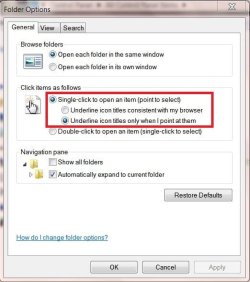
If you prefer the single click option it certainly does have a lot to do with it.


If you are trying to stop the behaviour shown in the example shown here: http://www.sevenforums.com/tutorials/75817-single-click-mode-point-select-enable-disable.html

Either use Option One, step 2 or Option Two, step 4 to disable the behaviour.

This is the thread Brink gave credit to masfi for thinking of creating the above tutorial: http://www.sevenforums.com/general-discussion/75712-how-disable-hover-select-single-click-mode.html

If that is still not what you are looking for there is more discussion here. With this one you would have to reverse engineer to dis-able: http://www.sevenforums.com/tutorials/9000-mouse-hover-makes-window-active-enable.html

If what you are trying to do is defeat the highlighting of what you hover or point at you will have to use a different theme than Aero.

If none of my suggestions are even close you the OP will have to be more descriptive in what you mean by activates.
 

My Computer

Computer type
PC/Desktop
Computer Manufacturer/Model Number
Gateway DX4831-01e (Mid-Tower Desktop)
OS
Originally Win 7 Hm Prem x64 Ver 6.1.7600 Build 7601-SP1 | Upgraded to Windows 10 December 14, 2019
CPU
Intel i3 530 2.93GHz, 2933MHz 2 Cores 4 Logical Processors
Motherboard
Gateway H57M01 133 megahertz
Memory
6GB of 1,333MHz DDR3 SDRAM
Graphics Card(s)
32MB Intel Graphics Media Accelerator HD IGChip
Sound Card
Realtek High Definition Audio
Monitor(s) Displays
Gateway HX2000 20inch TFT active matrix TN
Screen Resolution
1600 x 900 x 59 hertz
Hard Drives
WDC WD10EADS-00M2B0 [HDD] (1000.20 GB) -- drive 0,
HL-DT-ST DVDRAM GH41N [CD-ROM dr]
Four card readers, and Four USB 2.0
PSU
300watts.
Case
Mid-Tower Desktop
Cooling
Stock from Gateway
Keyboard
Natural Ergonomic Keyboard 4000, see Other Info
Mouse
Orig. Gateway wore out now using Insignia USB wired optical
Internet Speed
Vz FIOS 10ms png 57.64Mbps down 65.53Mbps up Speedtest.org
Antivirus
Zamana Anti-logger with Anti-malware, MSE, Windows Firewall,
Browser
IE11.0.9600.19399-Upd ver11.0.135, Firefox 68.0.1 x64
Other Info
System Specs by Belarc.

BIOS: American Megatrends Inc. P01-A0 11/17/2009

Replaced the MS 'Natural' Standard PS/2 Enhanced 101-102 Keyboard with a new Natural Ergonomic Keyboard 4000 on August 1st 2014.

Canon Pixma MG3222 Printer.

Updated to IE11 on 12102015 | Fios Quantum Router g1100

Additional AV: SpywareBlaster, manual Mbam, SAS
Back
Top