Disable UAC on a given app

TexTwil

New member
Member
Local time
9:39 AM
Messages
64
Hello,
every time I open Messenger Live, I have a UAC pop up asking me to allow this application. I do not want to completely disable the UAC but I don't want it to bug me all the time when I start it.

Is there a way to remember my decision ? Or Mr. Gates haven't thought about this ?

Thanks ;)
Tex
 

My Computer My Computer

At a glance

Windows 7i7 2.8 GhzCorsaire 8GBATI 5850
OS
Windows 7
CPU
i7 2.8 Ghz
Memory
Corsaire 8GB
Graphics Card(s)
ATI 5850
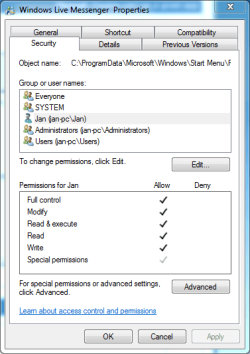
Try going to the messenger icon, right click properties, then security.

Make sure that you have full persmission for all activities.

Make sure that you are in an adiminstrator account.
 
Last edited:

My Computer My Computer

At a glance

Windows 10, Home Clean InstallIntel Core2 processsor Q8200(2.33Ghz 1333FSB)...6 gbATI Radeon 256MB HD3650
Computer type
PC/Desktop
Computer Manufacturer/Model Number
Dell XPS 420
OS
Windows 10, Home Clean Install
CPU
Intel Core2 processsor Q8200(2.33Ghz 1333FSB) Quad Core Tech
Motherboard
Dell
Memory
6 gb
Graphics Card(s)
ATI Radeon 256MB HD3650
Sound Card
Intergrated 7.1 Channel Audio
Monitor(s) Displays
Dell SP2009W 20"
Hard Drives
640 GB Serial ATA Hard drive
Cooling
Fan
Keyboard
Dell USB Keyboard
Mouse
Dell Premium Optical USB
Internet Speed
DSL 2.85
Try going to the messenger icon, right click properties, then security.

Make sure that you have full persmission for all activities.

Make sure that you are in an adiminstrator account.
Hi,
I just added all permission to myself on the properties but I'm still getting the pop up. I have only one account so I guess i'm in the Admin account
 

Attachments

  • Capture5.PNG
    Capture5.PNG
    15.1 KB · Views: 30

My Computer My Computer

At a glance

Windows 7i7 2.8 GhzCorsaire 8GBATI 5850
OS
Windows 7
CPU
i7 2.8 Ghz
Memory
Corsaire 8GB
Graphics Card(s)
ATI 5850
You can't disable UAC popup for a specific application. That is odd messenger live is giving you the popup. That usually means it is saving files to a protected area. Check the options to make sure it is not trying to save files to the "Program Files" directory or the "Windows" directory.
 

My Computer My Computer

At a glance

Windows 7
OS
Windows 7

My Computer My Computer

At a glance

Windows 10 Pro x64Intel Core i5 7400 @ 3.00GHz8GB 2133Mhz DDR4 (OEM supplied)Gygabyte Windforce GTX 1050Ti (Factory Overcl...
Computer type
PC/Desktop
Computer Manufacturer/Model Number
Medion Erazer (note to self: insert model number) - with custom additions
OS
Windows 10 Pro x64
CPU
Intel Core i5 7400 @ 3.00GHz
Motherboard
OEM supllied with PC
Memory
8GB 2133Mhz DDR4 (OEM supplied)
Graphics Card(s)
Gygabyte Windforce GTX 1050Ti (Factory Overclocked)
Sound Card
Realtek
Monitor(s) Displays
Acer Al1980 + HKC
Screen Resolution
1360*768(HKC) / 1280*1024(Acer)
Hard Drives
1TB Toshiba
1TB WD Caviar Green
120GB Samsung Evo 840
PSU
OEM supplied (no power rating on case)
Case
OEM Supplied
Cooling
Stock
Keyboard
Logitech Wireless
Mouse
Logitect Wireless
Internet Speed
40Mb/s Down 10Mb/s Up
Antivirus
Defender
Browser
Firefox
Agreed. Should be no reason why WLM is giving u a UAC pop-up. Is the program available to u in the start menu?
 

My Computer My Computer

At a glance

Windows XP - Now Windows 7 Home Premium (64-b...
OS
Windows XP - Now Windows 7 Home Premium (64-bit).
The reason why it's asking me for admin rights is probably because I'm running it in XP Compatibility mode (I want to have the icon in the notification area when it's running)

I will try the solution proposed by severedsolo.
 

My Computer My Computer

At a glance

Windows 7i7 2.8 GhzCorsaire 8GBATI 5850
OS
Windows 7
CPU
i7 2.8 Ghz
Memory
Corsaire 8GB
Graphics Card(s)
ATI 5850
aha that makes sense, well in that case, make sure that you change compatibility mode options at the .exe NOT the shortcut, it can be found at C:\Program Files (x86)\Windows Live\Messenger\msnmsgr.exe or C:\Program Files\Windows Live\Messenger\msnmsgr.exe if you run 32 bit Windows
 

My Computer My Computer

At a glance

Windows 10 Pro x64Intel Core i5 7400 @ 3.00GHz8GB 2133Mhz DDR4 (OEM supplied)Gygabyte Windforce GTX 1050Ti (Factory Overcl...
Computer type
PC/Desktop
Computer Manufacturer/Model Number
Medion Erazer (note to self: insert model number) - with custom additions
OS
Windows 10 Pro x64
CPU
Intel Core i5 7400 @ 3.00GHz
Motherboard
OEM supllied with PC
Memory
8GB 2133Mhz DDR4 (OEM supplied)
Graphics Card(s)
Gygabyte Windforce GTX 1050Ti (Factory Overclocked)
Sound Card
Realtek
Monitor(s) Displays
Acer Al1980 + HKC
Screen Resolution
1360*768(HKC) / 1280*1024(Acer)
Hard Drives
1TB Toshiba
1TB WD Caviar Green
120GB Samsung Evo 840
PSU
OEM supplied (no power rating on case)
Case
OEM Supplied
Cooling
Stock
Keyboard
Logitech Wireless
Mouse
Logitect Wireless
Internet Speed
40Mb/s Down 10Mb/s Up
Antivirus
Defender
Browser
Firefox
For this damn reason, I usually start the installer with Admin rights to avoid UAC. But only to known applications.
 

My Computer My Computer

At a glance

Lioni54GBIntel
Computer Manufacturer/Model Number
MacBook Pro
OS
Lion
CPU
i5
Memory
4GB
Graphics Card(s)
Intel
Screen Resolution
1200x800
Hard Drives
Seagate FreeAgent GO 250GB Ext. HDD
aha that makes sense, well in that case, make sure that you change compatibility mode options at the .exe NOT the shortcut, it can be found at C:\Program Files (x86)\Windows Live\Messenger\msnmsgr.exe or C:\Program Files\Windows Live\Messenger\msnmsgr.exe if you run 32 bit Windows
ok great. Thanks.
 

My Computer My Computer

At a glance

Windows 7i7 2.8 GhzCorsaire 8GBATI 5850
OS
Windows 7
CPU
i7 2.8 Ghz
Memory
Corsaire 8GB
Graphics Card(s)
ATI 5850
as far as I know you can tell windows not to warn you when a certain type of program is run initially, but as far as asking UAC not to prompt you when a specific program is run I can't say. And by initially I mean during installation; i.e. don't warn me if a .exe is going to run, don't warn me if a .msi is going to run; .zip; etc.
 

My Computer My Computer

At a glance

Ubuntu
OS
Ubuntu
aha that makes sense, well in that case, make sure that you change compatibility mode options at the .exe NOT the shortcut, it can be found at C:\Program Files (x86)\Windows Live\Messenger\msnmsgr.exe or C:\Program Files\Windows Live\Messenger\msnmsgr.exe if you run 32 bit Windows
I did that but I'm still getting the prompt :(
 

My Computer My Computer

At a glance

Windows 7i7 2.8 GhzCorsaire 8GBATI 5850
OS
Windows 7
CPU
i7 2.8 Ghz
Memory
Corsaire 8GB
Graphics Card(s)
ATI 5850
Use Vista for the compatibility mode. It should function as it would in XP mode.
 

My Computer My Computer

At a glance

Windows 10 Pro (x64)Intel Core i7-3930K (3.2GHz - 4.5GHz)4x Samsung 4GB PC3-12800 DDR3 (16GB 1600MHz)Nvidia Geforce GTX 690
Computer type
PC/Desktop
Computer Manufacturer/Model Number
Alienware Aurora ALX R4
OS
Windows 10 Pro (x64)
CPU
Intel Core i7-3930K (3.2GHz - 4.5GHz)
Motherboard
Alienware Aurora-R4 x79
Memory
4x Samsung 4GB PC3-12800 DDR3 (16GB 1600MHz)
Graphics Card(s)
Nvidia Geforce GTX 690
Sound Card
SteelSeries Siberia Elite
Monitor(s) Displays
Dell UltraSharp U3011
Screen Resolution
2560x1600
Hard Drives
Samsung 850 Pro 256 GB, Seagate 1TB Desktop Hybrid HDD, 2x Western Digital 4TB Green HDD
PSU
875W Some Dell PSU <.<
Case
Alienware Aurora ALX
Cooling
Custom Liquid Cooling (EK CPU & GPU blocks) dual EK 480RAD
Keyboard
Logitech G710+ Mechanical
Mouse
Logitech G700s
Internet Speed
Verizon Fios (50 mbps average)
Other Info
Server: Intel NUC D54250WYK: i5-4250U, 16GB, 256 GB mSATA, Windows Server 2012 R2

My Computer My Computer

At a glance

Windows 7 x64 pro/ Windows 7 x86 Pro/ XP SP3 x86
Computer Manufacturer/Model Number
Too many to describe...
OS
Windows 7 x64 pro/ Windows 7 x86 Pro/ XP SP3 x86
Back
Top