Disable WLM slide show?

Shroom

New member
Local time
2:03 PM
Messages
11
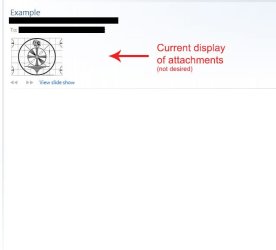
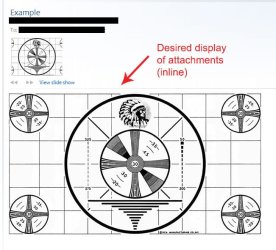
Is there a way to disable the "View slide show" "feature" in WLM 2011 so that when someone sends you an email with attached photos they show as inline attachments like they're supposed to?
 

My Computer

Computer Manufacturer/Model Number
NA
OS
Windows 7 Professional 64bit
CPU
i7 920
Motherboard
Asus P6T
Memory
6 GB
Graphics Card(s)
Geforce 260
Sound Card
None
Monitor(s) Displays
Dell 2408WFP
Screen Resolution
1920x1200
Hard Drives
System - 640GB WD Caviar Black
Data - 1.5TB WD Caviar Green
PSU
Corsair 800W
Case
Antec Sonata Elite
Cooling
Stock
Mouse
Deathadder
I believe what youre looking to disable is "active view". Here's how:

1. Go to your inbox and look at the top right of the page. Find where it says "options" and click to open a dropdown menu.

2. From the dropdown menu select "more options"

3. In the new window locate the "Reading email" header and click on "Active View settings"

4. Where it asks "would you like to see previews" just click "no" and save.

If you have any problems finding anything just let me know and I'll post pictures. Hope this helps!

Edit: Nevermind, that's for hotmail on the web. Let me see if I can find what you're really looking for :o
 

My Computer

Computer Manufacturer/Model Number
Vostro
OS
Windows 7 Ultimate (SP1)
CPU
AMD Sempron 3600+
Graphics Card(s)
ATI Radeon Xpress 1150
Screen Resolution
1200 x 800
Hard Drives
WD Scorpio Blue 500 GB
Is there a way to disable the "View slide show" "feature" in WLM 2011 so that when someone sends you an email with attached photos they show as inline attachments like they're supposed to?
I think it may depend on how they were sent in the first place. If the sender chose "Photo email" they were never attached, so you click a link in the email which takes you to their SkyDrive which displays the pictures in your browser. You can download those you want to save. If they actually "attached" or "inserted" them, then they will appear in the email as you describe. At least that's how it is in WLM 2009/10 which I'm still using. (Not sure about 2011, however.)
 

My Computer

Computer type
PC/Desktop
Computer Manufacturer/Model Number
OQO 2+
OS
Windows 8 Pro w/MC 32-bit
CPU
Intel Atom 1.86 GHz
Motherboard
OQO 2+
Memory
2 GB
Graphics Card(s)
Intel GMA 500
Sound Card
IDT
Monitor(s) Displays
LCD
Screen Resolution
800 x 480 (portable) 1280 x 1024 (docked)
Hard Drives
64 GB SSD
PSU
9 Ah Battery (portable) or OQO Brick (docked)
Case
Shirt Pocket Sized
Cooling
Tiny Fan
Keyboard
Slide out (portable) DiNovo Edge (docked)
Mouse
Eraser head (portable) Logitech Bluetooth (docked)
Internet Speed
WWAN or 802.11G (portable) T1 (docked)
Browser
IE 10
Other Info
DVD-RW OQO Docking Station
I think it may depend on how they were sent in the first place. If the sender chose "Photo email" they were never attached, so you click a link in the email which takes you to their SkyDrive which displays the pictures in your browser. You can download those you want to save. If they actually "attached" or "inserted" them, then they will appear in the email as you describe. At least that's how it is in WLM 2009/10 which I'm still using. (Not sure about 2011, however.)

I believe you are right. There are both options in 2011, "email message" and "photo email". A lot of people seem to be having this problem.

The only way to send them as simple attachments is by clicking attachments within a "email message" (not photo email). There is also an option to add a photo album from within an "email message", but that will produce a slideshow just the same as a "photo email". Hope that clears things up!
 

My Computer

Computer Manufacturer/Model Number
Vostro
OS
Windows 7 Ultimate (SP1)
CPU
AMD Sempron 3600+
Graphics Card(s)
ATI Radeon Xpress 1150
Screen Resolution
1200 x 800
Hard Drives
WD Scorpio Blue 500 GB
They weren't sent from WLM, they are regular attachments so there is no issue with photo email.
 

My Computer

Computer Manufacturer/Model Number
NA
OS
Windows 7 Professional 64bit
CPU
i7 920
Motherboard
Asus P6T
Memory
6 GB
Graphics Card(s)
Geforce 260
Sound Card
None
Monitor(s) Displays
Dell 2408WFP
Screen Resolution
1920x1200
Hard Drives
System - 640GB WD Caviar Black
Data - 1.5TB WD Caviar Green
PSU
Corsair 800W
Case
Antec Sonata Elite
Cooling
Stock
Mouse
Deathadder
They weren't sent from WLM, they are regular attachments so there is no issue with photo email.

It shouldn't default to slide show. When I tried it WLM gave me an option to 'view as slideshow', not default to it right away
 

My Computer

Computer Manufacturer/Model Number
Vostro
OS
Windows 7 Ultimate (SP1)
CPU
AMD Sempron 3600+
Graphics Card(s)
ATI Radeon Xpress 1150
Screen Resolution
1200 x 800
Hard Drives
WD Scorpio Blue 500 GB
I'm probably communicating poorly. When I view an email it has a thumbnail image with arrows below it and a link to "View slide show". It doesn't automatically start the slide show. The behavior I desire is for the images to just show inline like regular attachments. I'd prefer if it didn't add the slide show options but it wouldn't bother me too much if it were shown in addition to inline.

So when someone sends you photos attached to an email not created with WLM you see the attached images inline or do you see the slide show control?

I'm using Version 2011 (Build 15.4.3502.0922), are you using the newer build?
 

My Computer

Computer Manufacturer/Model Number
NA
OS
Windows 7 Professional 64bit
CPU
i7 920
Motherboard
Asus P6T
Memory
6 GB
Graphics Card(s)
Geforce 260
Sound Card
None
Monitor(s) Displays
Dell 2408WFP
Screen Resolution
1920x1200
Hard Drives
System - 640GB WD Caviar Black
Data - 1.5TB WD Caviar Green
PSU
Corsair 800W
Case
Antec Sonata Elite
Cooling
Stock
Mouse
Deathadder
I'm probably communicating poorly. When I view an email it has a thumbnail image with arrows below it and a link to "View slide show". It doesn't automatically start the slide show. The behavior I desire is for the images to just show inline like regular attachments. I'd prefer if it didn't add the slide show options but it wouldn't bother me too much if it were shown in addition to inline.

So when someone sends you photos attached to an email not created with WLM you see the attached images inline or do you see the slide show control?

I'm using Version 2011 (Build 15.4.3502.0922), are you using the newer build?

Maybe you could take a screenshot and I'll take a look. It would be better to visualize. Maybe you could use Paint and show where you'd like the images to appear... we'll get this sorted out for you!
 

My Computer

Computer Manufacturer/Model Number
Vostro
OS
Windows 7 Ultimate (SP1)
CPU
AMD Sempron 3600+
Graphics Card(s)
ATI Radeon Xpress 1150
Screen Resolution
1200 x 800
Hard Drives
WD Scorpio Blue 500 GB
This is how messages with photo attachments are shown now.

Example.jpg

I'd like them to be shown more or less like this. I don't care about the slideshow option as long as they are shown inline.

Example2.jpg
 

My Computer

Computer Manufacturer/Model Number
NA
OS
Windows 7 Professional 64bit
CPU
i7 920
Motherboard
Asus P6T
Memory
6 GB
Graphics Card(s)
Geforce 260
Sound Card
None
Monitor(s) Displays
Dell 2408WFP
Screen Resolution
1920x1200
Hard Drives
System - 640GB WD Caviar Black
Data - 1.5TB WD Caviar Green
PSU
Corsair 800W
Case
Antec Sonata Elite
Cooling
Stock
Mouse
Deathadder
Looks like you figured how to create the "desired display". What is the difference between the two cases in post #9?
 

My Computer

Computer type
PC/Desktop
Computer Manufacturer/Model Number
OQO 2+
OS
Windows 8 Pro w/MC 32-bit
CPU
Intel Atom 1.86 GHz
Motherboard
OQO 2+
Memory
2 GB
Graphics Card(s)
Intel GMA 500
Sound Card
IDT
Monitor(s) Displays
LCD
Screen Resolution
800 x 480 (portable) 1280 x 1024 (docked)
Hard Drives
64 GB SSD
PSU
9 Ah Battery (portable) or OQO Brick (docked)
Case
Shirt Pocket Sized
Cooling
Tiny Fan
Keyboard
Slide out (portable) DiNovo Edge (docked)
Mouse
Eraser head (portable) Logitech Bluetooth (docked)
Internet Speed
WWAN or 802.11G (portable) T1 (docked)
Browser
IE 10
Other Info
DVD-RW OQO Docking Station
Looks like you figured how to create the "desired display". What is the difference between the two cases in post #9?

The first case has just the 'view as slideshow' option above the body of the email, and the second one has the image in the body of the email. He doctored the photo to make it seem like it was there, when in fact it isn't.

To the OP, I haven't been able to find a way to get the images inline in WLM 2011, it might just be a case of advancement of technology that we need to get used to :rolleyes:
 

My Computer

Computer Manufacturer/Model Number
Vostro
OS
Windows 7 Ultimate (SP1)
CPU
AMD Sempron 3600+
Graphics Card(s)
ATI Radeon Xpress 1150
Screen Resolution
1200 x 800
Hard Drives
WD Scorpio Blue 500 GB
I figured as much but I was hoping there was some setting either in the program or via registry that would allow the old behavior.
 

My Computer

Computer Manufacturer/Model Number
NA
OS
Windows 7 Professional 64bit
CPU
i7 920
Motherboard
Asus P6T
Memory
6 GB
Graphics Card(s)
Geforce 260
Sound Card
None
Monitor(s) Displays
Dell 2408WFP
Screen Resolution
1920x1200
Hard Drives
System - 640GB WD Caviar Black
Data - 1.5TB WD Caviar Green
PSU
Corsair 800W
Case
Antec Sonata Elite
Cooling
Stock
Mouse
Deathadder
Back
Top