Solved Disabled internal Mic/no audio devices installed

GuyWithProblems

New member
Local time
11:02 PM
Messages
4
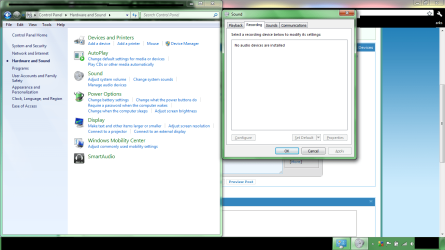
Hey I'm new, and I disabled my internal microphone by: Control panel>hardware and sound>manage audio devices>recording tab> and disabled it. I would like to turn it back on now. but it's saying No audio devices are installed :( please help
 

Attachments

  • HELP.png
    HELP.png
    78.7 KB · Views: 492

My Computer My Computer

OS
Windows 7 Home Premium
Last edited:

My Computer My Computer

Computer Manufacturer/Model Number
Custom Build
OS
Windows 7 Ultimate x64/Windows 8 Consumer Preview x64/Ubuntu 11.04
CPU
Intel Pentium Dual Core E6700 3.2GHz
Motherboard
ASUS P5G41T-M LX
Memory
Strontium 8192MB DDR3 1333Mhz
Graphics Card(s)
msi GeForce N560GTX-M2D1GD5 1GB
Sound Card
Realtek HD Audio
Monitor(s) Displays
CHIMEI CMV 221D 22"
Screen Resolution
1680x1050
Hard Drives
Seagate Barracuda LP Green 3.5'' 2TB Internal HDD 5900RPM + WD Elements Desktop 1TB External HDD 7200RPM
PSU
SHAW Viper-1500w Gaming PSU
Case
Black eMaxx ATX Mini Tower Case
Keyboard
Microsoft Wireless Keyboard 1000
Mouse
Microsoft Wireless Optical Mouse 2000
Internet Speed
100GB @ 4.76Mbps
And the sound card you have?
 

My Computer My Computer

Computer Manufacturer/Model Number
Custom Build
OS
Windows 7 Ultimate x64/Windows 8 Consumer Preview x64/Ubuntu 11.04
CPU
Intel Pentium Dual Core E6700 3.2GHz
Motherboard
ASUS P5G41T-M LX
Memory
Strontium 8192MB DDR3 1333Mhz
Graphics Card(s)
msi GeForce N560GTX-M2D1GD5 1GB
Sound Card
Realtek HD Audio
Monitor(s) Displays
CHIMEI CMV 221D 22"
Screen Resolution
1680x1050
Hard Drives
Seagate Barracuda LP Green 3.5'' 2TB Internal HDD 5900RPM + WD Elements Desktop 1TB External HDD 7200RPM
PSU
SHAW Viper-1500w Gaming PSU
Case
Black eMaxx ATX Mini Tower Case
Keyboard
Microsoft Wireless Keyboard 1000
Mouse
Microsoft Wireless Optical Mouse 2000
Internet Speed
100GB @ 4.76Mbps
The link in my first post should explain everything :)

By the way, I will not be able to reply until tomorrow. I'm going to sleep in about 5 minutes. Nite. ;)
 

My Computer My Computer

Computer Manufacturer/Model Number
Custom Build
OS
Windows 7 Ultimate x64/Windows 8 Consumer Preview x64/Ubuntu 11.04
CPU
Intel Pentium Dual Core E6700 3.2GHz
Motherboard
ASUS P5G41T-M LX
Memory
Strontium 8192MB DDR3 1333Mhz
Graphics Card(s)
msi GeForce N560GTX-M2D1GD5 1GB
Sound Card
Realtek HD Audio
Monitor(s) Displays
CHIMEI CMV 221D 22"
Screen Resolution
1680x1050
Hard Drives
Seagate Barracuda LP Green 3.5'' 2TB Internal HDD 5900RPM + WD Elements Desktop 1TB External HDD 7200RPM
PSU
SHAW Viper-1500w Gaming PSU
Case
Black eMaxx ATX Mini Tower Case
Keyboard
Microsoft Wireless Keyboard 1000
Mouse
Microsoft Wireless Optical Mouse 2000
Internet Speed
100GB @ 4.76Mbps
Hello GuyWithProblems, Welcome to the forum.

Right click on the blank space just underneath where it says No audio devices are installed and left click on Show Disabled Devices and Show Disconnected Devices you should now be able to Activate your device.

Let us know how you get on as this post may help others with similar problems.
 
Last edited:

My Computer My Computer

Computer Manufacturer/Model Number
Something I threw together
OS
Windows 7 Ultimate x64
CPU
Intel Core i7-2600K
Motherboard
Asus P8P67
Memory
16 GB G Skill F3-10666 CL9D-4GBRL
Graphics Card(s)
ATI Radeon HD 6870
Sound Card
ATI Radeon HDMI / Realtek ALC892
Monitor(s) Displays
2 x 22" standard monitors / LG32LC56v TV to watch films
Screen Resolution
1920 x1080
Hard Drives
2 x OCZ Vertex2 111.79GB
3 x Samsung103SJ
1 x Samsung103UJ
1 x WD3200BEVT
1 x Hitachi5K320-160
PSU
Thermaltake Toughpower Cable Management 750W
Case
Antec 300
Cooling
Noctua NH-U12P SE2 and 5 120mm Case fans
Keyboard
Microsoft Comfort Curve Keyboard 2000
Mouse
Hama M3110 / Logitech M305
Internet Speed
16000
Other Info
I have also used Fedora, Suse, Ubuntu Linux
And all other Windows from 95 to date except ME
No problem :D If you would just "
tick.png
Mark this thread as solved" it will then help others with the same problem
 

My Computer My Computer

Computer Manufacturer/Model Number
Something I threw together
OS
Windows 7 Ultimate x64
CPU
Intel Core i7-2600K
Motherboard
Asus P8P67
Memory
16 GB G Skill F3-10666 CL9D-4GBRL
Graphics Card(s)
ATI Radeon HD 6870
Sound Card
ATI Radeon HDMI / Realtek ALC892
Monitor(s) Displays
2 x 22" standard monitors / LG32LC56v TV to watch films
Screen Resolution
1920 x1080
Hard Drives
2 x OCZ Vertex2 111.79GB
3 x Samsung103SJ
1 x Samsung103UJ
1 x WD3200BEVT
1 x Hitachi5K320-160
PSU
Thermaltake Toughpower Cable Management 750W
Case
Antec 300
Cooling
Noctua NH-U12P SE2 and 5 120mm Case fans
Keyboard
Microsoft Comfort Curve Keyboard 2000
Mouse
Hama M3110 / Logitech M305
Internet Speed
16000
Other Info
I have also used Fedora, Suse, Ubuntu Linux
And all other Windows from 95 to date except ME
Woah, thought it was a hardware problem. Sorry. :confused:
 

My Computer My Computer

Computer Manufacturer/Model Number
Custom Build
OS
Windows 7 Ultimate x64/Windows 8 Consumer Preview x64/Ubuntu 11.04
CPU
Intel Pentium Dual Core E6700 3.2GHz
Motherboard
ASUS P5G41T-M LX
Memory
Strontium 8192MB DDR3 1333Mhz
Graphics Card(s)
msi GeForce N560GTX-M2D1GD5 1GB
Sound Card
Realtek HD Audio
Monitor(s) Displays
CHIMEI CMV 221D 22"
Screen Resolution
1680x1050
Hard Drives
Seagate Barracuda LP Green 3.5'' 2TB Internal HDD 5900RPM + WD Elements Desktop 1TB External HDD 7200RPM
PSU
SHAW Viper-1500w Gaming PSU
Case
Black eMaxx ATX Mini Tower Case
Keyboard
Microsoft Wireless Keyboard 1000
Mouse
Microsoft Wireless Optical Mouse 2000
Internet Speed
100GB @ 4.76Mbps
hi there, im having an issue with my sound ever since I've upgraded from vista to window 7 pro. sound does not work and also says no audio output device is installed...also try checking for my driver in device manager...but their's no video, sound, and gaming control to be found. tried downloading conexant hd audio driver but no luck didnt solve the issue.

Using a:
Compaq Pasario f700(F769wm)
 

My Computer My Computer

OS
windows 7 professional 32 bit
Hello there, late poster....

@ tman251 - Welcome to Seven Forums ! :D

If the above was not helpful, it could be caused/solved by a variety of issues: often related to system file corruption, installs that did not complete and are "stuck", incorrect drivers/devices or conflicts.

Unfortunately you've posted in a thread that has been long past completed, and marked solved, so might not get much of a response!

Could you please Fill Out Your System Specs? It would really help. Also, are you using a desktop or a laptop? What sound card are you using?

As mentioned above by JaidynM, you need to fill out as much of your system specs as possible before someone can help you very well (try to include the full model number, upgrade/install method for windows 7 & whether its a laptop, desktop, etc, but anything more would be helpful.) click the blue link to get help with that!

Then I would post a [NEW THREAD] with your question written as fully as possible while staying brief! (strike a balance!)

I'd be glad to help, once you try this!

Hope to hear from you, or see your new thread in Seven Forums!
Mike :D
 
Last edited:

My Computer My Computer

Computer Manufacturer/Model Number
Custom self build - Desktop
OS
MS Windows 7 Home Premium SP1 64-bit (Family Pack Lic.) Upgrade
CPU
AMD Phenom II X6: Black Ed 1090T - AM3 / 3.2GHz / 8MB
Motherboard
Biostar TA790XE3
Memory
2 dual ch sets OCZ DDR3 PC3-10666 Platinum 1333MHz 8GB total
Graphics Card(s)
Onboard
Sound Card
Onboard 5.1 channel HD
Monitor(s) Displays
SyncMaster "Legal-sized" LCD (rotatable)
Screen Resolution
unknown (8.5"x15")? pixels are not known
Hard Drives
HDD1: WD RE3 Enterprize [p/n: WD500ABYS-NDW]
________SATA-II (3Gb/s) 500GB/7200rpm/16MB

HDD2: Deskstar 7K1000.C [p/n: HDS721010CLA332]
________SATA-II (3Gb/s) 1TB/7200rpm/32MB
PSU
Antec 900W mATX 20+4 w/6-8SATA;2MLX;4x6(+2)PCIe[p/n HCG-900]
Case
Mid 10-bay tower - free space design interior & well vented
Cooling
CPU HS cooler, 14.5" Case-sysfan1, dual sysfan2, exhaust
Keyboard
Blue Star Ergonomic - ps/2
Mouse
LED coorded w/v. roller wheel - ps/2
Internet Speed
GbLAN 10/100/1000 & WLAN - on T1 (Peer Network)
Other Info
Harmon-Karden speakers (L,R @ sub)

APC (Lead/Acid Batt backup UPC+Surge protector+etc)

Sony DVD SATA(300) - RW DVD/CD SATA-II(300)
Thanks for replying

I really don't know what cause the problem...everything was actually working fine until one day I plugged in my earphone watching a movie. Here are the specs...

AMD Processor Class – Athlon 64 X2 processor having 1.8 GHz clock speed
512 KB L2 cache size
Installed Memory : One GB Memory with total 2 GB memory card slots (system comes with X2 512 MB RAM sticks)
120 GB hard drive, running at 5,400 RPM
LightScribe Double Layer DVD+/-RW SuperMulti Drive
 

My Computer My Computer

OS
windows 7 professional 32 bit
Thanks for replying

I really don't know what cause the problem...everything was actually working fine until one day I plugged in my earphone watching a movie. Here are the specs...

AMD Processor Class – Athlon 64 X2 processor having 1.8 GHz clock speed
512 KB L2 cache size
Installed Memory : One GB Memory with total 2 GB memory card slots (system comes with X2 512 MB RAM sticks)
120 GB hard drive, running at 5,400 RPM
LightScribe Double Layer DVD+/-RW SuperMulti Drive

Your first post sounded like it was since windows 7 was installed, but now I see it WAS working but stopped.

Do you know when this problem started, so you could check the event log and installed drivers in windows update at and just prior to that date?

Check in device mgmt for a "other devices" title in the list. Where did you download the drivers from? (windows update or a manufacturer's website, or other?)

Mike
 

My Computer My Computer

Computer Manufacturer/Model Number
Custom self build - Desktop
OS
MS Windows 7 Home Premium SP1 64-bit (Family Pack Lic.) Upgrade
CPU
AMD Phenom II X6: Black Ed 1090T - AM3 / 3.2GHz / 8MB
Motherboard
Biostar TA790XE3
Memory
2 dual ch sets OCZ DDR3 PC3-10666 Platinum 1333MHz 8GB total
Graphics Card(s)
Onboard
Sound Card
Onboard 5.1 channel HD
Monitor(s) Displays
SyncMaster "Legal-sized" LCD (rotatable)
Screen Resolution
unknown (8.5"x15")? pixels are not known
Hard Drives
HDD1: WD RE3 Enterprize [p/n: WD500ABYS-NDW]
________SATA-II (3Gb/s) 500GB/7200rpm/16MB

HDD2: Deskstar 7K1000.C [p/n: HDS721010CLA332]
________SATA-II (3Gb/s) 1TB/7200rpm/32MB
PSU
Antec 900W mATX 20+4 w/6-8SATA;2MLX;4x6(+2)PCIe[p/n HCG-900]
Case
Mid 10-bay tower - free space design interior & well vented
Cooling
CPU HS cooler, 14.5" Case-sysfan1, dual sysfan2, exhaust
Keyboard
Blue Star Ergonomic - ps/2
Mouse
LED coorded w/v. roller wheel - ps/2
Internet Speed
GbLAN 10/100/1000 & WLAN - on T1 (Peer Network)
Other Info
Harmon-Karden speakers (L,R @ sub)

APC (Lead/Acid Batt backup UPC+Surge protector+etc)

Sony DVD SATA(300) - RW DVD/CD SATA-II(300)
I can't really reamember when, but when that happens I just reinstalled window 7 to see if it still cause the problem and it did. Window automatically up dates my comp.
 

My Computer My Computer

OS
windows 7 professional 32 bit
Try going to the manufacturer's website and using the audio drives they supply under your particular model, they will have them under drivers/downloads area. (I'm assuming your computer is not a custom build, but without the info about your system from the link posted several times previously, I don't know anything about brand, model, etc.. and cant help pointing you in the right direction, so you'll have to find the site and enter in your model number to find the correct drivers, D/L them and install them.)

(also might be a hardware issue, we could try to rule that out next - esp. since the full clean install of windows you preformed should have make your system just as it was when it worked initially with windows 7)

Let me know,
Mike (I will be in and out today/tonight most likely)
 
Last edited:

My Computer My Computer

Computer Manufacturer/Model Number
Custom self build - Desktop
OS
MS Windows 7 Home Premium SP1 64-bit (Family Pack Lic.) Upgrade
CPU
AMD Phenom II X6: Black Ed 1090T - AM3 / 3.2GHz / 8MB
Motherboard
Biostar TA790XE3
Memory
2 dual ch sets OCZ DDR3 PC3-10666 Platinum 1333MHz 8GB total
Graphics Card(s)
Onboard
Sound Card
Onboard 5.1 channel HD
Monitor(s) Displays
SyncMaster "Legal-sized" LCD (rotatable)
Screen Resolution
unknown (8.5"x15")? pixels are not known
Hard Drives
HDD1: WD RE3 Enterprize [p/n: WD500ABYS-NDW]
________SATA-II (3Gb/s) 500GB/7200rpm/16MB

HDD2: Deskstar 7K1000.C [p/n: HDS721010CLA332]
________SATA-II (3Gb/s) 1TB/7200rpm/32MB
PSU
Antec 900W mATX 20+4 w/6-8SATA;2MLX;4x6(+2)PCIe[p/n HCG-900]
Case
Mid 10-bay tower - free space design interior & well vented
Cooling
CPU HS cooler, 14.5" Case-sysfan1, dual sysfan2, exhaust
Keyboard
Blue Star Ergonomic - ps/2
Mouse
LED coorded w/v. roller wheel - ps/2
Internet Speed
GbLAN 10/100/1000 & WLAN - on T1 (Peer Network)
Other Info
Harmon-Karden speakers (L,R @ sub)

APC (Lead/Acid Batt backup UPC+Surge protector+etc)

Sony DVD SATA(300) - RW DVD/CD SATA-II(300)
I missed your post several posts above most of your specs with the model number, sorry! It's hard to find when it's spread across several posts though, which is why the aforementioned tutorial explained in the first step how and where to enter the specs info so it shows up in your profile and is available in each post you make, in full.

So I think I inferred your Windows 7 Pro was the 64-bit edition somewhere above, if this is not correct stop here and tell me that you don't know or it's 32-bit. The following is for the 64-bit version:

Conexant HD-Audio SmartAudio 221 Driver

It is the newest version released by Compaq(HP) for your model. Make sure to read the instructions, I think it's a link near the top, then I would turn off your automatic updates temporarily, and install the driver. Reboot. Test to see if the problem persists. Let me know. You'll want to turn windows updates back on, just need to be sure it doesn't install a "newer" yet incompatible driver for your specific system first (assuming it helped)

Thanks
Mike
 

My Computer My Computer

Computer Manufacturer/Model Number
Custom self build - Desktop
OS
MS Windows 7 Home Premium SP1 64-bit (Family Pack Lic.) Upgrade
CPU
AMD Phenom II X6: Black Ed 1090T - AM3 / 3.2GHz / 8MB
Motherboard
Biostar TA790XE3
Memory
2 dual ch sets OCZ DDR3 PC3-10666 Platinum 1333MHz 8GB total
Graphics Card(s)
Onboard
Sound Card
Onboard 5.1 channel HD
Monitor(s) Displays
SyncMaster "Legal-sized" LCD (rotatable)
Screen Resolution
unknown (8.5"x15")? pixels are not known
Hard Drives
HDD1: WD RE3 Enterprize [p/n: WD500ABYS-NDW]
________SATA-II (3Gb/s) 500GB/7200rpm/16MB

HDD2: Deskstar 7K1000.C [p/n: HDS721010CLA332]
________SATA-II (3Gb/s) 1TB/7200rpm/32MB
PSU
Antec 900W mATX 20+4 w/6-8SATA;2MLX;4x6(+2)PCIe[p/n HCG-900]
Case
Mid 10-bay tower - free space design interior & well vented
Cooling
CPU HS cooler, 14.5" Case-sysfan1, dual sysfan2, exhaust
Keyboard
Blue Star Ergonomic - ps/2
Mouse
LED coorded w/v. roller wheel - ps/2
Internet Speed
GbLAN 10/100/1000 & WLAN - on T1 (Peer Network)
Other Info
Harmon-Karden speakers (L,R @ sub)

APC (Lead/Acid Batt backup UPC+Surge protector+etc)

Sony DVD SATA(300) - RW DVD/CD SATA-II(300)
thanks :cool:
 

My Computer My Computer

Computer Manufacturer/Model Number
Lemovo T410
OS
windows 7 enterprise
Same problem

i have the same problem but the right click wont solve it.
 

My Computer My Computer

Computer type
Laptop
Computer Manufacturer/Model Number
Acer
OS
windows 7
Big thanks to you guys! I was wondering what happened to my PC microphone.... I'm on Windows 8 and found this forum. I will now be making a tutorial on this for Windows 8 I bet some other people were probably frustrated losing there microphone because it was hidden away. I wonder why you would even have an option to hide it... what is the point of hiding it?
 

My Computer My Computer

Computer type
PC/Desktop
OS
Windows 8
Back
Top