Disabled USB after 5/11/2011 updates

wizzyworld

New member
Local time
10:41 PM
Messages
3
For two days in a row I had to go and do a system restore in order to use my keyboard and mouse. This morning I wake up and again updates shut the USB port down. The updates being installed are
Update for Windows 7 (KB2533552)
Windows Malicious Software Removal Tool - May 2011 (KB890830)
Update for Windows 7 (KB2534366)
Update for Windows 7 (KB2529073)

I am going to install them one at a time to locate the trouble maker. A few other people I know had similar problems where they could not use their keyboard, but still had mouse so could get in and do a restore. I had to hold down F8 till I had the option to do system repair and then do a system restore in order to fix the problem. I will post back once I can find the problem too see if their is an solution to fix it or just to disable automatic updates.
 

My Computer My Computer

OS
7 ultimate 32bit
It is this one. KB2529073
It is killing your USB driver that is already installed.
It is a driver update for MS generic driver but wants to install on everything.
Binary files in some USB drivers are not updated after you install Windows 7 SP1 or Windows Server 2008 R2 SP1

It did not kill mine it replaced my original driver from ASUS with a 5 year old 2006 generic driver then it installed the update.

I would just hide the Update.
Tutorial to show you how if needed.
http://www.sevenforums.com/tutorials/24376-windows-update-hide-restore-hidden-updates.html
 

My Computer My Computer

Computer Manufacturer/Model Number
Hopalong/ Godzilla
OS
Windows7 Pro 64bit SP-1; Windows XP Pro 32bit
CPU
Intel Core i7-870 Lynnfield 2.93GHz LGA 1156 95W Quad-Core
Motherboard
ASUS P7P55D-E PRO
Memory
8GB@1400MHz Crucial Ballistix DDR3-1600 4x2GB
Graphics Card(s)
ASUS ENGTX460 DirectCU/2DI/1GD5 1GB 256-bit GDDR5
Sound Card
VIA Onboard
Monitor(s) Displays
Asus VS248H-P 24"; Samsung SyncMaster 941BW 19"ws
Screen Resolution
1920x1080; 1440x900
Hard Drives
Samsung 830 120GB SSD
Intel 320 120GB SSD
Western Digital Caviar Black WD7501AALS 750GB 7200 RPM SATA 3.0Gb/s
Western Digital Caviar Black WD6401AALS 640GB 7200 RPM SATA 3.0Gb/s
PSU
COOLER MASTER Silent Pro RS850-AMBAJ3-US 850W Modular
Case
COOLER MASTER HAF 932 RC-932-KKN5-GP Black
Cooling
Scythe "Mugen-2 Rev.B" (2 ScytheKaze-Jyuni PWM fans)
Keyboard
Logitech K-320
Mouse
Kensington
Antivirus
Avast Inernet Suite
Browser
IE 9 ; Chrome
Those had been updated on mine without any issue...i'm on laptop and all have been correctly installed.

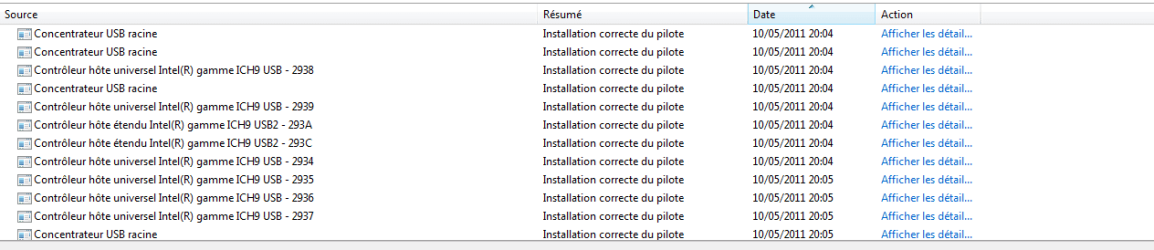
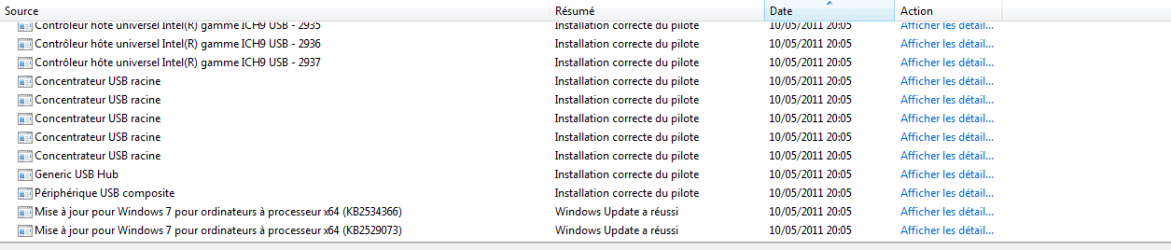
You can try to have a quick look after the install in the Reliability Index Score (RIS) and check for details on each USB devices updated.
 

Attachments

  • Capture.PNG
    Capture.PNG
    6.8 KB · Views: 105
  • Capture2.PNG
    Capture2.PNG
    6.9 KB · Views: 61

My Computer My Computer

Computer type
PC/Desktop
Computer Manufacturer/Model Number
Custom Build
OS
Windows 7 Professional SP1 - x64 [Non-UEFI Boot]
CPU
Ivy Bridge Core i5 3570K (Delidded)
Motherboard
Asus P8Z77-V LE PLUS
Memory
G.Skill "Ares" DDR3 PC3-12800 - 1600MHz (16Gb)
Graphics Card(s)
Asus Dual-RX480-O4G
Sound Card
Creative Sound Blaster Z w/5.1 sound system
Monitor(s) Displays
Asus IPS 23"
Screen Resolution
16/9
Hard Drives
Internal:
500Go Sata 6Gb/s (x2)
500Go Sata 3Gb/s (x2)
SSD 60Go Sata 6Gb/s
PSU
In Win C 900W Series 80+ Platinum
Case
Thermaltake Chaser A71
Cooling
Custom Water Cooling Loop
Keyboard
Cooler Master QuickFire XTi
Mouse
Razer Imperator 2012 (4G)
Antivirus
MSE
Browser
IE 11.0.xxx Rtm
Other Info
"Raid0" with Intel Smart Response Technology (HDD/SSD)
Yes this is the one that did it. I just installed it manually and it shut me down again, has power on boot up and then once windows starts it loses it. So this time I ran the system repair option and after 5 minutes the results are " a root file patch is preventing windows from starting correctly, A system restore was done to correct the problem.
Thx for replying so quickly. I will just disable that update.

It is this one. KB2529073
It is killing your USB driver that is already installed.
It is a driver update for MS generic driver but wants to install on everything.
Binary files in some USB drivers are not updated after you install Windows 7 SP1 or Windows Server 2008 R2 SP1

It did not kill mine it replaced my original driver from ASUS with a 5 year old 2006 generic driver then it installed the update.

I would just hide the Update.
Tutorial to show you how if needed.
http://www.sevenforums.com/tutorials/24376-windows-update-hide-restore-hidden-updates.html
 

My Computer My Computer

OS
7 ultimate 32bit

My Computer My Computer

Computer type
PC/Desktop
Computer Manufacturer/Model Number
Custom Build
OS
Windows 7 Professional SP1 - x64 [Non-UEFI Boot]
CPU
Ivy Bridge Core i5 3570K (Delidded)
Motherboard
Asus P8Z77-V LE PLUS
Memory
G.Skill "Ares" DDR3 PC3-12800 - 1600MHz (16Gb)
Graphics Card(s)
Asus Dual-RX480-O4G
Sound Card
Creative Sound Blaster Z w/5.1 sound system
Monitor(s) Displays
Asus IPS 23"
Screen Resolution
16/9
Hard Drives
Internal:
500Go Sata 6Gb/s (x2)
500Go Sata 3Gb/s (x2)
SSD 60Go Sata 6Gb/s
PSU
In Win C 900W Series 80+ Platinum
Case
Thermaltake Chaser A71
Cooling
Custom Water Cooling Loop
Keyboard
Cooler Master QuickFire XTi
Mouse
Razer Imperator 2012 (4G)
Antivirus
MSE
Browser
IE 11.0.xxx Rtm
Other Info
"Raid0" with Intel Smart Response Technology (HDD/SSD)
Thank You for the information and quick replies.

Great Job here guys....
 

My Computer My Computer

OS
7 ultimate 32bit
Back
Top