Disconnect network after screensaver

whynot

New member
Hi,
My Lan network Disconnect after screensaver runed , how ti fix this problem?
Thanks.
 

My Computer

OS
windows 7 X32
You probaby have your hard drive turning off or your network adapter going into power saving under the advance options under the screen saver


either one will disrupt the network
 

My Computer

Computer Manufacturer/Model Number
HP Pavilion Elite HPE-410f
OS
Windows 7 Ultimate x64
CPU
AMD Phenom x6 1045t
Motherboard
N/A
Memory
8 GB
Graphics Card(s)
ATI Radeon HD 5570
Sound Card
Realtek Highdefinition Audio / 5.1 Dolby Setup
Monitor(s) Displays
HP w2207h Widescreen
Screen Resolution
1680*1050
Hard Drives
1 TB (fixed), 320 Portable maxtor, Server Hard drives
PSU
350 Watt
Case
HP CASE
Cooling
Bass
Keyboard
Logitech MX 5500
Mouse
Logitech MX 5500
Internet Speed
ROAD RUNNER 16MB D/512 U
I checked wiat 2 minutes on resume, display logon screen . so after any time disconnect network conecction and disconnect internet
. how to fix this problem . please step by step
 

My Computer

OS
windows 7 X32
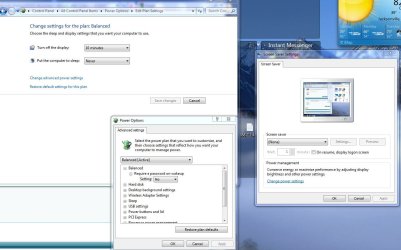
Just go where this picture takes you...

then all you have to do is modify these advance settings to make sure your hard drive doe not turn off nor does your wireless card go into power saving mode....

just basically what i would do is just have the computer stay on and just have it turn your monitor off ... that is basically it. Becuase if you have a network and you expect it to stay up... then you can't have anything shut down important like that.
 

Attachments

  • screensaver.JPG
    screensaver.JPG
    142.9 KB · Views: 843

My Computer

Computer Manufacturer/Model Number
HP Pavilion Elite HPE-410f
OS
Windows 7 Ultimate x64
CPU
AMD Phenom x6 1045t
Motherboard
N/A
Memory
8 GB
Graphics Card(s)
ATI Radeon HD 5570
Sound Card
Realtek Highdefinition Audio / 5.1 Dolby Setup
Monitor(s) Displays
HP w2207h Widescreen
Screen Resolution
1680*1050
Hard Drives
1 TB (fixed), 320 Portable maxtor, Server Hard drives
PSU
350 Watt
Case
HP CASE
Cooling
Bass
Keyboard
Logitech MX 5500
Mouse
Logitech MX 5500
Internet Speed
ROAD RUNNER 16MB D/512 U
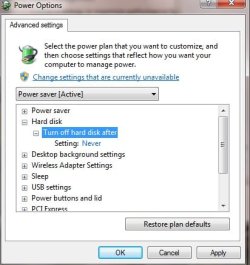
i change power settings to this !

This fixed my problem ?
 

Attachments

  • Untitled.jpg
    Untitled.jpg
    60.8 KB · Views: 47

My Computer

OS
windows 7 X32
For your network to stay up and running:

1. You cannot allow your hard drives to shut down
2. You cannot allow your computer to go into sleep
3. You cannot alllow your computer to go into hybernation
4. You cannot allow your computer to turn off the power to your network card
(picutre provided)

5. Turn off all that power saving modes.
 

Attachments

  • network.JPG
    network.JPG
    40.8 KB · Views: 99

My Computer

Computer Manufacturer/Model Number
HP Pavilion Elite HPE-410f
OS
Windows 7 Ultimate x64
CPU
AMD Phenom x6 1045t
Motherboard
N/A
Memory
8 GB
Graphics Card(s)
ATI Radeon HD 5570
Sound Card
Realtek Highdefinition Audio / 5.1 Dolby Setup
Monitor(s) Displays
HP w2207h Widescreen
Screen Resolution
1680*1050
Hard Drives
1 TB (fixed), 320 Portable maxtor, Server Hard drives
PSU
350 Watt
Case
HP CASE
Cooling
Bass
Keyboard
Logitech MX 5500
Mouse
Logitech MX 5500
Internet Speed
ROAD RUNNER 16MB D/512 U
With Unchecked : allow the computer to turnoff this device . . . . . fixed my problem ?
 

My Computer

OS
windows 7 X32
It should but only time will tell... you have to allow your computer to go back into sleep or screensaver to test it....

you can force your computer to go into sleep under 1 min if you dont want to wait.
 

My Computer

Computer Manufacturer/Model Number
HP Pavilion Elite HPE-410f
OS
Windows 7 Ultimate x64
CPU
AMD Phenom x6 1045t
Motherboard
N/A
Memory
8 GB
Graphics Card(s)
ATI Radeon HD 5570
Sound Card
Realtek Highdefinition Audio / 5.1 Dolby Setup
Monitor(s) Displays
HP w2207h Widescreen
Screen Resolution
1680*1050
Hard Drives
1 TB (fixed), 320 Portable maxtor, Server Hard drives
PSU
350 Watt
Case
HP CASE
Cooling
Bass
Keyboard
Logitech MX 5500
Mouse
Logitech MX 5500
Internet Speed
ROAD RUNNER 16MB D/512 U
I have this problem on XP, I installed some program that said if the screensaver was on
for it to disconnect the internet.. dont know if it was for wireless or not, yet I do have
an wireless connection, and only been able to test it that way.

Either or, I have not found away to keep the internet connected while the screensaver
is on, could someone point me to the way?

I do not know the program it was.. deleted most likely, I thought it would be easy to
fix, yet with time and time again, I have not found a reg fix, or a option to reverse it.

Thank you.

 

My Computer

Computer type
PC/Desktop
Computer Manufacturer/Model Number
dell
OS
Windows xp 32bit
Back
Top